As I have given various people already individually the formulas needed to calculate how much bandwidth is required I figured I would share this as well. If you are doing a stretched VSAN design you will want to read this excellent paper by Jase McCarty. This paper describes the bandwidth requirements between the “data sites” and from the data sites to the “witness site”. It provides the formula needed, and it will show you that the “general guidelines” provided during launch were relatively conservative. In many cases especially the the connection to the witness location can be low bandwidth. Just have a read when you are designing a stretched VSAN and do the math.
Server
Virtual SAN: Generic storage platform of the future
Over the last couple of weeks I have been presenting at various events on the topic of Virtual SAN. One of the sections in my deck is a bit about the future of Virtual SAN and where it is heading towards. Someone tweeted one of the diagrams in my slides recently which got picked up by Christian Mohn who provided his thoughts on the diagram and what it may mean for the future. I figured I would share my story behind this slide, which is actually a new version of a slide that was originally presented by Christos and also discussed in one of his blog posts. First, lets start with the diagram:
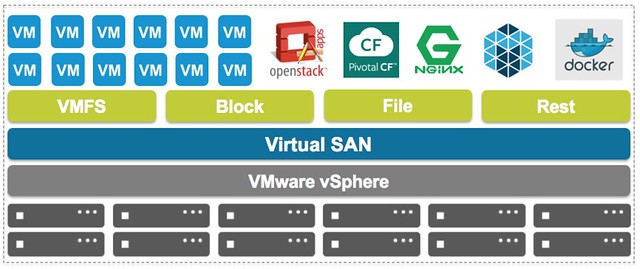
If you look at VSAN today and ask people what VSAN is today then most will answer: a “virtual machine” storage system. But VSAN to me is much more than that. VSAN is a generic object storage platform, which today is used to primarily store virtual machines. But these objects can be anything if you ask me, and on top of that can be presented as anything.
So what is it VMware is working towards, what is our vision? VSAN was designed to serve as a generic object storage platform from the start, and is being extended to serve as a platform to different types of data by providing an abstraction layer. In the diagram you see “REST” and “FILE” and things like Mesos and Docker, it isn’t difficult to imagine what types of workloads we envision to run on top of VSAN and what types of access you have to resources managed by VSAN. This could be through a native Rest API that is part of the platform which can be used by developers directly to store their objects on or through the use of a specific driver for direct “block” access for instance.
Combine that with the prototype of the distributed filesystem which was demonstrated at VMworld and I think it is fair to say that the possibilities are endless. VSAN isn’t just a storage system for virtual machines, it is a generic object based storage platform which leverages local resources and will be able to share those in a clustered fashion in any shape or form in the future. Christian definitely had a point, in which shape or form all of this will be delivered has to be seen though, this is not something I can (or want) to speculate on. Whether that is through Photon Platform, or something else is in my opinion besides the point. Even today VSAN has no dependencies on vCenter Server and can be fully configured, managed and monitoring using the APIs and/or the different command-line interface options we offer. Agility and choice have always been the key design principles for the platform.
Where things will go exactly and when this will happen is still to be seen. But if you ask me, exciting times are ahead for sure, and I can’t wait to see how everything plays out.
Virtual SAN and support for SATADOM
It seems that a lot of people haven’t picked up on this… With Virtual SAN in the past, or better said with vSphere, booting from SATADOM was not supported. This had to do with the default location of the scratch partition, the number of expected writes to the SATADOM device and simply the fact that we did not know how fast the device would wear out.
For those who don’t know, SATADOM devices are basically flash chips on a SATA module which usually directly goes on the motherboard. Great solution as it is as fast as SSD, as small as SD/USB which means you don’t lose a disk slot.

After many tests over the last year it was concluded that SATADOM can be fully supported for vSphere and Virtual SAN but that there are some requirements for the device itself:
- When you boot a Virtual SAN host from a SATADOM device, you must use:
- single-level cell (SLC) device
- The size of the boot device must be at least 16 GB.
Again, key reason for this is that all the trace logs and vSphere logs (etc) end up on this device and we don’t want it to wear out and cause all sorts of unexpected behaviour. As our documentation says: It is important that the SATADOM device meets the specifications outlined in this guide!
Anyway, now you know… more options when it comes to booting ESXi supported, which especially is handy when you want to use your disk slots for Virtual SAN!
Running vCenter Server Appliance 6.0 in Fusion
I am doing some simple tests at home and I am running the vCenter Server Appliance 6.0 in Fusion. In order to get it working there are a couple of tricks I have to perform, I find myself resorting to the same blogs over and over again so I figured I would just put it all on my own blog in a single location so I can simply copy/past where needed and don’t need to hit multiple sources.
First, deployment of vCenter Server in Fusion:
- Download the vCenter Server Appliance ISO
- Mount the appliance in OSX
- Copy the file “vmware-vcsa” from the folder “vcsa”
- Add “.ova” to the file by renaming it
- Open fusion go to “File” and “Import” the OVA but don’t start it
- Edit the “vmx” file of the VM you just created
- Typically stored under Documents –> Virtual Machines
- I edit them using vi through the terminal as that is what I’ve used for the last decade or so. The path for me looks something like this:
- /Users/depping/Documents/Virtual Machines.localized/vmware-vcsa-2800571.vmwarevm
- You will need to add a bunch of entries, I lifted these from William’s site of course… Thanks William
guestinfo.cis.deployment.node.type = “embedded”
guestinfo.cis.vmdir.domain-name = “vsphere.local”
guestinfo.cis.vmdir.site-name = “vsphere”
guestinfo.cis.vmdir.password = “VMware1!”
guestinfo.cis.appliance.net.addr.family = “ipv4”
guestinfo.cis.appliance.net.addr = “192.168.1.5”
guestinfo.cis.appliance.net.pnid = “192.168.1.5”
guestinfo.cis.appliance.net.prefix = “24”
guestinfo.cis.appliance.net.mode = “static”
guestinfo.cis.appliance.net.dns.servers = “192.168.1.1”
guestinfo.cis.appliance.net.gateway = “192.168.1.1”
guestinfo.cis.appliance.root.passwd = “VMware1!”
guestinfo.cis.appliance.ssh.enabled = “true”
Now I want to update vCenter Server, 6.0 in this instance, was described by Ryan Johnson recently, I tweaked it to meet my own needs
- Download the patch: https://my.vmware.com/group/vmware/patch#search
- Note that this isn’t the regular ISO file, the filename should look something like this: VMware-vCenter-Server-Appliance-6.0.0.10000-3018521-patch-FP.iso (6.0U1)
- Mount the ISO through Fusion
- SSH in to the vCenter Server:
- ssh root@192.168.1.5
- Now from the command run the “software-packages” command and let it use the ISO you just mounted
- software-packages install –iso –acceptEulas
- This upgrade will take a couple of minutes usually, in my case it took about 7 minutes to complete, next you will need to reboot the vCenter Server:
- shutdown reboot -r updates
That’s it… easy right.
Stretched Clusters: Disable failover of specific VMs during full site failure
Last week at VMworld when presenting on Virtual SAN Stretched Clusters someone asked me if it was possible to “disable the fail-over of VMs during a full site failure while allowing a restart during a host failure”. I thought about it and said “no, that is not possible today”. Yes you can “disable HA restarts” on a per VM basis, but you can’t do that for a particular type of failure.
The last statement is correct, HA does not allow you to disable restarts for a site failure. You can fully disable HA for a particular VM though. But when back at my hotel I started thinking about this question and realized that there is a work around to achieve this. I didn’t note down the name of the customer who asked the question, so hopefully you will read this.
When it comes to a stretched cluster configuration typically you will use VM/Host rules. These rules will “dictate” where VMs will run, and typically you use the “should” rule as you want to make sure VMs can run anywhere when there is a failure. However, you can also create “must” rules, and yes this means that the rules will not be violated and that those VMs can only run within that site. If a host fails within a site then the impacted VMs will be restarted within the site. If the site fails then the “must rule” will prevent the VMs from being restarted on the hosts in the other location. The must rules are pushed down to the “compatibility list” that HA maintains, which will never be violated by HA.
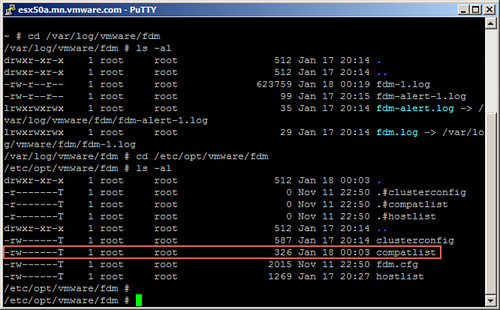
Simple work-around to prevent VMs from being restarted in another site.