There is a lot of material on stretched clusters already out there but somehow it seems that is hasn’t reached everyone yet. Last couple of weeks I spend a lot of time on the phone with different customers in the various countries/regions talking about designing a Virtual SAN stretched cluster. In this post I wanted to collect some design considerations for your Virtual SAN stretched clusters and provide pointers to different articles and white papers that can help you getting a better understanding of the solution. If any additional considerations come up in the various conversations I still have planned I will add this to this article, so it will be very much a “work in progress”.
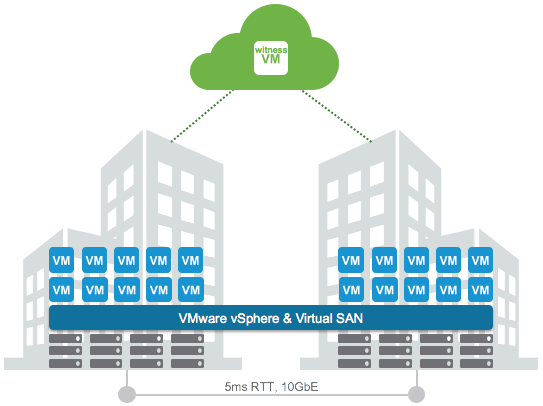
First and foremost a stretched cluster isn’t something you implement “just because you can”. It is a solution which is usually implemented when there is a strong desire to be able to avoid a disaster or recover in an extremely fast way from a disaster. Customers I talk with are usually mid-size and up, and typically provide some form of 24×7 service. As an example, I have a customer who runs (mission) critical workloads and there is one who hosts websites which have high uptime requirements(government services) on their stretched clusters. In both cases downtime is not acceptable from a business perspective, and unfortunately not all applications provide the level of availability required, which means it needs to be solved on a different layer.
First thing that needs to be looked at is the network. From a Virtual SAN perspective there are clear requirements:
- 5ms RTT latency max between data sites
- 200ms RTT latency max between data and witness site
- Both L3 and L2 are supported between the data sites
- 10Gbps bandwidth is recommended, dependent on the number of VMs this could be lower or higher, more guidance will be provided soon around this!
- L3 is expected between data and the witness sites
- 100Mbps bandwidth is recommended, dependent on the number of VMs this could be lower or higher, more guidance will be provided soon around this!
First thing I need to call out, if you do L3 between data sites note that you will need some form of multicast routing. L3 from data to the witness site doesn’t need this, it doesn’t use multicast, this requirement has been removed, which simplifies the design. Latency requirements are strict. 5ms (data/data) and 200ms (data/witness) maximum, but I think it is important to say that network latency will impact your storage performance. Each write will need to be replicated to the other site, which means that each write could take 5ms if that is your RTT. Yes this can be a killer, but keep in mind that all writes always go to SSD first, so network is going to be the challenge. The lower the latency the better. Also note that this only applies to “writes”, reads will be served locally as with the Stretched Cluster functionality VSAN also introduced “site locality” to avoid those network hops for reads. Some may say: well who in their right mind is going to incur a 5ms or 3ms network latency for every IO, well I guess that fully depends on what your business requirements are.
I already mentioned witness requirements, but what about the witness itself? I was talking to a customer last week who was planning on placing a brand new physical host to serve as the witness. No need for that, you can just deploy the VSAN witness appliance on an existing host. That witness will come with all the licenses included, so there is no vSphere/VSAN cost. If you have no third site then I think it is good to know that we are working on certifying the use of the witness in vCloud Air. Easy and cost effective way of having a witness in a 3rd site without needing a 3rd site and having to manage a 3rd site.
Then there is compute of course and storage. What do you need from that point of view? Well first of all you will have to buy a lot more hardware than you would normally need running in a single location. You will need extra CPU and memory resources to ensure VMs can be restarted when a full site has failed. Yes, HA Admission Control will help with that but you also need to plan for it which is something not everyone always realizes. I guess it is a discussion that you will need to have with the business, does performance need to be the same before / after a failure? If yes, then make sure you have sufficient capacity to tolerate a 50% loss.
From a storage perspective the VSAN Stretched Cluster is based on FTT=1. This means that if you have a 10GB VMDK that 10GB is stored in the first site, and another 10GB is stored in the second site, for a total of 20GB. Of course there is the swap file for a VM and some overhead. But that is relatively simple to calculate. Just remember: (Average VM disk capacity + Swap) * 2. I usually add 10% slackspace and another 10 / 20% for snapshots depending on the usage, and I would recommend adding room for growth. Another thing to remember is the limit of 200 VMs per host with this version of VSAN. Keep in mind that you want to tolerate a full site failure, so you will want to make sure that all VMs can run on the remaining site in a supported manner.
When it comes to HA and DRS the configuration is pretty straight forward and has been described in-depth by both Cormac and myself. A couple of things I want to point out in this article as they are configuration details which are easy to forget about.
- Make sure to specify additional isolation addresses, one in each site (das.isolationAddress0 – 1).
- Disable the default isolation address if it can’t be used to validate the state of the environment during a partition (if the gateway isn’t available in both sides).
- Disable Datastore heartbeating, without traditional external storage there is no reason to have this.
- Enable HA Admission Control and make sure it is set to 50% for CPU and Memory.
- Keep VMs local by creating “VM/Host” should rules.
And I think that covers most of it, well summarized relatively briefly compared to the excellent document Cormac developed with all details you can wish for. Make sure to read that if you want to know every aspect.