• Skip to primary navigation
  • Skip to main content
  • Skip to primary sidebar

Yellow Bricks

by Duncan Epping

  • Home
  • Unexplored Territory Podcast
  • HA Deepdive
  • ESXTOP
  • Stickers/Shirts
  • Privacy Policy
  • About
  • Show Search
Hide Search

Server

Virtual SAN, the leader in the hyper-converged market!

Duncan Epping · Jan 27, 2016 ·

I was just listening to the VMware earnings call, and needless to say that I was very excited hearing all the great news about Virtual SAN. When I talk to customers this is something that comes up every now and then, they want to know where we stand in the market. I figured I would share what was stated by Carl Eschenbach and Pat Gelsinger at the 2015 Q4 earnings call:

Summarizing a few other product areas, our hyper-converged offerings based on VMware Virtual SAN experienced significant traction. Specifically, our Virtual SAN business saw successes across a wide variety of industries, market segments, and geos. In Q4, total VSAN bookings grew nearly 200% year-over-year, and customer count has increased to over 3,000 versus over 1,000 a year ago. We are now well over $100 million annual run rate per total bookings.

With our next release of VSAN in Q1, we expect our momentum to build given the powerful new enterprise capabilities, the product brings to market. Taking into account, the hardware associated with running the Virtual SAN software and our current booking to run rate, we believe we are the industry leader in the hyper-converged offerings measured both by software and as an appliance.

And the best is yet to come… New version is around the corner, and I can’t wait for it to be released. Make sure to sign up for the launch events! (or attend one of the many VMUGs the upcoming months, I will personally be presenting in Newcastle, Johannesburg, Durban, Capetown and Den Bosch)

Rebuilding failed disk in VSAN versus legacy storage

Duncan Epping · Jan 26, 2016 ·

This is one of those questions that comes up every now and then, I have written about this before, but it never hurts to repeat some of it. The comment I got was around rebuild time of failed drives in VSAN, surely it takes longer than with a “legacy” storage system. The answer of course is: it depends (on many factors).

But what does it depend on? Well it depends on what exactly we are talking about, but in general I think the following applies:

With VSAN components (copies of objects, in other words copies of data) are placed across multiple hosts, multiple diskgroups and multiple disks. Basically if you have a cluster of lets say 8 hosts with 7 disks each and you have 200 VMs then the data of those 200 VMs will be spread across 8 hosts and 56 disks in total. If one of those 56 disks happens to fail then the data that was stored on that disk would need to be reprotected. That data is coming from the other 7 hosts which is potentially 49 disks in total. You may ask, why not 55 disks? Well because replica copies are never stored on the same hosts for resiliency purposes, look at the diagram below where a single object is split in to 2 data components and a witness, they are all located on different hosts!

We do not “mirror” disks, we mirror the data itself, and the data can and will be place anywhere. This means that when a failure has occurred of a disk within a diskgroup on a host all remaining disk groups / disk / hosts will be helping to rebuild the impacted data, which is 49 disks potentially. Note that not only will disks and hosts containing impacted objects help rebuilding the data, all 8 hosts and 55 disks will be able to receive the replica data!

Now compare this to a RAID set with a spare disk. In the case of a spare disk you have 1 disk which is receiving all the data that is being rebuild. That single disk can only take an X number of IOPS. Lets say it is a really fast disk and it can take 200 IOPS. Compare that to VSAN… Lets say you used really slow disks which only do 75 IOPS… Still that is (potentially) 49 disks x 75 IOPS for reads and 55 disks for writes.

That is the major difference, we don’t have a single drive as a designated hot spare (or should I say bottleneck?), we have the whole cluster as a hot spare! As such rebuild times when using similar drives should always be faster with VSAN compared to traditional storage. 

Disable VSAN site locality in low latency stretched cluster

Duncan Epping · Jan 15, 2016 ·

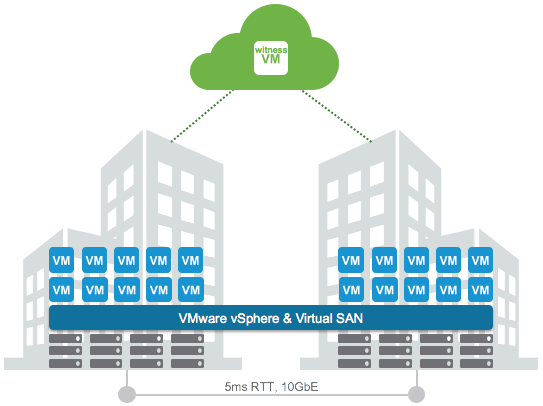
This week I was talking to a customer in Germany who had deployed a VSAN stretched cluster within a building. As it was all within a building (extremely low latency) and they preferred to have a very simple operational model they decided not to implement any type of VM/Host rules. By default when a stretched cluster is deployed in VSAN (and ROBO uses this workflow as well) then “site locality” is implemented for caching. This means that a VM will have its read cache on the host which holds the components in the site where it is located.

This is great of course and avoids incurring latency hit for reads. Now in some cases you may not desire this behaviour. For instance in the situation above where there is an extremely low latency connection between the different rooms in the same building. In this case as well because there are no VM/Host rules implemented a VM can freely roam around the cluster. Now when a VM moves between VSAN Fault Domains in this scenario the cache will need to be rewarmed as it only reads locally. Fortunately you can disable this behaviour easily through the advanced setting called DOMOwnerForceWarmCache:

[root@esxi-01:~] esxcfg-advcfg -g /VSAN/DOMOwnerForceWarmCache
Value of DOMOwnerForceWarmCache is 0
[root@esxi-01:~] esxcfg-advcfg -s 1 /VSAN/DOMOwnerForceWarmCache
Value of DOMOwnerForceWarmCache is 1

In a stretched environment you will see that this setting is set to 0 set it to 1 to disable this behaviour. In a ROBO environment VM migrations are uncommon, but if they do happen on a regular basis you may also want to look in to setting this setting.

Where do I run my VASA Vendor Provider for vVols?

Duncan Epping · Jan 6, 2016 ·

I was talking to someone before the start of the holiday season about running the Vendor Provider (VP) for vVols as a VM and what the best practices are around that. I was thinking about the implication of the VP not being available and came to the conclusion that when the VP is unavailable a bunch of things stop working out of which “bind” is probably most important.

The “bind” operation is what allows vSphere to access a given Virtual Volume (vVol), and this operation is issued during a power-on of a VM. This is how the vVols FAQ describes it:

When a vVol is created, it is not immediately accessible for IO. To Access vVol, vSphere needs to issue a “Bind” operation to a VASA Provider (VP), which creates IO access point for a vVol on a Protocol Endpoint (PE) chosen by a VP. A single PE can be the IO access point for multiple vVolss. “Unbind” Operation will remove this IO access point for a given vVol.

This means that when the VP is unavailable, you can’t power-on VMs at that particular time. For many storage systems that problem is mitigated by having the VP as part of their storage system itself, and of course there is the option to have multiple VPs as part of your solution, either in active/active or in active/standby configuration. In the case of VSAN for instance, each host has a VASA provider out of which one is active and others are standby, if the active fails the standby will take over automatically. So to be clear, it is up to the vendor to decide what type of availability to provide for the VP, some have decided to go for a single instance and rely on vSphere HA to restart the appliance, others have created active/standby etc.

But back to vVols, what if you own a storage system that requires an external VASA VP as a VM?

  • Run your VP VMs in a management cluster, if the hosts in the “production” cluster are impacted and VMs are restarted then at least the VP VMs should be up and running in your management cluster
  • Use multiple VP VMs if and when possible, if active/active or active / standby is supported make sure to run your VPs in that configuration
  • Do not use vVols for the VP itself, you don’t want to have any (circular) dependency between the availability of the VP and being able to power-on the VP itself
  • If there is no availability story for the VP, depending on the configuration of the appliance vSphere FT should be considered.

One more thing, if you are considering buying new storage, I think one question you definitely need to ask your vendor is what their story is around the VP. Is it a VM or is it part of the storage system itself? Is there an availability story for the VP, and if so is this “active/active” or “active/standby”? If not, what do they have on their roadmap around this? You are probably also asking yourself what VMware has planned to solve this problem, well there are a couple of things cooking and I can’t say too much about it. One important effort though is the inclusion of bind/unbind in the T10 SCSI standard, but as you can imagine, those things take time. (Which would allow us to power-on new VMs even when the VP is unavailable as it would be a SCSI command.) Until then, when you design a vVol environment, take the above into account when it comes to your Vendor Provider aka VP!

Jumbo Frames and VSAN Stretched Cluster configurations

Duncan Epping · Dec 22, 2015 ·

I received a question last week from a customer who had implemented a stretched VSAN cluster. The Health Check after the implementation indicated that there was an “issue” with the MTU configuration. The customer had explained that he had configured an MTU of 9000 between the two data sites and an MTU of (default) 1500 between data sites and the witness.

The question of course was, why the Health Check indicated there was an issue. The problem here is that witness traffic and data in todays version of Virtual SAN use the same VMkernel interface. If the VSAN VMkernel interface on the the “data” site is configured for 9000 and one the “witness” site is configured for 1500 then there is a mismatch which causes fragmentation etc. This is what the health check calls out. VSAN (and the health check as such) expects an “end-to-end” consistently configured MTU, even in a stretched environment.

  • « Go to Previous Page
  • Page 1
  • Interim pages omitted …
  • Page 73
  • Page 74
  • Page 75
  • Page 76
  • Page 77
  • Interim pages omitted …
  • Page 336
  • Go to Next Page »

Primary Sidebar

About the Author

Duncan Epping is a Chief Technologist and Distinguished Engineering Architect at Broadcom. Besides writing on Yellow-Bricks, Duncan is the co-author of the vSAN Deep Dive and the vSphere Clustering Deep Dive book series. Duncan is also the host of the Unexplored Territory Podcast.

Follow Us

  • X
  • Spotify
  • RSS Feed
  • LinkedIn

Recommended Book(s)

Also visit!

For the Dutch-speaking audience, make sure to visit RunNerd.nl to follow my running adventure, read shoe/gear/race reviews, and more!

Do you like Hardcore-Punk music? Follow my Spotify Playlist!

Do you like 80s music? I got you covered!

Copyright Yellow-Bricks.com © 2026 · Log in