• Skip to primary navigation
  • Skip to main content
  • Skip to primary sidebar

Yellow Bricks

by Duncan Epping

  • Home
  • Unexplored Territory Podcast
  • HA Deepdive
  • ESXTOP
  • Stickers/Shirts
  • Privacy Policy
  • About
  • Show Search
Hide Search

Server

Disk format version 4.0 update to 2.0 suggested

Duncan Epping · Jun 15, 2016 ·

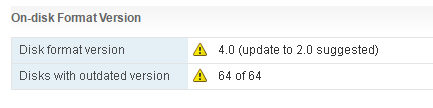
I’ve seen some people reporting a strange message in the Virtual SAN UI. The UI states the following: Disk format version 4.0 (update to 2.0 suggested). This is what that looks like (stole the pic from VMTN, thanks Phillip.)
disk format version 4.0 update to 2.0 suggested

A bit strange considering you apparently have 4.0 why would you go to 2.0 then? Well you are actually on 2.0 and are supposed to go to 3.0. The reason this happens is because, most likely, not all hosts within you cluster are on the same version of Virtual SAN, or vCenter Server was not updated to the last version and ESXi has a higher version. So far I have seen this being reported when people upgrade to vSphere 6.0 Update 2. If you are upgrading, make sure to upgrade all hosts to ESXi 6.0 Update 2, but before you do, upgrade the vCenter Server to 6.0 Update 2 first!
Playing around with EMC CloudArray on VSAN

Duncan Epping · Jun 14, 2016 ·

Today I figured I would play around with EMC CloudArray a bit on top of VSAN. It comes with a VxRail appliance by default so I figured I would check what it has to offer. For those who don’t know. CloudArray allows you to provide NFS/CIFS and Object based storage to your datacenter leveraging local storage but also integrate it with cloud storage for archival purposes. A pretty cool solution if you ask me, and could be a great way to deliver file and object services in an easy fashion on top of VSAN. (But you could also use this in your lab to serve up NFS or iSCSI etc to your lab for shared storage.)

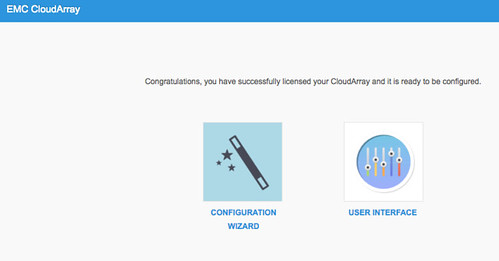
I signed up for a trial and downloaded the OVF. Deploying it was straight forward so no need to describe that, just like any other OVF. After the boot I grabbed the IP Address (we have DHCP in our lab) and did an “https://<ip of appliance/”. Now a setup screen shows up and it allows me to configure it. Fairly simple:

  • Click “Setup”
  • Click “Next”
  • Ensure “Enable CloudArray Portal” is ticked and click Next
  • Provide your account details so that the trial license can be pulled from the CloudArray website
  • Create an Admin account, I used “administrator”
  • Accept the EULA and click Finish
  • That was the setup, it will congratulate you and now you can configure it further

[Read more…] about Playing around with EMC CloudArray on VSAN

Can I select VSAN as my placeholder datastore with SRM?

Duncan Epping · Jun 13, 2016 ·

I received a question today about SRM, vSphere Replication and VSAN. The current documentation for SRM says the following:

Do not select as placeholder datastores any datastores that you use as the replication target datastore for vSphere Replication.

The question was, what about when using VSAN? As with VSAN as the source and destination datastore I usually only have 1 datastore. What do I select as my placeholder datastore then? Well with VSAN the situation is different. When using VSAN the placeholder datastore selected can be the VSAN datastore where the VMs are also replicated to. This is a gap in our current documentation, and we will make sure to get this updated asap.

Getting a 404 error with the Host Client

Duncan Epping · Jun 10, 2016 ·

Just a short post. I was getting a 404 error with the Host Client when hitting https://<ip of esxi host>/ui. No clue what it was caused by. I re-installed the latest version of the host client but that didn’t solve it. Then I noticed that my endpoints.conf had “/ local” missing. You can check that as follows when logged in through SSH:

cat /etc/vmware/rhttpproxy/endpoints.conf

I did the following (edit + restarted the HTTP reverse proxy) to get it working again:

Edit the config file:

vi /etc/vmware/rhttpproxy/endpoints.conf

add the following:

/ local 8309 redirect allow 

Restart the service:

/etc/init.d/rhttpproxy restart

Can all VSAN Witness VMs for ROBO be in the same VLAN?

Duncan Epping · Jun 9, 2016 ·

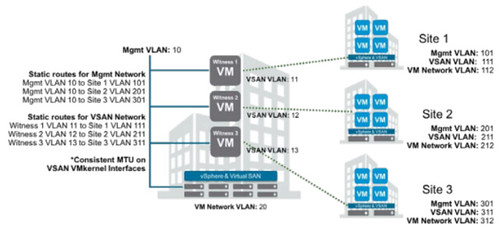
Yesterday I received the question if all VSAN Witness VMs for ROBO can be in the same VLAN? The excellent VSAN 2 node and Stretched Cluster guide for VSAN describes an example of how things can be implemented with different VLANs for the VSAN Witness, which would look like this:

Now the question came in from a customer implementing ROBO at scale if it was possible to have all VSAN Witness VMs for ROBO in the same VLAN. The answer in short is: yes. Keep in mind that the  ROBO locations access the Witness VM over L3 and there is no multicast needed between the ROBO location. Only thing you need to do is set up the routes from the ROBO location to the main site with the central Witness VMs. All of them can be in the same VLAN, fully supported!

  • « Go to Previous Page
  • Page 1
  • Interim pages omitted …
  • Page 66
  • Page 67
  • Page 68
  • Page 69
  • Page 70
  • Interim pages omitted …
  • Page 336
  • Go to Next Page »

Primary Sidebar

About the Author

Duncan Epping is a Chief Technologist and Distinguished Engineering Architect at Broadcom. Besides writing on Yellow-Bricks, Duncan is the co-author of the vSAN Deep Dive and the vSphere Clustering Deep Dive book series. Duncan is also the host of the Unexplored Territory Podcast.

Follow Us

  • X
  • Spotify
  • RSS Feed
  • LinkedIn

Recommended Book(s)

Also visit!

For the Dutch-speaking audience, make sure to visit RunNerd.nl to follow my running adventure, read shoe/gear/race reviews, and more!

Do you like Hardcore-Punk music? Follow my Spotify Playlist!

Do you like 80s music? I got you covered!

Copyright Yellow-Bricks.com © 2026 · Log in