• Skip to primary navigation
  • Skip to main content
  • Skip to primary sidebar

Yellow Bricks

by Duncan Epping

  • Home
  • Unexplored Territory Podcast
  • HA Deepdive
  • ESXTOP
  • Stickers/Shirts
  • Privacy Policy
  • About
  • Show Search
Hide Search

Server

Running a Witness Appliance on a 2 Node vSAN config with FT

Duncan Epping · Mar 10, 2017 ·

I have had various people asking, and to me it felt like an obvious answer, but as multiple have asked over the past couple of month I figured I would dedicate a post to it. The question is if it is supported to run the vSAN Witness Appliance for a 2 Node vSAN configuration on the 2 Node vSAN Configuration itself, but then with vSphere SMP-FT enabled on the Witness for extra protection.

The short answer: No, this is not supported.

The slightly longer answer: No, this is not supported. The vSAN Witness needs to run outside of the vSAN cluster it is acting as a witness for. The reason for this is fairly straight forward: Just imagine the vSAN hosts are partitioned and cannot talk to each other, yet both may have access to the Witness as a result of FT doing what it is designed to do. But those are different instances of the same Witness, which potentially can lead to all sorts of strange problems.
Startup intro: Runecast

Duncan Epping · Mar 7, 2017 ·

I met with Runecast a couple of years ago at VMworld. Actually, I am not sure they already had a name back then, I should probably say I met with the guys who ended up founding Runecast at VMworld. One of them, Stan, is a VCDX and back then he pitched this idea to me around an appliance that would analyze your environment based on a set of KBs. His idea was primarily based on his experience managing and building datacenters. (Not just Stan’s experience, but most of the team are actually former IBM employees) Interesting concept, kind of sounded similar to CloudPhysics to me, although the focus was more on correlation of KB then capacity management etc.

Fast forward to 2017 and I just finished a call with the Runecast team. I had a short conversation at VMworld 2016 and was under the impression that they sold the company or quit. None of this is true. Runecast managed to get a 1.6m euro funding (Czech Republic) and is going full steam ahead. With around 10 people, most being in Czech Republic they are ready to release the next version of Runecast Analyzer, which will be 1.5. So what does this provide?

Well just imagine you manage a bunch of hosts and vCenter (not unlikely when you visit my blog), maybe some shared storage along with it. There are many KB articles, frequent updates of these and many newly published KBs every week. Then there’s also a whole bunch of best practices and of course the vSphere Hardening Guide. As an administrator do you have time to read everything that is published every day? And then when you have read it, do you have time to check your environment if the issue or best practice described applies to your infrastructure? Of course you don’t, and this is where Runecast Analyzer comes in to play.

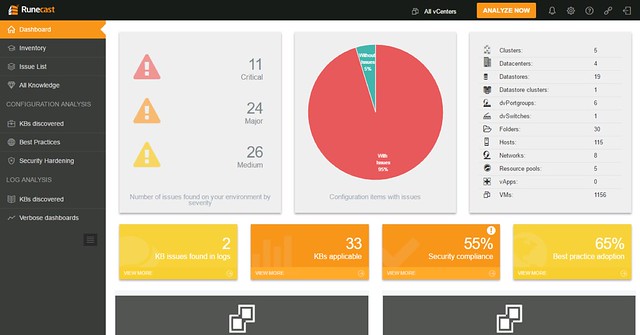
You download the appliance and provision it in to your environment, next you simply hook vCenter Server in to it and off you go. (As of 1.5 it also supports connecting several vCenter Server instances by the way.) Click analyze now and check the issues called out in the HTML-5 dashboard. As the screenshot below shows, this particular environment has issues identified in the log file that are described in a KB article. There are various other KB articles that may apply, just as an example: a combination of a certain virtual NIC with a specific OS may not be recommended. Also, various potential security issues and best practices are raised if they exist/apply.

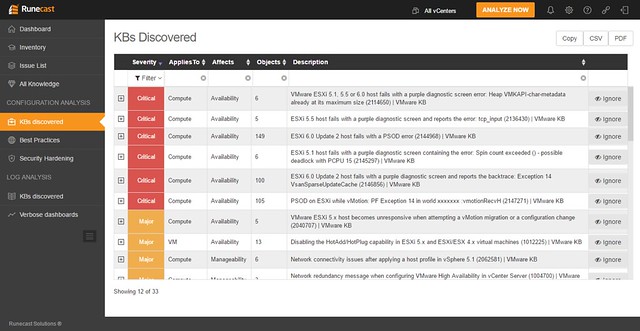
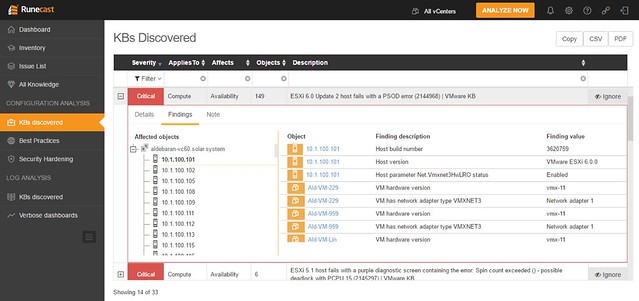
When you would click one of these areas you can drill down in to what the issue is and potentially figure out how to mitigate it. In the screenshot below you see the list of KBs that apply to this particular environment, you can open the particular entry (second screenshot below) and then find out to what it applies (objects: VMs, hosts, vCenter etc). If you feel it doesn’t apply to you, or you accept the risk, you can of course “ignore” the issue. When you click ignore a filter will be created which rules out this issue from being called out through the dashboard. The filtering mechanism is pretty smart, and you can easily create your own filters on any level of the virtual infra hierarchy. Yes, it is also possible to delete the filter(s) again when you feel it does apply to your environment.

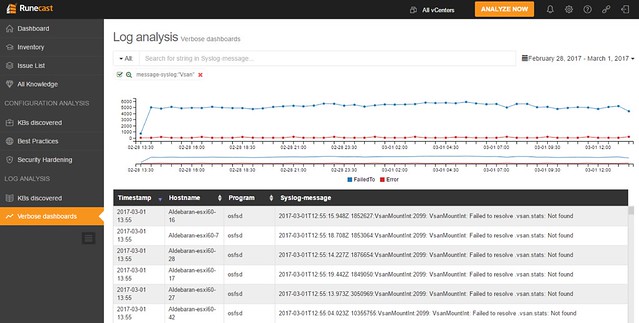
Besides checking the environment, as mentioned, Runecast can also analyze the logs for you. And I was happy to see that this got added, as it makes it unique compared to other solutions out there. Depending on what you are looking for you have these quick filtering options, and of course there are search strings and you can select a time period in which you would like to search of this particular string

As I said, all of this comes as a virtual appliance, which does not require direct connection to the internet. However, in order to keep the solution relevant you will need to update regularly, they mentioned they release a new data set once every two weeks roughly. It can be updated over the internet (through a proxy if needed), or you can download the ISO and update Runecast Analyzer through that, which could be very useful in secure locations. The appliance works against vSphere 5.x and 6.x (yes including 6.5) and there is a 30 day free trial. (Annual subscription, per socket pricing.) If you like to give it a try, click the banner on the right side, or go to their website: https://www.runecast.biz/. Pretty neat solution, and looking forward seeing what these guys can achieve with the funding they just received.

Cool tool update: RVTools 3.9.2

Duncan Epping · Mar 3, 2017 ·

It has been a year since version 3.8, but finally here it is… RVTools 3.9. Rob de Vey has been developing this tool since early 2008 and over 650k copies have been downloaded so far. I understand why, as it is a very easy to use tool that produces a lot of great information. On top of everything it was already providing, Rob introduced the following in version 3.9:

Version 3.9 (February, 2017)

  • Migrated RVTools to use .NET Framework version 4
  • Migrated RVTools to use NPOI 2.1.3.1
  • Support for vSphere 6.5
  • Improved logon performance
  • RVTools will no longer write messages to the Windows eventlog
  • All VM related tab pages now have a new column: OS according to the VMware Tools
  • All tab pages now have a new column: VI SDK Server
  • All tab pages column vCenter UUID renamed to VI SDK UUID
  • vInfo tab page: new column VI SDK API version
  • Export to Excel will now use xlsx format
  • Export to Excel all columns are now auto sized
  • Excel worksheet names will use same name as the tab page names
  • Annotations fields can now be excluded! See preference window
  • vPartition tab page new column: Consumed MB
  • vHealth _replica directories are excluded for zombie checks
  • sesparse.vmdk files are excluded for zombie checks
  • New tab page with license information
  • New PasswordEncryption application added with which you can encrypt your password
  • RVTools command line interface accepts now encrypted passwords
  • Bug fix: URL Link to online version info issue solved

vSAN 6.x customer? vSphere 6.0 Update 3 is out

Duncan Epping · Feb 26, 2017 ·

Are you a vSAN 6.x customer? vSphere 6.0 Update 3 is out! There are a bunch of important fixes and improvements (checksumming performance for instance) in Update 3, so I would highly recommend looking in to it and testing it out.

  • vSAN Details: https://kb.vmware.com/kb/2149127
  • vCenter Server download: https://my.vmware.com/web/vmware/details?downloadGroup=VC60U3&productId=491&rPId=14487
  • ESXi download: https://my.vmware.com/web/vmware/details?downloadGroup=ESXI60U3&productId=491&rPId=14487

Virtually Speaking Podcast – vSAN Customer Use Cases

Duncan Epping · Feb 22, 2017 ·

As John Nicholson was traveling in and around New Zealand I was asked by Pete if I could co-host the Virtually Speaking Podcast again. It is always entertaining to join, Pete is such a natural when it comes to these things. I euuh, well I do my best to keep up with him :). Below you can find the latest episode on the topic of vSAN Customer Use Cases. It includes a lot of soundbites recorded at VMware World Wide Kick Off / Tech Summit, which is a VMware internal event for all Sales, Pre-Sales and Post-Sales field facing people.

You can of course also subscribe on iTunes!

  • « Go to Previous Page
  • Page 1
  • Interim pages omitted …
  • Page 57
  • Page 58
  • Page 59
  • Page 60
  • Page 61
  • Interim pages omitted …
  • Page 336
  • Go to Next Page »

Primary Sidebar

About the Author

Duncan Epping is a Chief Technologist and Distinguished Engineering Architect at Broadcom. Besides writing on Yellow-Bricks, Duncan is the co-author of the vSAN Deep Dive and the vSphere Clustering Deep Dive book series. Duncan is also the host of the Unexplored Territory Podcast.

Follow Us

  • X
  • Spotify
  • RSS Feed
  • LinkedIn

Recommended Book(s)

Also visit!

For the Dutch-speaking audience, make sure to visit RunNerd.nl to follow my running adventure, read shoe/gear/race reviews, and more!

Do you like Hardcore-Punk music? Follow my Spotify Playlist!

Do you like 80s music? I got you covered!

Copyright Yellow-Bricks.com © 2026 · Log in