I was playing around with a vSAN 6.6 environment yesterday and I figured I would record a quick demo of some of the new functionality introduced. Took me a bit longer than expected, but here it is. I hope you will find it useful, a 1080p version can be viewed on youtube.
Server
What’s new for VMware vSAN 6.6?
Yes this may confuse you a bit, a new VMware vSAN release was just announced, namely vSAN 6.6, but it doesn’t coincide with a vSphere release. That is right, vSAN 6.6 will be released as a “patch” release for vSphere but a major version for vSAN! It seems like yesterday that we announced 6.2 with Stretched Clustering and 6.5 with iSCSI and 2-Node Direct Connect. vSAN 6.6 brings some exciting new functionality and a whole bunch of improvements. Note that there were already various performance enhancements introduced in vSphere 6.0 Update 3 for vSAN 6.2. (Note, this is just the announcement, it will be available at some point in the future.) Anyway, what’s new for vSAN 6.6?
- vSAN Encryption – Datastore level encryption in a dedupe/compression efficient way
- Local Protection for Stretched Clusters
- Removal of Multicast
- ESXi Host Client (HTML-5) management and monitoring functionality
- Enhanced rebalancing
- Enhanced repairs
- Enhanced resync
- Resync throttling
- Maintenance Pre-Check
- Stretched Cluster Witness Replacement UI
- vSAN included in “Phone Home / Customer Experience Improvement Program”
- Including Cloud based health checks!
- API enhancements
- vSAN Easy Install
- vSAN Config Assist / Firmware Update
- Enhanced Performance and Health Monitoring
Yes that is a long list… Some which I will talk about a bit more in-depth, others which probably speak for itself like for instance the removal of the Multicast requirement. From now on Unicast will be used, which means no longer do you need to setup multicast on the network, which will simplify the deployment. Do note that if you are upgrading to 6.6 from a previous version that you will be running in multicast mode until all hosts are on vSAN 6.6. An extensive networking document and upgrade document will be made available around the release of the bits that will explain this in-depth.
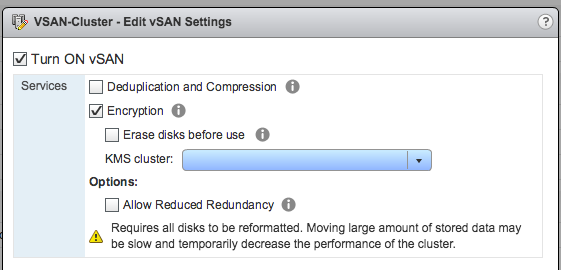
First big feature definitely is vSAN Encryption. In vSphere 6.5 the VAIO based VM Encryption (filter) was introduced and that was well received by many customers. For customers running all-flash vSAN however there was one big disadvantage and that is that encryption happens at the highest level meaning that the IO is encrypted when it reaches the write buffer and is moved to the capacity tier. As a result dedupe and compression benefits are close to 0. Hence the introduction of vSAN encryption. Note that there is no need for self encrypting drives etc. This is a software based solution, which means it works on hybrid / all-flash regardless of the devices you procure. Note that it is a cluster level option, if you prefer per VM than “VM Encryption” is the way to go. How do you enable it? Setup a KMS server, and simply tick the “Encryption” tick box and select the KMS. Pretty straight forward, couple of clicks. Ow and for those wondering where to set up the KMS cluster, you can find it here: vCenter instance object –> Configure tab –> More / Key Management Servers.
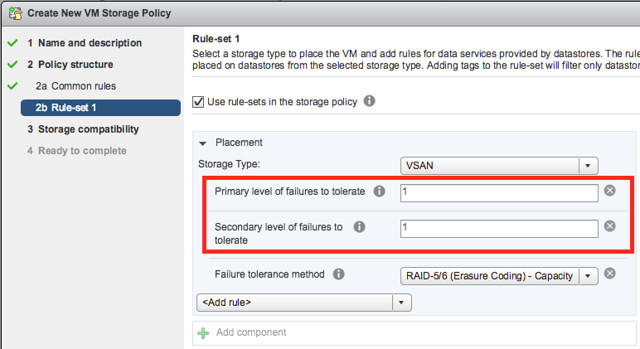
Next on the list is Local Protection for Stretched Clusters. Ever since we introduced stretched clustering I have asked for this. In the previous releases we had a RAID-1 configuration of an object across sites, which means 2 copies of the data, 1 in each site. This also means that when 1 site fails you only have a single copy left and an additional failure could lead to dataloss. It also means that if a single host fails in any of the sites and data needs to be resynced that this will happen over the connection between the locations. As of vSAN 6.6 this is no longer the case. You now have the ability to specify a “Primary FTT” and a “Secondary FTT”. Primary FTT can be set to 0 or 1 in a stretched cluster and 0 means the VM is not stretched, 1 means the VM is stretched. Then with Secondary FTT you can define how it is protected within a site, and this can be RAID-1 with multiple copies locally and even RAID-5 and RAID-6. So as of vSAN 6.6 you now have both site protection and local protection. On top of that, you can select which VMs need to be protected across sites and which do not. And if VMs do not need to be protected across sites you can even specify where the components should reside from a storage perspective, which of course should align with the “compute” part of the VM.
Another interesting enhancement is that you can specify that a certain VM does not need to be replicated (for instance when you already have some form of app level replication happening) and where the data of that particular VM needs to reside (affinity). That way you can ensure that when you have a clustered app the data actually sits in the same fault domain/site as the VM from a compute stance. Also when you have a stretched cluster, you can now from within the UI easily replace the Witness VM. Literally a couple of clicks.

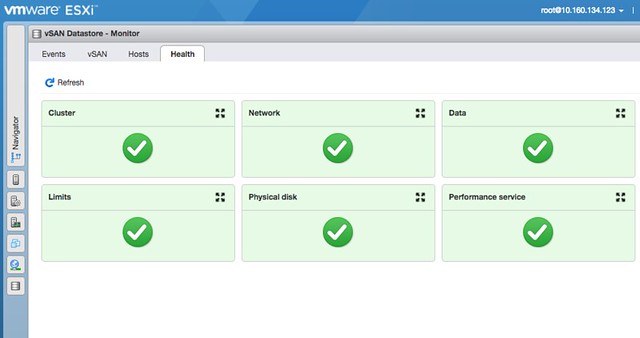
Also very useful is the introduction of vSAN workflows in the ESXi Host Client. Just imagine you cannot access vCenter Server, now you can go to an ESXi host and still have certain management and monitoring functionality to your disposal (see screenshot below). Simply go to Host Client (/ui), login, go to “Storage” and click “Monitor” under the vSAN Datastore. You will find “Events”, “vSAN” (configuration options), “Hosts” and “Health” there. Providing you a wealth of useful information and options. Note that changes made on a host level will in the “vSAN” section will apply that particular host only and should only be used when asked by Support for troubleshooting purposes! The Health Section however does show the current state of the full cluster.
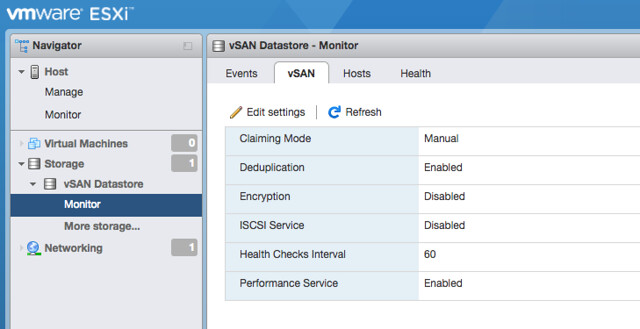
Edit vSAN settings:
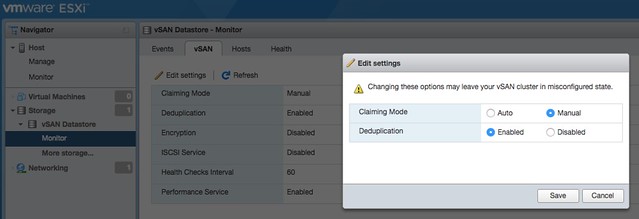
Host Client Health Checks:
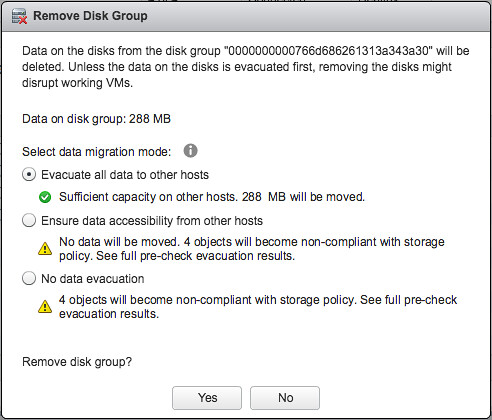
There were many other things introduced in the UI. For instance the ability to throttle resync traffic. Various customers had mentioned they would want to lower the amount of bandwidth consumed by resync traffic during production times, which is now an option in the UI. (Please don’t set this by default, as throttling resync also means longer resync times! This should only be used when directed by VMware Support.) What I also think people will appreciate is the Maintenance checks. If you want to place a host in maintenance mode or remove a diskgroup vSAN will check what the impact is and inform you about it if for instance there will not be sufficient capacity to complete the task.
Talking about resync and maintenance mode, a lot of work has gone in to enhancing rebalancing, repairs and resyncs. Today vSAN can rebalance an environment (or you can do this from the UI) when you reach over 80% capacity on any give device. It will move a component out to create disk space, however in some cases you may find yourself in the situation where the component is larger than any given device has available capacity. As of vSAN 6.6 the component will then be split up in 2 or more smaller components to create the needed headroom. From a repair and resync point of view also a lot has changed. If for instance a host returns for duty after 70 / 80 minutes vSAN will check what the best option is, keep resyncing/repairing the current component or simply update the component that just returned. What is the cheapest option?
Next up, vSAN Easy Install. Ever tried the bootstrapping mechanism that William Lam documented a while ago? It isn’t easy indeed, sure it is doable but each of us felt that this should be part of the product. As of this release the installer for the vCenter Server Appliance has been modified and it now provides the option to say that it will need to be provisioned to a greenfield vSAN environment. When you select this option a single node vSAN cluster will be created using the ESXi host you specify. This is where VCSA will then be deployed and when you are finished you can simply add the remaining hosts to the cluster, should be straight forward! For more details, read William’s excellent blog on this subject!

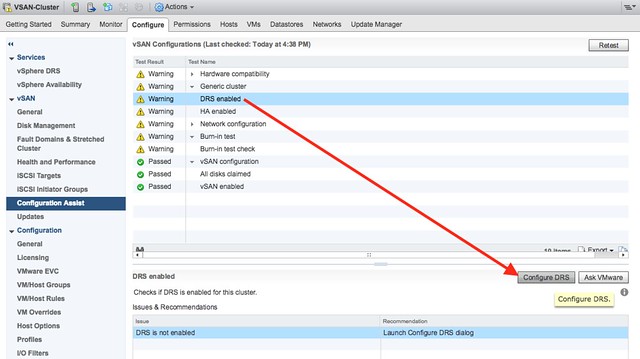
vSAN Config Assist / Firmware Updates can do many different things for you, including setting up the network for you on a DVS and will also check if all the required or expected features like HA and DRS are enabled and correctly configured… But the most important part, for certain vendors it will allow you to install/update firmware (Under vSAN click on “Updates”). It will download the OEM firmware and drivers and allow for an easy update, today this will work for Dell, Lenovo, Fujitsu, and SuperMicro. Hopefully more OEMs will join the party soon!
Last but not least: vSAN Cloud Health Check. There have been some changes to the Health Check to start with, for instance you can now skip certain future health checks for known issues that previously generated alerts. And from a Performance Monitoring stance we included metrics for vSAN network, resync, iSCSI, and client cache for instance. All very helpful, but I know most customers want more. This is hopefully what the Cloud Health Check and Analytics will provide. The Cloud Health Check for instance can detect issues and correlate them to certain KBs and point you to them, although the number of implemented KBs is still limited I believe this has great potential! Also the “Customer Experience Improvement Program” feature that is part of vSphere has been extended to include vSAN information, which over time should allow for reduced troubleshooting based on environment specific analytics / reporting.
If you ask me, another great release and I am already looking forward to the next release! (For those interested, Cormac also has a great “what’s new” on his blog.)
VM showing that HA failure response is disabled in 6.5?
I had a customer asking me today why on each VM it was showing that all HA responses are disabled. This customer is running vSphere 6.5 and below you can see what the UI showed. Note that it still says the VM is Protected, yet none of the protection mechanisms appeared to be enabled

I asked them to show me a screenshot of their HA configuration, and the HA configuration actually had several of these response mechanisms enabled. I checked my vSphere 6.5 lab and it seems I have the same problem and there’s a UI issue on the VM level details for vSphere HA in vSphere 6.5. I verified with engineering, and this is indeed a known issue which has been identified and is fixed in vCenter Server 6.5.0b! KB Article on the topic can be found here, and in the release notes for 6.5.0b it is mentioned that it is fixed.
Cohesity announces 4.0 and Round C funding
 Earlier this week I was on the phone with Rawlinson Rivera, my former VMware/vSAN colleague, and he told me all about the new stuff for Cohesity that was just announced. First of all, congrats with Round C funding. As we’ve all seen, lately it has been mayhem in the storage world. Landing a $90 million round is big. This round was co-led by investors GV (formerly Google Ventures) and Sequoia Capital. Both Cisco Investments and Hewlett Packard Enterprise (HPE) also participated in this round as strategic investors. I am not an analyst, and I am not going to pretend either, lets talk tech.
Besides the funding round, Cohesity also announced the 4.0 release of their hyper-converged secondary storage platform. Now, let it be clear, I am not a fan of the “hyper-converged” term used here. Why? Well I think this is a converged solution. They combined multiple secondary storage use cases and created a single appliance. Hyper-Converged stands for something in the industry, and usually it means the combination of a hypervisor, storage software and hardware. The hypervisor is missing here. (No I am not saying “hyper” in hyper-converged” stands for hypervisor.) Anyway, lets continue.
In 4.0 some really big functionality is introduced, lets list it out and then discuss each at a time:
- S3 Compatible Object Storage
- Quotas for File Services
- NAS Data Protection
- RBAC for Data Protection
- Folder and Tag based protection
- Erasure Coding
As of 4.0 you can now on the Cohesity platform create S3 Buckets, besides replicating to an S3 bucket you can now also present them! This is fully S3 compatible and can be created through their simple UI. Besides exposing their solution as S3 you can also apply all of their data protection logic to it, so you can have cloud archival / tiering /replication. But also enable encryption, data retention and create snapshots.
Cohesity already offered file services (NFS and SMB), and in this release they are expanding the functionality. The big request from customers was Quotas and that is introduced in 4.0. Along with what they call Write-Once-Read-Many (WORM) capabilities, which refers to data retention in this case (write once, keep forever).
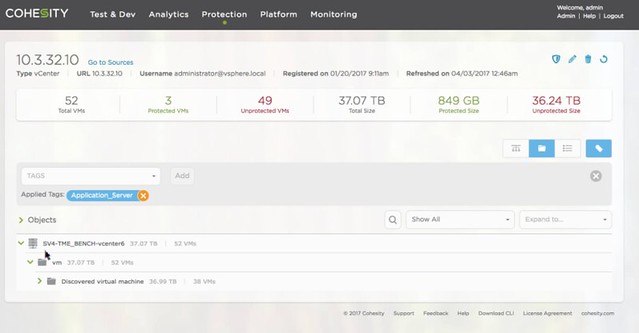
For the Data Protection platform they now offer NAS Data Protection. Basically they can connect to a NAS device and protect everything which is stored on that device by snapping the data and storing it on their platform. So if you have a NetApp filer for instance you can now protect that by offloading the data to the Cohesity platform. For the Data Protection solution they also intro Role Based Access. I think this was one of the big ticket items missing, and with 4.0 they now provide that as well. Last but not last “vCenter Integration”, which means that they can now auto-protect groups of VMs based on the folder they are in or the tag they have provided. Just imagine you have 5000 VMs, you don’t want to associate a backup scheme with each of these, you probably much rather do that for an X number of VMs with a similar SLA at a time. Give them a tag, and associate the tag with the protection scheme (see screenshot). Same for folders, easy.
Last but not least: Erasure Coding. This is not a “front-end” feature, but it is very useful to have. Especially in larger configurations it can safe a lot of precious disk space. Today they have “RAID-1” mechanism more or less, where each block is replicated / mirrored to another host in the cluster. This results in a 100% overhead, in other words: for every 100GB stored you need 200GB capacity. By introducing Erasure Coding they reduce that immediately to 33%. Or in other words, with a 3+1 scheme you get 50% more usable capacity and with a 5+2 (double protection) you get 43% more. Big savings, a lot of extra usable capacity.
Oh and before I forget, besides getting Cisco and HPE as investors you can now also install Cohesity on Cisco kit (there’s a list of approved configurations). HPE took it one step further even, they can sell you a configuration with Cohesity included and pre-installed. Smart move.
All in all, some great new functionality and some great enhancements of the current offering. Good work Cohesity, looking forward to see what is next for you guys.
Intel Optane support for vSAN, first HCI solution to deliver it
I am in Australia this week for the Sydney and Melbourne VMUG UserCon’s. Had a bunch of meetings yesterday and this morning the news was dropped that Intel Optane support was released for vSAN. The performance claims look great, 2.5x more IOPS and 2.5x less latency. (I don’t know the test specifics yet.) On top of that, Optane typically has a higher endurance rating, meaning that the device can incur a lot more writes, which makes it an ideal device for the vSAN caching layer.

While talking to customers the past couple of days though it was clear to me that performance is one thing, but flexibility of configuration is much more important. With vSAN you have the ability to select any server from the vSphere HCL and pick the components you want as long as they are on the vSAN HCL. Or you can simply pick a ready node and swap components as needed. As long as the controller remains the same for a ready node you can do that. Either way, you have choice, and now with Optane being certified you can use the latest in flash technology with vSAN!
Oh for those paying attention, the Intel P4800X Optane device isn’t listed on the HCL yet. The database is being updated as we speak, and the device should be included soon!