• Skip to primary navigation
  • Skip to main content
  • Skip to primary sidebar

Yellow Bricks

by Duncan Epping

  • Home
  • Unexplored Territory Podcast
  • HA Deepdive
  • ESXTOP
  • Stickers/Shirts
  • Privacy Policy
  • About
  • Show Search
Hide Search

Server

vSAN ReadyNode emulated configurations? What are those?

Duncan Epping · Sep 26, 2023 ·

Last week Pete Koehler dropped a bomb on us when he blogged about vSAN ReadyNode emulated configurations. Since then I had a few folks asking what this exactly is. It is fairly simple, some vendors have special SKUs for ReadyNodes, which doesn’t always make configuring a ReadyNode to the desired specifications based on the minimum requirements for vSAN ESA and the supported components. SAY WHAT?

Well just imagine you are a Dell shop and you want to use the R750. You simply check if the R750 is listed on the VCG, you list the minimum CPU spec and you go from there based on the minimum (and maximum) specifications for vSAN ESA and based on your workload profile. Just as an example, the minimum specifications for vSAN ESA are now as follows with the introduction of the vSAN AF-0 ReadyNode configuration:

  • Minimum of 16 cores Intel or AMD
    • For example: 2 x Intel Xeon® Gold 6334 3.6G, 8 cores
    • Or: 1 x AMD EPYC 9124 16C 200W 3.0GHz Processor
  • Minimum of 128GB memory
  • Minimum of 10GbE
  • Minimum of 2 NVMe Devices (as listed on vSAN VCG) and 3.2TB per host

Now that we know what those minimums are, I could simply go to the Dell website and spec a Dell R750 Server as desired. This server could have for instance:

  • 2 x Intel® Xeon Gold 6342 2.8G, 24 cores
  • 256GB memory
  • 25GbE networking
  • 6 x Dell Ent NVMe CM6 RI 3.84TB

Even though it is not on the list as a ReadyNode configuration, this configuration would be supported as all the components are certified, and the server itself is also certified as a vSAN ReadyNode platform, and we are following the guidelines as documented in the vSAN ESA RN KB.

I hope this helps those who are going through the process of procuring hardware for vSAN ESA.

vSphere 8.0 U2 and vSAN 8.0 U2 just shipped, learn all about it here!

Duncan Epping · Sep 22, 2023 ·

vSphere 8.0 U2 and vSAN 8.0 U2 just shipped, and of course the Unexplored Territory Podcast has already covered this. If you want to learn all about it make sure to listen to the episode below. Or of course read the release notes (vCenter, ESXi, vSAN).

You can find the vSAN 8.0 U2 episode on Spotify (https://bit.ly/3QNjpFk), and Apple (https://bit.ly/3QPt7XL), as well as any other podcast app, or simply listed via the embedded player below!

You can find the vSphere 8.0 U2 episode on Spotify (https://bit.ly/3snOh5l), Apple (https://bit.ly/45lRK2Q), as well as any other podcast app, or simply listed via the embedded player below!

Deleting the vCLS VMs using Retreat Mode starting with vSphere 8.0 U2

Duncan Epping · Sep 22, 2023 ·

I posted about “retreat mode” and how to delete the vCLS VMs when needed a while back, including a quick demo. Back then you needed to configure an advanced setting for a cluster if you wanted to delete the VMs for whatever reason. (Usually for troubleshooting purposes people would do a delete/recreate.) Starting with vSphere 8.0 U2 you can now use the UI to enable retreat mode on a per cluster level. How do you do this? well fairly straight forward:

  • Click on the cluster you would want to delete the VMs for
  • Click on Configure
  • Click on “General” under “vSphere Cluster Services”
  • Click on “EDIT VCLS MODE”
  • Click on “Retreat Mode” and click “OK”

Now the VMs will be deleted, if you want to recreate the VMs, follow the same procedure, but change “Retreat Mode” to “System Managed”. I tested the process yesterday and created a quick demo for you:

Scalable Snapshots demo with the vSAN 8.0 Express Storage Architecture

Duncan Epping · Sep 5, 2023 ·

Starting with vSAN 8 a brand new architecture was introduced called “Express Storage Architecture”. Over the last year or so a lot of information has been shared about ESA and the benefits of ESA. One of the things which ESA introduces is much-improved snapshot scalability.

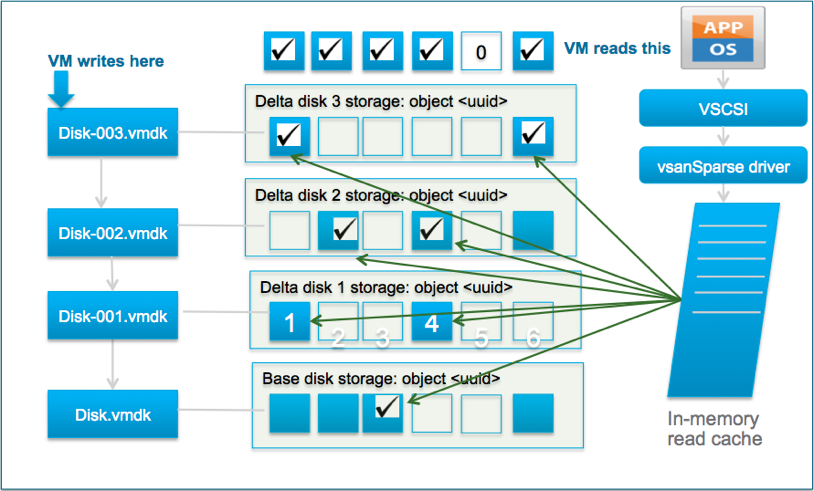
With vSAN OSA, and with VMFS, when you create a snapshot you typically immediately see a performance degradation. This is because both VMFS and vSAN OSA still operate using the redo-log based snapshot mechanism. This means that with vSAN OSA when you create a snapshot a new object is created and writes are re-directed. It also means that reads will be coming from various files, if you have one or more snapshots. This mechanism is, unfortunately, not very effective. Let me borrow a diagram that is part of a post John Nicholson wrote to demonstrate that old logic.

With vSAN 8 ESA the mechanism has changed and no longer does vSAN, or vSphere for that matter, create an additional object. vSAN ESA handles this on a meta-data level. In other words, instead of redirecting writes and traversing files for reads, vSAN now leverages a highly efficient B-Tree structure and pointers to keep track of which block is associated with which snapshot.

Not only is this more efficient from a capacity perspective, but more importantly it is very efficient from a performance standpoint. I ran half a dozen tests in my lab, and what I saw was a below 2% performance impact between a VM without a snapshot and a VM with one or multiple snapshots. I could NOT see a significant difference between the first or the fifth snapshot. I do want to point out that my lab is not officially certified to run vSAN ESA, nevertheless, I was very impressed with the results.

During the last run, I actually recorded the whole exercise. In this demo, I show the creation of one snapshot, while the VM is running a benchmark (HCIBench). Now, during the testing, I created not one but various snapshots and of course, I deleted all of them as well. You have all probably experienced extensive stun times during the deletion of a snapshot at times, and this is where vSAN ESA shines. The stun times have been reduced by 100 times, and that is something I am sure each of you will appreciate. Why have they been reduced drastically? Well, simply because we no longer have to copy data from one vSAN object to another. This makes a huge difference, not just for stun times, but also for performance in general (latency, IOPS, throughput). If you are interested, have a look at the demo!

Unexplored Territory #049 and #050, all about multi-cloud and cloud native workloads!

Duncan Epping · Jul 12, 2023 ·

I was working on my VMware Explore presentations so I forgot to post #049, figured I would post both at the same time for those who hadn’t seen these yet. In episode 049 we had two guests for the very first time, Gerrit Lehr and Andrea Siviero. Andrea and Gerrit talked us through the Multi-Cloud Adoption Framework and explained why customers are interested in this service and how it helps them meet their business goals. Listen to the full episode via Spotify (https://bit.ly/3Ny1EXE), Apple (https://bit.ly/449s2xA), or via the embedded player below.

Episode 050 focusses on Self-Managed Tanzu Mission Control, and we had Corey Dinkens as our guest. Corey discussed what Tanzu Mission Control is about, what the use case is, how customers are consuming it today, and why a self-managed solution makes sense for some customers compared to the SaaS offering. Interesting stuff if you ask me. Listen via Spotify (https://bit.ly/3XHU3dE), Apple (https://bit.ly/3XLm7g5), or use the embedded player below.

  • « Go to Previous Page
  • Page 1
  • Page 2
  • Page 3
  • Page 4
  • Page 5
  • Page 6
  • Interim pages omitted …
  • Page 336
  • Go to Next Page »

Primary Sidebar

About the Author

Duncan Epping is a Chief Technologist and Distinguished Engineering Architect at Broadcom. Besides writing on Yellow-Bricks, Duncan is the co-author of the vSAN Deep Dive and the vSphere Clustering Deep Dive book series. Duncan is also the host of the Unexplored Territory Podcast.

Follow Us

  • X
  • Spotify
  • RSS Feed
  • LinkedIn

Recommended Book(s)

Also visit!

For the Dutch-speaking audience, make sure to visit RunNerd.nl to follow my running adventure, read shoe/gear/race reviews, and more!

Do you like Hardcore-Punk music? Follow my Spotify Playlist!

Do you like 80s music? I got you covered!

Copyright Yellow-Bricks.com © 2026 · Log in