• Skip to primary navigation
  • Skip to main content
  • Skip to primary sidebar

Yellow Bricks

by Duncan Epping

  • Home
  • Unexplored Territory Podcast
  • HA Deepdive
  • ESXTOP
  • Stickers/Shirts
  • Privacy Policy
  • About
  • Show Search
Hide Search

Server

Happy Holidays: vSAN 8.0 U1 Book Discounted to less than 5 USD for the ebook!

Duncan Epping · Dec 8, 2023 ·

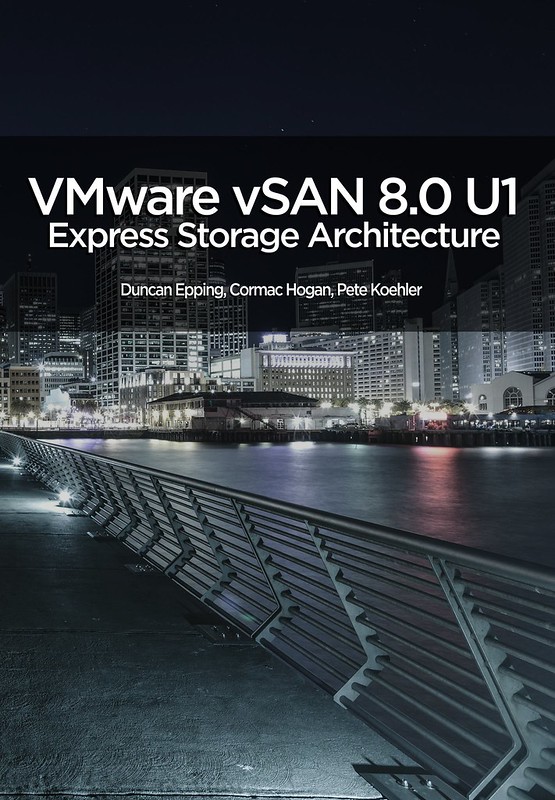
Holidays are coming, so we figured it was time to lower the price of the vSAN ESA 8.0 U1 book! Haven’t bought it yet? The paper edition is around $ 19.99 and the ebook is $ 4.99 (or less, depending on where you live).

It’s a lot of great content for a really low price, and as said we made sure the ebook is priced extremely aggressively as we prefer for technical books not to be printed. Pick it up, the price will return to normal (29.99 and 9.99) after the holiday season!

  • paper – 19.99 USD
  • ebook – 4.99 USD

Of course, we also have the links to other major Amazon stores:

  • United Kingdom – ebook – paper
  • Germany – ebook – paper
  • Netherlands – ebook – paper
  • Canada – ebook – paper
  • France – ebook – paper
  • Spain – ebook – paper
  • India – ebook
  • Japan – ebook – paper
  • Italy – ebook – paper
  • Mexico – ebook
  • Australia – ebook – paper
  • Brazil – ebook
  • Or just do a search in your local amazon store!
Doing network/ISL maintenance in a vSAN stretched cluster configuration!

Duncan Epping · Nov 21, 2023 ·

I got a question earlier about the maintenance of an ISL in a vSAN Stretched Cluster configuration which had me thinking for a while. The question was what would you do with your workload during maintenance. I guess the easiest of course is to power off all VMs and simply shutdown the cluster, for which vSAN has a UI option, and there’s a KB you can follow. Now, of course, there could also be a situation where the VMs need to remain running. But how does this work when you end up losing the connection between all three locations? Normally this would lead to a situation where all VMs will become “inaccessible” as you will end up losing quorum.

As said, this had me thinking, you could take advantage of the “vSAN Witness Resiliency” mechanism which was introduced in vSAN 7.0 U3. How would this work?

Well, it is actually pretty straight forward, if all hosts of 1 site are in maintenance mode, failed, or powered off, the votes of the witness object for each VM/Object will be recalculated within 3 minutes. When this recalculation has completed the witness can go down without having any impact on the VM. We introduced this capability to increase resiliency in a double-failure scenario, but we can (ab)use this functionality also during maintenance. Of course I had to test this, so the first step I took was placing all hosts in 1 location into maintenance mode (no data evac). This resulted in all my VMs being vMotioned to the other site.

Now next I checked with RVC if my votes were recalculated or not. As stated, depending on the number of VMs this can take around 3 minutes in total, but usually will probably be quicker. After the recalculation had been completed I powered off the Witness, and this was the result as shown below, all VMs were still running.

Of course, I had to double check on the commandline using RVC (you can use the command “vsan.vm_object_info” to check a particular object for instance) to ensure that indeed the components of those VMs were still “ACTIVE” instead of “ABSENT”, and there you go!

Now when maintenance has been completed, you simply do the reverse, you power on the witness, and then you power on the hosts in the other location. After the “resync” has been completed the VMs will be rebalanced again by DRS. Note, DRS rebalancing (or should rules being applied) will only happen when the resync of the VM has been completed.

What does Datastore Sharing/HCI Mesh/vSAN Max support when stretched?

Duncan Epping · Oct 31, 2023 ·

This question has come up a few times now, what does Datastore Sharing/HCI Mesh/vSAN Max support when stretched? It is a question which keeps coming up somehow, and I personally had some challenges to find the statements in our documentation as well. I just found the statement and I wanted to first of all point people to it, and then also clarify it so there is no question. If I am using Datastore Sharing / HCI Mesh, or will be using vSAN Max, and my vSAN Datastore is stretched, what does VMware (or does not) support?

We have multiple potential combinations, let me list them and add whether it is supported or not, not that this is at the time of writing with the current available version (vSAN 8.0 U2).

  • vSAN Stretched Cluster datastore shared with vSAN Stretched Cluster –> Supported
  • vSAN Stretched Cluster datastore shared with vSAN Cluster (not stretched) –> Supported
  • vSAN Stretched Cluster datastore shared with Compute Only Cluster (not stretched) –> Supported
  • vSAN Stretched Cluster datastore shared with Compute Only Cluster (stretched, symmetric) –> Supported
  • vSAN Stretched Cluster datastore shared with Compute Only Cluster (stretched, asymmetric) –> Not Supported

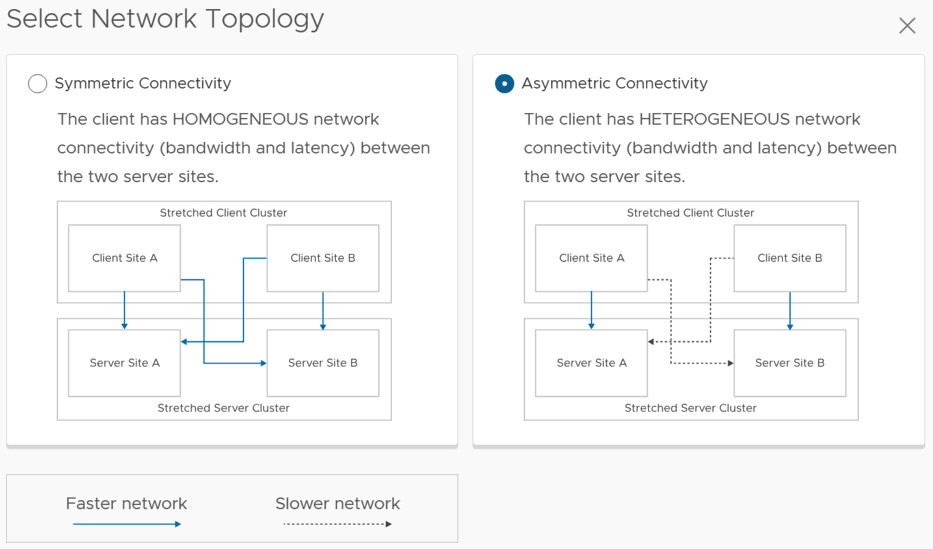
So what is the difference between symmetric and asymmetric? The below image, which comes from the vSAN Stretched Configuration, explains it best. I think Asymmetric in this case is most likely, so if you are running Stretched vSAN and a Stretched Compute Only, it most likely is not supported.

This also applies to vSAN Max by the way. I hope that helps. Oh and before anyone asks, if the “server side” is not stretched it can be connected to a stretched environment and is supported.


Witness resiliency feature with a 2-node cluster

Duncan Epping · Oct 9, 2023 ·

A few weeks ago I had a conversation with a customer about a large vSAN ESA 2-node deployment they were planning for. One of the questions they had was if they would have a 2-node configuration with nested fault domains if they would be able to tolerate a witness failure after one of the node had gone down. I tested this for a stretched cluster, but I hadn’t tested it with a 2-node configuration. Will we actually see the votes be re-calculated after a host failure, and will the VM remain up and running when the witness fails after the votes have been recalculated?

Let’s just test it, and look at RVC at what happens in each case. Let’s look at the healthy output first, then we will look at a host failure, followed by the witness failure:

Healthy

    DOM Object: 71c32365-667e-0195-1521-0200ab157625 
      RAID_1
        Concatenation
          Component: 71c32365-b063-df99-2b04-0200ab157625 
            votes: 2, usage: 0.0 GB, proxy component: true
          RAID_0
            Component: 71c32365-f49e-e599-06aa-0200ab157625 
              votes: 1, usage: 0.0 GB, proxy component: true
            Component: 71c32365-681e-e799-168d-0200ab157625 
              votes: 1, usage: 0.0 GB, proxy component: true
            Component: 71c32365-06d3-e899-b3b2-0200ab157625 
              votes: 1, usage: 0.0 GB, proxy component: tru
        Concatenation
          Component: 71c32365-e0cb-ea99-9c44-0200ab157625 
            votes: 1, usage: 0.0 GB, proxy component: false
          RAID_0
            Component: 71c32365-6ac2-ee99-1f6d-0200ab157625 
               votes: 1, usage: 0.0 GB, proxy component: false
            Component: 71c32365-e03f-f099-eb12-0200ab157625 
               votes: 1, usage: 0.0 GB, proxy component: false
            Component: 71c32365-6ad0-f199-a021-0200ab157625 
               votes: 1, usage: 0.0 GB, proxy component: false
      Witness: 71c32365-8c61-f399-48c9-0200ab157625 
        votes: 4, usage: 0.0 GB, proxy component: false

1 host down, as you can see the votes for the witness changed, of course the staste also changed from “active” to “absent”.

    DOM Object: 71c32365-667e-0195-1521-0200ab157625 
      RAID_1
        Concatenation (state: ABSENT (6)
          Component: 71c32365-b063-df99-2b04-0200ab157625 
            votes: 1, proxy component: false
          RAID_0
            Component: 71c32365-f49e-e599-06aa-0200ab157625 
              votes: 1, proxy component: false
            Component: 71c32365-681e-e799-168d-0200ab157625 
              votes: 1, proxy component: false
            Component: 71c32365-06d3-e899-b3b2-0200ab157625 
              votes: 1, proxy component: false
        Concatenation
          Component: 71c32365-e0cb-ea99-9c44-0200ab157625 
             votes: 2, usage: 0.0 GB, proxy component: false
          RAID_0
            Component: 71c32365-6ac2-ee99-1f6d-0200ab157625 
              votes: 1, usage: 0.0 GB, proxy component: false
            Component: 71c32365-e03f-f099-eb12-0200ab157625
              votes: 1, usage: 0.0 GB, proxy component: false
            Component: 71c32365-6ad0-f199-a021-0200ab157625 
              votes: 1, usage: 0.0 GB, proxy component: false
      Witness: 71c32365-8c61-f399-48c9-0200ab157625 
        votes: 1, usage: 0.0 GB, proxy component: false

And after I failed the witness, of course we had to check if the VM was still running and didn’t show up as inaccessible in the UI, and it did not. vSAN and the Witness Resilience feature worked as I expected it would work. (Yes, I double checked it through RVC as well, and the VM was “active”.)

Do I need 2 isolation addresses with a (vSAN) stretched cluster for vSphere HA?

Duncan Epping · Sep 27, 2023 ·

This question has come up multiple times now, so I figured I would write a quick post about it, do you need 2 isolation addresses with a (vSAN) stretched cluster for vSphere HA? This question comes up as the documentation has best practices around the configuration of HA isolation addresses for stretched clusters. The documentation (both for vSAN as well as traditional stretched storage) states that you need to have two reliable addresses, one in each location.

Now I have had the above question multiple times as some folks have mentioned that they can use a Gateway Address with Cisco ACI which would still be accessible in both locations even if there’s a partition due to for instance an ISL failure. If that is the case, and the IP address is indeed available in both locations during those types of failure scenarios then it would suffice to use a single IP address as your isolation address.

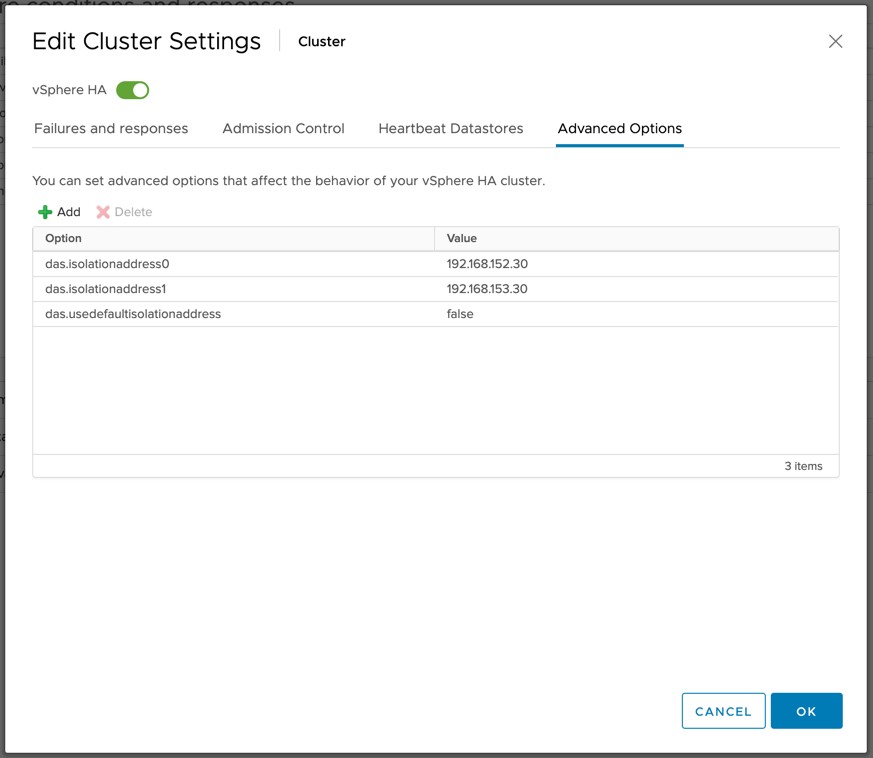
You will however need to make sure that the IP address is reachable over the vSAN network when using vSAN as your stretched storage platform. (When vSAN is enabled vSphere HA uses the vSAN network for communications.) If it is reachable you can simply define the isolation address by setting the advanced setting “das.isolationaddress0”. It is also recommended to disable the use of the default gate of the management network by setting “das.usedefaultisolationaddress” to false for vSAN based environments.

I have requested the vSAN stretched clustering documentation to be updated to reflect this.

  • « Go to Previous Page
  • Page 1
  • Page 2
  • Page 3
  • Page 4
  • Page 5
  • Interim pages omitted …
  • Page 336
  • Go to Next Page »

Primary Sidebar

About the Author

Duncan Epping is a Chief Technologist and Distinguished Engineering Architect at Broadcom. Besides writing on Yellow-Bricks, Duncan is the co-author of the vSAN Deep Dive and the vSphere Clustering Deep Dive book series. Duncan is also the host of the Unexplored Territory Podcast.

Follow Us

  • X
  • Spotify
  • RSS Feed
  • LinkedIn

Recommended Book(s)

Also visit!

For the Dutch-speaking audience, make sure to visit RunNerd.nl to follow my running adventure, read shoe/gear/race reviews, and more!

Do you like Hardcore-Punk music? Follow my Spotify Playlist!

Do you like 80s music? I got you covered!

Copyright Yellow-Bricks.com © 2026 · Log in