• Skip to primary navigation
  • Skip to main content
  • Skip to primary sidebar

Yellow Bricks

by Duncan Epping

  • Home
  • Unexplored Territory Podcast
  • HA Deepdive
  • ESXTOP
  • Stickers/Shirts
  • Privacy Policy
  • About
  • Show Search
Hide Search

Server

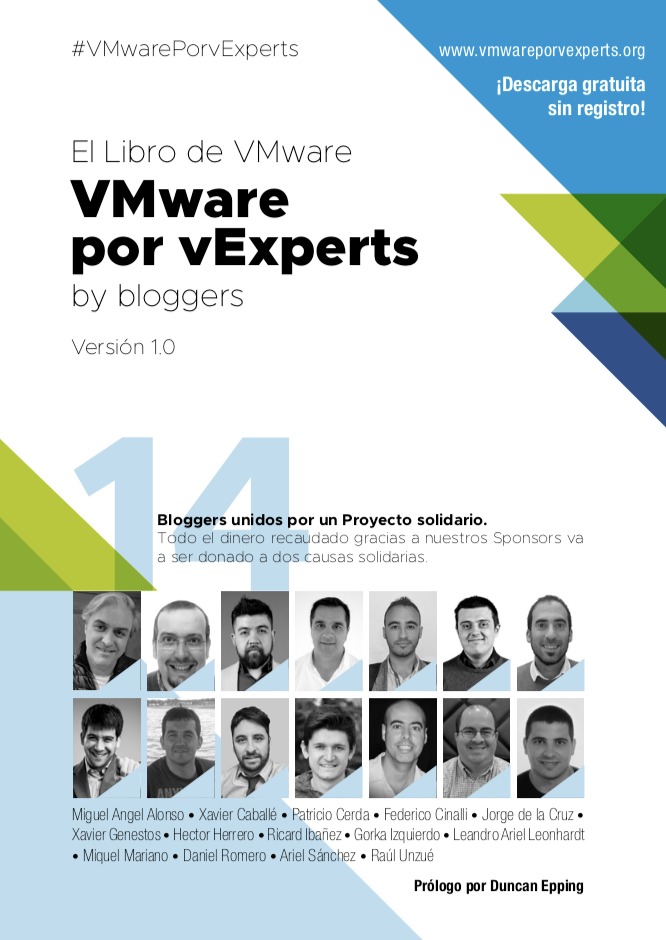
Free Spanish VMware technology ebook available now!

Duncan Epping · Apr 12, 2019 ·

A couple of months ago I was asked if I wanted to write a foreword for an upcoming ebook. I have done this various times, but this one was particularly interesting. Why? Well, there are 3 good reasons:

  1. This book is written by 14 community experts, many of which I have met over the past years.
  2. It is a free, but sponsored, ebook!
  3. All sponsor proceeds will go to charity.

The first book I wrote was also a book with multiple authors, it was only a handful of people and that was painful enough as it is. An insane amount of coordination is involved usually and I have a lot of respect for these guys, 14 people writing a single book is not easy.

On top of that, these guys decided to cover multiple VMware technologies, ranging from NSX to VDI to vSphere etc. Very cool if you ask me. Oh, and before I forget… They have already managed to collect over 25.000 Euro for charity. Great job guys, what an achievement. I am not going to say much more, just download the book (if you read/speak Spanish)! Thanks for letting me part of this.

https://www.vmwareporvexperts.org/

vSphere HA virtual machine failed to failover error on VMs in a partitioned cluster

Duncan Epping · Apr 12, 2019 ·

I received two questions this week around partition scenarios where after the failure has been lifted some VMs display the error message “vSphere HA virtual machine failed to failover”. The question that then arises is: why did HA try to restart it, and why did it fail? Well, first of all, this is an error that in most cases you can safely ignore. There’s a KB on the topic which gives a bit of detail to be found here, but let me explain also in a bit more depth.

In a partitioning scenario, each partition will have its own primary node. If there is no form of communication (datastore/network) possible, what the HA primary will do is it will list all the VMs that are currently not running within that partition. It will also want to try to restart those VMs. A partition is extremely uncommon in normal environments but may happen in a stretched cluster. In a stretched cluster when a partition happens a datastore only belongs to 1 location. The VMs which appear to be missing typically are running in the other location, as typically the other location will have access to that particular datastore. Although the primary has listed these VMs as “missing and need to restart” it will not be able to do this. Why? It doesn’t have access to the datastore itself, or when it has access to the datastore the files are locked as the VMs are still running. As a result, this will, unfortunately, be reported as a failed failover. Even though the VM was still running and there was no need for a failover. So if you hit this during certain failure scenarios, and the VMs were running as you expected, you can safely ignore this error.

vSAN Stretched Cluster failure scenarios and component votes

Duncan Epping · Apr 3, 2019 ·

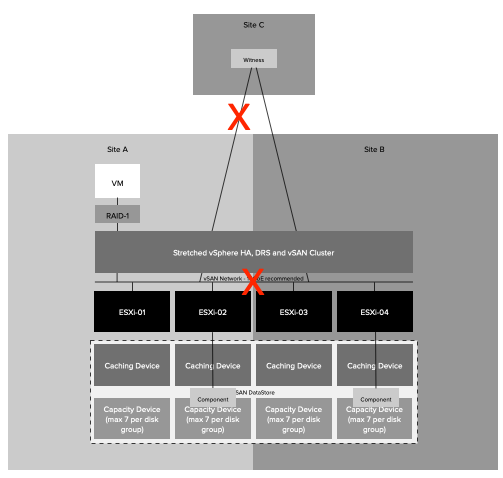
I was at a customer last week and had an interesting question about the vSAN voting mechanism. This customer had a stretched cluster and used RAID-5 within each location to protect the data on top of replicating across locations. During certain failure scenarios unexpectedly the data remained available, of course, it is great that you have higher availability than expected, but why did this happen? What this customer tested was powering off the Witness (which is deemed as a site failure) and next powered of 2 hosts in 1 location, which exceeds the “failures to tolerate” in a single location. You would expect, based on all documentation so far, that the data would be unavailable. Well for some VMs this was the case, but for others, that was not the case. Why is this? Well, it is all about the vote count in this case. Look at the below diagram and the number of votes for each component first.

In the above scenario if the Witness (W) fails we have 4 votes less. Out of a total of 13 that is not a problem. If two additional hosts fail, this is most likely still not a problem, even though you are exceeding the provided “failures to tolerate”. However, if by any chance Host1 is one of those failed hosts then you would lose quorum. Host1 has a component with 2 votes. So if host1 has failed and the witness has failed and host2 for instance, you have now lost 7 out of 13 votes. This means quorum is lost. Please note that that single component with 2 votes is random. For a different VM/Object it could be that the component which is placed on host6 or host7 has 2 votes.

Another thing to point out, if host5-8 all would fail the data is still available. However, if then host3 and host4 would fail the object would become unavailable. Even though you still would have quorum across locations, you have now also exceeded the specified “failures to tolerate” within the location. This is also something that will be taken in to account.

I hope that helps.

How to test failure scenarios!

Duncan Epping · Mar 14, 2019 ·

Almost on a weekly basis, I get a question about unexpected results during the testing of certain failure scenarios. I usually ask first if there’s a diagram that shows the current configuration. The answer is usually no. Then I would ask if they have a failure testing matrix that describes the failures they are introducing, the expected result and the actual result. As you can guess, the answer is usually “euuh a what”? This is where the problem usually begins. The problem usually gets worse when customers try to mimic a certain failure scenario.

What would I do if I had to run through failure scenarios? When I was a consultant we always started with the following:

  • Document the environment, including all settings and the “why”
  • Create architectural diagrams
  • Discuss which types of scenarios would need to be tested
  • Create a failure testing matrix that includes the following:
    • Type of failure
    • How to create the scenario
      • Preferably include diagrams per scenario displaying where the failure is introduced
    • Expected outcome
    • Observed outcome

What I would normally also do is describe in the expected outcome section the theory around what should happen. Maybe I should just give an example of a failure and how I would describe it more or less.

Type Failure: Site Partition

How to: Disable links between Site-A / Site-C and Site-A / Site-B

Expected outcome: The secondary location will bind itself with the witness and will gain ownership over all components. In the preferred location, the quorum is lost, as such all VMs will appear as inaccessible. vSAN will terminate all VMs in the preferred location. This is from an HA perspective however a partition and not an isolation as all hosts in Site-A can still communicate with each other. In the secondary location vSphere HA will notice hosts are missing. It will validate that the VMs that were running are running, or not running. All VMs which are not running, and have accessible components, will be restarted in the secondary location.

Observed outcome: The observed outcome was similar to the expected outcome. It took 1 minute and 30 seconds before all 20 test VMs were restarted.

In the above example, I took a very basic approach and didn’t even go into the level of depth you probably should go. I would, for instance, include the network infrastructure as well and specify exactly where the failure occurs, as this will definitely help during troubleshooting when you need to explain why you are observing a particular unexpected behavior. In many cases what happens is that for instance a site partition is simulated by disabling NICs on a host, or by closing certain firewall ports, or by disabling a VLAN. But can you really compare that to a situation where the fiber between two locations is damaged by excavations? No, you can not compare those two scenarios. Unfortunately this happens very frequently, people (incorrectly) mimic certain failures and end up in a situation where the outcome is different than expected. Usually as a result of the fact that the failure being introduced is also different than the failure that was described. If that is the case, should you still expect the same outcome? You probably should not.

Yes I know, no one likes to write documentation and it is much more fun to test things and see what happens. But without recording the above, a successful implementation is almost impossible to guarantee. What I can guarantee though is that when something fails in production, you most likely will not see the expected behavior when you have not tested the various failure scenarios. So please take the time to document and test, it is probably the most important step of the whole process.

Top 10 VMware tools podcast and RVTools 3.11.6

Duncan Epping · Mar 9, 2019 ·

Right after we finished recording the Virtually Speaking Podcast on the topic of VMware Tools (Listen to it, great episode featuring Pete, John, William Lam and myself) yesterday I received an email from Rob. Rob mentioned an update to RVTools, bringing it now to version 3.11.6. As I mentioned on the podcast, RVTools has been around for 10 years now, what an achievement! Insane number of downloads, but understandable as it is very useful for anyone and everyone running a VMware environment. If you never looked at it, download it today, I am sure you will find various inconsistencies or issues, we all have! So, what changed in 3.11.6?

Version 3.11.6 (March, 2019)

  • Upgraded RVTools solution to use VMware vSphere Management SDK 6.7U1
  • Windows Authentication Framework (Waffle) is no longer used by RVTools
  • NPOI .NET library for creating excel export files is no longer used by RVTools
  • RVTools now uses OpenXML and ClosedXML for creating the excel export files
  • Performance improvements for export to excel
  • added -ExcludeCustomAnnotations switch to RVTools command line interface
  • added –DBColumnNames switch to RVTools command line interface
  • vInfo tab page new column: Creation date virtual machine
  • vInfo tab page new columns: Primary IP Address and vmx Config Checksum
  • vInfo tab page new columns: log directory, snapshot directory and suspend directory
  • dvSwitch tab page new columns: LACP name, LACP mode and LACP loadbalance Algorithm
  • vNIC tab page new column: Name of uplink port
  • vNetwork tab page new column: Network Adapter DirectPath I/O Parameter
  • vHost tab page new columns: Serial number and BIOS vendor
  • Header row and first column in export Excel file are now locked.
  • First “Select” column is removed from excel worksheet vFloppy, vCD and vTools.
  • added a new executable to merge your vCenter xlsx files super-fast to one xlsx file.
    RVToolsMergeExcelFiles.exe -input c:\temp\AA.xlsx;c:\temp\BB.xlsx -output c:\temp\AABB.xlsx -template c:\temp\mytemplate.xlsx -verbose –overwrite
  • Example script RVToolsBatchMultipleVCs.ps1 is changed. It will now uses RVToolsMergeExcelFiles to merge the xlsx files.
  • Bug Fix: a Single Sign On problem solved
  • Bug Fix: ExportvSC+VMK2csv command was not working
  • Bug Fix: ExportdvPort2csv command was not working
  • Bug Fix: On vNIC tabpage not all Switch/dvSwitch information was displayed
  • Bug Fix: Export now reflect value of “Latency Sensitivity” enumeration
  • Bug Fix: After changing the preference settings the data is not always refreshed as needed
  • Bug fix: Content Libraries vmdk files are no longer reported as possible zombie files
  • « Go to Previous Page
  • Page 1
  • Interim pages omitted …
  • Page 36
  • Page 37
  • Page 38
  • Page 39
  • Page 40
  • Interim pages omitted …
  • Page 336
  • Go to Next Page »

Primary Sidebar

About the Author

Duncan Epping is a Chief Technologist and Distinguished Engineering Architect at Broadcom. Besides writing on Yellow-Bricks, Duncan is the co-author of the vSAN Deep Dive and the vSphere Clustering Deep Dive book series. Duncan is also the host of the Unexplored Territory Podcast.

Follow Us

  • X
  • Spotify
  • RSS Feed
  • LinkedIn

Recommended Book(s)

Also visit!

For the Dutch-speaking audience, make sure to visit RunNerd.nl to follow my running adventure, read shoe/gear/race reviews, and more!

Do you like Hardcore-Punk music? Follow my Spotify Playlist!

Do you like 80s music? I got you covered!

Copyright Yellow-Bricks.com © 2026 · Log in