• Skip to primary navigation
  • Skip to main content
  • Skip to primary sidebar

Yellow Bricks

by Duncan Epping

  • Home
  • Unexplored Territory Podcast
  • HA Deepdive
  • ESXTOP
  • Stickers/Shirts
  • Privacy Policy
  • About
  • Show Search
Hide Search

Server

vSAN 7.0 U2 Durability Components?

Duncan Epping · Mar 22, 2021 ·

Last week I published a new demo on my youtube channel (at the bottom of this post) and it discussed an enhanced feature called Durability Components. Some may know these as “delta components” as well. These durability components were introduced in vSAN 7.0 Update 1 and provided a mechanism to maintain the required availability for VMs while doing maintenance. That meaning that when you would place a host into maintenance mode new “durability components” would be created for the components which were stored on that host. This would then allow all the new VM I/O to be committed to the existing component, as well as the durability component.

Now, starting with vSAN 7.0 Update 2, vSAN also uses these durability components in situations where a host failure has occurred. So if a host has failed, durability components will be created to ensure we still maintain the specified availability level specified within the policy as shown in the diagram above. The great thing is that if a second host fails in an FTT=1 scenario and you are able to recover the first failed host, we can still merge the data with the first failed host with the durability component! So not only are these durability components great for improving the resync times, but they also provide a higher level of availability to vSAN! To summarize:

  1. Host fails
  2. Durability components are created for all impacted objects
  3. New writes are committed to existing components and the new durability components
  4. Host recovers
  5. Durability components are merged with the previously failed components
  6. Durability components are deleted when resync has completed

I hope that help providing a better understanding of how these durability components help improving availability/resiliency in your environment with vSAN 7.0 Update 2.

I can understand that some of you may not want to test durability components in their own environment, this is why I recorded a quick demo and published it on my youtube channel. Check out the video below, as it also shows you how durability components are represented in the UI.

vSphere 7.0 U2 Suspend VMs to Memory for maintenance!

Duncan Epping · Mar 17, 2021 ·

In vSphere 7.0 U2 a new feature popped up for Lifecycle Manager. This new feature basically provides the ability to specify what should happen to your workloads when you are applying updates or upgrades to your infrastructure. The new feature is only available for those environments which can use Quick Boot. Quick Boot basically is a different method of restarting a host. It basically skips the BIOS part, which makes a big difference in overall time to complete a reboot.

When you have LCM configured, you can enable Quick Boot by editing the “Remediation Settings”. You then simply tick the “Quick Boot” tickbox, which then provides you a few other options:

  • Do not change power state (aka vMotion the VMs)
  • Suspend to disk
  • Suspend to memory
  • Power off

I think all of these speak for themselves, and Suspend to Memory is the new feature that was introduced in 7.0 U2. When you select this option, when you do maintenance via LCM, the VMs which are running on the host which need to be rebooted, will be suspended to memory before the reboot. Of course, they will be resumed when the hypervisor returns for duty again. This should shorten the amount of time the reboot takes, while also avoiding the cost of migrating VMs. Having said that, I do believe that the majority of customers will want to migrate the VMs. When would you use this? Well, if you can afford a small VM/App downtime and have large mem configurations for hosts as well as workloads. As the migration of large memory VMs, especially when they are very memory active, could take a significant amount of time.

I hope that helps, if you want to know where to find the config option in the UI, or if you would like to see it demonstrated, simply watch the video below!

Compute only HCI Mesh with vSAN 7.0 U2

Duncan Epping · Mar 16, 2021 ·

I guess that title explains it all, starting with vSAN 7.0 U2, we now also support connecting a compute-only cluster with a vSAN cluster. Meaning that if you have a vSphere cluster that does not have vSAN enabled, you can now mount a remote vSAN Datastore to it and leverage all the capabilities it provides!

I am sure seeing this new capability will make many of you happy, as we had many customers asking for this when we launched HCI Mesh with vSAN 7.0 U1. The great thing is that there’s no need for a vSAN license on the compute-only cluster, even though we load up the vSAN Client on the Client Cluster. No, we are not using NFS, but we are using the vSAN proprietary protocol for this. Another thing that may be useful to know is that we doubled the number of hosts that can be connected to a single datastore, this has gone from 64 to 128!

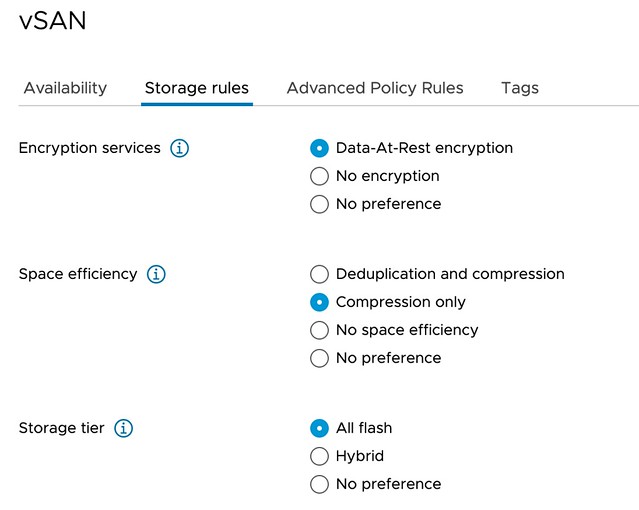
Last but not least, we have also extended the Policy Based Management Framework to allow for customers to specify which data services should be enabled on a datastore level. So if you select a policy, the vSAN datastores that will be presented, should not only be able to provide the RAID configuration specified, but should also have the data services enabled you require. Those data services would be: Deduplication and Compression, Compression, and/or Encryption, as shown in screenshot of the new policy capability below.

As mentioned, the feature itself is pretty straightforward and very easy to use. There are some things to take into consideration, of course, I wrote those down here. If you want to see it in action, make sure to check the demo below.

vSAN 7.0 U2 Skyline Health History

Duncan Epping · Mar 15, 2021 ·

I have already discussed this briefly during my 7.0 U2 video presentation, which can be found here, but I also wanted to share the demo I recorded with you, and provide some additional details. Over the past years, one of the most requested features for Skyline Health, or Health Check as it used to be called, was the ability to go back in time to see what has happened between certain dates. This functionality was demonstrated at VMworld, and a few VMUGs the past year, and now finally made it into the release with vSAN 7.0 U2.

The “health history” feature simply provides a toggle that enables you to go back in time. When you tick the toggle, you can specify a date range. Note that the range can be anywhere between the current date, and 30 days back. The health check data is stored, for 30 days, in the vCenter Server database. This is important to know because if you feel that there’s no need to store the data, you can disable the feature under vSAN Services in the Configuration tab. When you disable the feature the data is deleted from the vCenter Server database. Now if you flip the toggle, set a date range, and look at the different checks you should see green checks. If a check is not green, but rather red or orange you can click the check.

When clicking on the red square, you will see which check failed, and when exactly it failed. The number in the square or circle refers to the number of checks that were run and resulted in the same state. In other words, 37 red, 45 green, 54 red checks etc. When you click on it, you will see the below.

Hopefully, this will then allow you, during troubleshooting, to correlate particular failures or configuration changes, to the issue that bubbled up in the health check. I feel that having the date/time is already very useful, as it will allow you to focus on a more specific date/time range while reading logs or going through the events section.

Anyway, if you would like to see the feature in action, check out the demo below.

Introducing VMware vSAN 7.0 Update 2 (video)

Duncan Epping · Mar 9, 2021 ·

As you may have seen, today VMware announced the release of VMware vSAN 7.0 Update 2 (and vSphere 7.0 U2 as well of course). I was planning on doing a post on the 7.0 U2 release, but then I figured that I would try to record a video discussing most of the new features and enhancements introduced. Note, I do not cover the full release, I picked the features which I felt deserved some attention. I uploaded the video to my Youtube Channel, make sure to visit it and subscribe, as I will be releasing demos on various features in the upcoming weeks with some more detail where needed. Hope you enjoy it, and again, make sure to like the video and subscribe to the channel!

  • « Go to Previous Page
  • Page 1
  • Interim pages omitted …
  • Page 19
  • Page 20
  • Page 21
  • Page 22
  • Page 23
  • Interim pages omitted …
  • Page 336
  • Go to Next Page »

Primary Sidebar

About the Author

Duncan Epping is a Chief Technologist and Distinguished Engineering Architect at Broadcom. Besides writing on Yellow-Bricks, Duncan is the co-author of the vSAN Deep Dive and the vSphere Clustering Deep Dive book series. Duncan is also the host of the Unexplored Territory Podcast.

Follow Us

  • X
  • Spotify
  • RSS Feed
  • LinkedIn

Recommended Book(s)

Also visit!

For the Dutch-speaking audience, make sure to visit RunNerd.nl to follow my running adventure, read shoe/gear/race reviews, and more!

Do you like Hardcore-Punk music? Follow my Spotify Playlist!

Do you like 80s music? I got you covered!

Copyright Yellow-Bricks.com © 2026 ยท Log in