• Skip to primary navigation
  • Skip to main content
  • Skip to primary sidebar

Yellow Bricks

by Duncan Epping

  • Home
  • Unexplored Territory Podcast
  • HA Deepdive
  • ESXTOP
  • Stickers/Shirts
  • Privacy Policy
  • About
  • Show Search
Hide Search

Server

VMworld Session: vSphere Clustering Q&A

Duncan Epping · Aug 1, 2011 ·

We need your help for our VMworld session “VSP1682 – vSphere Clustering Q&A”. In order to ensure we can fill up the full 60 minutes we want to have a couple of questions ready in case no one in the audience has a question. Although I doubt that will be the case, it is better to be prepared than to stare at each-other for 50 minutes. So please help us out and submit some questions about HA, DRS and/or Storage DRS.

Our session is on Monday morning at 08:00 so if you haven’t yet, register today. By the way, Frank has another session which is DRS/Resource Management Deepdive… definitely worth attending, it is VSP3116 and on Monday at 11:30 and Thursday at 10:30 (sold out). Make sure to attend one of those. I’ve seen a preview of the slidedeck and it will be worth it. Another E P I C session will be VSP1956 on Monday at 13:00. It is the ESXi Quiz, yes… Death to Powerpoint. At this session you will see vExperts taking on VMware employees and in a knowledge quiz!

VMFS-5 LUN Sizing

Duncan Epping · Jul 29, 2011 ·

I had a question on my old VMFS LUN Sizing article I did back in 2009… The question was how valid the used formula and values still were in today’s environment especially considering VMFS-5 is around the corner. It is a very valid question so I decided to take my previous article and rewrite it. Now one thing to keep in mind though is that I tried to make it usable for generic consumption and you will still need to figure out things yourself as I simply don’t have all info needed to make it cookie-cutter, but I guess this is as close as it can get.

Parameters:

MinSize = 1.2GB
MaxVMs = 40
SlackSpace = 20%
AvgSizeVMDK = 30GB
AvgDisksVMs = 2
AvgMemSize = 3GB

Before I will drop the formula I want to explain the MaxVMs parameter. You will need to figure out how many IOps your LUN can handle first, for a hint check this article. But besides IOps you will also beed to take burst room into account and of course the RTO defined for this environment:

((IOpsPerLUN – 20%) / AVGIOpsPerVM) ≤ (MaxVMsWithinRTO)

Keep in mind that the article I pointed out just a second ago is geared towards worst case numbers, so no cache or other benefits. Secondly I subtracted 20% which is room for bursting. Now this is by no means a best practice and this number will need to be tweaked based on the size of your LUN and the total amount of IOps you LUN can handle. For instance when you are using 8 SATA spindles that 20% might only be 80 IOps, depending on the raid level used, in the case of SAS it could be 280 IOps with just 8 spindles and that is a huge difference. Anyway I leave that up to you to decide but I used 20% headroom for both disk space (for snapshots and the memory overhead swap files) and performance, just to keep it simple. The second part of this one is MaxVMsWithinRTO. In short make sure that you can recover the number of VMs on the datastore within the defined recovery time objective (RTO). You don’t want to find yourself in a situation where the RTO is 4hrs but the total amount of time for the restore is 24 hours.

Formula, aaahhh yes here we go. Now note that I did not take traditional constraints around “SCSI Reservations Conflicts” into account as with VMFS -5 and VAAI SCSI Locking Offload these  are lifted. If you have an array which doesn’t support the ATS primitive make sure you take this into account as well. Although the SCSI locking mechanism has been improved over the last years it could still limit you when you have a lot of power-on events, vMotion events etc.

(((MaxVMs * AvgDisksVMs) * AvgSizeVMDK) + ( MaxVMs * AvgMemSize)) + SlackSpace ≥ MinSize

Lets use the numbers defined in the parameters above and do the math:

(((40 * 2) * 30GB) + (40 * 3GB)) + 20% = (2400GB + 120GB) * 1.2 = 3024 GB

I hope this helps making your storage design decisions. One thing to keep in mind of course is that most storage arrays have optimal configurations for LUN sizes in terms of performance. Depending on your IOps requirements you might want to make sure that these align.

HA Architecture Series – Restarting VMs (4/5)

Duncan Epping · Jul 27, 2011 ·

Looking from the outside at the way HA in 5.0 behaves might not seem any different but it is. I will call out some changes with regards to how VM restarts are handled but would like to refer you to our book for my in-depth details. These are the things I want to point out:

  • Restart priority changes
  • Restart retry changes
  • Isolation response and detection changes

Restart priority changes

First thing I want to point out is a change in the way the VMs are prioritized for restarts. I have listed the full order in which virtual machines will be restarted below:

  • Agent virtual machines
  • FT secondary virtual machines
  • Virtual Machines configured with a restart priority of high,
  • Virtual Machines configured with a medium restart priority
  • Virtual Machines configured with a low restart priority

So what are these Agent VMs? Well these are VMs that provide a service like virus scanning or for instance edge services like vShield can provide. FT Secondary virtual machines make sense I guess and so does the rest of the list. Keep in mind though that if the restart fails of one of them HA will continue restarting the remaining virtual machines.

Restart retry changes

I explained how the restart retries worked for 4.1 in the past and basically the total number of restart tries would be 6 by default, this was 1 initial restart and 5 retries as defined with “das.maxvmrestartcount”. With 5.0 this behavior has changed and the max amount of restart counts is 5 in total. Although it might seem like a minor change, it is important to realize. The time line has also slightly change and this is what it looks like with 5.0:

  • T0 – Initial Restart
  • T2m – Restart retry 1
  • T6m – Restart retry 2
  • T14m – Restart retry 3
  • T30m – Restart retry 4

The “m” stands for minutes and it should be noted that the next retry will happen “X” after the master has detected the restart has failed. So in the case of T0 and T2m it could actually be that the retry happens after 2 minutes and 10 seconds.

Isolation response and detection changes

Another major change was part of the Isolation Response and Isolation Detection mechanism. Again from the outside it looks like not much has changed but actually a lot has and I will try to keep it simple and explain what has and why this is important to realize. First thing is the deprecation of “das.failuredetectiontime”. I know many of you used this advanced setting to tweak when the host would trigger the isolation response, that is no longer possible and needed to be honest. If you’ve closely read my other articles you hopefully picked up on the datastore heartbeating part already which is one reason for not needing this anymore. The other reason is that before the isolation response is triggered the host will actually validate if virtual machines can be restarted and if it isn’t an all out network outage. Most of us have been there at some point, a network admin decides to upgrade the switches and all hosts trigger the isolation response at the same time… well that won’t happen anymore! One thing that has changed because of that is the time it takes before a restart will be initiated. I have listed the timeline for both the isolation of a master and the failure of a slave below:

Isolation of a slave

  • T0 – Isolation of the host (slave)
  • T10s – Slave enters “election state”
  • T25s – Slave elects itself as master
  • T25s – Slave pings “isolation addresses”
  • T30s – Slave declares itself isolated and “triggers” isolation response

Isolation of a master

  • T0 – Isolation of the host (master)
  • T0 – Master pings “isolation addresses”
  • T5s – Master declares itself isolated and “triggers” isolation response

After the completion of this sequence, the (new) master will learn the host was isolated and will restart virtual machines based on the information provided by the slave.

As shown there is a clear difference and of course the reason for it being is the fact that when the master isolates there is no need to trigger an election process which will be needed in the case of a slave to detect if it is isolated or partitioned. One again, before the isolation response is triggered the host will validate if a host will be capable of restarting the virtual machines… no need to incur downtime when it is unnecessary.

I would suggest reading this article twice to fully absorb all the minor detailed changes. The book contains more details than this so if you are interested pick it up.

HA Architecture Series – Datastore Heartbeating (3/5)

Duncan Epping · Jul 26, 2011 ·

**disclaimer: Some of the content has been taken from the vSphere 5 Clustering Technical Deepdive book**

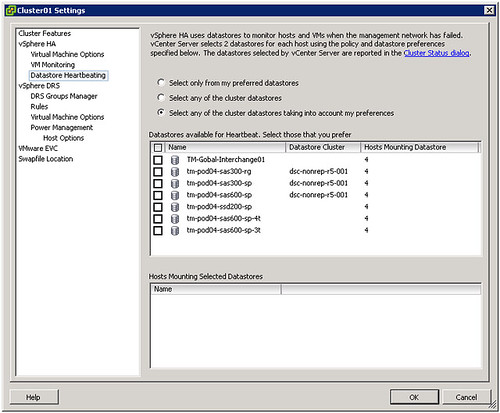
The first time I was playing around with 5.0 and particularly HA I noticed a new section in the UI called Datastore Heartbeating.

Those familiar with HA prior to vSphere 5.0 probably know that virtual machine restarts were always initiated, even if only the management network of the host was isolated and the virtual machines were still running. As you can imagine, this added an unnecessary level of stress to the host. This has been mitigated by the introduction of the datastore heartbeating mechanism. Datastore heartbeating adds a new level of resiliency and allows HA to make a distinction between a failed host and an isolated / partitioned host. Isolated vs Partitioned is explained in Part 2 of this series.

Datastore heartbeating enables a master to more correctly determine the state of a host that is not reachable via the management network. The new datastore heartbeat mechanism is only used in case the master has lost network connectivity with the slaves to validate whether the host has failed or is merely isolated/network partitioned. As shown in the screenshot above two datastores are automatically selected by vCenter. You can rule out specific volumes if and when required or even make the selection yourself. I would however recommend to let vCenter decide.

As mentioned by default it will select two datastores. It is possible however to configure an advanced setting (das.heartbeatDsPerHost) to allow for more datastores for datastore heartbeating. I can imagine this is something that you would do when you have multiple storage devices and want to pick a datastore from each, but generally speaking I would not recommend configuring this option as the default should be sufficient for most scenarios.

How does this heartbeating mechanism work? HA leverages the existing VMFS filesystem locking mechanism. The locking mechanism uses a so called “heartbeat region” which is updated as long as the lock on a file exists. In order to update a datastore heartbeat region, a host needs to have at least one open file on the volume. HA ensures there is at least one file open on this volume by creating a file specifically for datastore heartbeating. In other words, a per-host a file is created on the designated heartbeating datastores, as shown in the screenshot below. HA will simply check whether the heartbeat region has been updated.

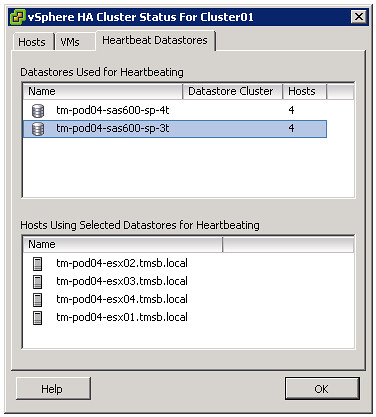
If you are curious which datastores have been selected for heartbeating. Just go to your summary tab on your cluster and click “Cluster Status”, the 3 tab “Heartbeat Datastores” will reveal it.


** Disclaimer: This article contains references to the words master and/or slave. I recognize these as exclusionary words. The words are used in this article for consistency because it’s currently the words that appear in the software, in the UI, and in the log files. When the software is updated to remove the words, this article will be updated to be in alignment. **

HA Architecture Series – Primary nodes? (2/5)

Duncan Epping · Jul 25, 2011 ·

**disclaimer: Some of the content has been taken from the vSphere 5 Clustering Technical Deepdive book**

As mentioned in an earlier post vSphere High Availability has been completely overhauled… This means some of the historical constraints have been lifted and that means you can / should / might need to change your design or implementation.

What I want to discuss today is the changes around the Primary / Secondary node concept that was part of HA prior to vSphere 5.0. This concept basically limited you in certain ways… For those new to VMware /vSphere, in the past there was a limit of 5 primary nodes. As a primary node was a requirement to restart virtual machines you always wanted to have at least 1 primary node available. As you can imagine this added some constraints around your cluster design when it came to Blades environments or Geo-Dispersed clusters.

vSphere 5.0 has completely lifted these constraints. Do you have a Blade Environment and want to run 32 hosts in a cluster? You can right now as the whole Primary/Secondary node concept has been deprecated. HA uses a new mechanism called the Master/Slave node concept. This concept is fairly straight forward. One of the nodes in your cluster becomes the Master and the rest become Slaves. I guess some of you will have the question “but what if this master node fails?”. Well it is very simple, when the master node fails an election process is initiated and one of the slave nodes will be promoted to master and pick up where the master left off. On top of that, lets take the example of a Geo-Dispersed cluster, when the cluster is split in two sites due to a link failure each “partition” will get its own master. This allows for workloads to be restarted even in a geographically dispersed cluster when the network has failed….

What is this master responsible for? Well basically all the tasks that the primary nodes used to have like:

  • restarting failed virtual machines
  • exchanging state with vCenter
  • monitor the state of slaves

As mentioned when a master fails a election process is initiated. The HA master election takes roughly 15 seconds. The election process is simple but robust. The host that is participating in the election with the greatest number of connected datastores will be elected master. If two or more hosts have the same number of datastores connected, the one with the highest Managed Object Id will be chosen. This however is done lexically; meaning that 99 beats 100 as 9 is larger than 1. That is a huge improvement compared to what is was like in 4.1 and prior isn’t it?

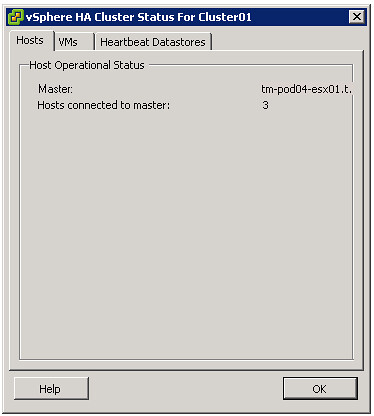
For those wondering which host won the election and became the master, go to the summary tab and click “Cluster Status”.

Isolated vs Partitioned

As this is a change in behavior I do want to briefly discuss the difference between an Isolation and a Partition. First of all, a host is considered to be either Isolated or Partitioned when it loses network access to a master but has not failed. To help explain the difference the states and the associated criteria below:

  • Isolated
    • Is not receiving heartbeats from the master
    • Is not receiving any election traffic
    • Cannot ping the isolation address
  • Partitioned
    • Is not receiving heartbeats from the master
    • Is receiving election traffic
    • (at some point a new master will be elected at which the state will be reported to vCenter)

In the case of an Isolation, a host is separated from the master and the virtual machines running on it might be restarted, depending on the selected isolation response and the availability of a master. It could occur that multiple hosts are fully isolated at the same time. When multiple hosts are isolated but can still communicate amongst each other over the management networks, it is called s a network partition. When a network partition exists, a master election process will be issued so that a host failure or network isolation within this partition will result in appropriate action on the impacted virtual machine(s).


** Disclaimer: This article contains references to the words master and/or slave. I recognize these as exclusionary words. The words are used in this article for consistency because it’s currently the words that appear in the software, in the UI, and in the log files. When the software is updated to remove the words, this article will be updated to be in alignment. **

  • « Go to Previous Page
  • Page 1
  • Interim pages omitted …
  • Page 178
  • Page 179
  • Page 180
  • Page 181
  • Page 182
  • Interim pages omitted …
  • Page 336
  • Go to Next Page »

Primary Sidebar

About the Author

Duncan Epping is a Chief Technologist and Distinguished Engineering Architect at Broadcom. Besides writing on Yellow-Bricks, Duncan is the co-author of the vSAN Deep Dive and the vSphere Clustering Deep Dive book series. Duncan is also the host of the Unexplored Territory Podcast.

Follow Us

  • X
  • Spotify
  • RSS Feed
  • LinkedIn

Recommended Book(s)

Also visit!

For the Dutch-speaking audience, make sure to visit RunNerd.nl to follow my running adventure, read shoe/gear/race reviews, and more!

Do you like Hardcore-Punk music? Follow my Spotify Playlist!

Do you like 80s music? I got you covered!

Copyright Yellow-Bricks.com © 2026 · Log in