• Skip to primary navigation
  • Skip to main content
  • Skip to primary sidebar

Yellow Bricks

by Duncan Epping

  • Home
  • Unexplored Territory Podcast
  • HA Deepdive
  • ESXTOP
  • Stickers/Shirts
  • Privacy Policy
  • About
  • Show Search
Hide Search

Server

Testing VM Monitoring on vSphere 5.0

Duncan Epping · Jul 20, 2011 ·

I was testing VM Monitoring and needed to trigger a Blue Screen of Death. Unfortunately the “CrashOnCtrlScroll” solution did not work so I needed a different solution. I finally managed to get it sorted by doing the following:

Add the following key to your registry by doing a copy and paste of the following line, note that I had to break up the line to make it viewable on my blog unfortunately:

reg add "HKEY_LOCAL_MACHINE\SYSTEM\CurrentControlSet\Control\CrashControl"
/v NMICrashDump /t REG_DWORD /d 0x1 /f

List all VMs running on the host to get the World ID of the VM, SSH into your ESXi 5.0 host and type the following:

esxcli vm process list

Write down or copy the world ID of the VM and send an NMI request to trigger the BSOD, replace “<world id>” with the appropriate ID:

vmdumper <world id vm> nmi

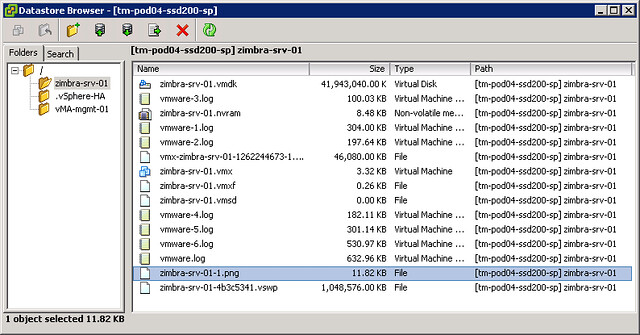
This results in a nice BSOD and followed by a reboot by VM Monitoring including a screenshot of the VMs console (see screenshot below) before the reboot.
What’s new?

Duncan Epping · Jul 20, 2011 ·

I had a lot of trouble finding the vSphere 5.0 What’s New whitepapers so I figured I would list all of them as I probably wouldn’t be the only one finding it challenging to get all of these. These are useful to quickly scan what has been introduced for a specific category. I would recommend reading these as it will give you a better understanding of what is coming up!

  • What’s New in vSphere 5.0
  • What’s New in VMware vSphere 5.0: VMware vCenter
  • What’s New in VMware vSphere 5.0: Platform Whitepaper
  • What’s New in VMware vSphere 5.0: Performance Whitepaper
  • What’s New in VMware vSphere 5.0: Storage Whitepaper
  • What’s New in VMware vSphere 5.0: Networking Whitepaper
  • What’s New in VMware vSphere 5.0: Availability Whitepaper
  • What’s New in VMware Data Recovery 2.0 Technical Whitepaper
  • VMware vSphere Storage Appliance Technical Whitepaper
  • What’s New in VMware vCenter Site Recovery Manager 5 Technical Whitepaper
  • What’s New in VMware vCloud Director 1.5 Technical Whitepaper

vSphere 5.0 vMotion Enhancements

Duncan Epping · Jul 20, 2011 ·

**disclaimer: this article is an out-take of our book: vSphere 5 Clustering Technical Deepdive**

There are some fundamental changes when it comes to vMotion scalability and performance in vSphere 5.0. Most of these changes have one common goal: being able to vMotion ANY type of workload. It doesn’t matter if you have a virtual machine with 32GB of memory that is rapidly changing memory pages any more with the the following enhancements:

  • Multi-NIC vMotion support
  • Stun During Page Send (SDPS)

Multi-NIC vMotion Support

One of the most substantial and visible changes is multi-NIC vMotion capabilities. vMotion is now capable of using multiple NICs concurrently to decrease the amount of time a vMotion takes. That means that even a single vMotion can leverage all of the configured vMotion NICs. Prior vSphere 5.0, only a single NIC was used for a vMotion enabled VMkernel. Enabling multiple NICs for your vMotion enabled VMkernel’s will remove some of the constraints from a bandwidth/throughput perspective that are associated with large and memory active virtual machines. The following list shows the currently supported maximum number of NICs for multi-NIC vMotion:

  • 1GbE – 16 NICs supported
  • 10GbE – 4 NICs supported

It is important to realize that in the case of 10GbE interfaces, it is only possible to use the full bandwidth when the server is equipped with the latest PCI Express busses. Ensure that your server hardware is capable of taking full advantage of these capabilities when this is a requirement.

Stun During Page Send

A couple of months back I described this cool vSphere 4.1 vMotion enhancement called Quick Resume and now it is replaced with Stun During Page Send, or also often referred to as “Slowdown During Page Send” is a feature that “slowsd own” the vCPU of the virtual machine that is being vMotioned. Simply said, vMotion will track the rate at which the guest pages are changed, or as the engineers prefer to call it, “dirtied”. The rate at which this occurs is compared to the vMotion transmission rate. If the rate at which the pages are dirtied exceeds the transmission rate, the source vCPUs will be placed in a sleep state to decrease the rate at which pages are dirtied and to allow the vMotion process to complete. It is good to know that the vCPUs will only be put to sleep for a few milliseconds at a time at most. SDPS injects frequent, tiny sleeps, disrupting the virtual machine’s workload just enough to guarantee vMotion can keep up with the memory page change rate to allow for a successful and non-disruptive completion of the process. You could say that, thanks to SDPS, you can vMotion any type of workload regardless of how aggressive it is.

It is important to realize that SDPS only slows down a virtual machine in the cases where the memory page change rate would have previously caused a vMotion to fail.

This technology is also what enables the increase in accepted latency for long distance vMotion. Pre-vSphere 5.0, the maximum supported latency for vMotion was 5ms. As you can imagine, this restricted many customers from enabling cross-site clusters. As of vSphere 5.0, the maximum supported latency has been doubled to 10ms for environments using Enterprise Plus. This should allow more customers to enable DRS between sites when all the required infrastructure components are available like, for instance, shared storage.

vSphere 5.0: vMotion enhancement, tiny but very welcome!

Duncan Epping · Jul 19, 2011 ·

vSphere 5.0 has many new compelling features and enhancements. Sometimes though it is that little tiny enhancement that makes life easier. In this case I am talking about a tiny enhancements for vMotion which I know many of you will appreciate. It is something that both Frank Denneman and I have addressed multiple times with our engineers and finally made it into this release.

Selection Resource Pools?

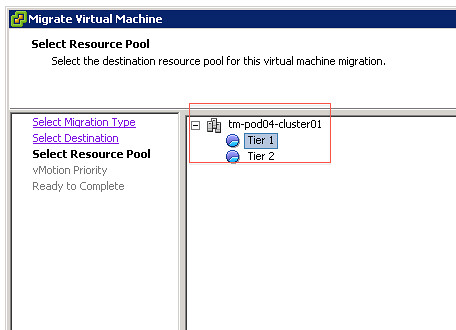
I guess we have all cursed when we had to manually migrate VMs around and accidentally selected the wrong Resource Pool. This operational “problem” has finally been resolved and I am very happy about it. As of 5.0 the “source” resource pool will automatically be selected. Of course it is still possible to override this and to select a different resource pool but in most cases “next – next – finish” will be just fine.

ESXi 5.0 and Scripted Installs

Duncan Epping · Jul 19, 2011 ·

When I was playing with ESXi 5.0 in my lab I noticed some changes during the installation process. Of course I had not bothered to read the documentation but when I watched the installer fail I figured it might make sense to start reading. I’ve documented the scripted installation procedure multiple times by now.

With ESXi 5.0 this has been simplified, this is what it looks like today:

I also want to point out that many of the standard installation commands have been replaced, removed or are not supported anymore. I created a simple script to automatically install an ESXi 5.0 host. It creates a second vSwitch and a second VMkernel for vMotion. It enables both the local and remote TSM and sets the default PSP for the EMC VMAX to Round Robin. As you can see there is a huge shift in this script towards esxcli. Although some of the old “esxcfg-*” commands might still be working they are deprecated and no longer supported. The new standard is esxcli, make sure you get familiarized with it and start using it today as over time this will be the only CLI tool available.


# Sample scripted installation file
# Accept the VMware End User License Agreement
vmaccepteula
# Set the root password for the DCUI and ESXi Shell
rootpw mypassword
# Install on the first local disk available on machine
install --firstdisk --overwritevmfs
# Set the network to DHCP on the first network adapater, use the specified hostname and do not create a portgroup for the VMs
network --bootproto=dhcp --device=vmnic0 --addvmportgroup=0
# reboots the host after the scripted installation is completed
reboot


%firstboot --interpreter=busybox
# Add an extra nic to vSwitch0 (vmnic2)
esxcli network vswitch standard uplink add --uplink-name=vmnic2 --vswitch-name=vSwitch0
#Assign an IP-Address to the first VMkernel, this will be used for management
esxcli network ip interface ipv4 set --interface-name=vmk0 --ipv4=192.168.1.41 --netmask=255.255.255.0 --type=static
# Add vMotion Portgroup to vSwitch0, assign it VLAN ID 5 and create a VMkernel interface
esxcli network vswitch standard portgroup add --portgroup-name=vMotion --vswitch-name=vSwitch0
esxcli network vswitch standard portgroup set --portgroup-name=vMotion --vlan-id=5
esxcli network ip interface add --interface-name=vmk1 --portgroup-name=vMotion
esxcli network ip interface ipv4 set --interface-name=vmk1 --ipv4=192.168.2.41 --netmask=255.255.255.0 --type=static
# Enable vMotion on the newly created VMkernel vmk1
vim-cmd hostsvc/vmotion/vnic_set vmk1
# Add new vSwitch for VM traffic, assign uplinks, create a portgroup and assign a VLAN ID
esxcli network vswitch standard add --vswitch-name=vSwitch1
esxcli network vswitch standard uplink add --uplink-name=vmnic1 --vswitch-name=vSwitch1
esxcli network vswitch standard uplink add --uplink-name=vmnic3 --vswitch-name=vSwitch1
esxcli network vswitch standard portgroup add --portgroup-name=Production --vswitch-name=vSwitch1
esxcli network vswitch standard portgroup set --portgroup-name=Production --vlan-id=10
# Set DNS and hostname
esxcli system hostname set --fqdn=esxi5.localdomain
esxcli network ip dns search add --domain=localdomain
esxcli network ip dns server add --server=192.168.1.11
esxcli network ip dns server add --server=192.168.1.12
# Set the default PSP for EMC V-MAX to Round Robin as that is our preferred load balancing mechanism
esxcli storage nmp satp set --default-psp VMW_PSP_RR --satp VMW_SATP_SYMM
# Enable SSH and the ESXi Shell
vim-cmd hostsvc/enable_ssh
vim-cmd hostsvc/start_ssh
vim-cmd hostsvc/enable_esx_shell
vim-cmd hostsvc/start_esx_shell

For more deepdive information read William’s post on ESXCLI and Scripted Installs.

  • « Go to Previous Page
  • Page 1
  • Interim pages omitted …
  • Page 180
  • Page 181
  • Page 182
  • Page 183
  • Page 184
  • Interim pages omitted …
  • Page 336
  • Go to Next Page »

Primary Sidebar

About the Author

Duncan Epping is a Chief Technologist and Distinguished Engineering Architect at Broadcom. Besides writing on Yellow-Bricks, Duncan is the co-author of the vSAN Deep Dive and the vSphere Clustering Deep Dive book series. Duncan is also the host of the Unexplored Territory Podcast.

Follow Us

  • X
  • Spotify
  • RSS Feed
  • LinkedIn

Recommended Book(s)

Also visit!

For the Dutch-speaking audience, make sure to visit RunNerd.nl to follow my running adventure, read shoe/gear/race reviews, and more!

Do you like Hardcore-Punk music? Follow my Spotify Playlist!

Do you like 80s music? I got you covered!

Copyright Yellow-Bricks.com © 2026 · Log in