There’s a nice new enhancement to vMotion in vSphere 5.1. (and no, it doesn’t have specific name :-)) With vSphere 5.1 you can migrate virtual machines live without needing “shared storage”. In other words you can vMotion virtual machines between ESXi hosts with only local storage. It is very simple:
- Open the vSphere Web Client
- Click “VMs and Templates”
- Right click the VM you want to migrate
- Select “Change both host and datastore”
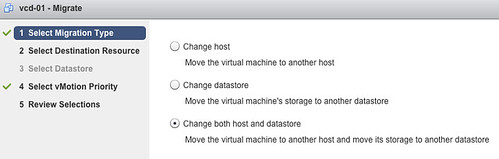
I am sure Frank Denneman is going to dive in to this soon so I won’t elaborate on how the process it self works. There’s already a blogpost out by Sreekant Setty which has some more details and which points to a nice white paper about vMotion / SvMotion performance.
seems like you can only perform this function via the WEB client and not the installed client? at least in the 5.1 beta?
Correct!
Yes, this also goes for the final release of vSphere 5.1
What version of vSphere / vCentre is required for this? I can’t seem to find an answer anywhere?
vCenter 5.1 using the Web Client.
I understand you need the web client… but what license level? Essentials Plus / Standard / Enterprise etc.?
Essentials Plus
So… just to clarify… I can effectively use Storage vMotion to move *live* machine storage, without needing shared storage, all in Essentials Plus? I just want to be sure I’ve understood this correctly as from the product specs, sVmotion doesn’t kick in until Standard – so I’m a bit confused!
It is not a Storage vMotion but a vMotion which also copies the disk via the Network.
Can you vMotion with different vLAN’s (172.17.xxx.xxx to 172.10.xxx.xxx)?
Yes you can, but this is not supported as far as I know. But it works fine.
Specifically storage…
For testing purpose can vmotion and management IP be on same vlan but different port group.
Yes, that is no problem at all. I run it in that config in my lab.
why is it not available in the normal client
windows client will die in next release, web client is the new one, probably thats all new features only exists in webclient.
can vmotion be done on pass through luns ?
I have a question about one the sVmotion requirements that I have seen when doing sVmotion with no shared storage. My source hosts are running ESX 4.1.0.502767 and my destination hosts will be running 5.1.0.1157734. I read that this capability requires ESX. 5.1 on the hosts so I just want to confirm that means the source and the destination?