• Skip to primary navigation
  • Skip to main content
  • Skip to primary sidebar

Yellow Bricks

by Duncan Epping

  • Home
  • Unexplored Territory Podcast
  • HA Deepdive
  • ESXTOP
  • Stickers/Shirts
  • Privacy Policy
  • About
  • Show Search
Hide Search

Server

Virtual SAN and Network IO Control

Duncan Epping · Oct 29, 2013 ·

Since I started playing with Virtual SAN there was something that I more or less avoided / neglected and that is Network IO Control. However, Virtual SAN and Network IO Control should go hand-in-hand. (And as such the Distributed Switch.) Note that when using VSAN (beta) the Distributed Switch and Network IO Control come with it. I guess I skipped it as there were more exciting thing to talk about, but as more and more people are asking about it I figured it is time to discuss Virtual SAN and Network IO Control. Before we get started, lets list the type of networks we will have within the VSAN cluster:

  • Management Network
  • vMotion Network
  • Virtual SAN Network
  • Virtual Machine Network

Considering it is recommend to use 10GbE with Virtual SAN that is what I will assume with this blog post. In most of these cases, at least I would hope, there will be a form of redundancy and as such we will have 2 x 10GbE to our disposal. So how would I recommend to configure the network?

Lets start with the various portgroups and VMkernel interfaces:

  • 1 x Management Network VMkernel interface
  • 1 x vMotion VMkernel interface (All interfaces need to be in the same subnet)
  • 1 x Virtual SAN VMkernel interface
  • 1 x Virtual Machine Portgroup

Some of you might be surprised that I have only listed the vMotion VMkernel interface and the Virtual SAN VMkernel interface once… And after various discussions and thinking about this for those I figured I would keep things as simple as possible, especially considering the average IO profile of server environments.

By default we can make sure the various traffic types are separated on different physical ports, but we can also set limits and shares when desired. I do not recommend using limits though, why limit a traffic type when you can use shares and “artificially limit” your traffic types based on resource usage and demand?! Also note that shares and limits are enforced per uplink.

So we will be using shares, as shares only come in to play when there is contention. What we will do is take 20GbE in to account and carve it up. Easiest way, if you ask me, is to say each traffic type gets an X number of GbE assigned at a minimum which is based on some of the recommendations out there for these types of traffic:

  • Management Network –> 1GbE
  • vMotion VMK –> 5GbE
  • Virtual Machine PG –> 2GbE
  • Virtual SAN VMkernel interface –> 10GbE

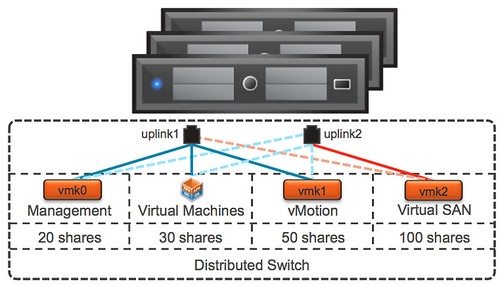
Now as you can see “management”, “virtual machine” and vMotion” traffic share Port 1 and “Virtual SAN” traffic uses Port 2. This way we have sufficient bandwidth for all the various types of traffic in a normal state. We also want to make sure that no traffic type can push out other types of traffic, for that we will use the Network IO Control shares mechanism.

Now lets look at it from a shares perspective.You will want to make sure that for instance vMotion and Virtual SAN always has sufficient bandwidth. I will work under the assumption that I only have 1 physical port available and all traffic types share the same physical port. We know this is not the case, but lets take a “worst case scenario” approach.

Lets assume you have a 1000 shares in total and lets take a worst case scenario in to account where 1 physical 10GbE ports has failed and only 1 is used for all traffic. By taking this approach you ensure that Virtual SAN always has 50% of the bandwidth to its disposal while leaving the remaining traffic types with sufficients bandwidth to avoid a potential self-inflicted DoS.

Traffic Type Shares Limit
Management Network  20 n/a
vMotion VMkernel Interface  50 n/a
Virtual Machine Portgroup  30 n/a
Virtual SAN VMkernel Interface  100 n/a

You can imagine that when you select the uplinks used for the various types of traffic in a smart way that even more bandwidth can be leveraged by the various traffic types. After giving it some thought, this is what I would recommend per traffic type:

  • Management Network VMkernel interface = Explicit Fail-over order = P1 active / P2 standby
  • vMotion VMkernel interface = Explicit Fail-over order = P1 active / P2 standby
  • Virtual Machine Portgroup = Explicit Fail-over order = P1 active / P2 standby
  • Virtual SAN VMkernel interface = Explicit Fail-over order = P2 active / P1 standby

Why use Explicit Fail-over order for these types? The best explanation here is predictability. By separating traffic types we allow for optimal storage performance while also providing vMotion and virtual machine traffic sufficient bandwidth.

Also vMotion traffic is bursty and can / will consume all available bandwidth, so when combined with Virtual SAN on the same uplink you could see how these two could potentially hurt each other. Of course depending on the IO profile of your virtual machines and the type of operations being done. But you can see how a vMotion of a virtual machine provisioned with a lot of memory can impact the available bandwidth for other traffic types. Don’t ignore this, use Network IO Control!

Lets try to visualize things, makes it easier to digest. Just to be clear, dotted lines are “standby” and the others are “active”.
Virtual SAN and Network IO Control

I hope this provides some guidance around how to configure Virtual SAN and Network IO Control in a VSAN environment. Of course there are various ways of doing it, this is my recommendation and my attempt to keep things simple and based on experience with the products.

4 is the minimum number of hosts for VSAN if you ask me

Duncan Epping · Oct 24, 2013 ·

<Update 1-oct-15>Make sure to read this article also as it is based on Virtual SAN 6.1, which is the current latest version </update>

What is the minimum number of hosts for VSAN? This is one of those discussions which is difficult… I mean, what is the minimum number of hosts for vSphere HA for instance. If you ask anyone that question then most people will say: the minimum number for HA is 2. However, when you think about why you are using vSphere HA then you will realize pretty quick that the actual minimum number is 3.

Why is that? Well you can imagine that when you need to upgrade your hosts you also want some form of resiliency for your virtual machines. Guess what, if you have only 2 hosts and you are upgrading 1 of them and the other fails… Where would your virtual machines be restarted? I can give you the answer: nowhere. The only host you had left is in maintenance mode and undergoing an upgrade. So in that case you are … euhm screwed.

Now lets looks at VSAN, in order to comply to a “number of failures to tolerate = 1” policy you will need 3 hosts at a minimum at all times. Even if 1 host fails miserably then you can still access your data because with 3 hosts and 2 mirror copies and a witness you will still have > 50% of your copies available. But what happens when you place one of those hosts in maintenance mode?

Well I guess when both remaining hosts keep on functioning as expected then all VMs will just keep on running, however if one fails… then… then you have a challenge. So think about the number of hosts you want to have supporting your VSAN datastore!

I guess the question then arises, with this “number of failures to tolerate” policy, how many hosts do I need at a minimum? How many mirror copies will be created and how many witnesses? Also, how many hosts will I need when I want to take “maintenance mode” in to consideration?

Number of Failures Mirror copies Witnesses Min. Hosts Hosts + Maintenance
0 1 0 1 host n/a
1 2 1 3 hosts 4 hosts
2 3 2 5 hosts 6 hosts
3 4 3 7 hosts 8 hosts

I hope that helps making the right decision…

Startup News Flash part 6

Duncan Epping · Oct 10, 2013 ·

There we are again and just a short one this time, Startup News Flash part 6. VMworld Europe is around the corner so I expect a bit more news next week, I know of at least 1 company revealing what they have been working on… So what happened in the world of flash/startups the last three weeks?

Fresh:

My buddies over at Tintri just announced two new products. The first one being the Tintri VMstore T600 series, with the T620 providing 13.5 TB of usable capacity and the T650 providing 33.5 TB of usable capacity, allowing you to run up to 2000 VMs(T650, the T620 goes up to 500 VMs) on these storage systems. What is unique about Tintri is how they designed their system, FlashFirst and VM-aware as they call it. Allowing for sub-millisecond latencies with over 99% IO coming out of flash, and of course VM-granular quality of service and data management (snapshots, cloning, and replication). Second announcement is all about management: Tintri Global Center. Let me take a quote from their blog, as it says it all: “The first release of Tintri Global Center can administer up to 32 VMstore systems and their resident VMs. Future versions will add additional control beyond monitoring and reporting with features — such as policy based load balancing and REST APIs to facilitate customized automation/scripts involving a combination of features across multiple VMstore systems such as reporting, snapshots, replication, and cloning. ”

Atlantis seems to be going full steam ahead announcing partnership with NetApp and Violin recently. I guess what struck me personally with these announcements is that we are bringing “all flash arrays” (AFAs) and “memory caching” together and it makes you wonder where you benefit from what the most. It is kind of like a supersized menu at McD, after ordering I always wonder if it was too much. But to be honest I have to read the menu in more detail, and maybe even try it out before I draw that conclusion. I do like the concept of AFAs and I love the concept of Atlantis… It appears that Atlantis is bringing in functionality which these solutions are lacking for now, and of course crazy performance. If anyone has experience with the combination, feel free to chime in!

Some older news:

  • Nothing to do with technology but more about validation of technology and a company. Vaughn Stewart, former NetApp executive, announced he joined Pure Storage as their Chief Evangelist. Pure Storage went all out and create an awesome video which you can find in this blog post. Nice move Vaughn, and congrats Pure Storage.
  • The VSAN Beta went live last week and the community forums opened up. If you want to be a part of this, don’t forget to sign up!


Designing your hardware for Virtual SAN

Duncan Epping · Oct 9, 2013 ·

Over the past couple of weeks I have been watching the VMware VSAN Community Forum with close interest and also twitter. One thing that struck me was the type of hardware people used for to test VSAN on. In many cases this is the type of hardware one would use at home, for their desktop. Now I can see why that happens, I mean something new / shiny and cool is released and everyone wants to play around with it, but not everyone has the budget to buy the right components… And as long as that is for “play” only that is fine, but lately I have also noticed that people are looking at building an ultra cheap storage solution for production, but guess what?

Virtual SAN reliability, performance and overall experience is determined by the sum of the parts

You say what? Not shocking right, but something that you will need to keep in mind when designing a hardware / software platform. Simple things can impact your success, first and foremost check the HCL, and think about components like:

  • Disk controller
  • SSD / PCIe Flash
  • Network cards
  • Magnetic Disks

Some thoughts around this, for instance the disk controller. You could leverage a 3Gb/s on-board controller, but when attaching lets say 5 disks to it and a high performance SSD do you think it can still cope or would a 6Gb/s PCIe disk controller be a better option? Or even leverage 12Gb/s that some controllers offer for SAS drives? Not only can this make a difference in terms of number of IOps you can drive, it can also make a difference in terms of latency! On top of that, there will be a difference in reliability…

I guess the next component is the SSD / Flash device, this one is hopefully obvious to each of you. But don’t let these performance tests you see on Tom’s or Anandtech fool you, there is more to an SSD then just sheer IOps. For instance durability, how many writes per day for X years life can your SSD handle? Some of the enterprise grades can handle 10 full writes or more per day for 5 years. You cannot compare that with some of the consumer grade drives out there, which obviously will be cheaper but also will wear out a lot faster! You don’t want to find yourself replacing SSDs every year at random times.

Of course network cards are a consideration when it comes to VSAN. Why? Well because I/O will more than likely hit the network. Personally, I would rule out 1GbE… Or you would need to go for multiple cards and ports per server, but even then I think 10GbE is the better option here. Most 10GbE are of a decent quality, but make sure to check the HCL and any recommendations around configuration.

And last but not least magnetic disks… Quality should always come first here. I guess this goes for all of the components, I mean you are not buying an empty storage array either and fill it up with random components right? Think about what your requirements are. Do you need 10k / 15k RPM, or does 7.2k suffice? SAS vs SATA vs NL-SATA? Also, keep in mind that performance comes at a cost (capacity typically). Another thing to realize, high capacity drives are great for… yes adding capacity indeed, but keep in mind that when IO needs to come from disk, the number of IOps you can drive and your latency will be determined by these disks. So if you are planning on increasing the “stripe width” then it might also be useful to factor this in when deciding which disks you are going to use.

I guess to put it differently, if you are serious about your environment and want to run a production workload then make sure you use quality parts! Reliability, performance and ultimately your experience will be determined by these parts.

<edit> Forgot to mention this, but soon there will be “Virtual SAN” ready nodes… This will make your life a lot easier I would say.

</edit>

Where is that Yellow-Bricks dude hanging out during VMworld?

Duncan Epping · Oct 8, 2013 ·

Some people have been asking what my agenda looks like, when my sessions are and if there are any specific social events I am likely to attend… Well here you go:

My sessions / group discussions:

  • Monday, Oct 14, 12:00 – 13:30 – TAM Day, Birds of a Feather Lunch
  • Monday, Oct 14, 13:45 – 14:30 – TAM Day, vCloud – Ask the experts sessions
  • Tuesday, Oct 15, 11:00 – 12:00 – Hall 8.0, Room B1 – vSphere HA Group Discussion
  • Tuesday, Oct 15, 17:00 – 18:00 – Hall 8.0, Room F2 – BCO4872 – Operating and Architecting a vSphere Metro Storage Cluster Based Infrastructure (sold out!)
  • Thursday, Oct 17, 13:30 – 14:30 – Hall 8.0, Room E3 – BCO4872 – Operating and Architecting a vSphere Metro Storage Cluster Based Infrastructure (repeat)

Social events I am may attend, and no… unfortunately I cannot get you tickets to these:

  • Sunday, Oct 13, evening: nothing planned
  • Monday, Oct 14, evening: VMUG party, VMware Ireland, Pernix Data
  • Tuesday, Oct 15, evening: CTO party, VMware Benelux, Veeam
  • Wednesday, Oct 16, evening: VMworld party

Hoping I will be able to attend the following sessions / discussion groups:

  • Wednesday, Oct 16, 12:30 – 13:30 – Hall 8.0, Room C1 – Group Discussion: Stretched Clusters with Lee Dilworth
  • Wednesday, Oct 16, 12:30 – 13:30 – Hall 8.0, Room F2 – Session: Performance and Capacity Management of DRS Clusters with Anne and Ganesha (both VMware engineers)
  • Wednesday, Oct 16, 14:00 – 15:00 – Hall 8.0, Room C2 – Group Discussion: VSAN with Cormac Hogan
  • Wednesday, Oct 16, 15:30 – 16:30 – Hall 8.0, Room C2 – Group Discussion: Disaster Recovery and Replication with Ken Wernerburg
  • Wednesday, Oct 16, 15:30 – 16:30 – Hall 8.0, Room D4 – Session: Storage DRS: Deep Dive and Best Practices to Suit Your Storage Environments with Mustafa and Sachin (both VMware engineers)
  • Wednesday, Oct 16, 17:00 – 18:00 – Hall 8.0, Room A3 – Session: Building a google-like infrastructure for the enterprise with Raymon Epping
  • Thursday, Oct 17, 9:00 – 10:00 – Hall 8.0, Room C1 – Group Discussion: Software Defined Storage with Rawlinson Rivera and Cormac Hogan
  • Thursday, Oct 17, 10:30 – 11:30 – Hall 8.0, Room G3 – Session: DRS: New Features, Best Practices and Future Directions (VMware engineer
  • « Go to Previous Page
  • Page 1
  • Interim pages omitted …
  • Page 114
  • Page 115
  • Page 116
  • Page 117
  • Page 118
  • Interim pages omitted …
  • Page 336
  • Go to Next Page »

Primary Sidebar

About the Author

Duncan Epping is a Chief Technologist and Distinguished Engineering Architect at Broadcom. Besides writing on Yellow-Bricks, Duncan is the co-author of the vSAN Deep Dive and the vSphere Clustering Deep Dive book series. Duncan is also the host of the Unexplored Territory Podcast.

Follow Us

  • X
  • Spotify
  • RSS Feed
  • LinkedIn

Recommended Book(s)

Also visit!

For the Dutch-speaking audience, make sure to visit RunNerd.nl to follow my running adventure, read shoe/gear/race reviews, and more!

Do you like Hardcore-Punk music? Follow my Spotify Playlist!

Do you like 80s music? I got you covered!

Copyright Yellow-Bricks.com © 2026 · Log in