• Skip to primary navigation
  • Skip to main content
  • Skip to primary sidebar

Yellow Bricks

by Duncan Epping

  • Home
  • Unexplored Territory Podcast
  • HA Deepdive
  • ESXTOP
  • Stickers/Shirts
  • Privacy Policy
  • About
  • Show Search
Hide Search

Server

HA Futures: Pro-active response

Duncan Epping · Oct 4, 2013 ·

We all know (at least I hope so) what HA is responsible for within a vSphere Cluster. Although it is great that vSphere HA responds to a failure of a host / VM / application and even in some cases your storage device; wouldn’t it be nice if vSphere HA could pro-actively respond to conditions which might lead to a failure? That is what we want to discuss in this article.

What we are exploring right now is the ability for HA to avoid unplanned downtime. HA would detect specific (health) conditions that could lead to catastrophic failures and pro-actively move virtual machines of that host. You could for instance think of a situation where 1 out of 2 storage paths goes down. Although not directly impacting the machines from an availability perspective, it could be catastrophic if that second path goes down. So in order to avoid ending up in this situation vSphere HA would vMotion all the virtual machines to a host which does not have a failure.

This could of course also apply to other components like networking or even memory or CPU. You could potentially have a memory dimm which is reporting specific issues that could impact availability, this in its turn could then trigger HA to pro-actively move all potentially impacted VMs to a different host.

A couple of questions we have for you:

  1. When such partial host failures occur today, how do you address these conditions? When do you bring the host back online?
  2. What level of integration do you expect with management tools? In other words, should we expose an API that your management solution can consume, or do you prefer this to be a stand-alone solution using a CIM provider for instance?
  3. Should HA treat all health conditions the same? I.e., always evacuate all VMs from an “unhealthy” host?
  4. How would you like HA to compare two conditions? E.g., H1 fan failure, H2 network path failure?

Please chime in,
I created a folder on my VSAN datastore, but how do I delete it?

Duncan Epping · Sep 27, 2013 ·

I created a folder on my VSAN datastore using the vSphere Web Client, but when I wanted to deleted it I received this error message that that wasn’t possible. So how do I delete a VSAN folder when I don’t need it any longer? It is fairly straight forward, you open up an SSH session to your host and do the following:

  • change directory to /vmfs/volumes/vsanDatastore
  • run “ls -l” in /vmfs/volumes/vsanDatastore to identify the folder you want to delete
  • run “/usr/lib/vmware/osfs/bin/osfs-rmdir <name-of-the-folder>” to delete the folder

This is what it would look like:

/vmfs/volumes/vsan:5261f0c54e0c785a-81e199f6c9a23d73 # ls -lah
total 6144
drwxr-xr-x    1 root     root         512 Sep 27 03:17 .
drwxr-xr-x    1 root     root         512 Sep 27 03:17 ..
drwxr-xr-t    1 root     root        1.4K Sep 24 05:38 16254152-1469-2c18-3319-002590c0c254
drwxr-xr-t    1 root     root        1.2K Sep 26 01:21 85803a52-6858-ded5-b40b-00259088447a
lrwxr-xr-x    1 root     root          36 Sep 27 03:17 ISO -> e64d1b52-1828-04ca-95a8-00259088447e
lrwxr-xr-x    1 root     root          36 Sep 27 03:17 TestVM -> ed31d351-a222-83bf-bb70-002590884480
drwxr-xr-t    1 root     root        1.4K Sep 27 01:40 cc8ebe51-6881-7dc8-37f8-00259088447e
drwxr-xr-t    1 root     root        1.2K Sep 27 01:52 e64d1b52-1828-04ca-95a8-00259088447e
drwxr-xr-t    1 root     root        1.2K Jul  3 07:52 ed31d351-a222-83bf-bb70-002590884480
lrwxr-xr-x    1 root     root          36 Sep 27 03:17 iso -> 16254152-1469-2c18-3319-002590c0c254
lrwxr-xr-x    1 root     root          36 Sep 27 03:17 las-fg01-vc01.vmwcs.com -> cc8ebe51-6881-7dc8-37f8-00259088447e
lrwxr-xr-x    1 root     root          36 Sep 27 03:17 vmw-iol-01 -> 85803a52-6858-ded5-b40b-00259088447a

/vmfs/volumes/vsan:5261f0c54e0c785a-81e199f6c9a23d73 # /usr/lib/vmware/osfs/bin/osfs-rmdir vmw-iol-01

Deleting directory 85803a52-6858-ded5-b40b-00259088447a in container id 5261f0c54e0c785a81e199f6c9a23d73 backed by vsan

Be careful though, cause when you delete it guess what… it is gone! Yes not being able to delete it using the Web Client is a known issue, and on the roadmap to be fixed.

Drag and drop vMotion not working with the 5.5 Web Client?

Duncan Epping · Sep 23, 2013 ·

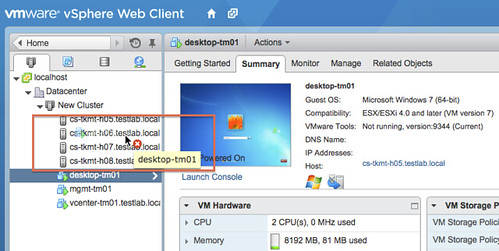
A couple of weeks I bumped into this issue where I constantly received a red cross when I wanted to “drag and drop” vMotion a virtual machine using the vSphere 5.5 Web Client. Annoying as it is something which I was waiting for to use as I used this all the time with the vSphere Client. Unfortunately it so happened that I stumbled in to a bug. Apparently when you do a drag and drop migration certain scenarios are filtered out to avoid issues. I guess the filter is too aggressive as today it filters out drag and drop to a host without the use of resource pools. The screenshot shows what this problem looks like in the UI.

I filed the bug of course, but unfortunately it was too late for the fix to make it in to the release. The engineering team has told me they are aiming to fix this in the first update release. So consider this an FYI to avoid getting frustrated around not being able to get this drag and drop thingie working. The support team just published a KB article on this matter as well.

Start your engines, time to download vSphere 5.5

Duncan Epping · Sep 22, 2013 ·

What a way to start the Sunday / Monday (depending on where you are) right? Yes, the day has finally come… Start your engines, it is time to download vSphere 5.5. Just like last year I decided to make a nice short post with all the links to the required download pages, I hope it makes your life easier!

Core vSphere and automation/tools:

  • ESXi 5.5
  • vCenter Server 5.5
  • vSphere Data Protection 5.5.1
  • vSphere Replication 5.5
  • vSphere App HA 1.0
  • vSphere Storage Appliance 5.5
  • Cisco Nexus 1000v for 5.5
  • vSphere PowerCLI 5.5
  • vCenter Orchestrator Appliance 5.5
  • vSphere Management Assistant 5.5
  • vCenter Certificate Automation Tool 5.5
  • vSphere CLI 5.5

Suite components:

  • VMware vCloud Automation Center 5.2.0
  • VMware vCloud Director 5.5.0
  • VMware vCenter Site Recovery Manager 5.5.0
  • VMware vCenter Heartbeat 6.6
  • VMware vCenter Infrastructure Navigator 5.7.0
  • VMware vCenter Operations Manager Standard 5.7.2
  • VMware vCenter Configuration Manager 5.7.0
  • VMware vSphere Big Data Extensions 1.0
  • VMware vCloud Networking and Security 5.5.0

Now start downloading and update those test environments / labs!

Be careful when defining a VM storage policy for VSAN

Duncan Epping · Sep 19, 2013 ·

I was defining a VM storage policy for VSAN and it resulted in something unexpected. You might have read that when no policy is defined within vCenter that VSAN defaults to the following for availability reasons:

  • Failures to tolerate = 1

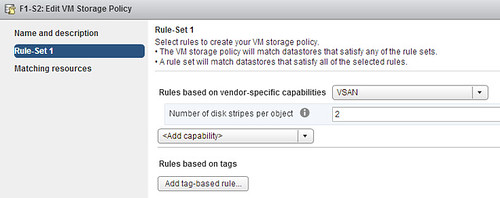
So I figured I would define a new policy and include “stripe width” in this policy. I wanted to have a stripe width of 2 and “failures to tolerate” set to the default of 1. I figured as “failures to tolerate” is set to 1 anyway by default I would specify it, but would just specify stripe width. Why add rules which already have the correct value right?

VM storage policy for VSAN

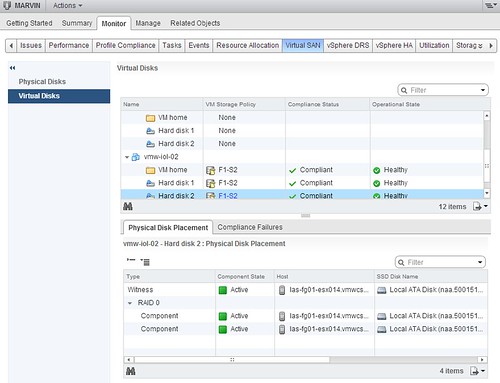
Well that is what I figured, no point in adding it… and this was the result:

Do you notice something in the above screenshot? I do… I see no “RAID 1” mentioned and all components reside on the same host, esx014, in this case. So what does that mean? It means that when you create a profile and do not specify “failures to tolerate” that is default to 0 and no mirror copies are created. This is not the situation you want to find yourself in! So when you define stripe width, make sure you also define “failures to tolerate”. Even better, when you create a VM Storage Policy always include “failures to tolerate. Below is an example of what my policy should have looked like.

VM storage policy for VSAN

So remember this: When defining a new VSAN VM Storage Policy always include “Number of failures to tolerate”! If you did forget to specify it, the nice thing here is that you can change VM Storage Policies on the fly and apply them directly to your VMs. Cormac has a nice article on this subject!

  • « Go to Previous Page
  • Page 1
  • Interim pages omitted …
  • Page 115
  • Page 116
  • Page 117
  • Page 118
  • Page 119
  • Interim pages omitted …
  • Page 336
  • Go to Next Page »

Primary Sidebar

About the Author

Duncan Epping is a Chief Technologist and Distinguished Engineering Architect at Broadcom. Besides writing on Yellow-Bricks, Duncan is the co-author of the vSAN Deep Dive and the vSphere Clustering Deep Dive book series. Duncan is also the host of the Unexplored Territory Podcast.

Follow Us

  • X
  • Spotify
  • RSS Feed
  • LinkedIn

Recommended Book(s)

Also visit!

For the Dutch-speaking audience, make sure to visit RunNerd.nl to follow my running adventure, read shoe/gear/race reviews, and more!

Do you like Hardcore-Punk music? Follow my Spotify Playlist!

Do you like 80s music? I got you covered!

Copyright Yellow-Bricks.com © 2026 · Log in