• Skip to primary navigation
  • Skip to main content
  • Skip to primary sidebar

Yellow Bricks

by Duncan Epping

  • Home
  • Unexplored Territory Podcast
  • HA Deepdive
  • ESXTOP
  • Stickers/Shirts
  • Privacy Policy
  • About
  • Show Search
Hide Search

Storage

vSAN Express Storage Architecture cluster sizes supported?

Duncan Epping · Dec 20, 2022 ·

On VMTN a question was asked about the size of the cluster being supported for vSAN Express Storage Architecture (ESA). There appears to be some misinformation out there on various blogs. Let me first state that you should rely on official documentation when it comes to support statements, and not on third party blogs. VMware has the official documentation website, and of course, there’s core.vmware.com with material produced by the various tech marketing teams. This is what I would rely on for official statements and or insights on how things work, and then of course there are articles on personal blogs by VMware folks. Anyway. back to the question, which cluster size is supported?

For vSAN ESA, VMware supports the exact same configuration when it comes to the cluster size as it supports for OSA. In other words, as small as a 2-node configuration (with a witness), as large as a 64-node configuration, and anything in between!

Now when it comes to sizing your cluster, the same applies for ESA as it does for OSA, if you want VMs to automatically rebuild after a host failure or long-term maintenance mode action, you will need to make sure you have capacity available in your cluster. That capacity comes in the form of storage capacity (flash) as well as host capacity. Basically what that means is that you need to have additional hosts available where the components can be created, and the capacity to resync the data of the impacted objects.

If you look at the diagram below, you see 6 components in the capacity leg and 7 hosts, which means that if a host fails you still have a host available to recreate that component, again, on this host you also still need to have capacity available to resync the data so that the object is compliant again when it comes to data availability.
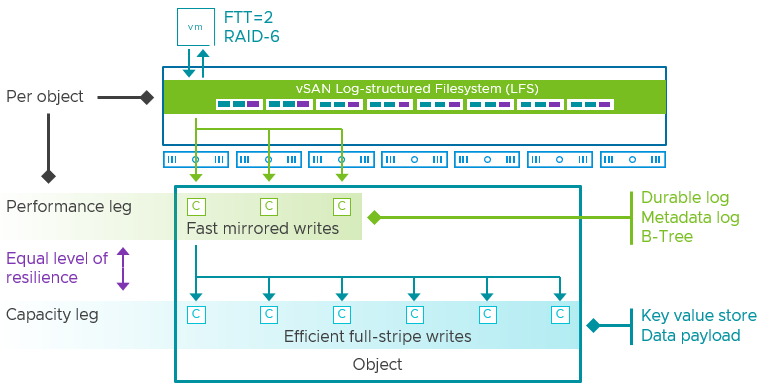
I hope that explains first of all what is supported from a cluster size perspective, and secondly why you may want to consider adding additional hosts. This of course will depend on the requirements you have and the budget you have.
Unexplored Territory Podcast 31 – VMware Edge Compute Stack? Featuring Marilyn Basanta!

Duncan Epping · Nov 21, 2022 ·

In episode 30 we spoke with Alan Renouf about the potential future of edge deployments, aka Project Keswick. We figured we also need to cover what is available today in the form of VMware Edge Compute Stack, so we invited Marilyn Basanta who is the Senior Director at VMware for Edge! Marilyn explains what the VMware Edge Compute Stack looks like, what customer use cases she encounters in the field, and how VMware Edge Compute Stack can help you run and deploy applications securely and efficiently in remote, and sometimes strange, locations. You can listen via Spotify – https://spoti.fi/3WWNIKu , Apple – https://apple.co/3hEFu9L, or use the embedded player below!

Are Nested Fault Domains supported with 2-node configurations with vSAN 8.0 ESA?

Duncan Epping · Oct 28, 2022 ·

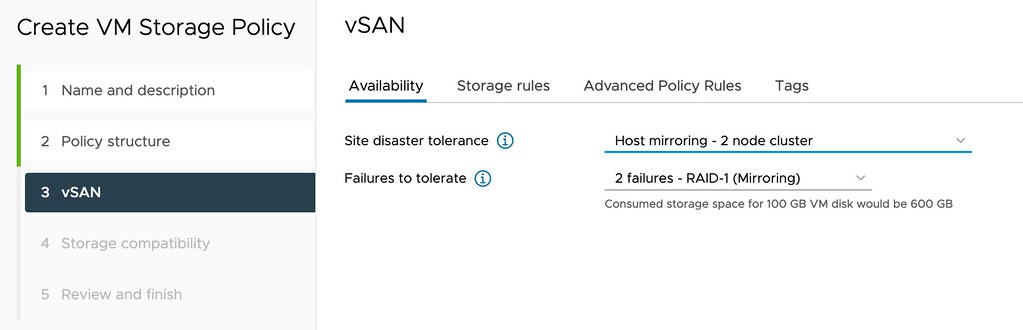
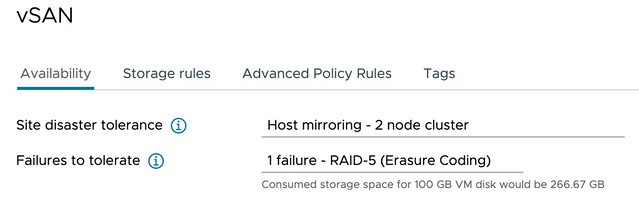
Short answer, yes 2-node configurations with vSAN 8.0 ESA support Nested Fault Domains. Meaning that when you have a 2-node configuration you can also protect your data within each host with RAID-1, RAID-5, or RAID-6! The configuration of this is pretty straightforward. You create a policy with “Host Mirroring” and select the protection you want in each host. The screenshot below demonstrates this.

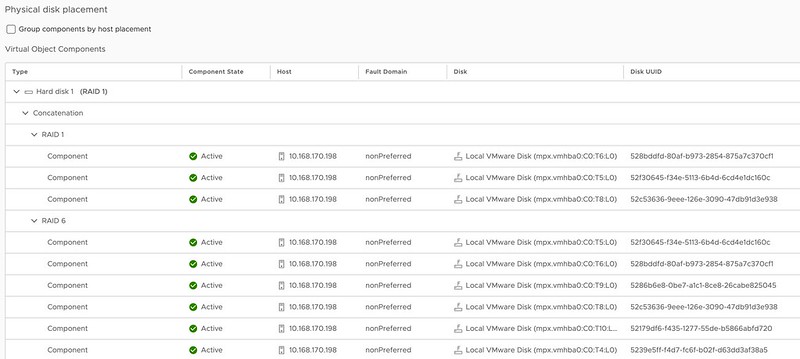
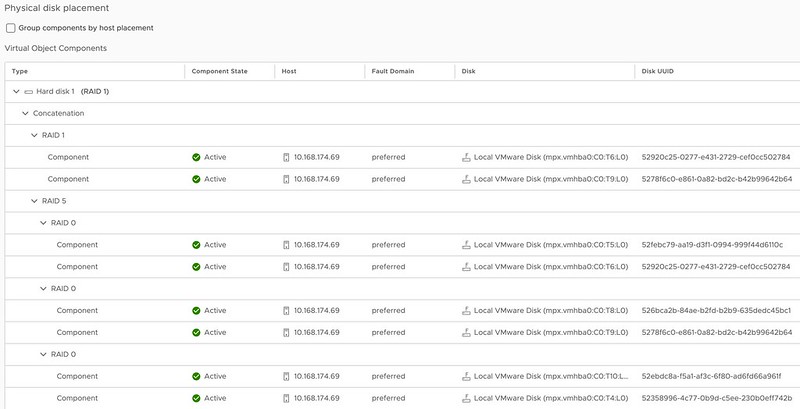
In the above example, I mirror the data across hosts and then have a RAID-5 configuration within each host. Now when I create a RAID-5 configuration within each host I will get the new vSAN ESA 2+1 configuration. (2 data blocks, 1 parity block) If you have 6 devices or more in your host, you can also create a RAID-6 configuration, which is 4+2. (4 data blocks, 2 parity blocks) This provides a lot of flexibility and can lower the overhead when desired compared to RAID-1. (RAID-1 = 100% overhead, RAID-5 = 50% overhead for 2+1, RAID-6 = 50% overhead) When you use RAID-5 and RAID-6 and look at the layout of the data it will look as shown in the next two screenshots, the first screenshot shows the RAID-5 configuration, and the second the RAID-6 configuration.

vSAN ESA 2-node nested fault domain raid-5

vSAN ESA 2-node nested fault domain raid-6

One thing you may wonder when looking at the screenshots is why they also have a RAID-1 configuration for the VMDK object, this is the “performance leg” that vSAN ESA implements. For RAID-5, which is “FTT=1”, this means you get 2 components. For RAID-6, which is FTT=2, this means you will get 3 components so you can tolerate 2 failures.

I hope that helps answer some of the questions folks had on this subject!


vSAN 8.0 ESA and Compression by default?

Duncan Epping · Oct 24, 2022 ·

Starting with vSAN 8 ESA (Express Storage Architecture) how data services have been implemented has changed significantly compared to the Original Storage Architecture. In vSAN OSA compression (and deduplication) happens before the data is stored on disk on each of the hosts the data is stored on. With vSAN 8.0 ESA this has changed completely. With vSAN ESA compression actually happens all the way at the top of the architecture, as shown and explained in the diagram/slide below.

vSAN ESA and Compression by Default?

Now, the big benefit of course of this is that if you compress the data first, and you compress the data from let’s say 4K to 2K then only 2K needs to be sent over the network to all hosts where the data is being stored. Not only that, if data needs to encrypted then only 2KB needs to be encrypted, and of course when you checksum the data then also only 2KB needs to be checksummed. So what are the savings here when encryption is enabled on ESA vs OSA?

  • Less data to send over the network
  • Less data to encrypt when encryption is enabled
  • Less data to checksum
  • Compression only takes place on the source host, and not on the destination hosts, so a lower number of CPU cycles is used for each IO

Also, with vSAN ESA the granularity in terms of compression is also different than with vSAN OSA. With OSA vSAN would compress from 4KB down to 2KB and that is it. If it couldn’t compress down to 2KB then it would not compress the block. With vSAN ESA that has changed. vSAN ESA will aim to always compress, but of course, it needs to make sense. No point in compressing 4KB down to 3.8KB. And yes, vSAN ESA will also go beyond 2KB if possible. As mentioned above in the screenshot, theoretically it is possible to reach an 8:1 compression ratio per 4KB block.

Now, the other difference is that you enable/disable compression through policy. How do you do this? When you create a policy for ESA you have the options in Storage Rules as shown in the screenshot below, “No Preference” (Default), “No space efficiency”, “Compression only”, and “Deduplication and compression”.

Now, let’s be clear, “Deduplication and compression” is not an option for ESA as “Deduplication” has not been implemented just yet. When you configure either of the other three options the outcome is as follows:

  • No preference – Compression enabled
  • No space efficiency – Compression disabled
  • Compression only – Compression enabled

Can you validate this? Yes, you can, and of course, I did to show you how that works. I created three policies with the above options selected for each respectively. I also created three VMs, with each of them having the appropriate policy selected as you can see in the screenshot below. VM_CompDisabled has the policy “Comp_Disabled” associated with it, and of course, that policy had “No space efficiency” selected.

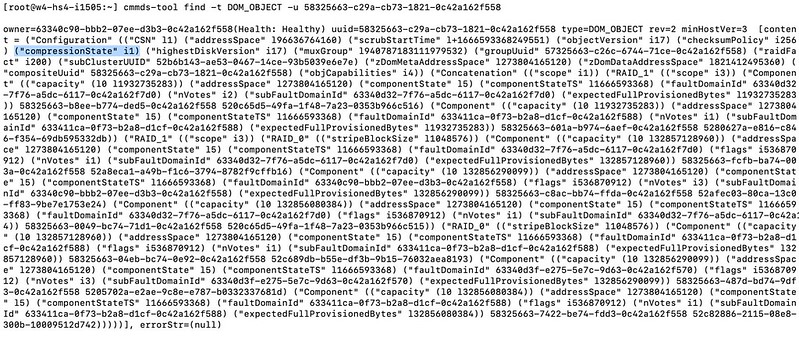
Now, where can you see if the object actually has compression enabled or disabled? Well, this is where it becomes a bit more complex, unfortunately (yes, I filed a feature request). If you want to validate it you will have to go to the command line and check the object itself. Simply copy the UUID you see in the screenshot above and use the command “cmmds-tool find -t DOM_OBJECT -u <UUID>“. When you run this command you will receive a lengthy output, and that output will contain the following string,("compressionState" i1), when compression is disabled.

Compression Enabled on vSAN ESA Object

One more thing I want to mention, as compression does not happen on a “physical” disk layer, or on the “disk group layer” as they do with vSAN OSA. If you switch between policies where compression is enabled/disabled, you will not see a massive rewrite of data occurring. When you switch from Disabled to Enabled only newly written data will be compressed! Same applies to when you switch back. Only newly written data will be impacted by the policy change.

For those who prefer to hear/see me going through the UI to disable compression on a per-VM basis, make sure to watch the below demo!

Nested Fault Domains on a 2-Node vSAN Stretched Cluster, is it supported?

Duncan Epping · Jun 20, 2022 ·

I spotted a question this week on VMTN, the question was fairly basic, are nested fault domains supported on a 2-node vSAN Stretched Cluster? It sounds basic, but unfortunately, it is not documented anywhere, probably because stretched 2-node configurations are not very common. For those who don’t know, with a nested fault domain on a two-node cluster you basically provide an additional layer of resiliency by replicating an object within a host as well. A VM Storage Policy for a configuration like that will look as follows.

This however does mean that you would need to have a minimum of 3 fault domains within your host as well if you want to, this means that you will need to have a minimum of 3 disk groups in each of the two hosts as well. Or better said, when you configure Host Mirroring and then select the second option failures to tolerate the following list will show you the number of disk groups per host you need at a minimum:

  • Host Mirroring – 2 Node Cluster
    • No Data Redundancy – 1 disk group
    • 1 Failure – RAID1 – 3 disk groups
    • 1 Failure – RAID5 – 4 disk groups
    • 2 Failures – RAID1 – 5 disk groups
    • 2 Failures – RAID6 – 6 disk groups
    • 3 Failures – RAID1 – 7 disk groups

If you look at the list, you can imagine that if you need additional resiliency it will definitely come at a cost. But anyway, back to the question, is it supported when your 2-node configuration happens to be stretched across locations, and the answer is yes, VMware supports this.

  • « Go to Previous Page
  • Page 1
  • Interim pages omitted …
  • Page 7
  • Page 8
  • Page 9
  • Page 10
  • Page 11
  • Interim pages omitted …
  • Page 101
  • Go to Next Page »

Primary Sidebar

About the Author

Duncan Epping is a Chief Technologist and Distinguished Engineering Architect at Broadcom. Besides writing on Yellow-Bricks, Duncan is the co-author of the vSAN Deep Dive and the vSphere Clustering Deep Dive book series. Duncan is also the host of the Unexplored Territory Podcast.

Follow Us

  • X
  • Spotify
  • RSS Feed
  • LinkedIn

Recommended Book(s)

Also visit!

For the Dutch-speaking audience, make sure to visit RunNerd.nl to follow my running adventure, read shoe/gear/race reviews, and more!

Do you like Hardcore-Punk music? Follow my Spotify Playlist!

Do you like 80s music? I got you covered!

Copyright Yellow-Bricks.com © 2026 · Log in