• Skip to primary navigation
  • Skip to main content
  • Skip to primary sidebar

Yellow Bricks

by Duncan Epping

  • Home
  • Unexplored Territory Podcast
  • HA Deepdive
  • ESXTOP
  • Stickers/Shirts
  • Privacy Policy
  • About
  • Show Search
Hide Search

Software Defined

What is new for Virtual SAN 6.0?

Duncan Epping · Feb 3, 2015 ·

vSphere 6.0 was just announced and with it a new version of Virtual SAN. I don’t think it is needed to introduce Virtual SAN as I have written many many articles about it in the last 2 years. Personally I am very excited about this release as it adds some really cool functionality if you ask me, so what is new for Virtual SAN 6.0?

  • Support for All-Flash configurations
  • Fault Domains configuration
  • Support for hardware encryption and checksum (See HCL)
  • New on-disk format
    • High performance snapshots / clones
    • 32 snapshots per VM
  •  Scale
    • 64 host cluster support
    • 40K IOPS per host for hybrid configurations
    • 90K IOPS per host for all-flash configurations
    • 200 VMs per host
    • 8000 VMs per Cluster
    • up to 62TB VMDKs
  • Default SPBM Policy
  • Disk / Disk Group serviceability
  • Support for direct attached storage systems to blade (See HCL)
  • Virtual SAN Health Service plugin

That is a nice long list indeed. Let my discuss some of these features a bit more in-depth. First of all “all-flash” configurations as that is a request that I have had many many times. In this new version of VSAN you can point out which devices should be used for caching and which will serve as a capacity tier. This means that you can use your enterprise grade flash device as a write cache (still a requirement) and then use your regular MLC devices as the capacity tier. Note that of course the devices will need to be on the HCL and that they will need to be capable of supporting 0.2 TBW per day (TB written) over a period of 5 years. For a drive that needs to be able to sustain 0.2 TBW per day, this means that over 5 years it needs to be capable of 365TB of writes. So far tests have shown that you should be able to hit ~90K IOPS per host, that is some serious horsepower in a big cluster indeed.

Fault Domains is also something that has come up on a regular basis and something I have advocated many times. I was pleased to see how fast the VSAN team could get it in to the product. To be clear, no this is not a stretched cluster solution… but I would see this as the first step, but that is my opinion and not VMware’s. This Fault Domain feature will allow you to specify fault domains per rack and then when you provision a new virtual machine VSAN will make sure that the components of the objects are placed in different fault domains.
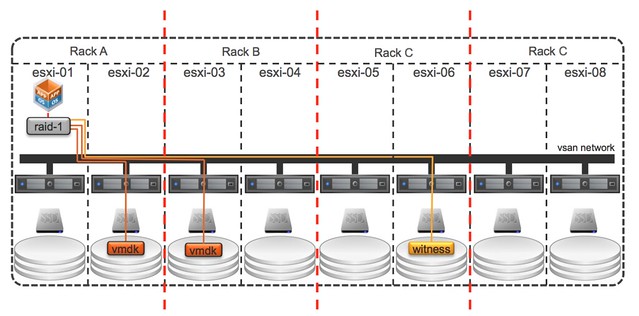
In this case when you do it per rack then even a full rack failure would not impact your virtual machine availability. Very cool indeed. The nice thing about the fault domain feature also is that it is very simple to configure. Literally a couple of clicks in the UI, but you can also use RVC or host profiles to configure it if you want to. Do note that you will need 6 hosts at a minimum for Fault Domains to make sense.

Then of course there is the scalability. Not just the 64 host cluster support but also the 200 VMs per host is a great improvement. Of course there is also the improvements around snapshot and cloning which can be attributed to the new on-disk format and the different snapshotting mechanism that is being used, less then 2% performance impact when going up to 32 levels deep is what we have been waiting for. Fair to say that this is where the acquisition of Virsto is coming in to play, and I think we can expect to see more. Also, the components number has gone up. The max number of components used to be 3000 and is now increased to 9000.

Then there is the support for blade systems with direct attached storage systems… this is very welcome, I had many customers asking for this. Note that as always the HCL is leading, so make sure to check the HCL before you decide to purchase equipment to implement VSAN in a blade environment. Same applies to hardware encryption and checksums, it is fully supported but make sure your components are listed with support for this functionality on the HCL! As far as I know the initial release will have 2 supported systems on there, one IBM system and I believe the Dell FX platform.

All of the operational improvements that were introduced around disk serviceability and being able to tag a device as “local / remote / SSD” are the direct result of feedback from customers and passionate VSAN evangelists internally at VMware. Also for instance pro-active rebalancing is now possible through RVC. If you add a host or remove a host and want to even out the nodes from a capacity point of view then a simple RVC command will allow you to do this. But also for instance the “resync” details can now be found in the UI, something I am very happy about as that will help people during PoCs not to run in to the scenario where they introduce new failures while VSAN is recovering from previous failures.

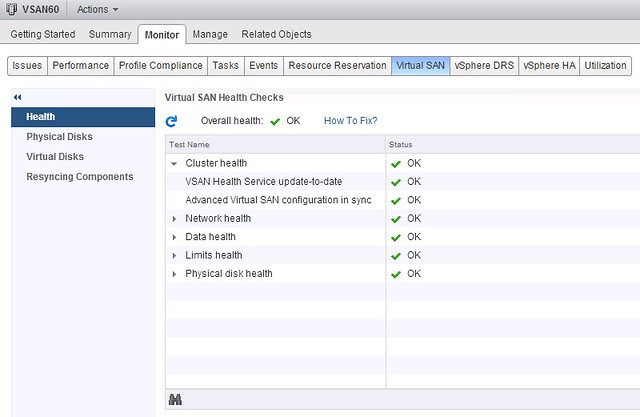
Last one I want to mention is the Virtual SAN Health Service plugin. This is a separately developed Web Client plugin that will provide in-depth information about Virtual SAN. I gave it a try a couple of weeks ago and now have it running in my environment, impressed with what is in there and great to see this type of detail straight in the UI. I expect that we  will see various iterations in the upcoming year.
EZT Disks with VSAN, why would you?

Duncan Epping · Jan 26, 2015 ·

I noticed a tweet today which made a statement around the use of eager zero thick disks in a VSAN setup for running applications like SQL Server. The reason this user felt this was needed was to avoid the hit on “first write to block on VMDK”, it is not the first time I have heard this and I have even seen some FUD around this so I figured I would write something up. On a traditional storage system, or at least in some cases, this first write to a new block takes a performance penalty. The main reason for this is that when the VMDK is thin, or lazy zero thick, the hypervisor will need to allocate that new block that is being written to and zero it out.

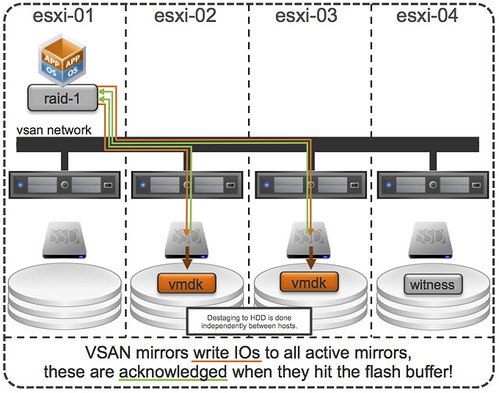
First of all, this was indeed true with a lot of the older storage system architectures (non-VAAI). However, this is something that even in 2009 was dispelled as forming a huge problem. And with the arrival of all-flash arrays this problem disappeared completely. But indeed VSAN isn’t an all-flash solution (yet), but for VSAN however there is something different to take in to consideration. I want to point out, that by default when you deploy a VM on VSAN you typically do not touch the disk format even and it will get deployed as “thin” with potentially a space reservation setting which comes from the storage policy! But what if you use an old template which has a zeroed out disk and you deploy that and compare it to a regular VSAN VM, will it make a difference? For VSAN eager zero thick vs thin will (typically) make no difference to your workload at all. You may wonder why, well it is fairly simple… just look at this diagram:

If you look at the diagram then you will see that the acknowledgement will happen to the application as soon as the write to flash has happened. So in the case of thick vs thin you can imagine that it would make no difference as the allocation (and zero out) of that new block would happen minutes after the application (or longer) has received the acknowledgement. A person paying attention would now come back and say: hey you said “typically”, what does that mean? Well that means that the above is based in the understanding that your working set will fit in cache, of course there are ways to manipulate performance tests to proof that the above is not always the case, but having seen customer data I can tell you that this is not a typical scenario… or extremely unlikely.

So if you deploy Virtual SAN… and have “old” templates floating around and they have “EZT” disks, I would recommend overhauling them as it doesn’t add much, well besides a longer waiting time during deployment.

Two logical PCIe flash devices for VSAN

Duncan Epping · Jan 5, 2015 ·

A couple of days ago I was asked whether I would recommend to use two logical PCIe flash devices leveraging a single physical PCIe flash device. The reason for the question was the recommendation from VMware to have two Virtual SAN disk groups instead of (just) one disk group.

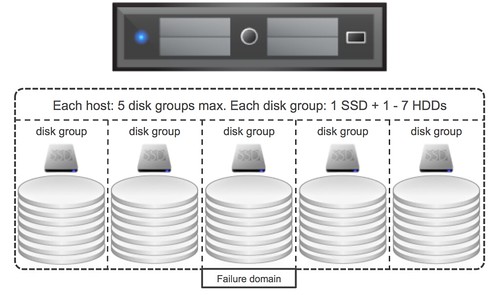
First of all, I want to make it clear that this is a recommended practices but definitely not a requirement. The reason people have started recommending it is because of “failure domains”. As some of you may know, when a flash device becomes unavailable, which is used for read caching / write buffering and fronts a given set of disks, all the disks in that disk group associated with the flash devices becomes unavailable. As such a disk group can be considered a failure domain, and when it comes to availability it is typically best to spread risks so having multiple failure domains is desirable.

When it comes to PCIe devices would it make sense to carve up a single physical device in to multiple logical? From a failure point of view I personally think it doesn’t add much value, if the device fails then it is likely both logical devices fail. From an availability point of view there isn’t much 2 logical devices adds, however it could be beneficial to have multiple logical devices if you have more than 7 disks per server.

As most of you will know each host can have 7 disks per disk group at most and 5 disk groups per server. If there is a requirement for the server to have more than 7 disks then there will be a need to have multiple flash devices, in that scenario creating multiple logical devices would be needed, although I would still prefer having multiple physical devices from a failure tolerance perspective than having multiple logical devices. But I guess it all depends on what type of devices you use, if you have sufficient PCIe slots available etc. In the end the decision is up to you, but do make sure you understand the impact of your decision.

Operational Efficiency (You’re not Facebook/Google/Netflix)

Duncan Epping · Dec 8, 2014 ·

In previous roles, also before I joined VMware, I was a system administrator and a consultant. The tweets below reminded me of the kind of work I did in the past and triggered a train of thought that I wanted to share…

@jtmcarthur56 That's only achievable when you have 50,000 servers running one application

— Howard Marks @DeepStorage@mastodon.social (@DeepStorageNet) December 3, 2014

Howard has a great point here. For some reason many people started using Google, Facebook or Netflix as the prime example of operational efficiency. Startups use it in their pitches to describe what they can bring and how they can simplify your life, and yes I’ve also seen companies like VMware use it in their presentations.When I look back at when I managed these systems my pain was not the infrastructure (servers / network / storage)… Even though the environment I was managing was based on what many refer to as legacy: EMC Clariion, NetApp FAS or HP EVA. The servers were never really the problem to manage either, sure updating firmware was a pain but not my biggest pain point. Provisioning virtual machines was never a huge deal… My pain was caused by the application landscape many of my customers had.

At companies like Facebook and Google the ratio of Application to Admin is different as Howard points out. I would also argue that in many cases the applications are developed in-house and are designed around agility, availability and efficiency… Unfortunately for most of you this is not the case. Most applications are provided by vendors which don’t really seem to care about your requirements, they don’t design for agility and availability. No, instead they do what is easiest for them. In the majority of cases these are legacy monolithic (cr)applications with a simple database which all needs to be hosted on a single VM and when you get an update that is where the real pain begins. At one of the companies I worked for we had a single department using over 80 different applications to calculate mortgages for the different banks and offerings out there, believe me when I say that that is not easy to manage and that is where I would spent most of my time.

I do appreciate the whole DevOps movement and I do see the value in optimizing your operations to align with your business needs, but we also need to be realistic. Expecting your IT org to run as efficient as Google/Facebook/Netflix is just not realistic and is not going to happen. Unless of course you invest deep and develop the majority of your applications in-house, and do so using the same design principles these companies use. Even then I doubt you would reach the same efficiency, as most simply won’t have the scale to reach it. This does not mean you should not aim to optimize your operations though! Everyone can benefit from optimizing operations, from re-aligning the IT department to the demands of todays world, from revising procedures… Everyone should go through this motion, constantly, but at the same time stay realistic. Set your expectations based on what lands on the infrastructure as that is where a lot of the complexity comes in.

NetApp joins the EVO:RAIL party and includes a FAS

Duncan Epping · Dec 4, 2014 ·

NetApp announced yesterday that they are now part of the EVO:RAIL partner program. Although I have been part of the EVO:RAIL team it is not something I would have seen coming. But I can see why they decided to join and find their announcement interesting. I wasn’t planning on writing about it as Mike Laverick already did yesterday, but as I received 8 emails over night on this topic I figured I would share what is going to be included in this package.

NetApp has created a rapid deployment mechanism for theNetApp FAS unit that will be integrated with the  NetApp EVO:RAIL appliance. The FAS unit will connect into the same top of rack switch that the EVO:RAIL appliance will connect into. We have created a link and launch capability that NetApp can leverage from within the EVO:RAIL configuration engine to rapidly configure/integrate the FAS unit with the EVO:RAIL appliance. 

Yes, this does mean that that 2U hyper-converged appliance which includes vSphere, VSAN and LogInsight now also will include a FAS unit (FAS 2500 judging by NetApp’s website?) in NetApp’s case. Now this is not the first time I have seen vendors adding hardware to the VMware EVO:RAIL offering, but in most other cases physical switches were included. I think this is a very interesting play though, and am looking forward to see how these two products will be integrated. From a configuration perspective I can envision what this would look like, but from a management point of view that will be a bit more challenging and may take some more time. With cool features like Virtual Volumes coming out in the near future this could be a nice way of providing a customer multiple types of storage in a seamless way.

  • « Go to Previous Page
  • Page 1
  • Interim pages omitted …
  • Page 44
  • Page 45
  • Page 46
  • Page 47
  • Page 48
  • Interim pages omitted …
  • Page 71
  • Go to Next Page »

Primary Sidebar

About the Author

Duncan Epping is a Chief Technologist and Distinguished Engineering Architect at Broadcom. Besides writing on Yellow-Bricks, Duncan is the co-author of the vSAN Deep Dive and the vSphere Clustering Deep Dive book series. Duncan is also the host of the Unexplored Territory Podcast.

Follow Us

  • X
  • Spotify
  • RSS Feed
  • LinkedIn

Recommended Book(s)

Also visit!

For the Dutch-speaking audience, make sure to visit RunNerd.nl to follow my running adventure, read shoe/gear/race reviews, and more!

Do you like Hardcore-Punk music? Follow my Spotify Playlist!

Do you like 80s music? I got you covered!

Copyright Yellow-Bricks.com © 2026 · Log in