• Skip to primary navigation
  • Skip to main content
  • Skip to primary sidebar

Yellow Bricks

by Duncan Epping

  • Home
  • Unexplored Territory Podcast
  • HA Deepdive
  • ESXTOP
  • Stickers/Shirts
  • Privacy Policy
  • About
  • Show Search
Hide Search

Software Defined

Virtual SAN and ESXTOP in vSphere 6.0

Duncan Epping · Feb 12, 2015 ·

Today I was fiddling with ESXTOP to see if anything was new for vSphere 6.0. Considering the massive number of metrics it already holds it is difficult to find things which stand out / are new. One thing did stick out though which is a new display for Virtual SAN.I haven’t found much detail around this new section in ESXTOP to be honest, but then again I guess most of it speaks for itself. If you are in ESXTOP and press “x” then you will go to the VSAN screen. Now when you press “f” you have the option to add “fields”, I enabled all and the below is the result:

Virtual SAN and ESXTOP

It isn’t a huge amount of detail yet, but being able to see the number of reads, writes and average latency is useful for sure per host. Also what has my interest is “RECOWR/s” and “MBRECOWR/s”. This refers to “recovery writes”, which is the resync of components which were somehow impacted by a failure. If for whatever reason RVC or the VSAN Observer is unavailble then it may be worth peaking at ESXTOP to see what is going on.
HP ConvergedSystem 200–HC EVO:RAIL available now!

Duncan Epping · Feb 11, 2015 ·

Yesterday I was informed by the EVO:RAIL team that the HP ConvergedSystem 200–HC EVO:RAIL is available (shipping) as of this week. I haven’t seen much around additional pieces HP is including, but I was told though that they are planning to integrate HP One View. HP One View is a management/monitoring solution that gives you a great high level overview of the state of your systems but at the same time enables you to dive deep when required. Depending on the version included HP One View can also do things like Firmware Management, which is very useful in a Virtual SAN environment if you ask me. I know though that many people have been waiting for HP to start shipping as it appears to be a preferred vendor for many customers. In terms of configuration, the HP solution is very much similar to what we have already seen out there:

  • 4 nodes in 2U each containing:
    • 2 x Intel® E5-2620 v2 six-core CPUs
    • 192 GB memory
    • 1 x SAS 300 GB 10k rpm drive ESXi boot device
    • 3 x SAS 1.2 TB 10k rpm drive (VSAN capacity tier)
    • 1 x 400 GB MLC enterprise-grade SSD (VSAN performance tier)
    • 1 x H220 host bus adapter (HBA) pass-through controller
    • 2 x 10GbE NIC ports
    • 1 x 1GbE IPMI port for remote (out-of-band) management

As soon as I find out more around integration of other components I will let you folks know.

What is new for Storage DRS in vSphere 6.0?

Duncan Epping · Feb 9, 2015 ·

Storage DRS must be one of the most under-appreciated features that is part of vSphere. For whatever reason it doesn’t get the airtime it deserves, not even from VMware folks which is a shame if you ask me. I was reading the What’s New material for vSphere 6.0 and I noticed that the “What is new for Storage DRS in vSphere 6.0” was completely missing. I figured I would do a quick write up of what has been improved and introduced for SDRS in 6.0 as some of the enhancements are quite significant! Lets start with a list and then look at these enhancements in more detail:

  • Deep integration with vSphere APIs for Storage Awareness (VASA)
  • Site Recovery Manager integration
  • vSphere Replication integration
  • Integration with Storage Policy Based Management

Lets start with the top one, deep integration with vSphere APIs for Storage Awareness (VASA) as that is the biggest improvement if you ask me. What the integration with VASA results in is fairly straight forward, when the VASA plugin for your storage system is configured then Storage DRS will understand what capabilities are enabled on your storage system and more specific your datastores. For example: when using Storage DRS previously on a deduplicated datastore it could happen that the migration initiated by Storage DRS had a negative result on the total available capacity on your storage system. This would be caused by the fact that the deduplication ratio was lower on the destination then it was on the source. Not a very pleasant surprise you can imagine. Also when for instance VMs are snapshotted from a storage system point of view or datastores are replicated… you can imagine that there would be an impact when moving a VM around in that scenario. With 6.0 Storage DRS is capable of understanding:

  • Array-based thin-provisioning
  • Array-based deduplication
  • Array-based auto-tiering
  • Array-based snapshot
  • Array-based replication

I guess you get the drill, SDRS is now fully capable of understanding the array capabilities and will make balancing decisions taking these capabilities in to consideration. For instance in the case of replication, when replication is enabled and your datastore is part of a consistency group then SDRS will ensure that the VM is only migrated to a datastore which belongs to the same consistency group! For deduplication this is the opposite by the way, in this case SDRS will be informed about which datastores belong to which deduplication domains and when datastores belong to the same domain it will know that moving between those datastores will have little to no effect on capacity. Depending on the level of detail the storage vendor provides through VASA SDRS will even be aware of how efficient the deduplication process is for a given datastore. (Not a VASA requirement, rather a recommendation so results may vary per vendor implementation) Auto-tiering is also an interesting one as this is something that comes up regularly. In this scenario with previous versions of SDRS it could happen that SDRS was moving VMs while the auto-tier array was just promoting or demoting blocks to a lower or higher tier. As you can imagine not a desired scenario and with the VASA integration this can be prevented from happening.

Second big thing is Site Recovery Manager and vSphere Replication integration. I already mentioned the consistency group awareness, of course this is also part of the SRM integration and when VMs are protected by SRM then SDRS will make sure that those VMs are only moved within their consistency group. If for whatever reason there is no way to move within a consistency group then SDRS as a second option can move VMs between datastores which are part of the same SRM Protection Group. Note that this could have an impact though on your workloads! SDRS of course will never automatically move a VM from a replicated to a non-replicated datastore. In fact, there is a strict hierarchy of what type of moves can be recommended:

  1. Moves within the same consistency group
  2. Moves across consistency groups, but within the same protection group
  3. Moves across protection groups
  4. Moves from a replicated datastore to non-replicated

Note that SDRS will try option 1 first, if it fails, will try option 2, if that fails will try option 3, and so on. Under no circumstances is a recommendation in the category of 2, 3 or 4 executed automatically. You will receive a warning after which you can manually apply the recommendation. This is done to ensure the administrator has full control and full awareness of the migration and can apply it during maintenance or during non-peak hours.

With regards to vSphere Replication also a lot has changed. So far there was no support for vSphere Replication enabled VMs to be part of an SDRS datastore cluster but with 6.0 it is fully supported. As of 6.0 Storage DRS will recognize replica VMs (which are replicated using vSphere Replication) and thresholds have been exceeded then SDRS will query vSphere Replication and will be able to migrate replicas to solve the resource constraint.

Up next the integration with Storage Policy Based Management. In the past when you had different tiers of datastores as part of the same Datastore Cluster then SDRS could potentially move a VM which was assigned policy “gold” to a datastore which was associated with a “silver” policy. With vSphere 6.0, SDRS is aware of storage policies in SPBM and will only move or place VMs to a datastore that can satisfy that VM’s storage policy.

Oh and before I forget, there is also the introduction of IOPS reservations on a per virtual disk level. This isn’t really part of Storage DRS but a function of the mClock scheduler and integrated with Storage IO Control and SDRS where needed. It isn’t available in the UI even in this release, only exposed through the VIM API so I doubt many of you will use it… figured though I would mention it already, and I will do a deeper write up later this week probably.

What is new for vMotion in vSphere 6.0?

Duncan Epping · Feb 5, 2015 ·

vMotion is probably my favourite VMware feature ever. It is one of those features which revolutionized the world and just when you think they can’t really innovate anymore they take it to a whole new level. So what is new?

  • Cross vSwitch vMotion
  • Cross vCenter vMotion
  • Long Distance vMotion
  • vMotion Network improvements
    • No requirement for L2 adjacency any longer!
  • vMotion support for Microsoft Clusters using physical RDMs

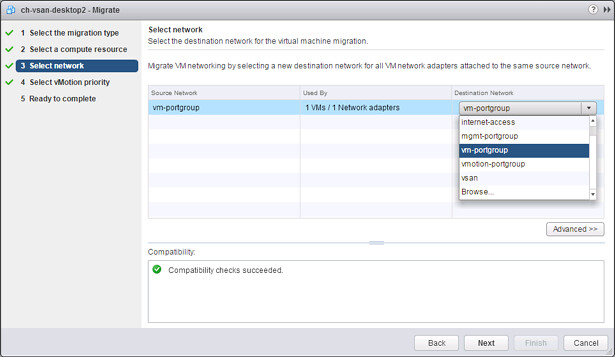
That is a nice long list indeed. Lets discuss each of these new features one by one and lets start at the top with Cross vSwitch vMotion. Cross vSwitch vMotion basically allows you to do what the name tells you. It allows you to migrate virtual machines between different vSwitches. Not just from vSS to vSS but also from vSS to vDS and vDS to vDS. Note that vDS to vSS is not supported. This is because when migrating from vDS metadata of the VM is transferred as well and the vSwitch does not have this logic and cannot handle the metadata. Note that the IP Address of the VM that you are migrating will not magically change, so you will need to make sure both  the source and the destination portgroup belong to the same layer 2 network. All of this is very useful during for instance Datacenter Migrations or when you are moving VMs between clusters for instance or are migrating to a new vCenter instance even.

Next on the list is Cross vCenter vMotion. This is something that came up fairly frequent when talking about vMotion, will we ever have the ability to move a VM to a new vCenter Server instance? Well as of vSphere 6.0 this is indeed possible. Not only can you move between vCenter Servers but you can do this with all the different migration types there are: change compute / storage / network. You can even do it without having a shared datastore between the source and destination vCenter aka “shared nothing migration. This functionality will come in handy when you are migrating to a different vCenter instance or even when you are migrating workloads to a different location. Note, it is a requirement for the source and destination vCenter Server to belong to the same SSO domain. What I love about this feature is that when the VM is migrated things like alarms, events, HA and DRS settings are all migrated with it. So if you have affinity rules or changed the host isolation response or set a limit or reservation it will follow the VM!

My personal favourite is Long Distance vMotion. When I say long distance, I do mean long distance. Remember that the max tolerated latency was 10ms for vMotion? With this new feature that just went up to 150ms. Long distance vMotion uses socket buffer resizing techniques to ensure that migrations succeed when latency is high. Note that this will work with any storage system, both VMFS and NFS based solutions are fully supported. (** was announced with 100ms, but updated to 150ms! **)

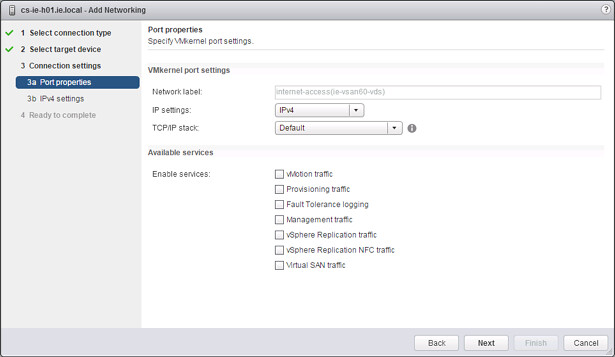
Then there are the network enhancements. First and foremost, vMotion traffic is now fully supported over an L3 connection. So no longer is there the need for L2 adjacency for your vMotion network, I know a lot of you have asked for this and I am happy to be able to announce it. On top of that. You can now also specify which VMkernel interface should be used for migration of cold data. It is not something many people are aware off, but depending on the type of migration you are doing and the type of VM you are migrating it could be in previous versions that the Management Network was used to transfer data. (Frank Denneman described this scenario in this post.) For this specific scenario it is now possible to define a VMkernel interface for “Provisioning traffic” as shown in the screenshot below. This interface will be used for, and let me quote the documentation here, “Supports the traffic for virtual machine cold migration, cloning, and snapshot creation. You can use the provisioning TPC/IP stack to handle NFC (network file copy) traffic during long-distance vMotion. NFC provides a file-type aware FTP service for vSphere, ESXi uses NFC for copying and moving data between datastores.”

Full support for vMotion of Microsoft Cluster virtual machines is also newly introduced in vSphere 6.0. Note that these VMs will need to use physical RDMs and only supported with Windows 2008, 2008 R2, 2012 and 2012 R2. Very useful if you ask me when you need to do maintenance or you have resource contention of some kind.

That was it for now… There is some more stuff coming with regards to vMotion but I cannot disclose that yet unfortunately.

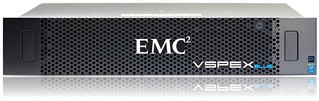
EMC VSPEX Blue aka EVO:RAIL going GA

Duncan Epping · Feb 3, 2015 ·

EMC VSPEX BLUEEMC just announced the general availability of VSPEX Blue. VSPEX Blue is basically EMC’s version of EVO:RAIL and EMC wouldn’t be EMC if they didn’t do something special with it. First thing that stands out from a hardware perspective is that EMC will offer two models a standard model with the Intel E5-2620 V2 proc and 128GB of memory, and a performance model which will hold 192GB of memory. That is the first time I have seen an EVO:RAIL offering with different specs. But that by itself isn’t too exciting…

When reading the spec sheet the following bit stood out to me:

EMC VSPEX BLUE data protection incorporates EMC RecoverPoint for VMs and VMware vSphere Data Protection Advanced. EMC RecoverPoint for VMs offers operational and disaster recovery, replication and continuous data protection at the VM level. VMware vSphere Data Protection Advanced provides centralized backup and recovery and is based on EMC Avamar technology. Further, with the EMC CloudArray gateway, you can securely expand storage capacity without limits. EMC CloudArray works seamlessly with your existing infrastructure to efficiently access all the on-demand public cloud storage and backup resources you desire. EMC VSPEX BLUE is backed by a single point of support from EMC 24×7 for both hardware and software.

EMC is including various additional pieces of software including vSphere Data Protection Advanced for backup and recovery, EMC Recovery Point for disaster recovery, EMC CloudArray gateway and the EMC VSPEX BLUE management software and EMC Secure Remote Service which will allow for  monitoring, diagnostics and repair services. This of course will differ per support offering, and there are currently 3 support offerings (basic, enhanced, premium). Premium is where you get all the bells and whistles with full 24x7x4 support.

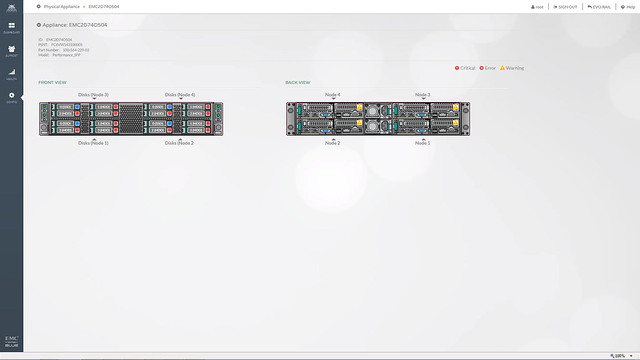
What is special about the management / support software in this case is that EMC took a different approach then normal. In this case the VSPEX BLUE interface will allow you to directly chat with support folks, dig up knowledge base articles and even the community is accessible from within. Also, the management layer will monitor the system and if something fails then EMC will contact you, also known as “phone home”. Besides the fact that the UI is a couple of steps ahead of anything I have seen so far, it looks like EMC will directly tie in with LogInsight which will provide deep insights from the hardware to the software stack. What also impressed me were the demos they provided and how they managed to create the same look and feel as the EVO:RAIL interface.

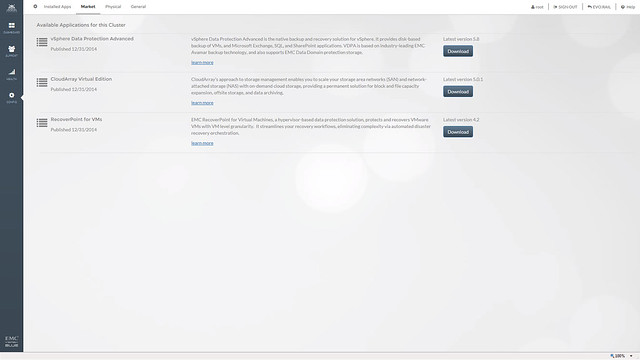
EMC also mentioned that they are working on a market place. This market place will allow you to deploy certain additional services, in this example you can see CloudArray, RecoverPoint and VDPA but more should be added soon! Will be interesting to see what kind of services will end up in the market place. I do feel that this is a great way of adding value on top of EVO:RAIL.

One of the services in the market place that stood out to me was CloudArray. So what about that EMC CloudArray gateway solution, what can you do with that? The CloudArray solution allows you to connect external offsite store as iSCSI or NFS to the appliance. It can be used for everything, but what I find most compelling is that it will allow you to replicate your backup data off-site. The CloudArray will come with 1TB local cache and 10 TB cloud storage!

I have to say that EMC did a great job packing the EVO:RAIL offering with additional pieces of software and I believe they are going to do well with VSPEX BLUE, in fact I would not be surprised if they are going to be the number 1 qualified partner in terms of sales really fast. If you are interested, the offering will be shipping on the 16th of February, but can be ordered today!

  • « Go to Previous Page
  • Page 1
  • Interim pages omitted …
  • Page 43
  • Page 44
  • Page 45
  • Page 46
  • Page 47
  • Interim pages omitted …
  • Page 71
  • Go to Next Page »

Primary Sidebar

About the Author

Duncan Epping is a Chief Technologist and Distinguished Engineering Architect at Broadcom. Besides writing on Yellow-Bricks, Duncan is the co-author of the vSAN Deep Dive and the vSphere Clustering Deep Dive book series. Duncan is also the host of the Unexplored Territory Podcast.

Follow Us

  • X
  • Spotify
  • RSS Feed
  • LinkedIn

Recommended Book(s)

Also visit!

For the Dutch-speaking audience, make sure to visit RunNerd.nl to follow my running adventure, read shoe/gear/race reviews, and more!

Do you like Hardcore-Punk music? Follow my Spotify Playlist!

Do you like 80s music? I got you covered!

Copyright Yellow-Bricks.com © 2026 · Log in