• Skip to primary navigation
  • Skip to main content
  • Skip to primary sidebar

Yellow Bricks

by Duncan Epping

  • Home
  • Unexplored Territory Podcast
  • HA Deepdive
  • ESXTOP
  • Stickers/Shirts
  • Privacy Policy
  • About
  • Show Search
Hide Search

Software Defined

Playing around with Tintri Global Center and Tintri storage systems

Duncan Epping · Jul 21, 2016 ·

Last week the folks from Tintri reached out and asked me if I was interested to play around with a lab they have running. They gave me a couple of hours of access to their Partner Lab. It had a couple of hosts, 4 different Tintri VMStore systems including their all-flash offering and of course their management solution Global Center. I have done a couple of posts on Tintri in the past, so if you want to know more about Tintri make sure to read those as well. (1, 2, 3, 4)

For those who have no clue whatsoever, Tintri is a storage company which sells “VM-Aware” storage. This basically means that all of the data services they offer can be enabled on a VM/VMDK level and they give visibility all the way down to the lowest level. And not just for VMware, they support other hypervisors as well by the way. I’ve been having discussions with Tintri since 2011 and it is safe to say they came a long way, most of my engagements however were presentations and the occasional demo so it was nice to actually go through the experience personally.

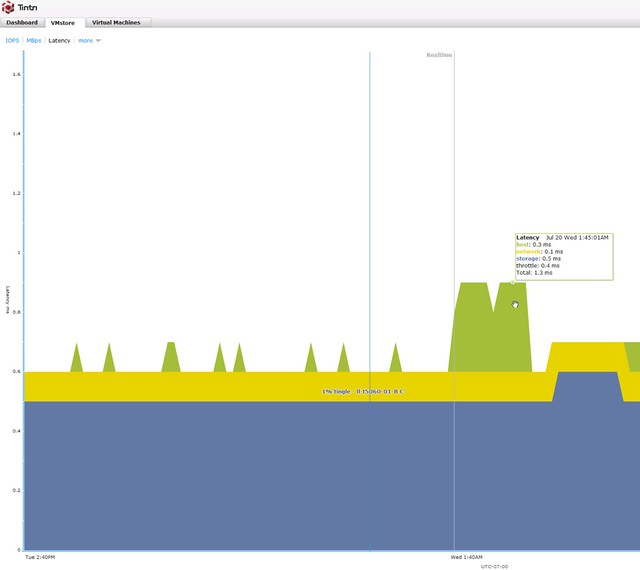
First of all their storage system management interface. If you login to one of them you are presented with all the info you would want to know, IOPS / Bandwidth / Latency, but even for latency you can see a split in network, host and storage latency. So if anything is misbehaving you will find out what and why probably relative fast.
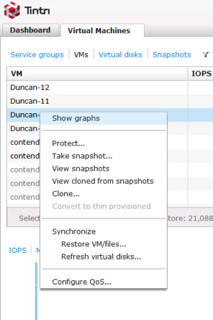
Not just that, if you look at the VMs running on your system from the array side you can also do things like take a storage snapshot, clone the vm, restore the VM, replicate it or set QoS for that VM. Very powerful, all of that is also available in vCenter by the way through a plugin.
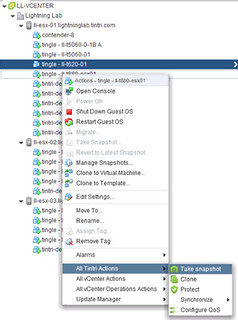
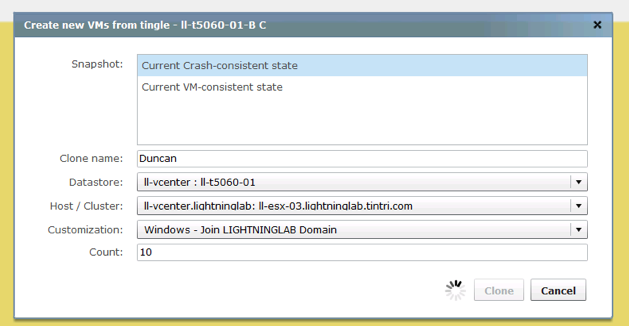
Now when you clone a VM, you can also create many VMs, pretty neat. I say give me 10 with the name Duncan and you get 10 of those called Duncan-01 –> Duncan-10.
Their central management solution is what I was interested in as I had only seen it once in a demo and that is it, it is called Tintri Global Center. Now one thing I have to say, it has been said by some that Tintri offers a scale out solution but the storage system itself is not a scale out system. When they refer to scale out, they refer to the ability to manage all storage systems through a single interface and the ability to group storage systems and load balance between those, which is done through Global Center and their “Pools” functionality. Pools kind of feels like SDRS to me as said in a previous post, now that I have played with it a bit it definitely feels a lot like SDRS. When I was playing with the lab I received the following message.
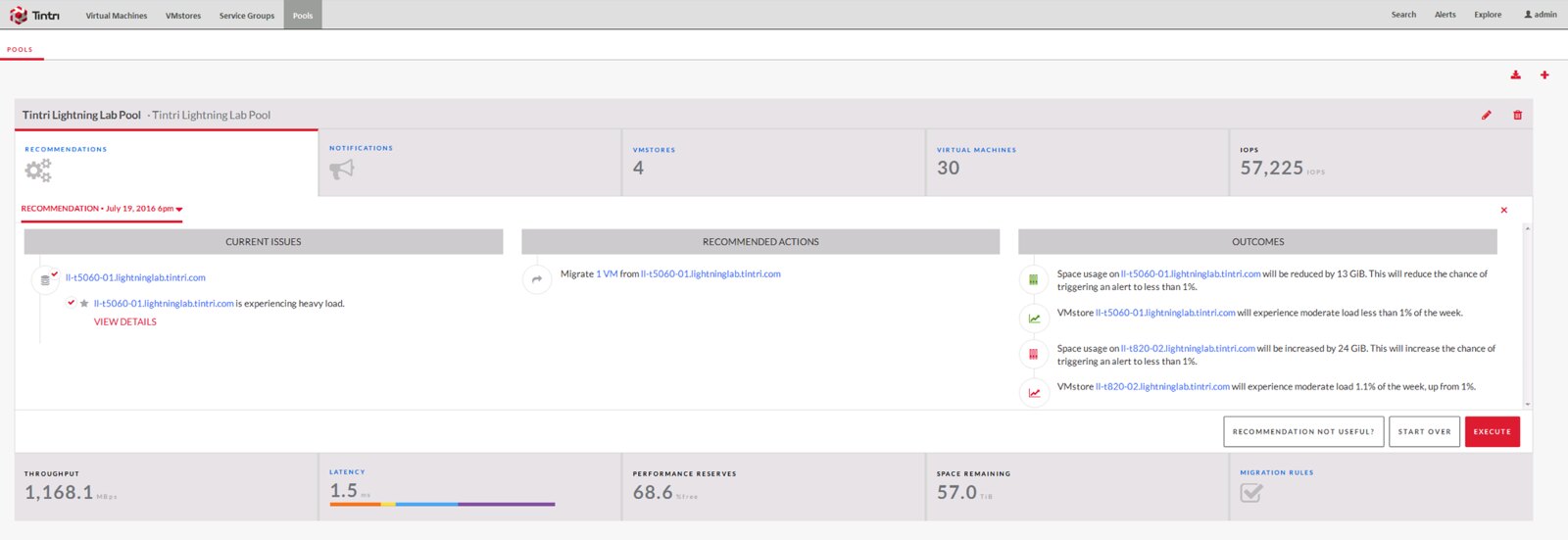
If you have used SDRS at some point in time and look at the screenshot (click it for bigger screenshot) you know what I mean. Anyway, good functionality to have. Pool different arrays and balance between based on space and performance. Nothing wrong with that. But that is not the best thing about Global Center, like I said I like the simplicity of Tintri’s interfaces and that also applies to Global Center. For instance when you login, this is the first you see
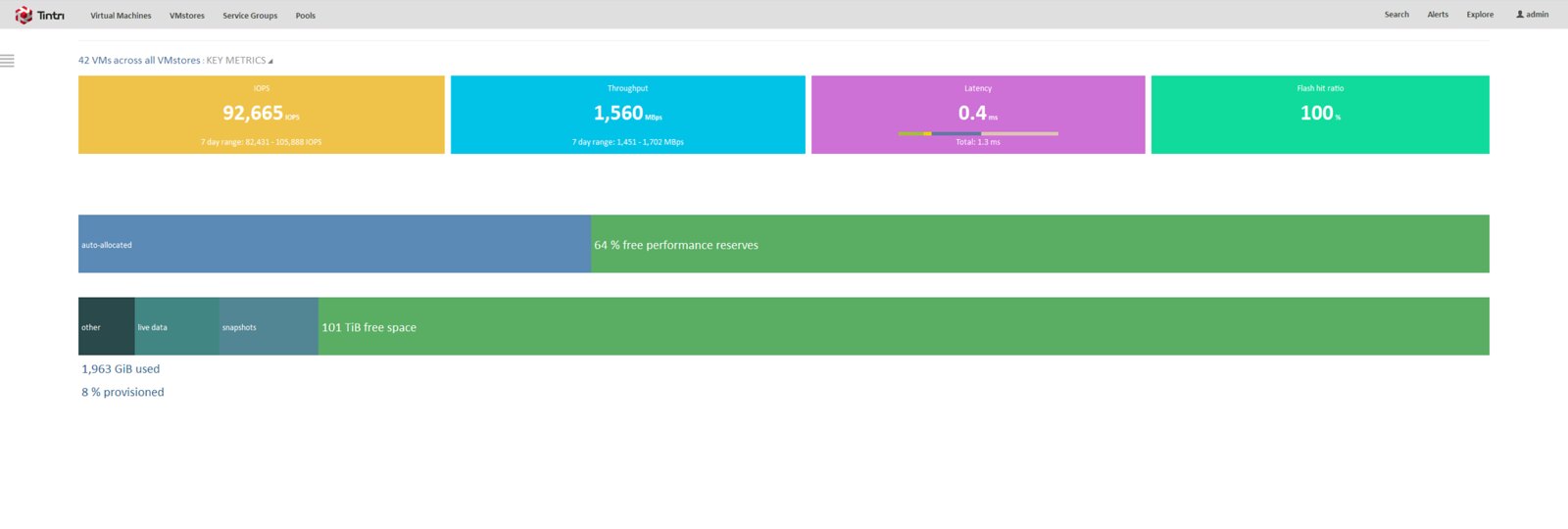
I really like the simplicity, it gives a great overview of the state of the total environment, and at the same time it will give you the ability to dive deeper when needed. You can look for per VMstore details, and figure out where your capacity is going for instance. (Snapshots, live data etc) But also see basic trending in terms of how what VMs are demanding from a storage performance and capacity point of view.

Having said all of that there is one thing that bugs me. Yes Tintri provides a VASA Provider but this is the “old style” VASA Provider which revolves around the datastore. Now if you look at VVols, it is all about the VM and which capabilities it needs. I would definitely welcome VVol support from Tintri, now I can understand this is no big priority for them as they have “similar” functionality, it is just that as a VM-Aware storage system I would expect there to be deep(er) integration from that perspective as well. But that is just me nitpicking I guess, as a VMware employee working for the BU that brought you VVols, it is safe to say I am biased when it comes to this. Tintri does offer an alternative which makes it easy to manage groups of VMs and it is called Service Groups. It allows you to apply data service to a logical grouping, which is defined by a rule. I could for instance say, all VMs that start with “Dun” need to be snapshotted every 5 hours, and this snapshot needs to be replicated etc etc. Pretty powerful stuff, and fairly easy to use as well. Still, for consistency it would be nice to be able to do this through SPBM in vSphere so that if I have other storage systems I can use the same mechanism to define services all through the same interface.

** Update: I was just pointed to the fact that there is a VVol capable VASA Provider, at least according to the VMware HCL. I have not seen the implementation and what is / what is not exposed unfortunately. Also just read the documentation and VVol is indeed supported. With a caveat for some systems: Tintri OS 4.1 supports VMware VMware vSphere Aware Storage API (VASA), 3.0 (VVOL 1.0). The Tintri vCenter Web Client Plugin is not required to run VVOLs on Tintri. VVOLs is not available for Tintri VMstore T540 or T445 systems. Also, the docs I’ve see don’t show the capabilities exposed through VVols unfortunately. **
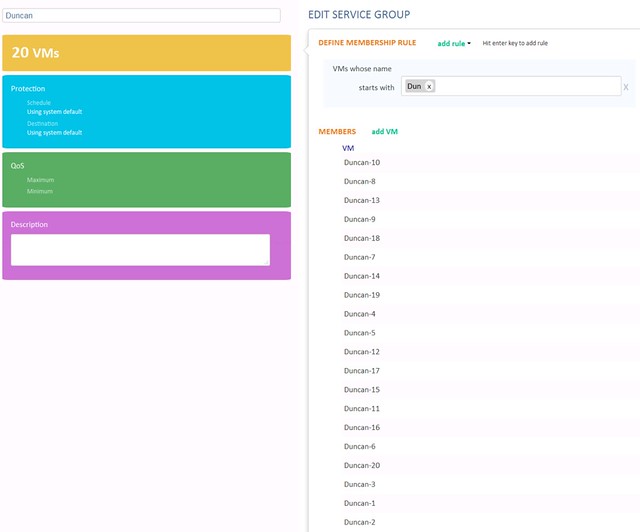
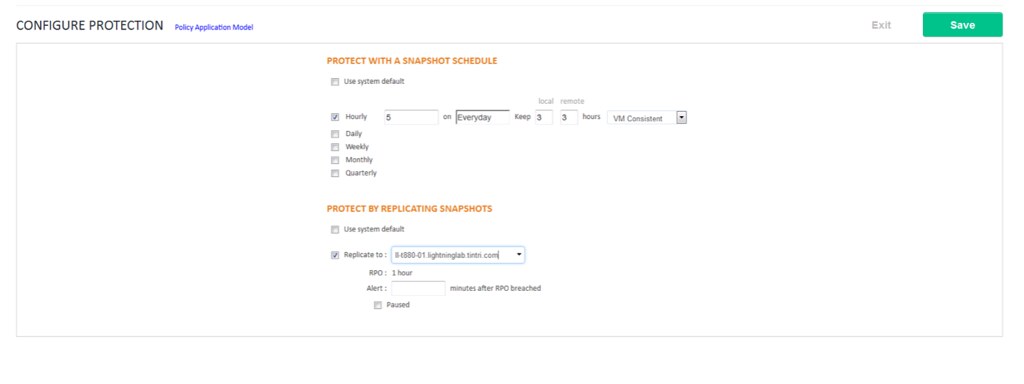
Again, I really liked the simplicity of the solution. The overall user experience was great, I mean taking a snapshot is dead simple. Replicating that snapshot? One click. Clone? One click. QoS? 3 settings. Do I need to say more? Well done Tintri, and looking forward to what you guys will release next and thanks for providing me the opportunity to play around in your lab, I hope I didn’t break anything.
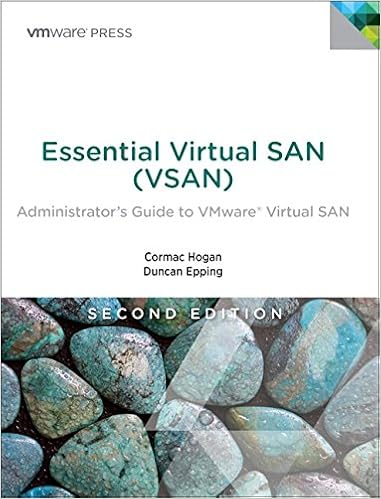

Essential Virtual SAN second edition paper copy available now!

Duncan Epping · Jun 27, 2016 ·

As of today Essential Virtual SAN second edition paper copy is available on Amazon! If you are interested, pick it up today, note that there is also a Kindle version out there if you prefer that!

VMware’s Virtual SAN has rapidly proven itself in environments ranging from hospitals to oil rigs to e-commerce platforms. Along the way, it has matured to offer unsurpassed features for data integrity, availability, and space efficiency. Virtual SAN 6.x makes all-flash storage practical for even more use cases, while radically simplifying IT operations and supporting the transition to hyper-converged infrastructures (HCI). Now, the authors of Essential Virtual SAN (VSAN) have thoroughly updated their definitive guide to this transformative technology. Writing for vSphere administrators, architects, and consultants, Cormac Hogan and Duncan Epping explain what Virtual SAN is, how it has evolved, what it now offers, and how to gain maximum value from it.

If you want to order the paper version at a local book store, here are the ISBN details:

  • ISBN-13: 978-0134511665
  • ISBN-10: 0134511662

Goodbye SAN Huggers!

Duncan Epping · Jun 20, 2016 ·

This week I presented at the German VMUG and a day after the event someone commented on my session. Well not really on my session, but more on my title. My title was “Goodbye SAN Huggers“. Mildly provocative indeed. “SAN Huggers” is a play on the term “Server Hugger“. That term has been around for the longest time and refers to people who prefer to be able to point out their servers. People who prefer the physical world, where every application ran on one server and every server was equal to one physical box.
SAN Huggers are pretty much the same type of people. They prefer the physical world. A world where they define RAID Groups, Storage Pools and LUNs. A world where a bunch of servers end up on the LUN they created. Those LUNs have certain data services enabled and if you need other data services, well then you simply move your servers around! SAN Huggers like to maintain strict control, and to me personally they are in the same position the Server Huggers were 12-15 years ago. It is time to let go however!

Now let it be clear, 12-15 years ago when virtualization changed the world of IT and VMware exploded literally and server huggers felt threatened by the rise of virtualization servers did not go away. Server Administrators did not disappear. Server Administrators evolved. Many took on additional responsibilities, in most cases that would be the responsibility over VMware ESX / Virtual Infrastructure. The same applies to storage.

When I say goodbye SAN Huggers, I am not referring to “Virtual SAN” taking over the world. (Although I do think that Hyper-Converged will eat the traditional storage system’s lunch for a large portion.) I am talking about how the world of storage is (and has been) evolving. Literally my next slide typically has a quote on it that states the following: “Hardware evolution started the storage revolution“. The story around this slide makes it clear what I mean when I say Goodbye SAN Huggers.

The hardware evolution has literally changed the storage landscape. Software Defined Storage is quickly taking over the world, but in my opinion the key reason for this is the evolution from a hardware perspective. In the past we had to group harddisk to provide a single unit that could deliver sufficient capacity, performance and increase availability at the same time. That was achieved using RAID constructs, and with the introduction of virtualization and high demanding workloads storage systems had to resort to wide striping, introduced larger caches, disk pools etc to deliver the capabilities required.

In todays world a lot of these constructs are no longer needed. The evolution in the world of hardware allowed for the introduction of Software Defined Storage. First and foremost flash, whether PCIe, NVMe or SAS/SATA based. These devices removed the need for complex constructs to provide thousands of IOPS. A single flash device today, even consumer grade, can provide higher performance than many of the storage systems we have all managed over the years. Not even talking about enterprise grade flash devices where 100k IOPS (with sub millisecond latency) is more or less the norm. Than there is the network, 10GbE, 25GbeE, 40GbE and even higher. Low latency and high bandwidth comes at (relative) low cost, and add to that the ever growing CPU capabilities, cores and speed combined with faster bus speeds and high (and fast) memory configurations. Hardware is no longer a constraint, the revolution is now, enter the world of Software Defined Storage.

And this, this is where I typically introduce: Virtual SAN, Virtual Volumes and the vSphere APIs for IO Filtering (vSphere Data Services delivered through filter drivers). Functionality provided by VMware which enables efficient operations, simplicity and flexibility. All through the use of policy, which can simply be attached to your workloads, be it a virtual machine or virtual disk even. The days of creating LUNs, RAID groups and needing wide striping or huge amounts of devices to get a decent user experience are gone. We can say goodbye to the physical world, we can say goodbye to the SAN Hugger. We can move forward and evolve, not just our datacenters but also our personal growth and areas of interest and expertise as a result.

Disk format version 4.0 update to 2.0 suggested

Duncan Epping · Jun 15, 2016 ·

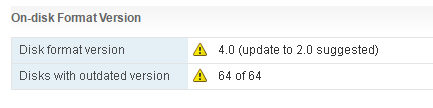
I’ve seen some people reporting a strange message in the Virtual SAN UI. The UI states the following: Disk format version 4.0 (update to 2.0 suggested). This is what that looks like (stole the pic from VMTN, thanks Phillip.)

disk format version 4.0 update to 2.0 suggested

A bit strange considering you apparently have 4.0 why would you go to 2.0 then? Well you are actually on 2.0 and are supposed to go to 3.0. The reason this happens is because, most likely, not all hosts within you cluster are on the same version of Virtual SAN, or vCenter Server was not updated to the last version and ESXi has a higher version. So far I have seen this being reported when people upgrade to vSphere 6.0 Update 2. If you are upgrading, make sure to upgrade all hosts to ESXi 6.0 Update 2, but before you do, upgrade the vCenter Server to 6.0 Update 2 first!

Playing around with EMC CloudArray on VSAN

Duncan Epping · Jun 14, 2016 ·

Today I figured I would play around with EMC CloudArray a bit on top of VSAN. It comes with a VxRail appliance by default so I figured I would check what it has to offer. For those who don’t know. CloudArray allows you to provide NFS/CIFS and Object based storage to your datacenter leveraging local storage but also integrate it with cloud storage for archival purposes. A pretty cool solution if you ask me, and could be a great way to deliver file and object services in an easy fashion on top of VSAN. (But you could also use this in your lab to serve up NFS or iSCSI etc to your lab for shared storage.)

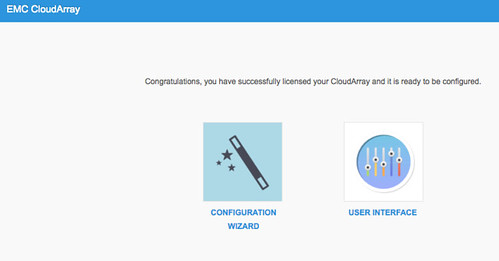
I signed up for a trial and downloaded the OVF. Deploying it was straight forward so no need to describe that, just like any other OVF. After the boot I grabbed the IP Address (we have DHCP in our lab) and did an “https://<ip of appliance/”. Now a setup screen shows up and it allows me to configure it. Fairly simple:

  • Click “Setup”
  • Click “Next”
  • Ensure “Enable CloudArray Portal” is ticked and click Next
  • Provide your account details so that the trial license can be pulled from the CloudArray website
  • Create an Admin account, I used “administrator”
  • Accept the EULA and click Finish
  • That was the setup, it will congratulate you and now you can configure it further

[Read more…] about Playing around with EMC CloudArray on VSAN

  • « Go to Previous Page
  • Page 1
  • Interim pages omitted …
  • Page 29
  • Page 30
  • Page 31
  • Page 32
  • Page 33
  • Interim pages omitted …
  • Page 71
  • Go to Next Page »

Primary Sidebar

About the Author

Duncan Epping is a Chief Technologist and Distinguished Engineering Architect at Broadcom. Besides writing on Yellow-Bricks, Duncan is the co-author of the vSAN Deep Dive and the vSphere Clustering Deep Dive book series. Duncan is also the host of the Unexplored Territory Podcast.

Follow Us

  • X
  • Spotify
  • RSS Feed
  • LinkedIn

Recommended Book(s)

Also visit!

For the Dutch-speaking audience, make sure to visit RunNerd.nl to follow my running adventure, read shoe/gear/race reviews, and more!

Do you like Hardcore-Punk music? Follow my Spotify Playlist!

Do you like 80s music? I got you covered!

Copyright Yellow-Bricks.com © 2026 · Log in