• Skip to primary navigation
  • Skip to main content
  • Skip to primary sidebar

Yellow Bricks

by Duncan Epping

  • Home
  • Unexplored Territory Podcast
  • HA Deepdive
  • ESXTOP
  • Stickers/Shirts
  • Privacy Policy
  • About
  • Show Search
Hide Search

Software Defined

vSphere 6.5 what’s new – VMFS 6 / Core Storage

Duncan Epping · Oct 18, 2016 ·

I haven’t spend a lot of time looking at VMFS lately. I was looking in to what was new for vSphere 6.5 and then noticed a VMFS section. Good to see there is still being worked on new features and functionality for the core vSphere file system. So what is new with VMFS 6:

  • Support for 4K Native Drives in 512e mode
  • SE Sparse Default
  • Automatic Space Reclamation
  • Support for 512 devices and 2000 paths (versus 256 and 1024 in the previous versions)
  • CBRC aka View Storage Accelerator

Lets look at them one by one, I think support for 4K native drives in 512e mode speaks for itself. Sizes of spindles keep growing and these new “advanced format” drives come with a 4K byte sector instead of the usual 512 byte sector, which is primarily for better handling of media errors. As of vSphere 6.5 this is now fully supported but note that for now it is only supported when running in 512e mode! The same applies to Virtual SAN in the 6.5 release, only supported in 512e mode. This basically means that 512 byte sectors is being emulated on a 4k drive. Hopefully we will have more on full support for 4Kn for vSphere/VSAN soon.

From an SE Sparse perspective, right now SE Sparse is used primarily View and for LUNs larger than 2TB. When on VMFS 6 the default will be SE Sparse. Not much more to it than that. If you want to know more about SE Sparse, read this great post by Cormac.

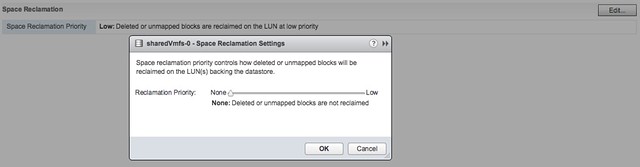
Automatic Space Reclamation is something that I know many of my customers have been waiting for. Note that this is based on VAAI Unmap which has been around for a while and allows you to unmap previously used blocks. In other words, storage capacity is reclaimed and released to the array so that when needed other volumes can use these blocks. In the past you needed to run a command to reclaim  the blocks, now this has been integrated in the UI and can simply be turned on or off. Oh, you can find this in the UI when you go to your datastore object and then click configure, you can set it to “none” which means you disable it, or you set it to low in the UI as shown in the screenshot below.
If you prefer “esxcli” then you can do the following to get the info of a particular datastore (sharedVmfs-0 in my case) :

esxcli storage vmfs reclaim config get -l sharedVmfs-0
   Reclaim Granularity: 1048576 Bytes
   Reclaim Priority: low

Or set the datastore to a particular level, note that using esxcli you can also set the priority to medium and high if desired:

esxcli storage vmfs reclaim config set -l sharedVmfs-0 -p high

Next up, support for 512 Devices and 2000 Paths. In previous versions the limit was 256 devices and 1024 paths and some customers were hitting this limit in their cluster. Especially when RDMs are used or people have a limited number of VMs per datastore, or maybe 8 paths to each device are used it becomes easy to hit those limits. Hopefully with 6.5 that will not happen anytime soon. On the other hand, personally I would hope more and more people are considering moving towards either VSAN or Virtual Volumes.

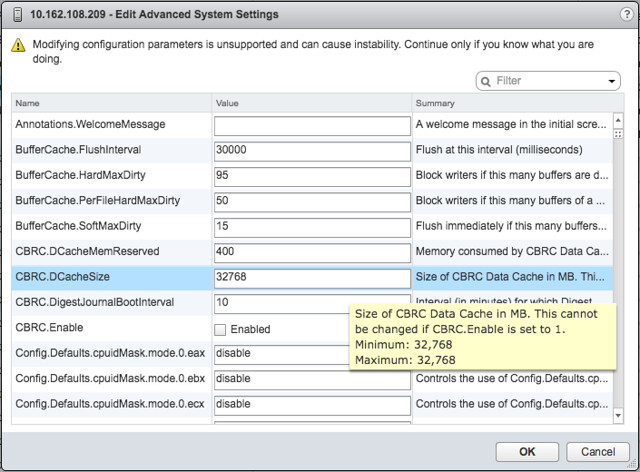
This is one I accidentally ran in to and not really directly related to VMFS but I figured I would add it here anyway otherwise I would forget about it. In the past CBRC aka View Storage Accelerator was limited to 2GB of memory cache per host. I noticed in the advanced settings that it now is set to 32GB, which is a big difference compared to the 2GB in previous releases. I haven’t done any testing, but I assume our EUC team has and hopefully we will see some good performance data on this big increase soon.
And that was it… some great enhancements in the core storage space if you ask me. And I am sure there was even more, and if I find out more details I will share those with you as well.
Hyper-Converged is here, but what is next?

Duncan Epping · Oct 11, 2016 ·

Last week I was talking to a customer and they posed some interesting questions. What excites me in IT (why I work for VMware) and what is next for hyper-converged? I thought they were interesting questions and very relevant. I am guessing many customers have that same question (what is next for hyper-converged that is). They see this shiny thing out there called hyper-converged, but if I take those steps where does the journey end? I truly believe that those who went the hyper-converged route simply took the first steps on an SDDC journey.

Hyper-converged I think is a term which was hyped and over-used, just like “cloud” a couple of years ago. Lets breakdown what it truly is: hardware + software. Nothing really groundbreaking. It is different in terms of how it is delivered. Sure, it is a different architectural approach as you utilize a software based / server side scale-out storage solution which sits within the hypervisor (or on top for that matter). Still, that hypervisor is something you were already using (most likely), and I am sure that “hardware” isn’t new either. Than the storage aspect must be the big differentiator right? Wrong, the fundamental difference, in my opinion, is how you manage the environment and the way it is delivered and supported. But does it really need to stop there or is there more?

There definitely is much more if you ask me. That is one thing that has always surprised me. Many see hyper-converged as a complete solution, reality is though that in many cases essential parts are missing. Networking, security, automation/orchestration engines, logging/analytic engines, BC/DR (and orchestration of it) etc. Many different aspects and components which seem to be overlooked. Just look at networking, even including a switch is not something you see to often, and what about the configuration of a switch, or overlay networks, firewalls / load-balancers. It all appears not to be a part of hyper-converged systems. Funny thing is though, if you are going on a software defined journey, if you want an enterprise grade private cloud that allows you to scale in a secure but agile manner these components are a requirement, you cannot go without them. You cannot extend your private cloud to the public cloud without any type of security in place, and one would assume that you would like to orchestrate every thing from that same platform and have the same networking / security capabilities to your disposal both private and public.

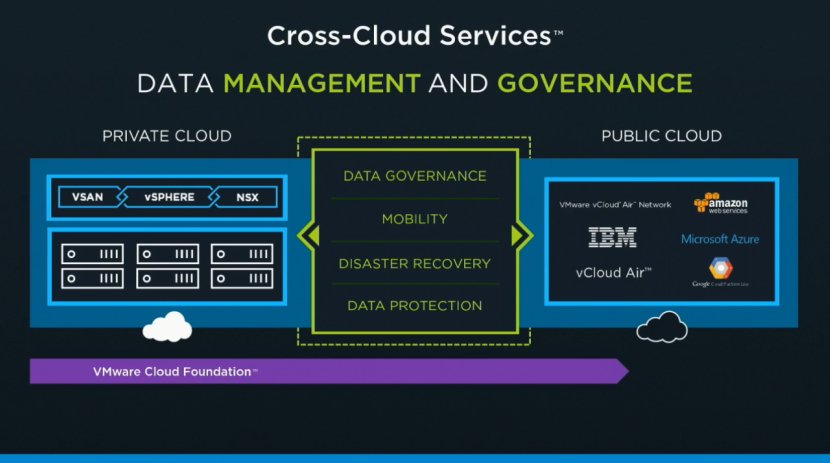
That is why I was so excited about the VMworld US keynote. Cross Cloud Services on top of hyper-converged leveraging all the tools VMware provides today (vSphere, VSAN, NSX) will exactly allow you to do what I describe above. Whether that is to IBM, vCloud Air or any other of the mega clouds listed in the slide below is even besides the point. Extending your datacenter services in to public clouds is what we have been talking about for a while, this hybrid approach which could bring (dare I say) elasticity. This is a fundamental aspect of SDDC, of which a hyper-converged architecture is simply a key pillar.

Hyper-converged by itself does not make a private cloud. Hyper-converged does not deliver a full SDDC stack, it is a great step in to the right direction however. But before you take that (necessary) hyper-converged step ask yourself what is next on the journey to SDDC. Networking? Security? Automation/Orchestration? Logging? Monitoring? Analytics? Hybridity? Who can help you reach full potential, who can help you take those next steps? That’s what excites me, that is why I work for VMware. I believe we have a great opportunity here as we are the only company who holds all the pieces to the SDDC puzzle. And with regards to what is next? Deliver all of that in an easy to consume manner, that is what is next!


Startup intro: Reduxio

Duncan Epping · Sep 23, 2016 ·

About a year ago my attention was drawn to a storage startup called Reduxio, not because of what they were selling (they weren’t sharing much at that point though even) but because two friends joined them, Fred Nix and Wade O’Harrow (EMC / vSpecialist fame). I tried to set up a meeting back then and it didn’t happen for whatever reason and it slipped my mind completely. Before VMworld Fred asked me if I was interested in meeting up and we ended up having an hour long conversation at VMworld with Reduxio’s CTO Nir Peleg and Jacob Cherian who is the VP of Product. This week we followed up that conversation with a demo, we had an hour scheduled but the demo was done in 20 minutes… not because it wasn’t interesting, but because it was that simple and intuitive. So who is Reduxio and what do they have to offer?

Reduxio is a storage company which was founded in 2012 and backed by Seagate Technology, Intel Capital, JVP and Carmel Ventures. I probably shouldn’t say storage company as they are more positioning themselves as a data management company, which makes sense if you know their roadmap. For those who care, Reduxio has a head office in San Francisco and an R&D site in Israel. Today Reduxio offers a hybrid storage system. The system is called HX550 and is a dual controller (active/standby) solution which comes in a 2U form factor with 8 SSDs and 16 HDDs, of course connected over 10GbE, dual power supply which also includes a cache protection unit for power failures. Everything you would expect from a storage system I guess.

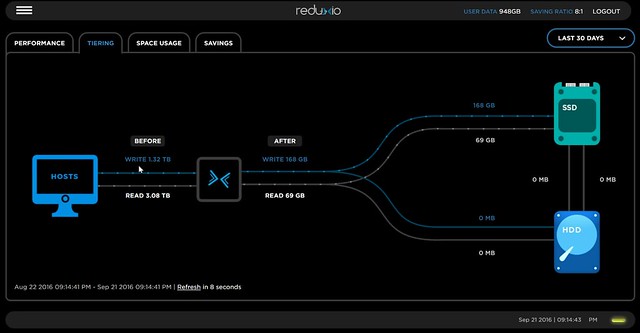
But the hardware specs are not what interested me. The features offered by the platform, or Reduxio’s TIME OS (as they call it) is what sets them apart from others. First of all, not surprisingly, the architecture revolves around flash. It is a tiering based architecture which provides in-memory deduplication and compression, this means that dedupe and compressions happens before data is stored on SSD or HDD. What I found interesting as well is that Reduxio expects IO to be random and all IO will go to SSD, however if it does detect sequential streams then the SSD is bypassed and the IO stream will go directly to HDD. This goes for both  reads and writes by the way. Also, they take proximity of the data in to account when IO moves between SSD and HDD, very smart as that ensures data moves efficiently. All of this by the way, is shown in the UI of course, including dedupe/compression results etc.

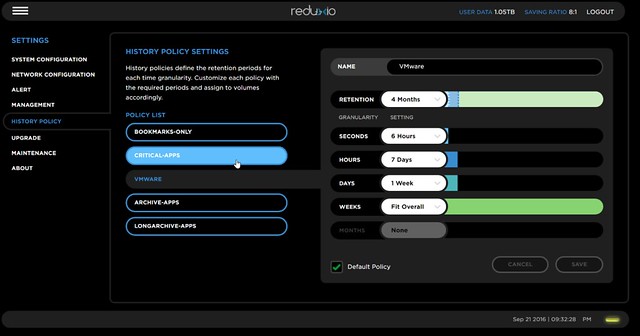
Now the interesting part is the “BackDating” feature Reduxio offers. Basically in their UI you can specify the retention time of data and automatically all volumes with the created policy will adhere to those retention times. You could compare it to snapshots, but Reduxio solved it differently. They asked themselves first what the outcome was a customer expected and then looked at how they could solve the problem, without taking existing implementations like snapshots in to account. In this case they added time as an attribute to a stored block. The screenshot below by the way shows how you can create BackDating policies and what you can set in terms of granularity. So “seconds” need to be saved for 6 hours in this example, hourly for 7 days and so on.

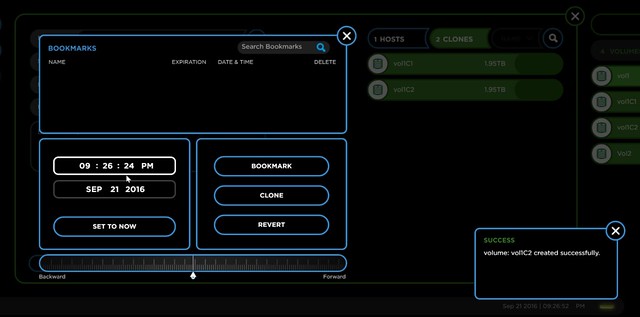
Big benefit is that as a result you can go to a volume and go back to a point in time and simply revert the volume to that point in time or create a clone from that volume for that point in time. This is also how the volume will be presented back to vSphere by the way, so you will have to re-signature it before you can access it. The screenshot below shows what the UI looks like, very straight forward, select a date / time or just use the slide if you need to go back seconds/minutes/hours.

What struck me when they demoed this by the way was how fast these volume clones were created. Jacob, who was driving the demo, explained that you need to look at their system as a database. They are not creating an actual volume, the cloned volume seen by the host is more the result of a query where the data set consists of volume, offset, reference and time. Just a virtual construct that points to data.

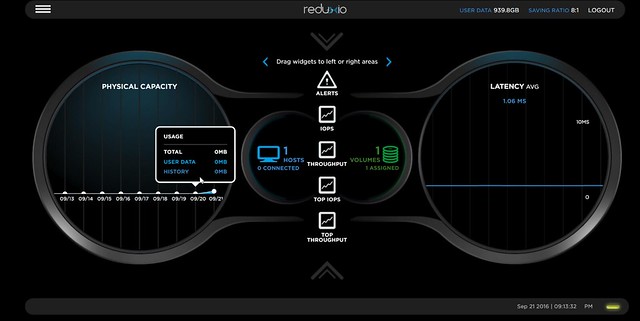
Oh and before I forget, just to keep things simple the UI also allows you to set a bookmark for a certain point in time so that it is easier to go back to that point using your own naming scheme. Talking about the UI, I think this is the thing that impressed me most, it is a simple concept, but allowing you to drag and drop widgets in to your front page dashboard is something I appreciate a lot. I may want to see different info on the frontpage than someone else, having the ability to change this is very welcome. The other thing about their UI, it doesn’t feel crammed. In most cases with enterprise systems we seem to have the habit of cramming as much as we can on a single page which then usually results in users not knowing where to start. Reduxio took a clean slate approach, what do we need and what don’t we need?

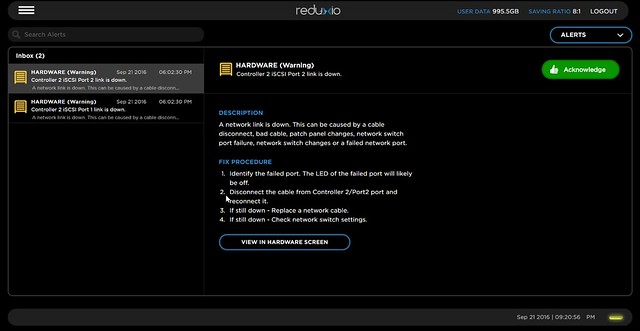
One other thing I liked was a feature they call StorSense. This is basically a SaaS based support infrastructure where analytics and an event database can help you prevent issues from occurring. When there is an error for instance the UI will inform you about the issue and also tells you how to mitigate it. Something which I felt was very useful as you don’t need to search an external KB system to figure out what is going on. Of course they also still offer traditional logging etc for those who prefer that.

That sounds cool right? So what’s the catch you may ask? Well there is one thing I feel is missing right now and that is replication. Or I should rather say the ability to sync data to different locations. Whether that is traditional sync replication or async replication or something in a different shape or form is to be seen. I am hoping they take a different approach again, as that is what Reduxio seems to be good at, coming up with interesting alternative ways for solving the same problem.

All in all they impressed me with what they have so far, and I didn’t even mention it, but they also have a vSphere plugin which allows for VM Level recovery. Hopefully we can expect support for VVols soon and some form of replication, just imagine how powerful that combination can be. Great work guys, and looking forward to hearing more in the future!

If you want to know more about them I encourage you to fill out their contact form so they can get back to you and give you a demo as I am sure you will appreciate it. (Or simply hit up someone like Fred Nix on twitter) Thanks Fred, Jacob and Nir for taking the time to have a chat!

Running your VSAN witness for a 2 node cluster on a 2 node cluster

Duncan Epping · Sep 20, 2016 ·

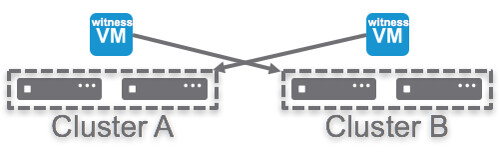
A week ago we had a discussion on twitter about a scenario which was talked about at VMworld. The scenario is one where you have two 2-node clusters and for each 2-node cluster the required Witness VM is running on the other. Let me show you what I mean to make it clear:

The Witness VM on Cluster A is the witness for Cluster B, and the Witness VM on Cluster B is the witness for Cluster A. As it stands today this is not a supported configuration out of the box. For ongoing support, it is required that users go through the RPQ process so VMware can validate the design. Please contact your VMware representative for more details.

A knowledge base article should be published on this topic soon, if and when it is published I will update this post and point to it.

Sharing VMworld slides

Duncan Epping · Sep 7, 2016 ·

I know the VMworld team will share them as well over time, but I figured I would do the same thing through my blog. Here are two decks. First deck is the deck for “VMworld – sto7650 -Software defined storage @VMmware primer”. This session I presented with Lee Dilworth. I presented VSAN and Lee did the VVol and VAIO section. Second deck is the deck for “VMworld 2016 – INF8036 – enforcing a vSphere cluster design with PowerCLI automation” which I presented with Chris Wahl. I added the youtube video that the VMworld team shared to the second deck as well. Hope you folks find it useful.

download / comments for “sto7650 -Software defined storage @VMmware primer”

download / comments for “INF8036 – enforcing a vSphere cluster design with PowerCLI automation”

download / comments for “INF7875 – A day in the life of a VSAN IO.”

  • « Go to Previous Page
  • Page 1
  • Interim pages omitted …
  • Page 27
  • Page 28
  • Page 29
  • Page 30
  • Page 31
  • Interim pages omitted …
  • Page 71
  • Go to Next Page »

Primary Sidebar

About the Author

Duncan Epping is a Chief Technologist and Distinguished Engineering Architect at Broadcom. Besides writing on Yellow-Bricks, Duncan is the co-author of the vSAN Deep Dive and the vSphere Clustering Deep Dive book series. Duncan is also the host of the Unexplored Territory Podcast.

Follow Us

  • X
  • Spotify
  • RSS Feed
  • LinkedIn

Recommended Book(s)

Also visit!

For the Dutch-speaking audience, make sure to visit RunNerd.nl to follow my running adventure, read shoe/gear/race reviews, and more!

Do you like Hardcore-Punk music? Follow my Spotify Playlist!

Do you like 80s music? I got you covered!

Copyright Yellow-Bricks.com © 2026 · Log in