• Skip to primary navigation
  • Skip to main content
  • Skip to primary sidebar

Yellow Bricks

by Duncan Epping

  • Home
  • Unexplored Territory Podcast
  • HA Deepdive
  • ESXTOP
  • Stickers/Shirts
  • Privacy Policy
  • About
  • Show Search
Hide Search

Management & Automation

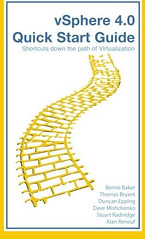
vSphere 4.0 Quick Start Guide: Shortcuts down the path of Virtualization

Duncan Epping · Nov 23, 2009 ·

It took us longer than expected, my apologies for that, but the vSphere 4.0 Quick Start Guide is finally available! Time lines got extended as we decided to go with Booksurge instead of Lulu. Booksurge is an Amazon company which means Amazon sells it as of today.

So what is the vSphere Quick Start Guide? 256 Pages of tips and hints on how to get around with vCenter, the Service Console and Powershell. Or as Amazon describes it: “vSphere 4.0 Quick Start Guide continues from an idea started several years ago by a few engineers. The idea was simple, provide an easy to use reference guide for all level administrators, consultants and architects. Recently VMware introduced many new features in vSphere 4.0 and with this handy pocket guide you will learn about each of these new features. With each chapter, the pages in this essential guide will answer common questions while giving you unprecedented insight into: Expert tips & tricks Pitfalls to avoid RemoteCLI & PowerCLI (PowerShell) scripts Configuration how to’s Virtualization best practices.”

Just to make it absolutely clear, although Alan Renouf is not mentioned on Amazon he is one of the six Authors and responsible for all Powershell scripts included in the book. For some weird reason Amazon does not take more than 5 authors and Alan got cut off but we are working on getting Alan listed as we speak.
vMA Patch 2

Duncan Epping · Nov 21, 2009 ·

vMA 4.0 Patch 2 has just officially been released. This release contains multiple bugfixes and security patches. Make sure to install the patch. KB article 1014689 describes how to do the upgrade from within the appliance.

RVTools 2.7.1

Duncan Epping · Nov 19, 2009 ·

Rob de Veij has just uploaded a new version of RVTools, 2.7.1. So far over RVTools has been downloaded over 25000 times. Yes 25000 times, that is a lot isn’t it. There’s a good reason though that it is popular. It is easy to use and gives you all the details you are looking for.

Version 2.7.1 contains the following new features and bug fixes:

  • RVTools now reports storage which is wasted by zombie VMs, VMDKs, templates and snapshots. You can find this information on the vHealth tab page. If you guys pay me a dime for every gigabyte of wasted storage, found by RVTools, you will make me rich.
  • Due to the fact that the search all datastores task can take a long time to complete, RVTools now use a separate thread to collect this information.
  • The default percentage value of “free datastore capacity” is changed from 10% to 15%.
  • Bug fix! If a snapshot is more than two levels deep, only the first two are visible. With the input from Mike Price this problem is now solved! Thanks again Mike.

The full releasenotes can be found here. I guess that’s enough for today, just download it!

in the ghetto….

Duncan Epping · Nov 18, 2009 ·

William Lam just updated two of his most popular scripts. If you haven’t looked at them yet, make sure you do as they are worth it. ghettoVCB(g2) enables the backup of virtual machines residing on either an ESX or ESXi host. ghettoVCBg2 is a complete rewritten and enhanced version of ghettoVCB or as William puts it “harder, better, faster, stronger”.

ghettoVCBg2

11/17/09 – The following enhancements and fixes have been implemented in this release of ghettoVCBg2. Special thanks goes out to Gerhard Ostermann for assisting with some of the logic in the ghettoVCBg2 script and the rest of the ghettoVCBg2 BETA testers. Thanks for everyones time and comments to make this script better!

Enhancements:

  • Email log support
  • Include/exclude specific VMDK(s)
  • Additional logging + dry run mode

Fixes:

  • Independent disk aware
  • Large VMDK backups

Original script, but updated with new features and a bug fix:

ghettoVCB

11/17/09 – The following enhancements and fixes have been implemented in this release of ghettoVCB. Special thanks goes out to all the ghettoVCB BETA testers for providing time and their environments to test features/fixes of the new script!

Enhancements:

  • Individual VM backup policy
  • Include/exclude specific VMDK(s)
  • Logging to file
  • Timeout variables
  • Configur snapshot memory/quiesce
  • Adapter format
  • Additional logging + dryrun mode
  • Support for both physical/virtual RDMs

Fixes:

  • Independent disk aware

Resource Pools and Shares

Duncan Epping · Nov 13, 2009 ·

I just wanted to write a couple of lines about Resource Pools. During most engagements I see environments where Resource Pools have been implemented together with shares. These Resource Pools are usually labeled “Low”, “Normal” and “High” with the shares set respectively. This is the traditional example being used during the VMware vSphere / VI3 course. Why am I writing about this you might ask yourself as many have successfully deployed environments with resource pools.

The problem I have with default implementations is the following:

Sibling resource pools share resources according to their relative share values.

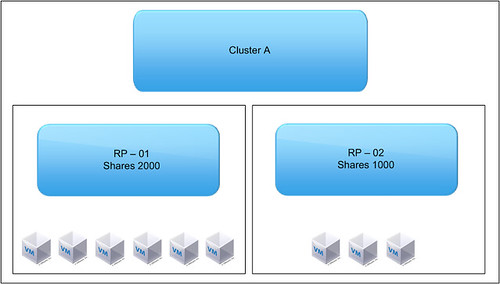
Please read this line a couple of times. And then look at the following diagram:

What’s the issue here?

RP – 01 -> 2000 Shares -> 6 VMs
RP – 02 -> 1000 Shares -> 3 VMs

So what happens if these 9 VMs start fight for resources. Most people assume that the 6 VMs, which are part of RP-01,  get more resources than the 3 VMs. Especially when you name them “Low” and “Normal” you expect the VMs which are part of “Low” to get a “lower” amount of resources than those which belong to the “Normal” resource pool. But is this the case?

No it is not. Sibling resource pools share resources according to their relative share values. In other words, resources are divided on a resource pool level, not on a per VM level. So what happens here? RP-01 will get 66% of the resources and RP-02 will get 33% of the resources. But because RP-01 contains twice as many VMs as RP-02 this will not make a difference when all VMs are fighting over resources… Each VM will roughly get the same amount of processor time. This is something that not many people take into account when designing an infrastructure or when implementing resource pools.

  • « Go to Previous Page
  • Page 1
  • Interim pages omitted …
  • Page 16
  • Page 17
  • Page 18
  • Page 19
  • Page 20
  • Interim pages omitted …
  • Page 44
  • Go to Next Page »

Primary Sidebar

About the Author

Duncan Epping is a Chief Technologist and Distinguished Engineering Architect at Broadcom. Besides writing on Yellow-Bricks, Duncan is the co-author of the vSAN Deep Dive and the vSphere Clustering Deep Dive book series. Duncan is also the host of the Unexplored Territory Podcast.

Follow Us

  • X
  • Spotify
  • RSS Feed
  • LinkedIn

Recommended Book(s)

Also visit!

For the Dutch-speaking audience, make sure to visit RunNerd.nl to follow my running adventure, read shoe/gear/race reviews, and more!

Do you like Hardcore-Punk music? Follow my Spotify Playlist!

Do you like 80s music? I got you covered!

Copyright Yellow-Bricks.com © 2026 · Log in