• Skip to primary navigation
  • Skip to main content
  • Skip to primary sidebar

Yellow Bricks

by Duncan Epping

  • Home
  • Unexplored Territory Podcast
  • HA Deepdive
  • ESXTOP
  • Stickers/Shirts
  • Privacy Policy
  • About
  • Show Search
Hide Search

Management & Automation

Overhauling the HA deepdive section

Duncan Epping · Feb 23, 2010 ·

I’ve been working on an overhauled version of the HA Deepdive Page. I’ve been adding “basic design principles” which hopefully you find useful.Here’s an example of what they look like:

Basic design principle: For iSCSI the preferred isolation response is always “Power off” to avoid a possible split brain scenario.

Another bit I’ve added is the following:

Please keep in mind that if you have an unbalanced cluster(host with different CPU or memory resources) your percentage is equal or preferably larger than the percentage of resources provided by the largest host. This way you ensure that all virtual machines residing on this host can be restarted in case of a host failure. Another thing to keep in mind is as there are no slots which HA uses resources might be fragmented throughout the cluster. Make sure you have at least a host with enough available capacity to boot the largest VM (reservation CPU/MEM). Also make sure you select the highest restart priority for this VM(of course depending on the SLA) to ensure it will be able to boot.)

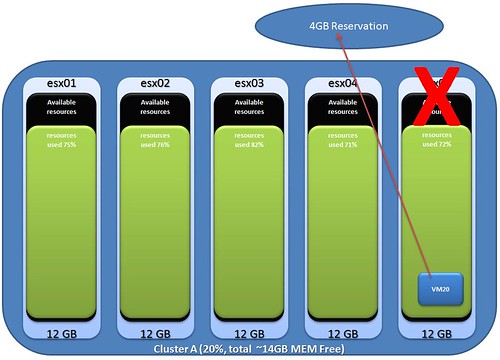
What I’m discussing here is the impact of selecting a “Percentage” instead of the amount of host failures for your HA cluster. Although you might have enough spare resources left on your total cluster, the reservation of a single VM might cause it not to boot when resources are fragmented. Make sure these VMs are the first to boot up when disaster strikes by using restart priorities.

I created a diagram which makes it more obvious I think. So you have 5 hosts, each with roughly 76% memory usage. A host fails and all VMs will need to failover. One of those VMs has a 4GB memory reservation, as you can imagine failing over this particular VM will be impossible.
Cool Tool Update: RVTools 2.8.1

Duncan Epping · Feb 21, 2010 ·

Rob de Veij has just released a new version of RVTools. The update only contains bug fixes but most definitely worth downloading again!

Version 2.8.1 (February 2010)

  • On vHost tab new field: number of running vCPUs
  • On vSphere VMs in vApp where not displayed.
  • Filter not working correct when annotations or custum fields contains null value.
  • When NTP server(s) = null the time info fields are not displayed on the vHost tabpage.
  • When datastore name or virtual machine name containts spaces the inconsistent foldername check was not working correct.
  • Tools health check now only executed for running VMs.

VUM and downloading patches via PAC

Duncan Epping · Feb 16, 2010 ·

When I tried to download patches via a freshly installed VMware vSphere Update Manager today I received the following error:

https://hostupdate.vmware.com/software/VUM/PRODUCTION/index.xml;
hosting the patch definitions and patches cannot be reached or has no patch data

Although we configured a proxy including the appropriate account it would not work. As suggested in this KB article I removed the “http://” part of the proxy address but still it bailed out with the error above. After trying several combinations I noticed that the proxy was actually a PAC address instead of a proxy server. A PAC basically serves a list which contains the proxy details of the environment. This comes in handy when you’ve got multiple proxy for redundancy… In this case VMware Update Manager wasn’t fond of the PAC file. When I used the address of the proxy server instead of the host server the PAC file it worked like a charm…

RVTools 2.8

Duncan Epping · Jan 31, 2010 ·

Rob de Veij just released a brand new version of RVTools. Download it while it is still hot! Please note that this application supports ESX(i) Server 3.5 and vCenter 2.5. vSphere 4 is in experimental support.

Latest Version: 2.8 | January 31, 2010
Download | Documentation

  • On vHost tab field “# VMs” now only powered on VMs are counted.
  • On vHost tab field “VMs per core” now only powered on VMs are counted.
  • On vHost tab field “vCPUs per core” now only powered on VMs are counted.
  • On vDatastore tab field “# VMs” now only calculated for VM’s which are powered on.
  • Health check “Number of running virtual CPUs per core” now only powered on VMs are counted.
  • Health check “Number of running VMs per datastore” now only powered on VMs are counted.
  • During Installation there will be an application event source created for RVTools. This to fix some security related problems.
  • Some users run into a timeout exception from the SDK Web server. The default web service timeout value is now changed to a higher value.
  • New fields on vHost tab: NTP Server(s), time zone information, Hyper Threading information (available and active), Boot time, DNS Servers, DHCP flag, Domain name and  DNS Search order
  • New Health Check: Inconsistent folder names.
  • Improved exception handling on vDisk, vSwitch and vPort tab pages.

VMware vCenter Lifecycle Manager (LCM) 1.1

Duncan Epping · Jan 29, 2010 ·

VMware has just released LCM 1.1.

What’s new?

VMware vCenter Lifecycle Manager (LCM) 1.1 release enhances the performance, robustness, and scalability of LCM and resolves a number of known issues.

The LCM 1.1 release runs on VMware vCenter Orchestrator 4.0.1. To run LCM 1.1, you must install the version of Orchestrator (4.0.1 Build 4502) that accompanies the LCM 1.1 download. See the vCenter Lifecycle Manager 1.1 Installation and Configuration Guide for installation instructions.

Download now.

http://www.vmware.com/support/pubs/lcm_pubs.html

VMware vCenter Lifecycle Manager Release Notes
VMware vCenter Lifecycle Manager Installation and Configuration Guide
VMware vCenter Lifecycle Manager Administration Guide
VMware vCenter Lifecycle Manager User’s Guide

  • « Go to Previous Page
  • Page 1
  • Interim pages omitted …
  • Page 14
  • Page 15
  • Page 16
  • Page 17
  • Page 18
  • Interim pages omitted …
  • Page 44
  • Go to Next Page »

Primary Sidebar

About the Author

Duncan Epping is a Chief Technologist and Distinguished Engineering Architect at Broadcom. Besides writing on Yellow-Bricks, Duncan is the co-author of the vSAN Deep Dive and the vSphere Clustering Deep Dive book series. Duncan is also the host of the Unexplored Territory Podcast.

Follow Us

  • X
  • Spotify
  • RSS Feed
  • LinkedIn

Recommended Book(s)

Also visit!

For the Dutch-speaking audience, make sure to visit RunNerd.nl to follow my running adventure, read shoe/gear/race reviews, and more!

Do you like Hardcore-Punk music? Follow my Spotify Playlist!

Do you like 80s music? I got you covered!

Copyright Yellow-Bricks.com © 2026 · Log in