• Skip to primary navigation
  • Skip to main content
  • Skip to primary sidebar

Yellow Bricks

by Duncan Epping

  • Home
  • Unexplored Territory Podcast
  • HA Deepdive
  • ESXTOP
  • Stickers/Shirts
  • Privacy Policy
  • About
  • Show Search
Hide Search

Data Recovery

RE: Re-Imagining Ransomware Protection with VMware Ransomware Recovery

Duncan Epping · Apr 13, 2023 ·

Last week a blog post was published on VMware’s Virtual Blocks blog on the topic of Ransomware Recovery. Some of the numbers shared were astonishing and hard to contextualize even. Global damages caused by ransomware for instance are estimated to exceed 42 billion dollars in 2024, and this is expected to be doubling every year. Also, 66% of all enterprises were hit by ransomware, of which 96% did not regain full access to their data.

Now, it explicitly mentions “enterprises”, but this does not mean that only enterprise organizations are prone to ransomware attacks. Ransomware attacks do not discriminate, every company, non-profit, and even individuals are at risk if you ask me. As a smart person once said, data is the new oil, and it seems that everyone is drilling for it, including trespassers who don’t own the land! Of course, depending on the type of organization, solutions and services are available to mitigate the risks of losing access to your company’s most valuable asset, data.

VMware, and many other vendors, have various solutions (and services) to protect your data center, your workloads, and essentially your data. But what do you do if you are breached? How do you recover? How fast can you recover, and how fast do you need to recover? How far back do you need to go, and are you allowed to go? Some of you may wonder why I ask these questions, well that has everything to do with the numbers shared at the start of this blog. Unfortunately, today, when organizations are breached malicious code is often only detected after a significant amount of time. Giving the attacker time to collect information about the environment, spread itself throughout the environment, activate the attack, and ultimately request the ransom.

This is when you, the administrator, the consultant, and the cloud admin, will get those questions. How fast can you recover? How far back do we need to go? Where do we recover to? And what about your data? All fair questions, but these shouldn’t be asked after an attack has occurred and ransom is demanded. These are questions we all need to ask constantly, and we should be aligning our Ransomware Recovery strategy with the answers to those questions.

Now, it is fair to say that I am probably somewhat biased, but it is also fair to say that I am as Dutch as it gets and I wouldn’t be writing this blog if I did not believe in this service. VMware’s Ransomware Recovery as a Service, which is part of VMware Cloud Disaster Recovery, provides a unique solution in my humble opinion. First, the service provided can just simply start as a cloud storage service to which you replicate your workloads, without needing to run a full (small but still) software-defined datacenter. This is especially useful for those organizations that can afford to take ~3hrs to spin up an SDDC when there’s a need to recover (or test the process). However, it is also possible to have an SDDC ready for recovery at all times, which will reduce the recovery time objective significantly.

Of course, VMware provides the ability to protect multiple environments, many different workloads, and many point-in-time copies (snapshots). But it also enables you to verify your recovery point (snapshot) in a fully isolated environment. What you will appreciate is that the solution will actually not only isolate the workloads, but on top of that also provide you insights at various levels about the probability of the snapshot being infected. First of all, while going through the recovery process, entropy and change rate are shown which provides insights of when potentially the environment was infected. (Or ransomware was activated for that matter.)

But maybe even more important, through the use of NSX and VMware’s Next Generation Anti-Virus software, a recovery point can be safely tried. A quarantined environment is instantiated and the recovery point can be scanned for vulnerabilities and threats, and an analysis of the workloads to be recovered can be provided, as shown below. This simplifies the recovery and validation process immensely, as it removes the need for many of the manual steps usually involved in this process. Of course, as part of the recovery process, the advanced runbook capabilities of VMware Cloud Disaster Recovery are utilized, enabling the recovery of a full data center, or simply a select group of VMs, by running a recovery plan. This recovery plan includes the order in which workloads need to be powered on and restored, but can also include IP customization, DNS registration, and more.
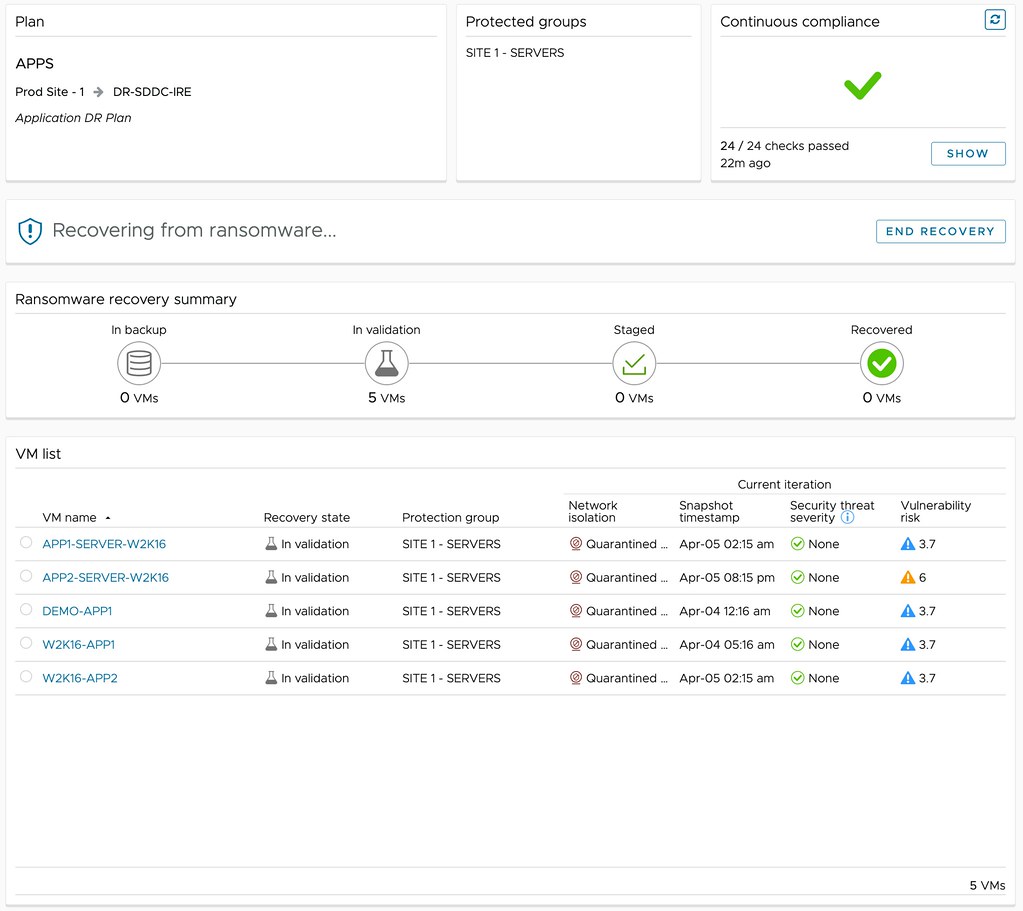
Depending on the outcome of the analysis, you can then determine what to do with the snapshot. Is the data not compromised? Are the workloads not infected? Are there any known vulnerabilities that we would need to mitigate first? If data is compromised, or the environment is infected in any shape or form, you can simply disregard the snapshot and clean the environment. Rinse and repeat until you find that recovery point that is not compromised! If there are known vulnerabilities, and the environment is clean, you can mitigate those and complete the recovery. Ultimately resulting in full access to your company’s most valuable asset, data.
Unexplored Territory: recovering from a ransomware attack /w Sazzala Reddy!

Duncan Epping · Nov 1, 2021 ·

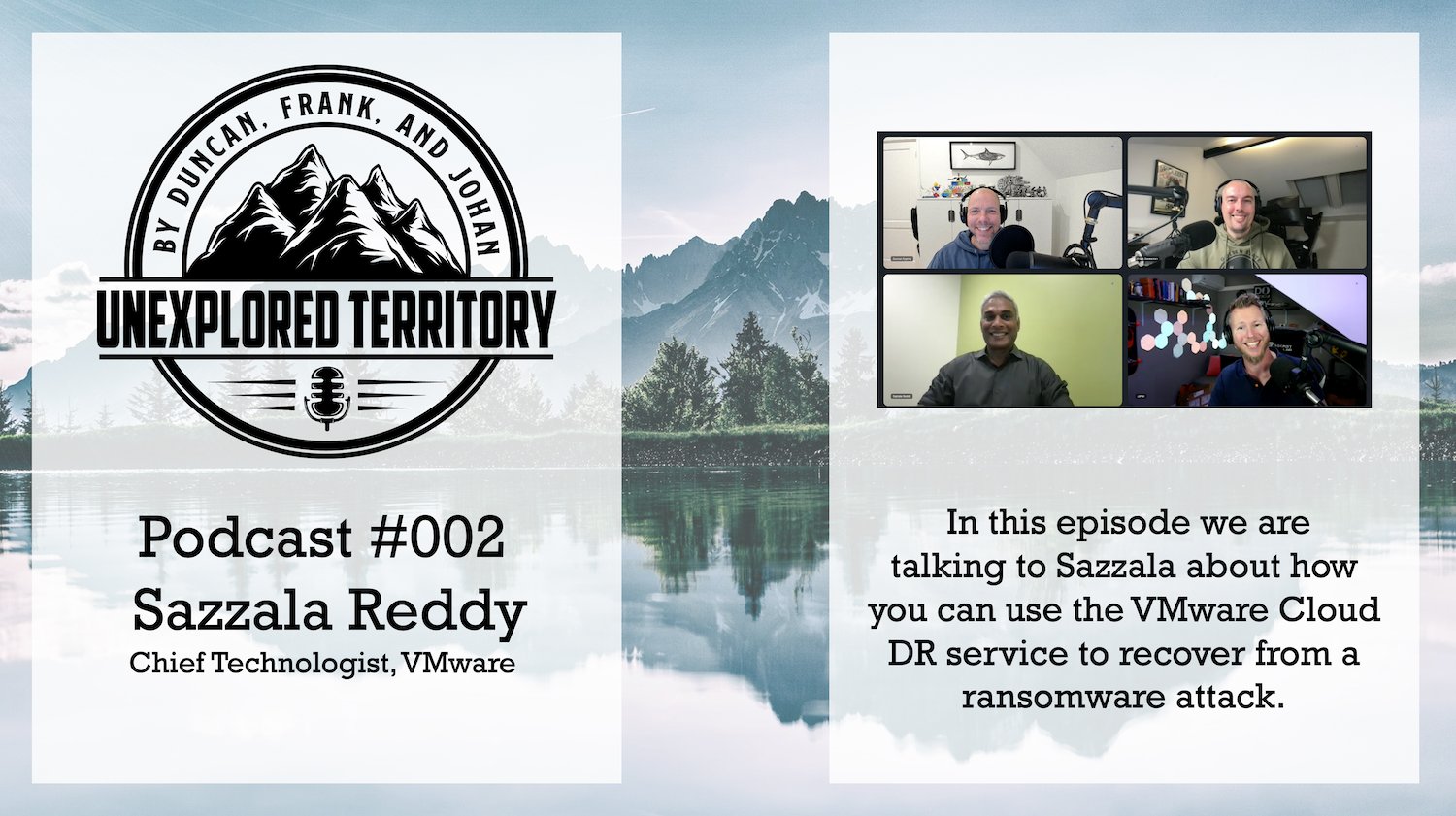
There we go, episode 002 of the Unexplored Territory Podcast was just published. In this episode we talk to Sazzala Reddy. Sazzala is a Chief Technologist at VMware who joined via the Datrium acquisition, where he was the CTO. Before founding Datrium, he was at Dell/EMC, where he came in via the DataDomain acquisition. I think it is fair to say that Sazzala has a heavy data/storage DNA. We discuss Sazzala’s career path, why better is sometimes worse, and we extensively discuss VCDR and the new cloud file system that is being developed. I think it is a very interesting episode and would encourage everyone to give it a listen!

Make sure to follow Sazzala on twitter (https://twitter.com/sazzala) and read his blog post on the VCDR filesystem: https://bit.ly/3CiQoav.

Listen now via Apple Podcasts: https://apple.co/2ZOziDx, Spotify: https://spoti.fi/3BEkFja, Google: https://bit.ly/3Cy3ssF, Overcast: https://overcast.fm/+zyG9k_hks, Website: https://bit.ly/3w70FnV.

Does vSAN Enhanced Durability work when you have a limited number of hosts?

Duncan Epping · Apr 19, 2021 ·

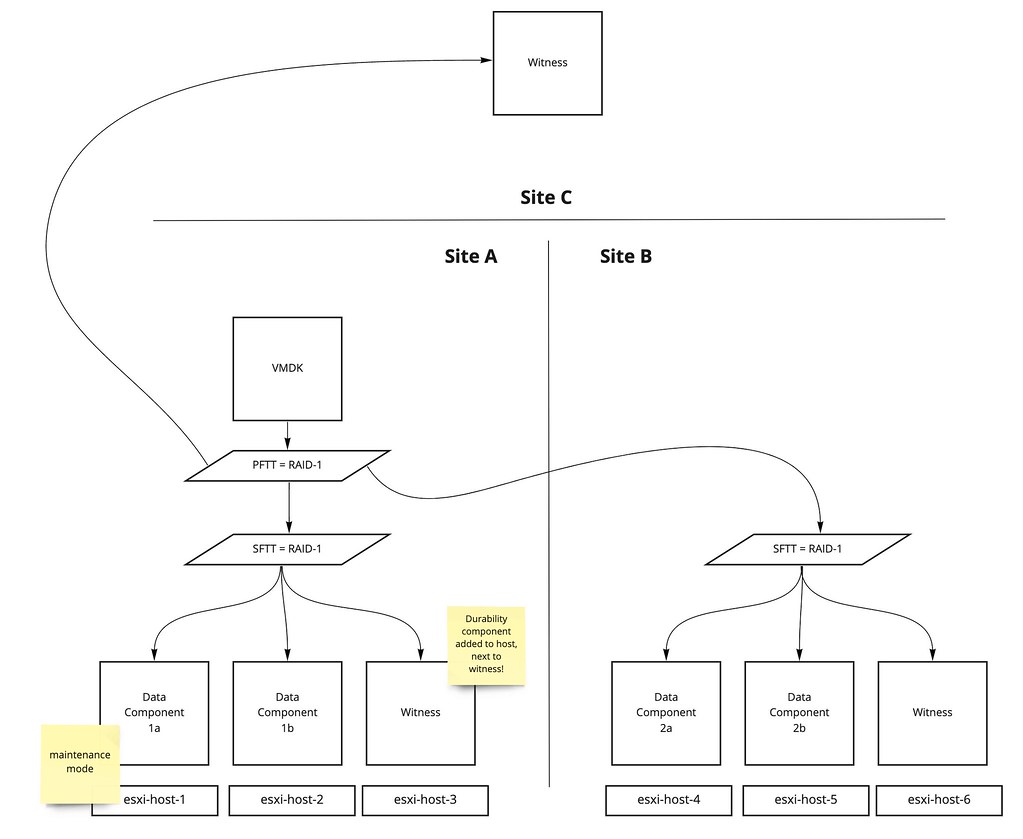
Last week I had a question about how vSAN Enhanced Durability works when you have a limited number of hosts. In this case, the customer had a 3+3+1 stretched cluster configuration, and they wondered what would happen when they would place a host into maintenance mode. Although I was pretty sure I knew what would happen, I figured I would test it in the lab anyway. Let’s start with a high-level diagram of what the environment looks like. Note I use a single VM as an example, just to keep the scenario easy to follow.

In the diagram, we see a virtual disk that is configured to be stretched across locations, and protected by RAID-1 within each location. As a result, you will have two RAID-1 trees each with two components and a witness, and of course, you would have a witness component in the witness location. Now the question is, what happens when you place esxi-host-1 into maintenance mode? In this scenario, vSAN Enhanced Durability will want to create a “durability component”. This durability component is used to commit all new write IO to. This will allow vSAN to resync fast after maintenance mode, and enhances durability as we would still have 2 copies of the (new) data.

However, in the scenario above we only have 3 hosts per location. The question then is, where is this delta component created then? As normally with maintenance mode you would need a 4th host to move data to. Well, it is simple, in this case, what vSAN does is it creates a “durability component” on the host where the witness resides, within the location of course. Let me show you in a diagram, as that makes it clear instantly.

By adding the Durability component next to the witness on esxi-host-3, vSAN enhances durability even in this stretched cluster situation, as it provides a local additional copy of new writes. Now, of course I tested this in my lab. So for those who prefer to see a demo, check out the youtube video below.

Startup intro: SaaS-based backup solution Clumio

Duncan Epping · Apr 6, 2020 ·

Last week I saw an update from one of the Clumio founders on twitter. It reminded me that I had promised to take a look at their product. This week I had a meeting set up with Clumio and we went over their product and how to configure it briefly. Clumio is a SaaS based backup solution that was founded in 2017 by former PernixData, Nutanix, EMC folks. The three founders are Poojan Kumar, Kaustubh Patil, and Woon Jung, and those three you may remember from PernixData. One thing to point out is that they had 3 rounds of funding (~190 million dollars) so far and they came out of stealth around VMworld 2019. Coincidentally they won the Gold award for Best of VMworld in the data protection category, and best of show for the entire show, not bad for a first VMworld. I guess that I have to point out that although I would classify them as backup/recovery today, they are adding new functionality weekly and “backup/recovery” is probably not a fair category, data protection is more appropriate and it would not surprise me if that evolves to data management and protection over time. If you are not a fan of reading, simply head over to my youtube video on Clumio, otherwise, just continue below.

So how does it work conceptually? Well they basically have a SaaS solution, but you will need to install an OVA (they call it a cloud connector) in your environment to connect to the SaaS platform for VMware on-premises and VMware Cloud on AWS. When you connect AWS EBS they use a cloud formation template. This cloud connector is a 4 vCPU/8GB virtual machine that then needs the ability to connect to “the outside world” of course. The Cloud Connector is stateless and requires no updates. You can run this Cloud Connector appliance in multiple clusters, on-prem, or in VMware Cloud on AWS and once they are registered you will see those data sources in your portal.  This is nice as you can see all your data sources across public and private clouds in one single pane of glass. You will have the ability to define “backup schemes” by creating policies. These policies can of course then be associated with objects. These objects can be VMs, Clusters and even vCenter Server instances. This means that if you assign a policy to vCenter Server that every new VM created will inherit the policy automatically. You may wonder, where is your data stored? Your data is stored in S3 buckets that are part of the Clumio SaaS-based platform. Customers are isolated from each other, they will have their own dedicated S3 buckets, and these buckets are created and maintained by Clumio, you as a customer only interact with Clumio! [Read more…] about Startup intro: SaaS-based backup solution Clumio

My recommended sessions for VMworld Europe 2019!

Duncan Epping · Sep 23, 2019 ·

I created a list of recommended sessions for VMworld US, so I figured I would do the same for VMworld Europe. I am limiting it to 15 sessions for Europe and removed some of the sessions I had listed for the US and added some others for EMEA. I personally have 2 sessions scheduled at the moment, and they filled up rather fast in the US, so make sure to register early: HCI1870BE and HBI2186BE.

Okay, here’s my top 15 list, please note that this is pretty much in random order:

  • 60 Minutes of Non-Uniform Memory Architecture [HBI2278BE] by Frank Denneman
    This session got raving reviews in the US, I attended it personally and I can highly recommend it. That is if you think your brain can handle it… it is deep!
  • PowerCLI Deep Dive [HBI1729BE] by Luc Dekens and Kyle Ruddy
    What can I say? These guys speak PowerCLI. They know it inside out, just make sure you are ready to go deep!
  • VMware Cloud Foundation Deep Dive [HBI2044BE] by Jason Shaw
    I am a big fan of full-stack HCI solutions, and in this session, Jason talks about what VMware Cloud Foundation brings to the table.
  • HCI Management: Current and Future [HCI1207BE] by JunChi Zhang and Christian Dickmann
    Every year these guys bring some really cool demos and they expect you to provide feedback at the end of the session. So if you want to have a chance to influence vSAN/vSphere, attend this one!
  • Project Pacific Technical Overview: Unifying vSphere and Kubernetes [HBI4500BE] by Michael West and Jared Rosoff
    There was a lot of buzz surrounding the announcement of Project Pacific. I managed to sit in one or two sessions in the US, and knowing Jared was the lead engineering on this project I suspect that this session may even go deeper than the ones I attended in the US.
  • The Virtually Speaking Podcast Live: The Future of Storage [HCI1894PE] by Pete Flecha, John Nicholson, and guests
    I was a guest on the US in this session, it was a lot of fun. A lively discussion, and great questions from the audience on top of that. Plus, it is amazing to see Pete Flecha do the intro and outro live, I always thought that was pre-recorded!
  • The Cloud Backbone Network: A Paradigm Shift in Corporate WAN [OCTO1911BE] by Israel Cidon
    I have seen a session on this topic by Israel at an internal conference and it was nothing short of mind-blowing. I would highly recommend attending this if you want to learn more about how we could potentially improve corporate WANs in the future by leveraging SD-WAN technology. Mind, this session is foreward looking!
  • Showcase Keynote: HCI – The Foundation for your Future-proof Infrastructure [HCI3551KE] by Cormac Hogan and John Gilmartin
    I presented this session in the US with John, Cormac will be presenting it in Europe with John. I am sure it will be filled with great demos once again, and I will definitely try to attend this one in person
  • Leveraging the Latest Server Technologies in vSphere [HBI2362BE] by Niels Hagoort
    This session wasn’t on my list for the US, but after watching the recording I feel it is worth attending in person! A good overview of what we are doing with the latest HW technologist in vSphere.
  • vSphere Virtual Volumes: Technical Deep Dive [HBI2853BE] by Jason Massae and Thiruvengada Govinda Thirumal
    The adoption of vVols is growing fast, and it is for a good reason. Jason and Thiruvengada will explain in-depth what vVols is and how it works, and of course what the benefits are of adopting it.
  • Tech Preview of Site Recovery Manager with Virtual Volumes [HCI2894BE] by Stefan Tsonev and Velina Krasteva
    The tech preview of SRM for vVols has been discussed various times, but in this session by Stefan and Velina it is also demonstrated. So if you are interested in disaster recovery solutions in combination with vVols then this is one to attend!
  • Meet the [ML] Driver of the Self-Driving Datacenter [MLA1904BE] by Jad El-Zein and Arun Annavarapu
    At VMworld US Project Magna was unveiled, VMware’s effort to deliver the self-driving datacenter. A very interesting concept, which is explained in this session by Jad and Arun. I’ve seen some of the work, and it has a lot of potential, highly recommend attending this session!
  • Technical Deep Dive on Cloud Native Storage 1.0 [HCI2763BE] by Cormac Hogan and Myles Gray
    Cormac and Myles are the Cloud Native experts in our business unit, and I can guarantee that this will be a great session filled with cool demos.
  • Optimizing vSAN for Performance [HCI1757BE] by Paudie ORiordan
    If anyone can explain how to optimize vSAN, how to do benchmarking, and what to avoid… it is Paudie. On top of that, he is a great speaker and you can basically ask him anything on the topic of storage. Must see!
  • Innovations in vMotion: Features, Performance, and Best Practices [HBI1421BE] by Sreekanth Setty and Arunachalam Ramanathan
    I watched this session in the US, it provides an excellent overview of the enhancements introduced for vMotion to improve vMotion (and switch over) times. They also talk about some enhancements coming in the near future. Very interesting stuff.

Scheduling opens up tomorrow (24th of September), so make sure to hit the portal early. I guarantee that many of the sessions above will be full in a matter of days. So don’t say I did not warn you in advance!

  • « Go to Previous Page
  • Page 1
  • Page 2
  • Page 3
  • Page 4
  • Interim pages omitted …
  • Page 6
  • Go to Next Page »

Primary Sidebar

About the Author

Duncan Epping is a Chief Technologist and Distinguished Engineering Architect at Broadcom. Besides writing on Yellow-Bricks, Duncan is the co-author of the vSAN Deep Dive and the vSphere Clustering Deep Dive book series. Duncan is also the host of the Unexplored Territory Podcast.

Follow Us

  • X
  • Spotify
  • RSS Feed
  • LinkedIn

Recommended Book(s)

Also visit!

For the Dutch-speaking audience, make sure to visit RunNerd.nl to follow my running adventure, read shoe/gear/race reviews, and more!

Do you like Hardcore-Punk music? Follow my Spotify Playlist!

Do you like 80s music? I got you covered!

Copyright Yellow-Bricks.com © 2026 · Log in