• Skip to primary navigation
  • Skip to main content
  • Skip to primary sidebar

Yellow Bricks

by Duncan Epping

  • Home
  • Unexplored Territory Podcast
  • HA Deepdive
  • ESXTOP
  • Stickers/Shirts
  • Privacy Policy
  • About
  • Show Search
Hide Search

Data Recovery

vSphere 6.0 finally announced!

Duncan Epping · Feb 3, 2015 ·

Today Pat Gelsinger and Ben Fathi announced vSphere 6.0. (if you missed it you can still sign up for other events) I know many of you have been waiting on this and are ready to start your download engines but please note that this is just the announcement of GA… the bits will follow shortly. I figured I would do a quick post which details what is in vSphere 6.0 / what is new.There were a lot of announcements today, but I am just going to cover vSphere 6.0 and VSAN. I have some more detailed posts to come so I am not gonna go in to a lot of depth in this post, I just figured I would post a list of all the stuff that is in the release… or at least that I am aware off, some stuff wasn’t broadly announced.

  • vSphere 6
    • Virtual Volumes
      • Want “Virtual SAN” alike policy based management for your traditional storage systems? That is what Virtual Volumes will bring in vSphere 6.0. If you ask me this is the flagship feature in this release.
    • Long Distance vMotion
    • Cross vSwitch and vCenter vMotion
    • vMotion of MSCS VMs using pRDMs
    • vMotion L2 adjacency restrictions are lifted!
    • vSMP Fault Tolerance
    • Content Library
    • NFS 4.1 support
    • Instant Clone aka VMFork
    • vSphere HA Component Protection
    • Storage DRS and SRM support
    • Storage DRS deep integration with VASA to understand thin provisioned, deduplicated, replicated or compressed datastores!
    • Network IO Control per VM reservations
    • Storage IOPS reservations
    • Introduction of Platform Services Controller architecture for vCenter
      • SSO, licensing, certificate authority services are grouped and can be centralized for multiple vCenter Server instances
    • Linked Mode support for vCenter Server Appliance
    • Web Client performance and usability improvements
    • Max Config:
      • 64 hosts per cluster
      • 8000 VMs per cluster
      • 480 CPUs per host
      • 12TB of memory
      • 1000 VMs per host
      • 128 vCPUs per VM
      • 4TB RAM per VM
    • vSphere Replication
      • Compression of replication traffic configurable per VM
      • Isolation of vSphere Replication host traffic
    • vSphere Data Protection now includes all vSphere Data Protection Advanced functionality
      • Up to 8TB of deduped data per VDP Appliance
      • Up to 800 VMs per VDP Appliance
      • Application level backup and restore of SQL Server, Exchange, SharePoint
      • Replication to other VDP Appliances and EMC Avamar
      • Data Domain support
  • Virtual SAN 6
    • All flash configurations
    • Blade enablement through certified JBOD configurations
    • Fault Domain aka “Rack Awareness”
    • Capacity planning / “What if scenarios”
    • Support for hardware-based checksumming / encryption
    • Disk serviceability (Light LED on Failure, Turn LED on/off manually etc)
    • Disk / Diskgroup maintenance mode aka evacuation
    • Virtual SAN Health Services plugin
    • Greater scale
      • 64 hosts per cluster
      • 200 VMs per host
      • 62TB max VMDK size
      • New on-disk format enables fast cloning and snapshotting
      • 32 VM snapshots
      • From 20K IOPS to 40K IOPS in hybrid configuration per host (2x)
      • 90K IOPS with All-Flash per host

As you can see a long list of features and products that have been added or improved. I can’t wait until the GA release is available. In the upcoming days I will post some more details on some of the above listed features as there is no point in flooding the blogosphere even more with similar info.
VMworld session on vSphere Metro Storage Cluster on youtube!

Duncan Epping · Nov 16, 2013 ·

I didn’t even realize this, but just found out that the session Lee Dilworth and I did at VMworld on the subject of vSphere Metro Storage Clusters can actually be viewed for free on youtube!

There are some more sessions up on youtube, so make sure you have a look around!

Back to Basics: Install, configure and use vSphere Data Protection

Duncan Epping · Sep 18, 2012 ·

Installing vSphere Data Protection is just a couple of steps. I downloaded the vSphere Replication virtual appliance. Note there are three different versions available and depending on how large your environment is you will need to select a version. I selected the 0.5TB version as I have a limited amount of virtual machines. This is how you import it and configure it, but before you begin I recommend ensuring DNS records are created before deploying the appliance!

  • Open the Web Client
  • Go to your cluster under “vCenter” —> “Hosts and Clusters”.
  • Right click the cluster object and click “All vCenter Actions” —> “Deploy OVF Template”
  • As a source I select the ova file I downloaded, now click “Next”
  • Validate the details and click “Next”
  • If you agree “Accept” the EULA and click “Next”
  • Enter the “Name” of the virtual machine and select the “Folder” this virtual machine will needs to be placed in and click “Next”
  • Select the “Datastore” it needs to be provisioned to and click “Next”
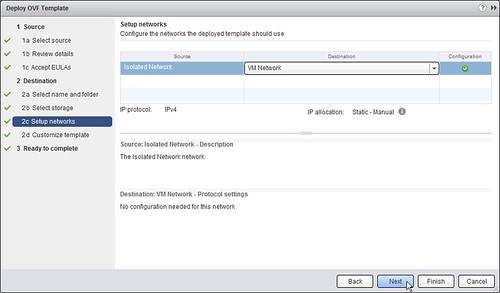
  • Select the “Network” it needs to be connected to and click “Next”
  • [Read more…] about Back to Basics: Install, configure and use vSphere Data Protection

vCloud Suite 5.1 available

Duncan Epping · Sep 11, 2012 ·

No I didn’t set my alarm clock like Eric Sloof, just to be one of the first to post it… hence the reason this is “late”. But I got some more lined up for you though in the upcoming days. Now that the vCloud Suite 5.1 is available. Make sure to start your download engines and prep to upgrade. Before you start downloading, make sure to hit the launch page. I created a nice short URL for it

VMware NOW – Get the Latest Info on VMware Product Launches:
http://vmwa.re/vcloudnow

Download links:

  • ESXi 5.1.0 Installable
  • vCenter Server 5.1.0 and modules
  • VMware vCloud Director 5.1.0
  • VMware vCenter Site Recovery Manager 5.1.0
  • VMware vCenter Infrastructure Navigator 1.2.0
  • VMware vCenter Operations Management 5.0.3
  • VMware vCenter Configuration Manager 5.5.1
  • vSphere Data Protection 5.1.0 
  • vSphere Replication 5.1.0
  • vSphere Storage Appliance 5.1.0 
  • vCloud Networking and Security 5.1.0
  • vSphere PowerCLI 5.1
  • vSphere CLI 5.1
  • vCenter Orchestrator Appliance 5.1.0
  • vSphere Management Assistant 5.1

What’s new docs:

  • What’s New in VMware vSphere 5.1
  • What’s new in VMware vCenter 5.1
  • What’s New in VMware vSphere 5.1 – Networking
  • What’s New in VMware vSphere 5.1 – Platform
  • What’s New in VMware vSphere 5.1 – Storage
  • What’s New in VMware vSphere 5.1 – Performance
  • Introduction to VMware vSphere Replication
  • Introduction to VMware vSphere Data Protection
  • What’s new in VMware vSphere Storage Appliance
  • What’s new in vCloud Director 5.1


Introducing SimpliVity, a new storage / compute platform

Duncan Epping · Aug 21, 2012 ·

Around VMworld many new companies are “born”… well most of them have been around for a while, but fact is that they go public around VMworld. With SimpliVity it is no different. SimpliVity is a new storage company, although “storage” might be understating what they actually do.

I had an intro to SimpliVity last week, and yesterday SimpliVity publicly announced their product the OmniCube. The OmniCube is a 2U unit which combines Compute and Storage resources in a single node combining SATA and SSD drives.

Yes I can hear you thinking aahhhh another Nutanix-alike solution… well not really and I will explain why in the upcoming paragraphs. I guess the biggest difference from a physical perspective is that this is not a multi-node 2U unit like Nutanix is. This is a single node 2U unit, it can hold a max of 768GB of memory but comes with 128GB by default. It holds two 6 core 2.5Ghz intel procs and 2 x 10Gbe and 2 x 1Gbe. From a storage perspective it comes with 4 x 200GB SSD and 8 x 3TB SATA drives. With deduplication and compression, usable capacity is around 20TB. This was calculated using conservative estimates for deduplication (1.5:1) and compression (1.5:1). Depending on the use case this is more than likely a lot higher. Yes the OmniCube is a beast.

But SimpliVity / OmniCube is not about hardware, SimpliVity in my opinion is really about the solution. SimpliVity took a VM centric approach, or should we say VM aware (Not unlike Tintri). All operations / policies are on a per VM basis. So if you want to enable replication, this will be on a per VM basis. Not just replication but they have added a whole bunch of other cool features like:

  • Global management
  • Snapshots
  • Deduplication / Compression (global!)
  • Cloud Integration

The cool thing of course that these features can be combined. Having your snapshots deduplicated will have an impact on the amount of data stored. Only replicating deduplicated and compressed blocks will lower your bandwidth requirements… and that especially comes in handy when you are replicating / storing data in a cloud environment as the dedupe / compression is on a global basis.

Combine all of that with a tight VMware vSphere integration and I believe we have a very interesting solution on our hands. Now I know some of you are skeptical about these new companies popping up, and I can also be skeptical but a quick search on linkedin reveals where these guys are coming from… and with most of their engineers having a strong storage and virtualization background you know they will be on top of their game.

Simplivity has a booth at VMworld, for anyone interested in new compute/storage architectures definitely recommended to stop by, or register for their session:

SPO3287 – Everybody Wants to Rule the World. 5 Steps to Successfully Building and Ruling a Virtual Infrastructure Empire

Cormac also posted a nice article on this topic, make sure to read it!

  • « Go to Previous Page
  • Page 1
  • Interim pages omitted …
  • Page 4
  • Page 5
  • Page 6

Primary Sidebar

About the Author

Duncan Epping is a Chief Technologist and Distinguished Engineering Architect at Broadcom. Besides writing on Yellow-Bricks, Duncan is the co-author of the vSAN Deep Dive and the vSphere Clustering Deep Dive book series. Duncan is also the host of the Unexplored Territory Podcast.

Follow Us

  • X
  • Spotify
  • RSS Feed
  • LinkedIn

Recommended Book(s)

Also visit!

For the Dutch-speaking audience, make sure to visit RunNerd.nl to follow my running adventure, read shoe/gear/race reviews, and more!

Do you like Hardcore-Punk music? Follow my Spotify Playlist!

Do you like 80s music? I got you covered!

Copyright Yellow-Bricks.com © 2026 · Log in