• Skip to primary navigation
  • Skip to main content
  • Skip to primary sidebar

Yellow Bricks

by Duncan Epping

  • Home
  • Unexplored Territory Podcast
  • HA Deepdive
  • ESXTOP
  • Stickers/Shirts
  • Privacy Policy
  • About
  • Show Search
Hide Search

BC-DR

Standby vCenter Server for disaster recovery

Duncan Epping · Aug 9, 2010 ·

I was reading through some documentation and found a piece on creating a cold Standby vCenter server. This used to be a common practice with vCenter 2.5 and it worked well as vCenter itself was more or less stateless.

With vSphere 4.0 something changed. Although at first it might not seem substantial it actually is. As of vSphere 4.0 VMware started using ADAM. ADAM is most commonly referred to as the component which enables Linked Mode. Linked Mode gives you the opportunity to manage multiple vCenter Server from a single pane of glass.

Not only will you have a single pane of glass you will also have a central store for roles and permissions. This is key! Roles and permissions are stored in ADAM.

Lets assume you have just a single vCenter Server and are not using Linked Mode. This will not impact the way vCenter Server stores its roles and permissions… it will still use ADAM. Even when cloned daily full consistency can not be guaranteed and as such I would personally not recommend using a cold Standby vCenter Server unless you are willing to take the risks and have fully tested it.
HA/DRS and Flattened Shares

Duncan Epping · Jul 22, 2010 ·

A week ago I already touched on this topic but I wanted to get a better understand for myself what could go wrong in these situations and how vSphere 4.1 solves this issue.

Pre-vSphere 4.1 an issue could arise when shares had been set custom on a virtual machine. When HA fails over a virtual machine it will power-on the virtual machine in the Root Resource Pool. However, the virtual machine’s shares were scaled for its appropriate place in the resource pool hierarchy, not for the Root Resource Pool. This could cause the virtual machine to receive either too many or too few resources relative to its entitlement.

A scenario where and when this can occur would be the following:

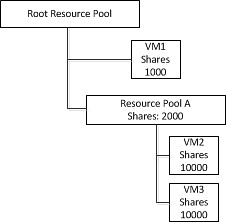
VM1 has a 1000 shares and Resource Pool A has 2000 shares. However Resource Pool A has 2 VMs and both will have 50% of those “2000” shares.

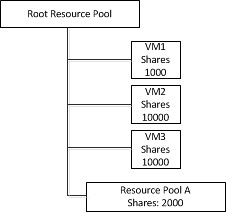
When the host would fail both VM2 and VM3 will end up on the same level as VM1. However as a custom shares value of 10000 was specified on both VM2 and VM3 they will completely blow away VM1 in times of contention. This is depicted in the following diagram:

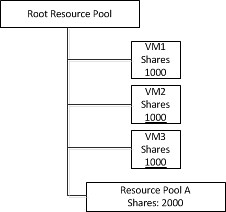
This situation would persist until the next invocation of DRS would re-parent the virtual machine to it’s original Resource Pool. To address this issue as of vSphere 4.1 DRS will flatten the virtual machine’s shares and limits before fail-over. This flattening process ensures that the VM will get the resources it would have received if it would have been failed over to the correct Resource Pool. This scenario is depicted in the following diagram. Note that both VM2 and VM3 are placed under the Root Resource Pool with a shares value of 1000.

Of course when DRS is invoked  both VM2 and VM3 will be re-parented under Resource Pool A and will receive the amount of shares they had originally assigned again. I hope this makes it a bit more clear what this “flattened shares” mechanism actually does.

New Academic/Tech Paper on FT

Duncan Epping · Jul 19, 2010 ·

I received this Paper a while back and think it is an excellent read. I just copied a random part of the paper to give you an idea of what it covers. There’s not much more to say about it then just read it, it is as in-depth as it can get on FT. I read it several times by now and still discover new things every time I read it.

The Design and Evaluation of a Practical System for Fault-Tolerant Virtual Machines

There are many possible ways to attempt to detect failure of the primary and backupVMs. VMware FT uses UDP heartbeating between servers that are running fault-tolerantVMs to detect when a server may have crashed. In addition, VMware FT monitors thelogging traffic that is sent from the primary to the backup VM and the acknowledgmentssent from the backup VM to the primary VM.

vSphere 4.1 HA feature, totally unsupported but too cool

Duncan Epping · Jul 16, 2010 ·

Early 2009 I wrote an article on the impact of Primary Nodes and Secondary Nodes on your design. This was primarily focussed on Blade environments and basically it discussed how to avoid having all your primary nodes in a single chassis. If that single chassis would fail, no VMs would be restarted as one of the primary nodes is the “failover coordinator” and without a primary node to assign this role to a failover can’t be initiated.

With vSphere 4.1 a new advanced setting has been introduced. This setting is not even experimental, it is unsupported. I don’t recommend anyone using this in a production environment, if you do want to play around with it use your test environment. Here it is:

das.preferredPrimaries = hostname1 hostname2 hostname3
or
das.preferredPrimaries = 192.168.1.1,192.168.1.2,192.168.1.3

The list of hosts that are preferred as primary can either be space or comma separated. You don’t need to specify 5 hosts, you can specify any number of hosts. If you specify 5 and all 5 are available they will be the primary nodes in your cluster. If you specify more than 5, the first 5 of your list will become primary.

Please note that I haven’t personally tried it and I can’t guarantee it will work.

VMware View without HA?

Duncan Epping · Jul 15, 2010 ·

I was discussing something with one of my former colleagues a couple of days ago. He asked me what the impact was of running VMware View in an environment without HA.

To be honest I am not a View SME, but I do know a thing or two about HA/vSphere in general. So the first thing that I mentioned was that it wasn’t a good idea. Although VDI in general is all about density not running HA in these environments could lead to serious issues when a host fails.

Now, just imagine you have 80 Desktop VMs per host running and roughly 8 hosts in a DRS only cluster on NFS based storage. One of those hosts is isolated from the network…. what happens?

  1. User connection is dropped
  2. VMDK Lock times out
  3. User tries to reconnect
  4. Broker powers on the VM on a new host

Now that sounds great doesn’t it? Well yeah in a way it does, but what happens when the host is not isolated anymore?

Indeed, the VMs were still running. So basically you have a split brain scenario. The only way in the past to avoid this was to make sure you had HA enabled and had set HA to power off the VM.

But with vSphere 4 Update 2 a new mechanism has been introduced. I wanted to stress this, as some people have already made assumption that it is part of AAM/HA. It actually isn’t… The question for powering off the VM to recover from the split brain scenario is generated by “hostd” and answered by “vpxa”. In other words, with or without HA enabled ESX(i) will recover the split brain

Again, I am most definitely not a Desktop/View guy so I am wondering how the View experts out there look against disabling HA on your View Compute Cluster. (Note that on the Management Layer this should be enabled.)

  • « Go to Previous Page
  • Page 1
  • Interim pages omitted …
  • Page 44
  • Page 45
  • Page 46
  • Page 47
  • Page 48
  • Interim pages omitted …
  • Page 63
  • Go to Next Page »

Primary Sidebar

About the Author

Duncan Epping is a Chief Technologist and Distinguished Engineering Architect at Broadcom. Besides writing on Yellow-Bricks, Duncan is the co-author of the vSAN Deep Dive and the vSphere Clustering Deep Dive book series. Duncan is also the host of the Unexplored Territory Podcast.

Follow Us

  • X
  • Spotify
  • RSS Feed
  • LinkedIn

Recommended Book(s)

Also visit!

For the Dutch-speaking audience, make sure to visit RunNerd.nl to follow my running adventure, read shoe/gear/race reviews, and more!

Do you like Hardcore-Punk music? Follow my Spotify Playlist!

Do you like 80s music? I got you covered!

Copyright Yellow-Bricks.com © 2026 · Log in