• Skip to primary navigation
  • Skip to main content
  • Skip to primary sidebar

Yellow Bricks

by Duncan Epping

  • Home
  • Unexplored Territory Podcast
  • HA Deepdive
  • ESXTOP
  • Stickers/Shirts
  • Privacy Policy
  • About
  • Show Search
Hide Search

vSphere

vSphere Native Key Provider backup not working

Duncan Epping · Apr 7, 2021 ·

I had three people asking this question the past few weeks, they were trying to configure the vSphere Native Key Provider so that they could enable vSAN Encryption, but the backup function wasn’t working. If you have not seen the Native Key Provider in action yet, just watch the video below.

As demonstrated in the video, when you configure the vSphere Native Key provider, you need to back up the key first before you can use it. Now, as mentioned, I had a few folks asking the past weeks why they couldn’t back up the key. The reason for it is simple, when you configure the Native Key Provider and want to back it up, you need to access the vSphere UI via the fully qualified domain name. In other words, when you access the H5 UI via the IP address of the vCenter Server, then the backup function won’t work. Also, when you have multiple vCenter Server instances in Linked Mode, you need to make sure you access the correct vCenter Server, the vCenter Server instance on which the Native Key Provider is enabled. Isn’t all of this documented? Yes, it is! But who reads documentation these days right?

vSAN File Services and Stretched Clusters!

Duncan Epping · Mar 29, 2021 ·

As most of you probably know, vSAN File Services is not supported on a stretched cluster with vSAN 7.0 or 7.0U1. However, starting with vSAN 7.0 U2 we now fully support the use of vSAN File Services on a stretched cluster configuration! Why is that?

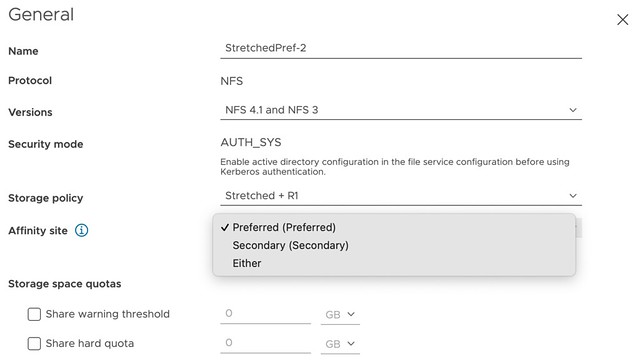
In 7.0 U2, you now have the ability to specify during configuration of vSAN File Services to which site certain IP addresses belong. In other words, you can specify the “site affinity” of your File Service services. This is shown in the screenshot below. Now I do want to note, this is a soft affinity rule. Meaning that if hosts, or VMs, fail on which these file services containers are running it could be that the container is restarted in the opposite location. Again, a soft rule, not a hard rule!

Of course, that is not the end of the story. You also need to be able to specify for each share with which location they have affinity. Again, you can do this during configuration (or edit it afterward if desired), and this basically then sets the affinity for the file share to a location. Or said differently, it will ensure that when you connect to file share, one of the file servers in the specified site will be used. Again, this is a soft rule, meaning that if none of the file servers are available on that site, you will still be able to use vSAN File Services,  just not with the optimized data path you defined.

Hopefully, that gives a quick overview of how you can use vSAN File Services in combination with a vSAN Stretched Cluster.  I created a video to demonstrate these new capabilities, you can watch it below.

Compute only HCI Mesh with vSAN 7.0 U2

Duncan Epping · Mar 16, 2021 ·

I guess that title explains it all, starting with vSAN 7.0 U2, we now also support connecting a compute-only cluster with a vSAN cluster. Meaning that if you have a vSphere cluster that does not have vSAN enabled, you can now mount a remote vSAN Datastore to it and leverage all the capabilities it provides!

I am sure seeing this new capability will make many of you happy, as we had many customers asking for this when we launched HCI Mesh with vSAN 7.0 U1. The great thing is that there’s no need for a vSAN license on the compute-only cluster, even though we load up the vSAN Client on the Client Cluster. No, we are not using NFS, but we are using the vSAN proprietary protocol for this. Another thing that may be useful to know is that we doubled the number of hosts that can be connected to a single datastore, this has gone from 64 to 128!

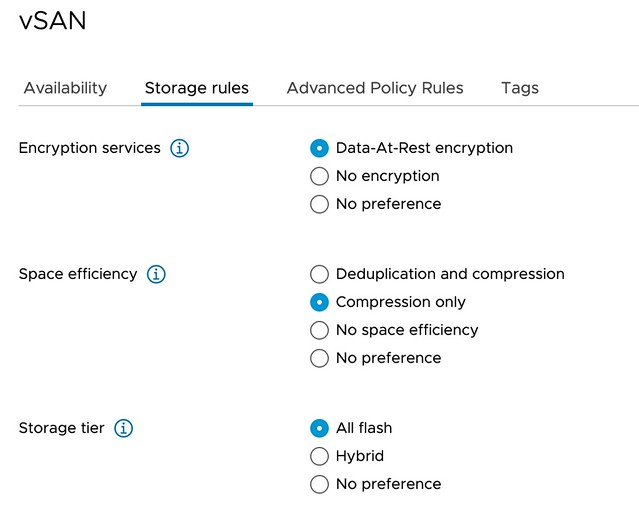
Last but not least, we have also extended the Policy Based Management Framework to allow for customers to specify which data services should be enabled on a datastore level. So if you select a policy, the vSAN datastores that will be presented, should not only be able to provide the RAID configuration specified, but should also have the data services enabled you require. Those data services would be: Deduplication and Compression, Compression, and/or Encryption, as shown in screenshot of the new policy capability below.

As mentioned, the feature itself is pretty straightforward and very easy to use. There are some things to take into consideration, of course, I wrote those down here. If you want to see it in action, make sure to check the demo below.

I joined the Futr Tech Podcast last week, check out the episode here!

Duncan Epping · Feb 16, 2021 ·

Last week I had the pleasure of joining Chris and Sandesh on the Futr Tech podcast. The episode was just published online, and I wanted to share it with all of you via this blog post. Make sure to watch/listen to the episode and subscribe to the youtube channel or podcast. I’ve been following these guys for a while, and there are some very interesting conversations to check out. (I enjoyed the episode with Bipul Sinha very much.)

You can find them on youtube here, or add them to your podcast app of choice (buzzsprout, spotify, itunes) I had fun, looking forward to some more podcasting in 2021!

How long does it take before a host is declared failed?

Duncan Epping · Jan 26, 2021 ·

I had a question this week around the failure of a host. The question was how long it takes before a host is declared failed. Now let’s be clear, failed means “dead” in this case, not isolated or partitioned. It could be the power has failed, the host has gone completely unresponsive, or anything else where there’s absolutely no response from the host whatsoever. In that scenario, how long does it take before HA has declared the VM dead? Now note, the below timeline is in a traditional infrastructure. Also note, that this is theoretical, when everything is optimal.

  • T0 – Secondary Host failure.
  • T3s – The Primary Host begins monitoring datastore heartbeats for 15 seconds.
  • T10s – The host is declared unreachable and the Primary will ping the management network of the failed host.
    • This is a continuous ping for 5 seconds.
  • T15s – If no heartbeat datastores are configured, the host will be declared dead.
  • T18s – If heartbeat datastores are configured and there have been no heartbeats, the host will be declared dead, restarts will be initiated.

Now, when a Primary Host fails the timeline looks a bit different. This is mainly because first, a new Primary Host will need to be elected. Also, we need to ensure that the new primary has received the latest state of all secondary hosts.

  • T0 – Primary Host failure.
  • T10s – Primary election process initiated.
  • T25s – New primary elected and reads the protectedlist.
    • New primary waits for secondary hosts to report running VMs
  • T35s – Old primary declared unreachable.
  • T50s – Old primary declared dead, new primary initiates restarts for all VMs on the protectedlist which are not running.

Keep in mind, this does not mean that VMs will be restarted with 18 seconds, or 35 seconds, for that matter. When the host is declared dead, or a new primary is elected, the restart process starts. The VMs that need to be restarted will first need to be placed, and when placed, they will need to be restarted. All of these steps will take time. On top of that, depending on the operating system and the apps running within the VM, the time it takes before the restart is fully completed could vary a lot between VMs. In other words, although the state is declared rather fast, the actual total time it takes to restart can vary and is definitely not an exact science.

  • « Go to Previous Page
  • Page 1
  • Interim pages omitted …
  • Page 6
  • Page 7
  • Page 8
  • Page 9
  • Page 10
  • Interim pages omitted …
  • Page 159
  • Go to Next Page »

Primary Sidebar

About the Author

Duncan Epping is a Chief Technologist and Distinguished Engineering Architect at Broadcom. Besides writing on Yellow-Bricks, Duncan is the co-author of the vSAN Deep Dive and the vSphere Clustering Deep Dive book series. Duncan is also the host of the Unexplored Territory Podcast.

Follow Us

  • X
  • Spotify
  • RSS Feed
  • LinkedIn

Recommended Book(s)

Also visit!

For the Dutch-speaking audience, make sure to visit RunNerd.nl to follow my running adventure, read shoe/gear/race reviews, and more!

Do you like Hardcore-Punk music? Follow my Spotify Playlist!

Do you like 80s music? I got you covered!

Copyright Yellow-Bricks.com © 2026 · Log in