• Skip to primary navigation
  • Skip to main content
  • Skip to primary sidebar

Yellow Bricks

by Duncan Epping

  • Home
  • Unexplored Territory Podcast
  • HA Deepdive
  • ESXTOP
  • Stickers/Shirts
  • Privacy Policy
  • About
  • Show Search
Hide Search

vsphere ha

This host has no isolation addresses defined as required by vSphere HA

Duncan Epping · Dec 19, 2018 ·

I had a comment on one of my 2-node vSAN cluster articles that there was an issue with HA when disabling the Isolation Response. The isolation response is not required for 2-node as it is impossible to properly detect an isolation event and vSAN has a mechanism to do exactly what the Isolation Response does: kill the VMs when they are useless. The error witnessed was “This host has no isolation addresses defined as required by vSphere HA” as shown also in the screenshot below.
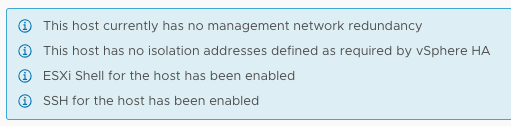
This host has no isolation addresses defined as required by vSphere HA

So now what? Well first of all, as mentioned in the comments section as well, vSphere always checks if an isolation address is specified, that could be the default gateway of the management network or it could be the isolation address that you specified through advanced setting das.isolationaddress. When you use das.isolationaddress it often goes hand in hand with das.usedefaultisolationaddress set to false. That last setting, das.usedefaultisolationaddress, is what causes the error above to be triggered. What you should do in a 2-node configuration is the following:

  1. Do not configure the isolation response, explanation to be found in the above-mentioned article
  2. Do not configure das.usedefaultisolationaddress, if it is configured set it to true
  3. Make sure you have a gateway on the management vmkernel, if that is not the case you could set das.isolationaddress and simply set it to 127.0.0.1 to prevent the error from popping up.

Hope this helps those hitting this error message.
What happens if all hosts in a vSphere HA cluster are isolated?

Duncan Epping · Aug 15, 2018 ·

I received this question through twitter today from Markus who was going through the vSphere 6.7 Clustering Deep Dive. And it is fairly straightforward: what happens when all hosts are isolated in a cluster, will the isolation response be triggered?

https://twitter.com/RealRockaut/status/1029652167735631874

I wrote about this a long long time ago, but it doesn’t hurt to re-iterate this. Before triggering the isolation response HA will actually verify the state of the rest of the cluster. Does anyone own the datastore on which the VMs that are impacted by this isolation run? If the answer is no, the ownership of a datastore is dropped during the election, then HA will not trigger the isolation response. I will try to update the book when I have time to include that, hopefully, that means a new version of the ebook will be pushed out to all owners automatically.

Trigger APD on iSCSI LUN on vSphere

Duncan Epping · Jun 21, 2018 ·

I was testing various failure scenarios in my lab today for the vSphere Clustering Deepdive session I have scheduled for VMworld. I needed some screenshots and log files of when a datastore hit an APD scenario, for those who don’t know APD stands for all paths down. In other words: the storage is inaccessible and ESXi doesn’t know what has happened and why. vSphere HA has the ability to respond to that kind of failure. I wanted to test this, but my setup was fairly simple and virtual. So I couldn’t unplug any cables. I also couldn’t make configuration changes to the iSCSI array as that would rather trigger a PDL (permanent device loss), so how do you test and APD scenario?

After trying various things like killing the iSCSI daemon (it gets restarted automatically with no impact on the workload) I bumped in to this command which triggered the APD:

  • SSH in to the host you want to trigger the APD on, run the following command
    esxcli iscsi session remove  -A vmhba65
  • Make sure of course to replace “vmhba65” with the name of your iSCSI adapter

This triggered APD, as witness in the fdm.log and vmkernel.log, and ultimately resulted in vSphere HA killing the impacted VM and restarting it on a healthy host. Anyway, just wanted to share this as I am sure there are others who would like to test APD responses in their labs or before their environment goes in to production.

There may be other easy ways as well, if you know any, please share in the comments section.

Insufficient configured resources to satisfy the desired vSphere HA failover level

Duncan Epping · Dec 9, 2017 ·

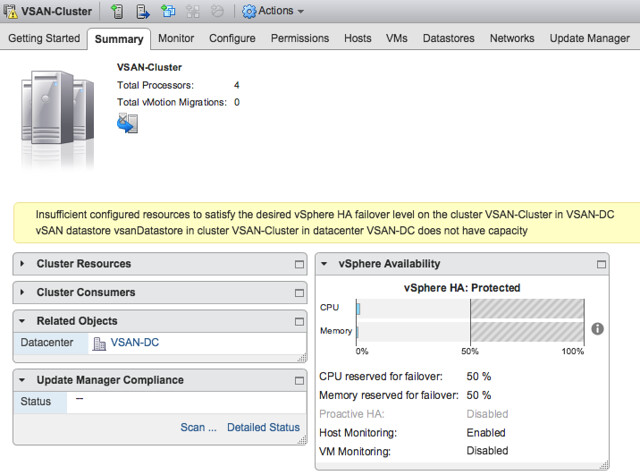
I was going over some of the VMTN threads and I noticed an issue brought up with Admission Control a while ago. Completely forgot about it until it was brought up again internally. With vSphere 6.5 and vSphere HA there seems to be a problem with some Admission Control Policies. When you for instance have selected the Percentage Based Admission Control Policy and you have a low number of hosts, you could receive the following error

Insufficient configured resources to satisfy the desired vSphere HA failover level on the cluster …

I managed to reproduce this in my lab, and this is what it looks like in the UI:

It seems to happen when there’s a minor difference in resources between the host, but I am not 100% certain about it. I am trying to figure out internally if it is a known issue or not, and will come back to this when I know in which patch it will be solved and/or if it is indeed a known issue.


Using HA VM Component Protection in a mixed environment

Duncan Epping · Nov 29, 2017 ·

I have some customers who are running both traditional storage and vSAN in the same environment. As most of you are aware, vSAN and VMCP do not go together at this point. So what does that mean for traditional storage, as in with traditional storage for certain storage failure scenarios you can benefit from VMCP.

Well the statement around vSAN and VMCP is actually a bit more delicate. vSAN does not propagate PDL or APD in a way which VMCP understands. So you can enable VMCP in your environment, without it having an impact on VMs running on top of vSAN. The VMs which are running on the traditional storage will be able to use the VMCP functionality, and if an APD or PDL is declared on the LUN they are running on vSphere HA will take action. For vSAN, well we don’t propagate the state of a disk that way and we have other mechanisms to provide availability / resiliency.

In summary: Yes, you can enable HA VMCP in a mixed storage environment (vSAN + Traditional Storage). It is fully supported.

  • « Go to Previous Page
  • Page 1
  • Page 2
  • Page 3
  • Page 4
  • Go to Next Page »

Primary Sidebar

About the Author

Duncan Epping is a Chief Technologist and Distinguished Engineering Architect at Broadcom. Besides writing on Yellow-Bricks, Duncan is the co-author of the vSAN Deep Dive and the vSphere Clustering Deep Dive book series. Duncan is also the host of the Unexplored Territory Podcast.

Follow Us

  • X
  • Spotify
  • RSS Feed
  • LinkedIn

Recommended Book(s)

Also visit!

For the Dutch-speaking audience, make sure to visit RunNerd.nl to follow my running adventure, read shoe/gear/race reviews, and more!

Do you like Hardcore-Punk music? Follow my Spotify Playlist!

Do you like 80s music? I got you covered!

Copyright Yellow-Bricks.com © 2026 · Log in