• Skip to primary navigation
  • Skip to main content
  • Skip to primary sidebar

Yellow Bricks

by Duncan Epping

  • Home
  • Unexplored Territory Podcast
  • HA Deepdive
  • ESXTOP
  • Stickers/Shirts
  • Privacy Policy
  • About
  • Show Search
Hide Search

VMware

Changes: I am joining VMware R&D!

Duncan Epping · Nov 27, 2012 ·

I just wanted to let all of you know that I have decided to take on a new challenge within VMware. Per December 1st I will be joining the R&D organization as part of Integration Engineering. In this team I will be providing operational and architectural feedback on our products to engineering and I will be exploring new possibilities with our products. Needless to say I am very excited about it!

I want to thank my management (Kaushik Banerjee and Bogomil Balkansky) for supporting my move and supporting me the last two years within Technical Marketing. I also want to thank all of my Technical Marketing friends for the fun projects we worked on together.

I am looking forward to getting started within Integration Engineering, and I am thankful for this awesome opportunity. I have been saying this at every single session I presented, but just as a reminder, if you have feedback around products / features / work flows / operational efficiency, don’t hesitate to let me know.

Want to do some VMware Hands-on Labs but don’t have the kit?

Duncan Epping · Nov 22, 2012 ·

Those who have visited VMworld and done a couple of labs know how awesome these are. Recently VMware announced that the VMware Hands-On Labs (HoL) would be made available online. You had the option to register for the beta and last week they announced the public beta was opened! On twitter some early reports are already popping up and judging by the comments people are loving it.

Just completed my first HOL – highly productive!! /cc @vmwarehol

— Maish Saidel-Keesing (@maishsk) November 22, 2012


@vmwarehol Glad to be a part of it! Really amazing stuff!!!

— Jake Robinson (@jakerobinson) November 17, 2012


Loving the HoL Beta! cc: @heyitspablo @vmwareholyfrog.com/mof74p

— Bill Hill (@virtual_bill) November 14, 2012


If you want to know more about the HoL portal make sure to read this blog, I played around with it various times… I loved it. Sign up and try it out. There is no excuse any longer for not having hands-on experience with VMware products, you don’t need to own a lab…

Warning: Latest OS X updates causes issues with Fusion 5.0.x!

Duncan Epping · Nov 12, 2012 ·

On the VMware VMTN Forums it is reported that VMware Fusion 5.0.x in combination with the latest OS X updates (MacBook Air and MacBook Pro Update 2.0) causes virtual machines to crash. This is reported in the following threads:

  • http://communities.vmware.com/thread/425117
  • http://communities.vmware.com/thread/425153
  • http://communities.vmware.com/thread/425010

The error encountered is:

VMware Fusion has encountered an error and has shut down the virtual machine.

You can simply solve this as mentioned by Darius:

In the meantime, please try this: With your VM powered off, go into the Virtual Machine > Settings, then choose Display, and turn off the Accelerate 3D Graphics option.  Then close the Settings window and try to power on your VM.

Cool iPad app: VMware Mobile Knowledge Portal

Duncan Epping · Oct 9, 2012 ·

We’ve just published a cool application, it is called the VMware Mobile Knowledge Portal.

Description
The Mobile Knowledge Portal gives you access to VMware marketing and technical content. Use the application to watch installation videos, read product whitepapers, and learn best practices.

I think this is a very useful app for those who like to have a centralized place for all their tech content. This is going to grow soon and be expanded in to various areas. Just go out and download it, try it and leave some feedback here!

Can I protect my vCenter Server with vSphere Replication?

Duncan Epping · Sep 21, 2012 ·

Someone asked this question last week when I posted my “back to basics” vSphere Replication blog. I guess protecting vCenter Server isn’t too difficult but how about recovering it after a failure?

Those who have used vSphere Replication know that you need vCenter Server to click “Recover”. In a dual vCenter Server configuration that is not a problem. But what if you just want to protect your vCenter Server virtual machine and replicate it to a second piece of storage. I tested this and then “killed” my vCenter Server. How do I get my vCenter Server up and running again from this replica?

Let me start by saying that this is unsupported as far as I know. So lets start by checking the folder in which the replica of the vCenter Server resides:

  8.5K Sep 21 09:46 hbrcfg.GID-d69c6cad-42a5-474a-86c4-c3158d1a3b42.6.nvram.18
  3.4K Sep 21 09:46 hbrcfg.GID-d69c6cad-42a5-474a-86c4-c3158d1a3b42.6.vmx.16
   267 Sep 21 09:46 hbrcfg.GID-d69c6cad-42a5-474a-86c4-c3158d1a3b42.6.vmxf.17
124.0K Sep 21 09:46 hbrdisk.RDID-9786ae39-cd3a-4773-be63-cd1bc3641d59.14.175750085646519-delta.vmdk
   379 Sep 21 09:46 hbrdisk.RDID-9786ae39-cd3a-4773-be63-cd1bc3641d59.14.175750085646519.vmdk
 52.0K Sep 21 09:46 hbrdisk.RDID-ae17cfad-c8d8-460c-99a1-8f26ff1133b9.13.43820857661344-delta.vmdk
   375 Sep 21 09:46 hbrdisk.RDID-ae17cfad-c8d8-460c-99a1-8f26ff1133b9.13.43820857661344.vmdk
  4.1K Sep 21 09:46 hbrgrp.GID-d69c6cad-42a5-474a-86c4-c3158d1a3b42.txt
 25.0G Sep 21 09:46 vcenter-tm01-flat.vmdk
   473 Sep 21 09:46 vcenter-tm01.vmdk
 60.0G Sep 21 09:46 vcenter-tm01_1-flat.vmdk
   476 Sep 21 09:46 vcenter-tm01_1.vmdk

As you can see the folder contains a lot of files we are familiar with… Especially the vmdk files and the vmx files is something we can work with. So how would we get this vcenter up and running. Lets look at the vmxf file first as that will reveal the original name of the vmx file:

<vmxPathName type="string">vcenter-tm01.vmx</vmxPathName></VM></Foundry>

Next I am going to copy the “.nvram”, “.vmx” and “.vmxf” file and give them the name “vcenter-tm01.nvram” etc.

cp hbrcfg.GID-d69c6cad-42a5-474a-86c4-c3158d1a3b42.6.vmxf.17 vcenter-t 
vcenter-tmp.vmxf

So now I have all the files I need with the right name… Next I will first “unregister” the original vCenter Server virtual machine… just to avoid any weird issues. I list all the virtual machines registered against this host first:

vim-cmd /vmsvc/getallvms

Now that I have the “vmid” I can unregister the original virtual machine:

vim-cmd /vmsvc/unregister <vmid>

Now that the original virtual machine is removed unregistered from the host, I should be able to register the “new” vCenter Server virtual machine… aka the replica.

vim-cmd /solo/register /vmfs/volumes/4f228789-84f6b84c-e17e-984be1047b16/vcenter-tm01/vcenter-tm01.vmx

Lets break that one down just to be clear:

vim-cmd /solo/register /path/to/vmxfile/filename.vmx

This command will return the “vmid” of the virtual machine we just registered. Now we can power it on…

vim-cmd /vmsvc/power.on

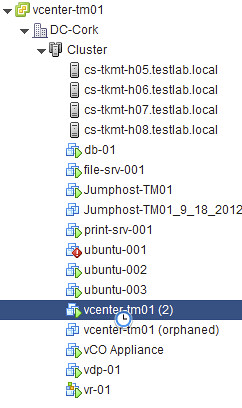
Now it sits there for a while, and when I log in with the vSphere Client and check the host it is running on I see this message that says “the virtual machine might have been moved or copied…”, I answer it by saying that is was copied and now the vCenter virtual machine boots up and I can login again. Yes there is an orphaned vCenter Server instance there, and you will need to clean that up… also there might be some obsolete files in the folder of this replica, and you might want to clean those up as well. Anyway, the vCenter Server virtual machine is up and running again, and that was the goal of this exercise right 🙂

  • « Go to Previous Page
  • Page 1
  • Interim pages omitted …
  • Page 73
  • Page 74
  • Page 75
  • Page 76
  • Page 77
  • Interim pages omitted …
  • Page 124
  • Go to Next Page »

Primary Sidebar

About the Author

Duncan Epping is a Chief Technologist and Distinguished Engineering Architect at Broadcom. Besides writing on Yellow-Bricks, Duncan is the co-author of the vSAN Deep Dive and the vSphere Clustering Deep Dive book series. Duncan is also the host of the Unexplored Territory Podcast.

Follow Us

  • X
  • Spotify
  • RSS Feed
  • LinkedIn

Recommended Book(s)

Also visit!

For the Dutch-speaking audience, make sure to visit RunNerd.nl to follow my running adventure, read shoe/gear/race reviews, and more!

Do you like Hardcore-Punk music? Follow my Spotify Playlist!

Do you like 80s music? I got you covered!

Copyright Yellow-Bricks.com © 2026 · Log in