• Skip to primary navigation
  • Skip to main content
  • Skip to primary sidebar

Yellow Bricks

by Duncan Epping

  • Home
  • Unexplored Territory Podcast
  • HA Deepdive
  • ESXTOP
  • Stickers/Shirts
  • Privacy Policy
  • About
  • Show Search
Hide Search

VMware

VMware View Infrastructure Resiliency whitepaper published

Duncan Epping · Feb 24, 2013 ·

One of the white papers I worked on in 2012 when I was part of Technical Marketing was just published. This white paper is about VMware View infrastructure resiliency. It is a common question from customers, and now with this white paper you can explore the different options and understand the impact of these options. Below is a link to the paper and the description is has on the VMware website.

VMware View Infrastructure Resiliency: VMware View 5 and VMware vCenter Site Recovery Manager
“This case study provides insight and information on how to increase availability and recoverability of a VMware View infrastructure using VMware vCenter Site Recovery Manager (SRM), common disaster recovery (DR) tools and methodologies, and vSphere High Availability.”

I want to thank Simon Richardson, Kris Boyd, Matt Coppinger and John Dodge for working with me on this paper. Glad it is finally available!
vSphere HA 5.x restart attempt timing

Duncan Epping · Feb 18, 2013 ·

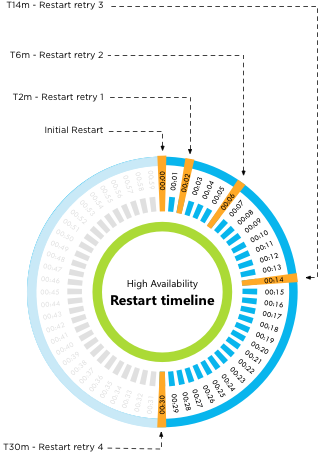
I wrote about how vSphere HA 5.x restart attempt timing works a long time ago but there appears still to be some confusion about this. I figured I would clarify this a bit more, I don’t think I can make it more simple than this:

  • Initial restart attempt
  • If the initial attempt failed, a restart will be retried after 2 minutes of the previous attempt
  • If the previous attempt failed, a restart will be retried after 4 minutes of the previous attempt
  • If the previous attempt failed, a restart will be retried after 8 minutes of the previous attempt
  • If the previous attempt failed, a restart will be retried after 16 minutes of the previous attempt

After the fifth failed attempt the cycle ends. Well that is, unless a new master host is selected (for whatever reason) between the first and the fifth attempt. In that case, we start counting again. Meaning that if a new master is selected after attempt 3, the new master will start with the “initial restart attempt.

Or as Frank Denneman would say:

vSphere HA 5.x restart attempt timing


** Disclaimer: This article contains references to the words master and/or slave. I recognize these as exclusionary words. The words are used in this article for consistency because it’s currently the words that appear in the software, in the UI, and in the log files. When the software is updated to remove the words, this article will be updated to be in alignment. **

VMware to acquire Virsto; Brief look at what they offer today

Duncan Epping · Feb 11, 2013 ·

Most of you have seen the announcement around Virsto by now, for those who haven’t read this blog post: VMware to acquire Virsto. Virsto is a storage company which offers a virtual storage solution. I bumped in to Virsto various times in the past and around VMworld 2012 got reminded about them when Cormac Hogan wrote an excellent article about what they have to offer for VMware customers. (Credits go to Cormac for the detailed info in this post)  When visiting Virsto’s website there is one thing that stands out and that is “software defined storage”. Lets take a look at what Virsto offers and what software defined storage means to them.

Lets first start with the architecture. Virsto has developed an appliance and a host level service which together forms an abstraction layer for existing storage devices. In other words, storage devices are connected directly to the Virsto appliance and Virsto aggregates these devices in to a large storage pool. This pool is in its turn served up to your environment as an NFS datastore. Now I can hear you think, what is so special about this?

As Virsto has abstracted storage and raw device are connected to their appliance they control the on-disk format. What does this mean? Devices that are attached to the Virsto appliance are not formatted with VMFS. Rather Virsto has developed their own filesystem which is highly scalable and what makes this solution really interesting. This filesystem is what allows Virsto to offer specific data services, to increase performance and scale and reduce storage capacity consumption.

Lets start with performance, as Virsto sits in between your storage device and your host they can do certain things to your IO. Not only does Virsto increase read performance, but their product also increases write performance. Customers have experienced performance increases between 5x and 10x. For the exact technical details read Cormac’s article. For now let me say that they sequentialise IO in a smart way and de-stage writes to allow for a more contiguous IO flow to your storage device. As you can imagine, this also means that the IO utilisation of your storage device can and probably will go down.

From an efficiency perspective Virsto optimizes your storage capacity by provisioning every single virtual disk as a thin disk. However, this thin disk does not introduce the traditional performance overhead associated with thin disks preventing the waste of precious disk space just to avoid performance penalties. What about functionality like snapshotting and cloning, this must introduce overhead and slow things down is what I can hear you think… Again, Virsto has done an excellent job of reducing overhead and optimizing for scale and performance. Virsto allows for hundreds, if not thousands, of clones of a gold template without sacrificing performance while saving storage capacity. Not surprising Virsto is often used in Virtual Desktop and large Test and Development environments as it has proven to reduce the cost of storage with as much as 70%.

Personally I am excited about what Virsto has to offer and what they have managed to achieve in a relatively short time frame. The solution they have developed, and especially their data services framework promises a lot for the future. Hopefully I will have time on my hands soon to play with their product and provide you with more insights and experience.

Software Defined Datacenter Roadshow – Benelux – Free Event!

Duncan Epping · Feb 6, 2013 ·

Would like to hear more about Software Defined Datacenters from experts like Frank Denneman, Mike Laverick, Cormac Hogan, Kamau Wanguhu and many others? VMware and IBM are organizing an awesome event in the Benelux. Yes this is a full day event, and it is free for everyone, if you just want to sign up… go here. If you need to be convinced keep reading as there are some awesome sessions scheduled.

Agenda
09.00 - 09.30 Registration
09.30 - 09.45 Welcome
09.45 - 10.30 Keynote VMware: Software-Defined Data Center
10.30 - 11.15 Keynote IBM: Converged Systems: beyond NextGen DC’s
11.15 - 11.30 Break and split into parallel sessions
11.30 - 12.15 Parallel track 1 or meet the expert
12.15 - 13.00 Lunch
13.00 - 13.45 Parallel track 2 or meet the expert
14.00 - 14.45 Parallel track 3 or meet the expert
15.00 - 15.45 Parallel track 4 or meet the expert
16.00 - 16.45 Parallel track 5 or meet the expert
16.45 - 17.30 Networking drink

The awesome part is that at this event you will also have the ability to sit down with one of the experts for a 1:1 discussion and get your questions answered. Below is the list of people you can sit down with, make sure to register for that!

VMware
Frank Denneman – Resource Management Expert
Cormac Hogan – Storage Expert
Kamau Wanguhu – Software Defined Networking Expert
Mike Laverick – Cloud Infrastructure Expert
Ton Hermes – End User Computing Expert

IBM
Tikiri Wanduragala – IBM PureSystems Expert
Dennis Lauwers – Converged Systems Expert
Geordy Korte – Software Defined Networking Expert
Andreas Groth – End User Computing Expert

So if you live in The Netherlands, Belgium or Luxemburg… make sure to sign up. As mentioned, it is a free event. And with people like Cormac Hogan, Frank Denneman, Mike Laverick and Kamau Wanguhu you know it is going to get deep technical.

  • 5th March – Amsterdam
  • 7th March – Brussels
  • 8th March – Luxemburg

–> Sign up now <–

Insufficient resources to satisfy HA failover level on cluster

Duncan Epping · Dec 4, 2012 ·

I had this question yesterday where the error “Insufficient resources to satisfy HA failover level on cluster” comes from. And although it is hopefully clear to all of my regular readers this is caused by something that is called vSphere HA Admission Control, I figured I would reemphasize it and make sure people can easily find it when they do a search on my website.

When vSphere HA Admission Control is enabled vCenter Server validates if enough resources are available to guarantee all virtual machines can be restarted. If this is not the case the error around the HA failover level will appear. So what could cause this to happen and how do you solve it?

  • Are all hosts in your cluster still available (any hosts down )?
    • If a host is down  it could be insufficient resource are available to guarantee restarts
  • Check which admission control policy has been selected
    • Depending on which policy has been selected a single large reservation could skew the admission control algorithm (primarily “host failures” policy is impacted by this)
  • Admission Control was recently enabled
    • Could be that the cluster was overcommitted, or various reservations are used,  causing the policy to be violated directly when enabled

In most cases when this error pops up it is caused by a large reservation on memory or CPU and that should always be the first thing to check. There are probably a million scripts out there to check this, but I prefer to use either the CloudPhysics appliance (cloud based flexible solution with new reports weekly), or RVTools which is a nice Windows based utility that produces quick reports. If you are interested in more in-depth info on admission control I suggest reading this section of my vSphere HA deepdive page.

  • « Go to Previous Page
  • Page 1
  • Interim pages omitted …
  • Page 72
  • Page 73
  • Page 74
  • Page 75
  • Page 76
  • Interim pages omitted …
  • Page 124
  • Go to Next Page »

Primary Sidebar

About the Author

Duncan Epping is a Chief Technologist and Distinguished Engineering Architect at Broadcom. Besides writing on Yellow-Bricks, Duncan is the co-author of the vSAN Deep Dive and the vSphere Clustering Deep Dive book series. Duncan is also the host of the Unexplored Territory Podcast.

Follow Us

  • X
  • Spotify
  • RSS Feed
  • LinkedIn

Recommended Book(s)

Also visit!

For the Dutch-speaking audience, make sure to visit RunNerd.nl to follow my running adventure, read shoe/gear/race reviews, and more!

Do you like Hardcore-Punk music? Follow my Spotify Playlist!

Do you like 80s music? I got you covered!

Copyright Yellow-Bricks.com © 2026 · Log in