• Skip to primary navigation
  • Skip to main content
  • Skip to primary sidebar

Yellow Bricks

by Duncan Epping

  • Home
  • Unexplored Territory Podcast
  • HA Deepdive
  • ESXTOP
  • Stickers/Shirts
  • Privacy Policy
  • About
  • Show Search
Hide Search

VMware

VSAN VDI Benchmarking and Beta refresh!

Duncan Epping · Nov 26, 2013 ·

I was reading this blog post on VSAN VDI Benchmarking today on Vroom, the VMware Performance blog. You see a lot of people doing synthetic tests (max iops with sequential reads) on all sorts of storage devices, but lately more and more vendors are doing these more “real world performance tests”. While reading this article about VDI benchmarking, and I suggest you check out all parts (part 1, part 2, part 3), there was one thing that stood out to me and that was the comparison between VSAN and an All Flash Array.

The following quotes show the strength of VSAN if you ask me:

we see that VSAN can consolidate 677 heavy users (VDImark) for 7-node and 767 heavy users for 8-node cluster. When compared to the all flash array, we don’t see more than 5% difference in the user consolidation.

Believe me when I say that 5% is not a lot. If you are actively looking at various solutions, I would highly recommend to include the “overhead costs” to your criteria list as depending on the solution chosen this could make a substantial difference. I have seen other solutions requiring a lot more resources. But what about response time, cause that is where the typical All Flash Array shines… ultra low latency, how about VSAN?

Similar to the user consolidation, the response time of Group-A operations in VSAN is similar to what we saw with the all flash array.

Both very interesting results if you ask me. Especially the < 5% in user consolidation is what stood out to me the most! Once again, for more details on these tests read the VDI Benchmarking blog part 1, part 2, part 3!

Beta Refresh

For those who are testing VSAN, there is a BETA refresh available as of today. This release has a fix for the AHCI driver issue… and it increases the disk group limit from 6 to 7. From a disk group perspective this will  come in handy as many servers have 8, 16 or 24 disk slots allowing you to do 7HHDs + 1 SSD per group. Also some additional RVC commands have been added in the storage policy space, I am sure they will come in handy!

Nice side affect of the number of HDDs going up is increase in max capacity:

(8 hosts * (5 diskgroups * 7 HDDs)) * Size of HDD = Total capacity

With 2 TB disks this would result in:

(8 * (5 * 7)) * 2TB = 560TB

Now keep on testing with VSAN and don’t forget to report feedback through the community forums or your VMware rep.
Virtual SAN and maintenance windows…

Duncan Epping · Nov 25, 2013 ·

After writing the article that “4 is the minimum number of hosts for VSAN” I received a lot of questions via email and on twitter etc about the cost associated with it and if this was a must. Let me start with saying that I wrote this article to get people thinking about Sizing their VSAN environment. When it comes to it, Virtual SAN and maintenance windows can be a difficult topic.

I guess there are a couple of things to consider here. Even in a regular storage environment you typically do upgrades in a rolling fashion meaning that if you have two controllers one will be upgraded while they other handles IO. In that case you are also at risk. The thing is though, as a virtualization administrator you have a bit more flexibility, and you expect certain features to work as expected like for instance vSphere HA. You need to ask yourself what is the level of risk I am willing to take, the level of risk I can take?

When it comes to placing a host in to Maintenance Mode, from a VSAN point of view you will need to ask yourself:

  • Do I want to move data from one host to another to maintain availability levels?
  • Do I just want to ensure data accessibility and take the risk of potential downtime during maintenance?

I guess there is something to say for either. When you move data from one node to another, to maintain availability levels, your “maintenance window” could be stretched extremely long. As you would potentially be copying TBs over the network from host to host it could take hours to complete. If your ESXi upgrade including a host reboot takes about 20 minutes, is it acceptable to wait for hours for the data to be migrated? Or do you take the risk, inform your users about the potential downtime, and as such do the maintenance with a higher risk but complete it in minutes rather than hours? After those 20 minutes VSAN would sync up again automatically, so no data loss etc.

It is impossible for me to give you advice on this one to be honest, I would highly recommend to also sit down with your storage team. Look at what their current procedures are today, what they have included in their SLA to the business (if there is one), and how they handle upgrades / periodic maintenance.


VSAN performance: many SAS low capacity VS some SATA high capacity?

Duncan Epping · Nov 14, 2013 ·

Something that I have seen popping up multiple times now is the discussion around VSAN and spindles for performance. Someone mentioned on the community forums they were going to buy 20 x 600GB SAS drives for their VSAN environment for each of their 3 hosts. These were 10K SAS disks, which obviously outperform the 7200 RPM SATA drives. I figured I would do some math first:

  • Server with 20 x 600GB 10K SAS = $9,369.99 per host
  • Server with 3 x 4TB Nearline SAS = $4,026.91 per host

So that is about a 4300 dollar difference. Note that I did not spec out the full server, so it was a base model without any additional memory etc, just to illustrate the Perf vs Capacity point. Now as mentioned, of course the 20 spindles would deliver additional performance. Because after all you have additional spindles and better performing spindles. So lets do the math on that one taking some average numbers in to account:

  • 20 x 10K RPM SAS with 140 IOps each = 2800 IOps
  • 3 x 7200 RPM NL-SAS with 80 IOps each = 240 IOps

That is a whopping 2560 IOps difference in total. That does sound like an awe full lot doesn’t it? To  a certain extent it is a lot, but will it really matter in the end? Well the only correct answer here is: it depends.

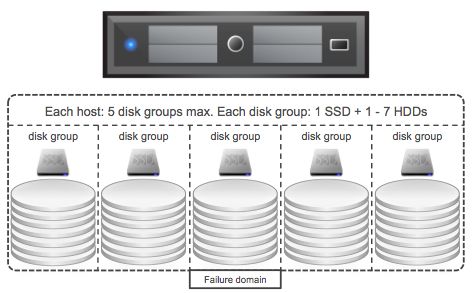
I mean, if we were talking about a regular RAID based storage system it would be clear straight away… the 20 disks would win for sure. However we are talking VSAN here and VSAN heavily leans on SSD for performance. Meaning that each diskgroup is fronted by an SSD and that SSD is used for both Read Caching (70% of capacity) and write buffering (30%) of capacity. Illustrated in the diagram below.

The real question is what is your expected IO pattern? Will most IO come from read cache? Do you expect a high data change rate and as such could de-staging be problematic when backed by just 3 spindles? Then on top of that, how and when will data be de-staged? I mean, if data sits in write buffer for a while it could be the data changes 3 or 4 times before being destaged, preventing the need to hit the slow spindles. It all depends on your workload, your IO pattern, your particular use case. Looking at the difference in price, I guess it makes sense to ask yourself the question what $ 4300 could buy you?

Well for instance 3 x 400GB Intel S3700 capable of delivering 75k read IOps and 35k write IOps (~800 dollars per SSD). That is extra, as with the server with 20 disks you would also still need to buy SSD and as the rule of thumb is roughly 10% of your disk capacity you can see what either the savings are or the performance benefits could be. In other words, you can double up on the cache without any additional costs compared to the 20-disk server. I guess personally I would try to balance it a bit, I would go for higher capacity drives but probably not all the way up to 4TB. I guess it also depends on the server type you are buying, will they have 2.5″ drive slots or 3.5″? How many drive slots will you have and how many disks will you need to hit the capacity requirements? Are there any other requirements? As this particular user mentioned for instance he expected extremely high sustained IOs and potentially full backups daily, as you can imagine that could impact the number of spindles desired/required to meet performance expectations.

The question remains, what should you do? To be fair, I cannot answer that question for you… I just wanted to show that these are all things one should think about before buying hardware.

Just a nice little fact, today a VSAN host can have 5 Disk Groups with 7 disks, so 35 disks in total. With 32 hosts in a cluster that is 1120 disks… That is some nice capacity right with 4TB disks that are available today.

I also want to point out that a tool is being developed as we speak which will help you making certain decisions around hardware, cache sizing etc. Hopefully more news on that soon,

** Update, as of 26/11/2013 the VSAN Beta Refresh allows for 7 disks in a disk group… **


VSAN and Network IO Control / VDS part 2

Duncan Epping · Nov 12, 2013 ·

About a week ago I wrote this article about VSAN and Network IO Control. I originally wrote a longer article that contained more options for configuring the network part but decided to leave a section out of it for simplicity sake. I figured as more questions would come I would publish the rest of the content I developed. I guess now is the time to do so.

In the configuration described below we will have two 10GbE uplinks teamed (often referred to as “etherchannel” or “link aggregation”). Due to the physical switch capabilities the configuration of the virtual layer will be extremely simple. We will take the following recommended minimum bandwidth requirements in to consideration for this scenario:

  • Management Network –> 1GbE
  • vMotion VMkernel –> 5GbE
  • Virtual Machine PG –> 2GbE
  • Virtual SAN VMkernel interface –> 10GbE

When the physical uplinks are teamed (Multi-Chassis Link Aggregation) the Distributed Switch load balancing mechanism is required to be configured as:

  1. IP-Hash
    or
  2. LACP

It is required to configure all portgroups and VMkernel interfaces on the same Distributed Switch using either LACP or IP-Hash depending on the type physical switch used. Please note all uplinks should be part of the same etherchannel / LAG. Do not try to create anything fancy here as a physically and virtually incorrectly configured team can and probably will lead to more down time!

  • Management Network VMkernel interface = LACP / IP-Hash
  • vMotion VMkernel interface = LACP / IP-Hash
  • Virtual Machine Portgroup = LACP / IP-Hash
  • Virtual SAN VMkernel interface = LACP / IP-Hash

As various traffic types will share the same uplinks we also want to make sure that no traffic type can push out other types of traffic during times of contention, for that we will use the Network IO Control shares mechanism.

We will work under the assumption that only have 1 physical port is available and all traffic types share the same physical port for this exercise. Taking a worst case scenario approach in to consideration will guarantee performance even in a failure scenario. By taking this approach we can ensure that Virtual SAN always has 50% of the bandwidth to its disposal while leaving the remaining traffic types with sufficient bandwidth to avoid a potential self-inflicted DoS. When both Uplinks are available this will equate to 10GbE, when only one uplink is available the bandwidth is also cut in half; 5GbE. It is recommended to configure shares for the traffic types as follows:


Traffic Type Shares Limit
Management Network  20 n/a
vMotion VMkernel Interface  50 n/a
Virtual Machine Portgroup  30 n/a
Virtual SAN VMkernel Interface  100 n/a


The following diagram depicts this configuration scenario.

vSphere Metro Storage Cluster using Virtual SAN, can I do it?

Duncan Epping · Oct 31, 2013 ·

This question keeps on coming up over and over again lately, vSphere Metro Storage Cluster (vMSC) using Virtual SAN, can I do it? (I guess the real question is “should you do it”.) It seems that Virtual SAN/VSAN is getting more and more traction, even though it is still beta and people are trying to come up with all sorts of interesting usecases. At VMworld various people asked if they could use VSAN to implement a vMSC solution during my sessions and the last couple of weeks this question just keeps on coming up in emails etc.

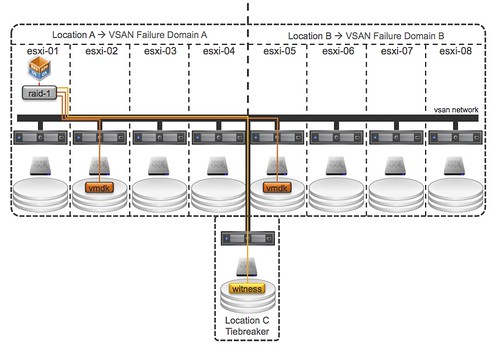
I guess if you look at what VSAN is and does it makes sense for people to ask this question. It is a distributed storage solution with a synchronous distributed caching layer that allows for high resiliency. You can specify the number of copies required of your data and VSAN will take care of the magic for you, if a component of your cluster fails then VSAN can respond to it accordingly. This is what you would like to see I guess:

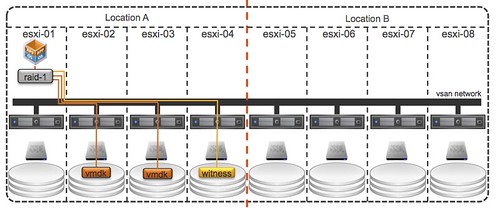
Now let it be clear, the above is what you would like to see in a stretched environment but unfortunately not what VSAN can do in its current form. I guess if you look at the following it becomes clear why it might not be a such a great idea to use VSAN for this use case at this point in time.

The problem here is:

  • Object placement: You will want that second mirror copy to be in Location B but you cannot control it today as you cannot define “failure domains” within VSAN at the moment.
  • Witness placement: Essentially you want to have the ability to have a 3rd site that functions as a tiebreaker when there is a partition / isolation event.
  • Support: No one has tested/certified VSAN over distance, in other words… not supported

For now, the answer is to the question can I use Virtual SAN to build a vSphere Metro Storage Cluster is: No, it is not supported to span a VSAN cluster over distance. The feedback and request from many of you has been heard loud and clear by our developers and PM team… And at VMworld it was already mentioned by one of the developers that he was intrigued by the use case and he would be looking in to it in the future. Of course, there was no mention of when this would happen or even if it would ever happen.

  • « Go to Previous Page
  • Page 1
  • Interim pages omitted …
  • Page 65
  • Page 66
  • Page 67
  • Page 68
  • Page 69
  • Interim pages omitted …
  • Page 124
  • Go to Next Page »

Primary Sidebar

About the Author

Duncan Epping is a Chief Technologist and Distinguished Engineering Architect at Broadcom. Besides writing on Yellow-Bricks, Duncan is the co-author of the vSAN Deep Dive and the vSphere Clustering Deep Dive book series. Duncan is also the host of the Unexplored Territory Podcast.

Follow Us

  • X
  • Spotify
  • RSS Feed
  • LinkedIn

Recommended Book(s)

Also visit!

For the Dutch-speaking audience, make sure to visit RunNerd.nl to follow my running adventure, read shoe/gear/race reviews, and more!

Do you like Hardcore-Punk music? Follow my Spotify Playlist!

Do you like 80s music? I got you covered!

Copyright Yellow-Bricks.com © 2026 · Log in