• Skip to primary navigation
  • Skip to main content
  • Skip to primary sidebar

Yellow Bricks

by Duncan Epping

  • Home
  • Unexplored Territory Podcast
  • HA Deepdive
  • ESXTOP
  • Stickers/Shirts
  • Privacy Policy
  • About
  • Show Search
Hide Search

VMware

Essential Virtual SAN book available as of today! (ebook first)

Duncan Epping · Jul 11, 2014 ·

Yes, the day has finally come… Our pet project, the Essential Virtual SAN book is finally out! Cormac and I decided to take the “e-book first” route which enables us to have it out weeks before the printed copy. Before doing the thank you’s and provide you with some details on what the book is about, I want to thank my co-author Cormac! It was a great pleasure working with you on this project Cormac, thanks for asking me to be part of this exciting book!

We want to thank our technical editors Paudie O’Riordan and Christos Karamanolis, whom spent countless of hours reading and editing our raw materials. We would like to thank the VMware Virtual SAN engineering team for the countless of hours discussing the ins and outs of Virtual SAN. Especially Christian Dickmann and (again) Christos Karamanolis, it would not have been possible without your help! We also want to acknowledge William Lam, Wade Holmes, Rawlinson Rivera, Simon Todd, Alan Renouf, and Jad El-Zein for their help and contributions to the book. Last but not least we want to thank the Pearson team for their flexibility and agility and getting things done, and our management (Phil Weiss, Adam Zimman, and Mornay van der Walt) for supporting us on this journey.!

Cormac and I are also very pleased to say that we have two awesome forewords by no one less than VMware CTO Ben Fathi and SVP of Storage and Availability at VMware Charles Fan! Thanks for taking the time out of your busy schedule, we very much appreciate it.

What does the book cover?

Understand and implement VMware Virtual SAN: the heart of tomorrow’s Software-Defined Datacenter (SDDC)

VMware’s breakthrough Software-Defined Datacenter (SDDC) initiative can help you virtualize your entire datacenter: compute, storage, networks, and associated services. Central to SDDC is VMware Virtual SAN (VSAN): a fully distributed storage architecture seamlessly integrated into the hypervisor and capable of scaling to meet any enterprise storage requirement.

Now, the leaders of VMware’s wildly popular Virtual SAN previews have written the first authoritative guide to this pivotal technology. You’ll learn what Virtual SAN is, exactly what it offers, how to implement it, and how to maximize its value.

Writing for administrators, consultants, and architects, Cormac Hogan and Duncan Epping show how Virtual SAN implements both object-based storage and a policy platform that simplifies VM storage placement. You’ll learn how Virtual SAN and vSphere work together to dramatically improve resiliency, scale-out storage functionality, and control over QoS.

Both an up-to-the-minute reference and hands-on tutorial, Essential Virtual SAN uses realistic examples to demonstrate Virtual SAN’s most powerful capabilities. You’ll learn how to plan, architect, and deploy Virtual SAN successfully, avoid gotchas, and troubleshoot problems once you’re up and running.

Coverage includes

  • Understanding the key goals and concepts of Software-Defined Storage and Virtual SAN technology
  • Meeting physical and virtual requirements for safe Virtual SAN implementation
  • Installing and configuring Virtual SAN for your unique environment
  • Using Storage Policy Based Management to control availability, performance, and reliability
  • Simplifying deployment with VM Storage Policies
  • Discovering key Virtual SAN architectural details: caching I/O, VASA, witnesses, pass-through RAID, and more
  • Ensuring efficient day-to-day Virtual SAN management and maintenance
  • Interoperating with other VMware features and products
  • Designing and sizing Virtual SAN clusters
  • Troubleshooting, monitoring, and performance optimization

ASIN: B00LODTZSA
ISBN-10: 013385499X
ISBN-13: 978-0133854992

You can buy it via Amazon.com for Kindle, and it will also be available shortly via Pearson.com for any other ebook format!
das.maskCleanShutdownEnabled is set to true by default

Duncan Epping · Jul 9, 2014 ·

I had a couple of questions on the topic of das.maskCleanShutdownEnabled today. For those who have not read the other articles I wrote about this topic, this is in short what it does and why it was introduced and how I explained it in an email today:

When a virtual machine is powered off (or shut down) by a user a property is set to true named “runtime.cleanPowerOff”. To vSphere HA this indicates that the virtual machine was powered off by a user and as such when a host fails it knows that for this virtual machine it doesn’t need to take action. By default this property is set to true. If for whatever reason the virtual machine is killed by ESXi than this property is set to false.

vSphere HA provides the ability to respond to a storage failure (PDL). When a PDL occurs it can kill a virtual machine and then restart the virtual machine. However, “runtime.cleanPowerOff” default is “true” and vSphere HA cannot access the datastore (PDL remember) to change the property! So this means if the VM is killed after the PDL, then it won’t be restarted as HA assumes it was cleanly powered off.

This is where das.maskCleanShutdownEnabled comes in to play. By setting this to “true”, vSphere HA assumes that VM is not cleanly powered off. Only when you cleanly power it off the property is set. In other words, In a PDL situation it will now restart the VM even though the datastore was unavailable when the VM was killed!

Back to the original question, what is das.maskCleanShutdownEnabled set to in 5.1 and later? Do you need to set it manually? No you do not, by default it is set to true! So when you configure a cluster, be aware of this… Especially in a stretched cluster environment where a PDL scenario is not unlikely.

** do not forget to also set terminateVMonPDL described in this blog post if you want VMs to be automatically killed when a PDL occurs! **

Result of the Vietnam volunteering experience…

Duncan Epping · Jun 27, 2014 ·

Before I forget, once again I would like to thank everyone who has made all of this possible. All the individuals and corporations who stepped up and made a donation, thank you on behalf of Orphan Impact and of course all of the children! (Donations are always welcome and help is always needed, look here for more details.) Some of you reached out to me personally and have asked me what the result was of the volunteering and their donations to Orphan Impact. Well the result was huge if I say so myself. With the money raised and the help provided Orphan Impact is on its way to provide computer classes to multiple additional orphanages! I just received a video that I wanted to share with all of you. In this video the results of the trip are explained both from the Orphan Impact side and from the VMware side in terms of volunteering experience.

Before I do, for those who missed the original blog posts on my volunteering experience:

  • Vietnam trip, first couple of days…
  • Vietnam trip, half way down…
  • Almost wrapping up: Vietnam Trip
  • As he faced the sun he cast no shadow

Orphan Impact Story:

Quick pointer to new Virtual SAN Ready Node configs

Duncan Epping · Jun 23, 2014 ·

Just a quick pointer to the new document that holds all Virtual SAN Ready Node configurations: Virtual SAN Ready Node.pdf. In this document various new configurations are described and a couple of old ready node configurations appear to have been removed. I expect these new configurations to be added in the upcoming weeks.

Another very useful document recently released on the topic of Virtual SAN hardware is the following: Virtual SAN Hardware Quick Reference Guide. It describes for both Server and VDI workloads different profiles and give examples around how you should configure your hardware to meet certain requirements.

Disconnect a host from VSAN cluster doesn’t change capacity?

Duncan Epping · Jun 13, 2014 ·

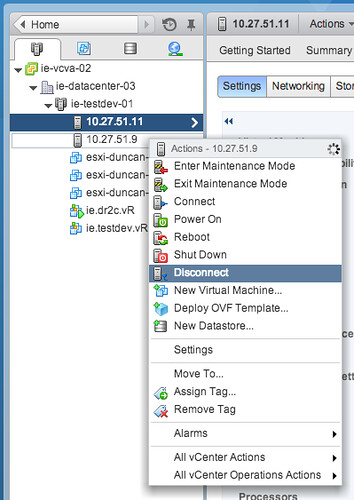
Someone asked this question on VMTN this week and I received a similar question this week from another user… If you disconnect a host from a VSAN cluster it doesn’t change the total amount of available capacity. The customer was wondering why this was. Well the answer is simple: You are not disconnecting the host from your VSAN cluster, but you are rather disconnecting it from vCenter Server instead! (In contrary to HA and DRS by the way) In other words: your VSAN host is still providing storage to the VSAN datastore when it is disconnected.

If you want a host to leave a VSAN cluster you have two options in my opinion:

  • Place it in maintenance mode with full data migration and remove it from the cluster
  • Run the following command from the ESXi command line:
    esxcli vsan cluster leave

Please keep that in mind when you do maintenance… Do not use “disconnect” but actually remove the host from the cluster if you do not want it to participate in VSAN any longer.

  • « Go to Previous Page
  • Page 1
  • Interim pages omitted …
  • Page 58
  • Page 59
  • Page 60
  • Page 61
  • Page 62
  • Interim pages omitted …
  • Page 124
  • Go to Next Page »

Primary Sidebar

About the Author

Duncan Epping is a Chief Technologist and Distinguished Engineering Architect at Broadcom. Besides writing on Yellow-Bricks, Duncan is the co-author of the vSAN Deep Dive and the vSphere Clustering Deep Dive book series. Duncan is also the host of the Unexplored Territory Podcast.

Follow Us

  • X
  • Spotify
  • RSS Feed
  • LinkedIn

Recommended Book(s)

Also visit!

For the Dutch-speaking audience, make sure to visit RunNerd.nl to follow my running adventure, read shoe/gear/race reviews, and more!

Do you like Hardcore-Punk music? Follow my Spotify Playlist!

Do you like 80s music? I got you covered!

Copyright Yellow-Bricks.com © 2026 · Log in