• Skip to primary navigation
  • Skip to main content
  • Skip to primary sidebar

Yellow Bricks

by Duncan Epping

  • Home
  • Unexplored Territory Podcast
  • HA Deepdive
  • ESXTOP
  • Stickers/Shirts
  • Privacy Policy
  • About
  • Show Search
Hide Search

VMware

Book: Networking for VMware Administrators

Duncan Epping · Mar 25, 2014 ·

Fellow blogger Chris Wahl just announced the availability of an awesome book titled Networking for VMware Administrators he authored with Steve Pantol. The book is published via VMware Press and is a must read if you ask me. I am going to order it for sure as it is an area that I can definitely brush up on. The book is 368 pages and covers everything from the networking models to switching, but of course heavily focuses on the virtual side and dives in to the standard vSwitch, distributed switch and the Cisco Nexus 1000v!

Knowing Chris this book is going to be worth it, his blog material has always been excellent and I expect nothing less. Congrats Chris and Steve, awesome work and looking forward to reading it.
You can pick the book up here: paper | kindle

VSAN HCL more than VSAN-ready nodes

Duncan Epping · Mar 20, 2014 ·

Over the last couple of weeks, basically since VSAN was launched, I noticed something and I figured I would blog about it. Many people seem to be under the impression that the VSAN Ready Nodes are your only option if you want to buy new servers to run VSAN on. This is definitely NOT the case. VSAN Ready Nodes are a great solution for people who do not want to bother going through the exercise of selecting components themselves from the VSAN HCL. However, the process is not as complicated as it sounds.

There are a couple of “critical aspects” when it comes to configuring a VSAN host and those are:

  • Server which is on the vSphere HCL (pick any)
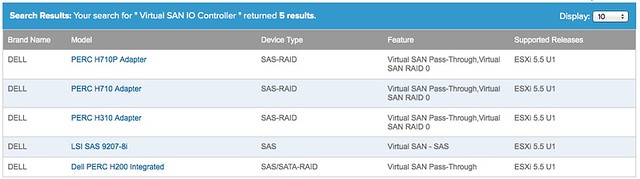
  • SSD, Disk Controller and HDD which is on the VSAN HCL: vmwa.re/vsanhcl

Yes that is it! So if you look at the current list of Ready Nodes for instance, it contains a short list of Dell Servers (T620 and R720). However the vSphere HCL has a long list of Dell Servers, and you can use ANY of those. You just need to make sure your VSAN (critical) components are certified, and you can simply do that using the VSAN HCL. For instance, even the low end PowerEdge R320 can be configured with components that are supported by VSAN today as it supports the H710 and the H310 disk controller which are also on the VSAN HCL.

So let me recap that: You can select ANY host from the vSphere HCL, as long as you ensure the SSD / Disk Controller and HDD are on the VSAN HCL you should be good.

VSAN and the AHCI controller (hint: not supported!)

Duncan Epping · Mar 17, 2014 ·

I have seen multiple people reporting this already so I figured I would write a quick blog post. Several folks are going from Beta to GA release for VSAN and so far people have been very successful, except for those using disk controllers which are not on the HCL like the on-board AHCI controller. For whatever reason it appeared on the HCL for a short time during the beta, but it is not supported (and not listed) today. I have had similar issues in my lab, and as far as I am aware there is no workaround at the moment. The errors you will see appear in the various logfiles have the keywords: “APD”, “PDL”, “Path lost” or “NMP device <xyz> is blocked”.

Before you install / configure Virtual SAN I highly want to recommend validating the HCL: http://vmwa.re/vsanhcl (I figured I will need this URL a couple of times in the future so I created this nice short url)

Update: with 5.5 U2 it is reported AHCI works, however still not supported!

Rebuilding your Virtual SAN Lab? Wipe the disks first!

Duncan Epping · Mar 12, 2014 ·

** You can do this in the vSphere UI these days, read William’s article on how to! **

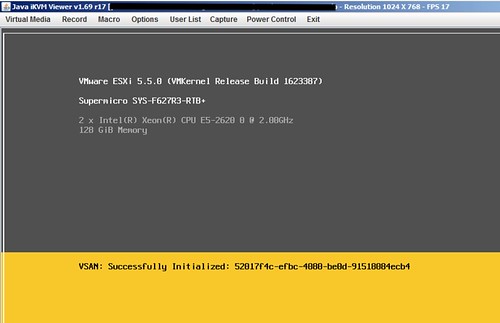
Are you ready to start rebuilding your Virtual SAN lab from beta builds to GA code, vSphere 5.5 U1? One thing I noticed is that the installer is extremely slow when there are Virtual SAN partitions on disk. It sits there at “VSAN: successfully initialized” for a long time and when you get to the “scanning disks” part it takes equally as long. Eventually I succeeded, but it just took a long time. Could be because I am running with an uncertified disk controller of course, either way if you are stuck in the following screen there is a simple solution.

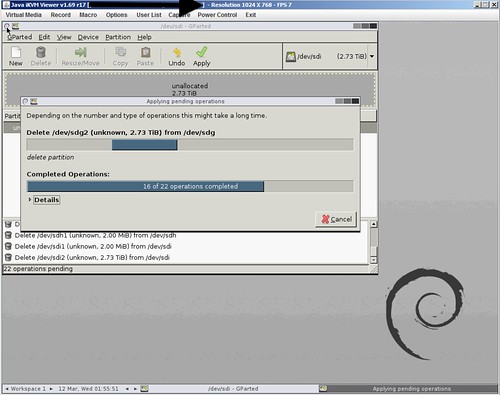
Just wipe ALL disks first before doing the installation. I used the Gparted live ISO to wipe all my disks clean, just delete all partitions and select “apply”. Takes a couple of minutes, but saved me at least 30 minutes waiting during the installation.

VSAN Design Consideration: Booting ESXi from USB with VSAN?

Duncan Epping · Mar 10, 2014 ·

** Update, as of November 21st we also support SD/USB boot with higher memory configurations when core dump partition is increased. Also read this KB article on the topic of increasing the ESXi diagnostic partition size **

One thing most probably won’t realize is that there is a design consideration with VSAN when it comes to installing ESXi. Many of you have probably been installing ESXi on USB or SD and this is also still supported with VSAN. There is one caveat however and this caveat is around the total number of GBs of memory in a host. The design consideration is fairly straight forward and also documented in the VSAN Design and Sizing Guide. Just to make it a bit easier to find it I copied/pasted it here for your convenience:

  • Use SD, USB, or hard disk devices as the installation media whenever ESXi hosts are configured with as much as 512GB memory. Minimum size for USB/SD card is 4GB, recommended 8GB.
  • Use a separate magnetic disk or solid-state disk as the installation device whenever ESXi hosts are configured with more than 512GB memory.

You may wonder what the reason is, the reason for this is that VSAN will use the core dump partition to store VSAN traces that can be used by VMware Global Support Services and the VMware Engineering team for root cause analysis when needed. So make sure when configuring host to keep this in mind when going above 512GB of memory.

Please note that this is what has been tested by VMware and will be supported, so this is not just any recommendation but could have impact on support!

  • « Go to Previous Page
  • Page 1
  • Interim pages omitted …
  • Page 60
  • Page 61
  • Page 62
  • Page 63
  • Page 64
  • Interim pages omitted …
  • Page 124
  • Go to Next Page »

Primary Sidebar

About the Author

Duncan Epping is a Chief Technologist and Distinguished Engineering Architect at Broadcom. Besides writing on Yellow-Bricks, Duncan is the co-author of the vSAN Deep Dive and the vSphere Clustering Deep Dive book series. Duncan is also the host of the Unexplored Territory Podcast.

Follow Us

  • X
  • Spotify
  • RSS Feed
  • LinkedIn

Recommended Book(s)

Also visit!

For the Dutch-speaking audience, make sure to visit RunNerd.nl to follow my running adventure, read shoe/gear/race reviews, and more!

Do you like Hardcore-Punk music? Follow my Spotify Playlist!

Do you like 80s music? I got you covered!

Copyright Yellow-Bricks.com © 2026 · Log in