• Skip to primary navigation
  • Skip to main content
  • Skip to primary sidebar

Yellow Bricks

by Duncan Epping

  • Home
  • Unexplored Territory Podcast
  • HA Deepdive
  • ESXTOP
  • Stickers/Shirts
  • Privacy Policy
  • About
  • Show Search
Hide Search

VMware

VMworld 2015: vSphere APIs for IO Filtering update

Duncan Epping · Aug 31, 2015 ·

I suspect that the majority of blogs this week will all be about Virtual SAN, Cloud Native Apps and EVO. If you ask me then the vSphere APIs for IO Filtering announcements are just as important. I’ve written about VAIO before, in a way, and it was first released in vSphere 6.0 and opened to a select group of partners. For those who don’t know what it is, lets recap, the vSphere APIs for IO Filtering is a framework which enables VMware partners to develop data services for vSphere in a fully supported fashion. VMware worked closely with EMC and Sandisk during the design and development phase to ensure that VAIO would deliver what partners would require it to deliver.

These data services can be applied to on a VM or VMDK granular level and can be literally anything by simply attaching a policy to your VM or VMDK. In this first official release however you will see two key use cases for VAIO though:

  1. Caching
  2. Replication

The great thing about VAIO if you ask me is that it is an ESXi user space level API, which over time will make it possible for all the various data services providers (like Atlantis, Infinio etc) who now have a “virtual appliance” based solution to move in to ESXi and simplify their customers environment by removing that additional layer. (To be technically accurate, VAIO APIs are all user level APIs, the filters are all running in user space, only a part of the VAIO framework runs inside the kernel itself.) On top of that, as it is implemented on the “right” layer it will be supported for VMFS (FC/iSCSI/FCoE etc), NFS, VVols and VSAN based infrastructures. The below diagram shows where it sits.
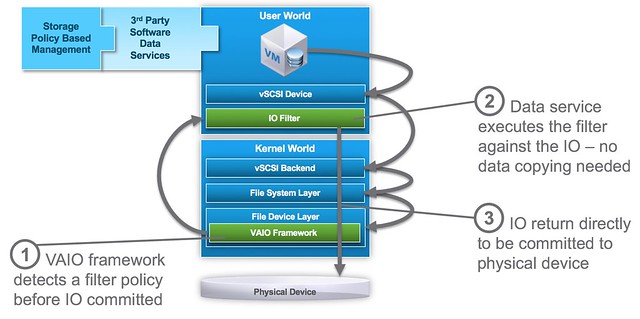
VAIO software services are implemented before the IO is directed to any physical device and does not interfere with normal disk IO. In order to use VAIO you will need to use vSphere 6.0 Update 1. On top of that of course you will need to procure a solution from one of the VMware partners who are certified for it, VMware provides the framework – partners provide the data services!

As far as I know the first two to market will be EMC and Sandisk. Other partners who are working on VAIO based solutions and you can expect to see release something are Actifio, Primaryio, Samsung, HGST and more. I am hoping to be able to catch up with one or two of them this week or over the course of the next week so I can discuss it a bit more in detail.
Project #vGiveback

Duncan Epping · Aug 30, 2015 ·

It is VMworld again, and just like last year VMware decided to give back to the community. No I am not talking about the virtualization community, but I am talking about charity, the great thing is that just like last year you can get VMware to give away an X amount to a charity cause of your choice (health, children, education or environment). As a friend of the VMware foundation I would like to ask ALL of you to help. So what do you need to do, what is the goal?

Well it is simple. Publish a picture on either Instagram or Twitter. Make sure the picture represents the cause and of course you need to tag it, use #vGiveBack and copy in @vmwFoundation. Your message should look like something like this:

Make sure to take a pic at Mos West and select your charity cause! Slightly awkward though 😀 #environment #vGiveBack pic.twitter.com/UUJ1EvO58X

— Duncan Epping (@DuncanYB) August 30, 2015

(Causes can be: #health #children #education or #environment)

The goal is 10,000 photos between Monday, August 31st and Thursday, September 3rd, out of which a mosaic will be crated. The final image for the mosaic symbolizes our community impact, and once complete, unlocks a donation that will be divided in proportion to the causes you select.

So what am I asking?

  1. Post a picture on twitter or instagram with the right hashtags and make copy in @vmwFoundation (it doesn’t need to be in front of one of those signs by the way, it can be a different pic…)
  2. Ask all of your friends to do the same, we need to hit that number lets make this go viral!

Every little bit will help. Each tweet or instagram post will bring us one step closer to unlocking our collective impact. If you don’t have twitter or instagram, ask your wife/son/daughter/friend to post for you!

Virtual SAN Ready Nodes taking charge!

Duncan Epping · Aug 25, 2015 ·

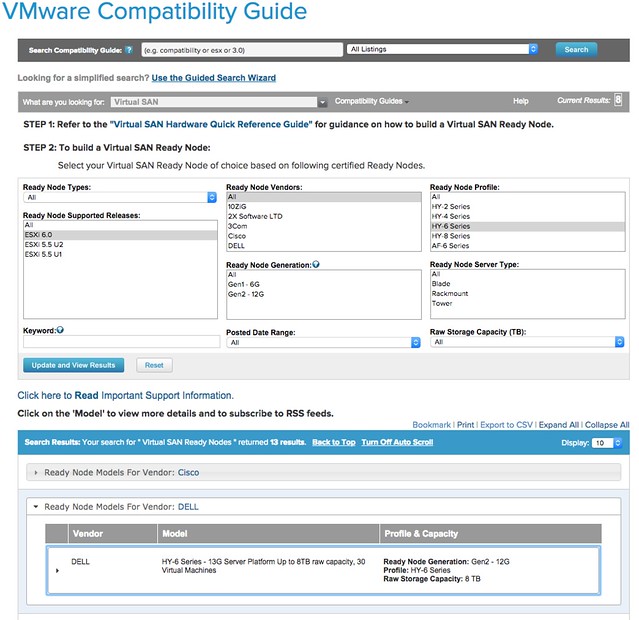
Yes that is right, Virtual SAN Ready Nodes are taking charge! As of today when you visit the VMware Compatibility Guide for Virtual SAN it will all revolve around Virtual SAN Ready Nodes instead of individual components. You may ask yourself why that is, well basically because we want to make it easier for you to purchase the hardware needed while removing the complexity of selecting components. This means that if you are a Dell customer and want to run Virtual SAN you can simply select Dell in the VMware Compatibility Guide and then look at the different models there are of the different sizes. It is very easy as can be seen in the screenshot below.

virtual san ready nodes

Traditionally there were 3 different sizes for “Server Virtualization”, but with the full overhaul of the VSAN VCG a new size was added. The naming of the sizing has also changed. Let me explain what it looks like now, note that these “sizing profiles” are the same across all vendors so comparing HP to Dell or IBM (etc) was never easier!

New NameOld Name
HY-2Hybrid Server Low
HY-4** new **
HY-6Hybrid Server Medium
HY-8Hybrid Server High
HY-8Hybrid VDI Linked Clones
Hybrid VDI Full Clones
AF-6All Flash Server Medium
AF-8All Flash Server High
AF VDI Linked Clones
AF VDI Full Clones

The new model introduced is HY-4 Series, the reason this model was introduced is because some customers felt that the price difference between HY-2 and H&-6 was too big. By introducing a model in between we now cover all price ranges. Note that it is still possible when selecting the models to make changes to the configuration. If you want model HY-2 with an additional 2 disks, or with 128GB of memory instead of 32GB then you can simply request this.

So what are we talking about in terms of capacity etc? Of course this is all documented and listed on the VCG as well, but let me share it with you here also for your convenience. Note that performance and VM numbers may be different for your scenario, this of course will depend on your workload and the size of your VMs etc.

ModelCPU / MemStorage CapStorage PerfVMs per node
HY-21 x 6 core / 32GB2TB4000 IOPSUp to 20
HY-42 x 8 core / 128GB4TB10K IOPSUp to 30
HY-62 x 10 core / 256GB8TB20K IOPSUp to 50
HY-82 x 12 core / 348GB12TB40K IOPSUp to 100
AF-62x12 core / 256GB8TB50K IOPSUp to 60
AF-82x12 core / 348GB12TB80K IOPSUp to 120

In my opinion, this new “Ready Node” driven VMware Compatibility Guide driven approach is definitely 10 times easier then focusing on individual components. You pick the ready node that comes close to what you are looking for, provide your OEM with the SKU listed and tell them about any modifications needed in terms of CPU/Mem or Disk Capacity. PS: If you want to access the “old school HCL” then just click on the “Build Your Own based on Certified Components” link on the VCG page.

Tintri announces all-flash storage device and Tintri OS 4.0

Duncan Epping · Aug 20, 2015 ·


Last week I had the pleasure of catching up with Tintri. It has been a while since I spoke with them, but I have been following them from the very start. I met up with them in Mountain View a couple of times when it was just a couple of guys on a rather empty floor with a solution that sounded really promising. Tintri’s big thing is simplicity if you ask me. Super simple to setup, really easy to manage, and providing VM granular controls for about everything you can imagine. The solution comes in the form of a hybrid storage device (disks and flash) which is served up to the hypervisor as an NFS mount.
Today Tintri announces that they will be offering an all-flash system next to their hybrid systems. When talking to Kieran he made it clear that the all-flash system would probably be only for a subset of their customers. The key reason for this being that the hybrid solution already brings great performance and is at a much lower cost of course. The new all-flash model is named VMstore T5000 and comes in two variants: T5060 and T5080. The T5060 can hold up to 2500 VMs and around 36TB with dedupe and compression. For the T5080 that is 5000 VMs and around 73TB. Both delivered in a 2U form factor by the way. The expected use case for the all flash systems is large persistent desktops and multi TB high performance databases. Key thing here is of course not jus the number of IOPS it can drive, but the consistent low latency it can deliver.

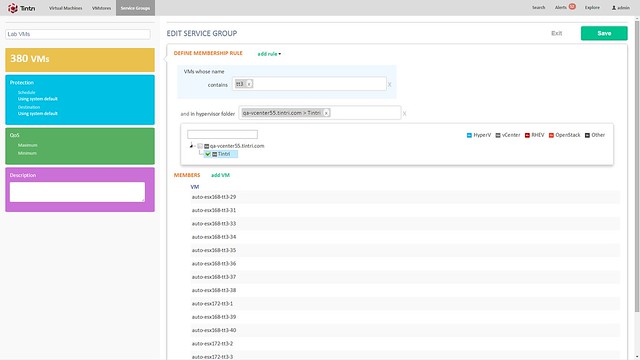
Besides the hardware, there is also a software refresh. Tintri OS 4.0 and Global Center 2.1 are being announced. Tintri OS 4.0 is what is sitting on the VMstore storage systems and Global Center is their central management solution. With the 2.1 release Global Center now supports up to 100.000 VMs. It allows you to centrally manage both Tintri’s hybrid and all-flash systems from one UI and smart things like informing you when a VM is provisioned to the wrong storage system (hybrid but performance wise requires all-flash for instance). Not just inform you, but it also has the ability to migrate the VM from storage system to storage system. Note that during the migration all aspects that were associated with it (QoS, Replication etc) is kept. (Not unlike Storage DRS, but in this case the solution is aware of all that happens on the storage system) What I liked personally about Global Center is the performance views / health views. It is very easy to see what the state of your environment is, where latency is coming from etc. Also, if you need to configure things like QoS, replication or snapshotting for multiple VMs you can do this from the Global Center console by simply grouping them as show in the screenshot below.

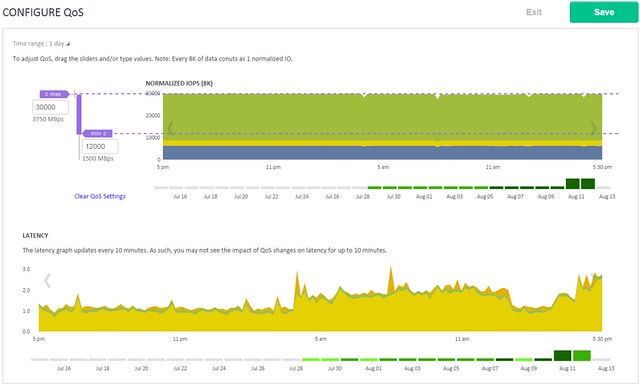
Tintri QoS was demoed during the call, and I found this also particularly interesting as it allows you to define QoS on a VM (or VMDK) granular level. When you do things like specifying an IOPS limit it is good to know that Tintri normalizes the IOPS based on the size of the IO. Simply said, all IO of 8KB or lower becomes 1 normalized IOPS, an IO which is 16KB will be 2 normalized IOPS etc. This to ensure fairness in environments (this will be almost every environment) where IO sizes greatly vary. Those whom have ever tried to profile their workloads will know why this is important. What I’ve always like about Tintri is their monitoring things like latency for instance how they split that up in hypervisor, network and storage is very useful. They have done an excellent job again for QoS management.

Last but not least Tintri introduces Tintri VMstack. Basically their converged offering where Compute + Storage + Hypervisor is bundled and delivered as a single stack to customers. It will provide you the choice of storage platform (well needs to be Tintri of course), hypervisor, compute and network infrastructure. It can also include things like OpenStack or the vRealize Suite. Personally I think this is a smart move, but this is something I would have preferred to have seen launched 12-18 months ago. Nevertheless, it is a good move.

Using VM-Host rules without DRS enabled

Duncan Epping · Aug 20, 2015 ·

This week I was playing with the VM-Host rules in my environment. In this particular environment I had DRS disabled and I noticed some strange things when I created the VM-Host rules. I figured it should all work in a normal way as I was always told that VM/Host rules can be configured without DRS being enabled. And from a “configuration” perspective that is correct. However there is a big caveat here, and lets look at the two options you have when creating a rule namely “should” and “must”.

When using a VM-Host “must” rule when DRS is disabled it all works as expected. When you have the rule defined then you cannot place the VM on a host which is not within the VM-Host group. You cannot power it on on those hosts, no vMotion and HA will not place the VM there either after a failure. Everything as expected.

In the case of a VM-Host “should” rule when DRS is disabled this is different! When you have a should rule defined and DRS is disabled then vCenter will allow you to power on a VM on a host which is not part of the rule. HA will restart VMs on hosts as well which are not part of the rule, and you can migrate a VM to one of those hosts. All of this without a warning that the host is not in the rule and that you are violating the rule. Even after explicitly defining an alarm I don’t see anything triggered. The alarm by the way is called “VM is violating a DRS VM-Host affinity rule”.

I reached out to the HA/DRS engineering team and asked them why that is. It appears the logic for the “should” rule, in contrary to the “must rule, is handled by DRS. This includes the alerting. It makes sense to a certain extent, but it wasn’t what I expected.  So be warned, if you don’t have DRS enabled, “VM-Host should rules” will not work. Must rules however will work perfectly fine. (Yes, I’ve asked them to look in to this and fix it so it behaves as you would expect it to behave and come with a warning when you try anything that violates a should rule.)


  • « Go to Previous Page
  • Page 1
  • Interim pages omitted …
  • Page 48
  • Page 49
  • Page 50
  • Page 51
  • Page 52
  • Interim pages omitted …
  • Page 124
  • Go to Next Page »

Primary Sidebar

About the Author

Duncan Epping is a Chief Technologist and Distinguished Engineering Architect at Broadcom. Besides writing on Yellow-Bricks, Duncan is the co-author of the vSAN Deep Dive and the vSphere Clustering Deep Dive book series. Duncan is also the host of the Unexplored Territory Podcast.

Follow Us

  • X
  • Spotify
  • RSS Feed
  • LinkedIn

Recommended Book(s)

Also visit!

For the Dutch-speaking audience, make sure to visit RunNerd.nl to follow my running adventure, read shoe/gear/race reviews, and more!

Do you like Hardcore-Punk music? Follow my Spotify Playlist!

Do you like 80s music? I got you covered!

Copyright Yellow-Bricks.com © 2026 · Log in