• Skip to primary navigation
  • Skip to main content
  • Skip to primary sidebar

Yellow Bricks

by Duncan Epping

  • Home
  • Unexplored Territory Podcast
  • HA Deepdive
  • ESXTOP
  • Stickers/Shirts
  • Privacy Policy
  • About
  • Show Search
Hide Search

VMware

HCI1603BU – Tech Preview of Native vSAN Data Protection

Duncan Epping · Sep 4, 2018 ·

The second session I watched was HCI1603BU Tech Preview of Native vSAN Data Protection by Michael Ng. I already discussed vSAN Data Protection last year, but considering the vSAN Beta is coming up soon that includes this functionality I felt it was worth covering again. Note that the beta will be a private beta, so if you are interested please sign up, you may be one of the customers getting selected for the beta.
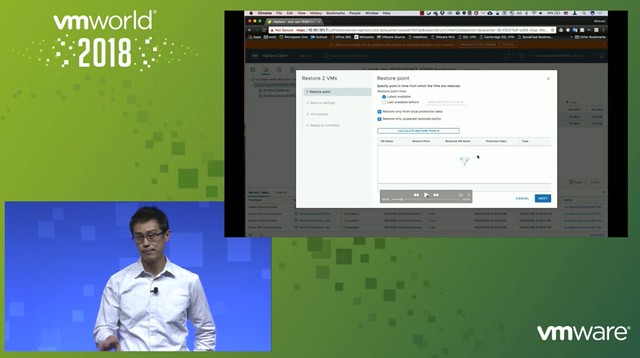
Michael started out with an explanation about what an SSDC brings to customers, and how a digital foundation is crucial for any organization that wants to be competitive in the market. vSAN, of course, is a big part of the digital foundation, and for almost every customer data protection and data recovery is crucial. Michael went over the various vSAN use cases and also the availability and recoverability mechanisms before introducing Native vSAN Data Protection.

Now it is time for the vSAN Native Data Protection introduction. Michael first explains that we will potentially have a solution in the future where we can simply create snapshots locally through specifying the number of local snapshots you want in policy. On top of that, in the future, we will potentially provide the option to specify the snapshots (plus a full copy) will need to be offloaded to secondary storage. Secondary storage could be NFS, S3 Object Storage (both on-premises and in the cloud). Also, it should be possible to replicate VMs and snapshots to a DR location through policies.

What I think is very compelling is the fact that the native protection comes as part of vSAN/vSphere, there’s no need to install an appliance or additional software. vSAN Data Protection will be baked into the platform. Easy to enable and easy to consume through policy. The first focus is vSAN Local Data Protection.

vSAN Local Data Protection will provide Crash and Application-consistent snapshots at an RPO of 5 minutes and with a low RTO. On top of that, it will be possible to instant clone the snapshot. Meaning that you can restore the snapshot as an “instant clone”, this could be interesting when you want to test a certain patch or upgrade for instance. You can even specify during the recovery that the NIC doesn’t need to be connected. Application consistency is achieved by leveraging VSS providers on Windows and on Linux the VMware Tools pre- and post-scripts are being used.

What enables vSAN Data Protection is a new snapshotting technology. This new technology provides a lot better performance than traditional vSphere (or vSAN) snapshots. It also provides for better scale, meaning that you can go way above the 32 limit we currently have.

Next Michael demoed vSAN Data Protection, which is something I have done on various occasions if you are interested in what it looks like just watch the session. If I have time I may record a demo myself just so it is easier to share with you.

What I personally hadn’t seen yet were the additional performance views added. Very useful as it allows you to quickly check what the impact is of snapshots on general performance. Is there an impact? Do I need to change my policy?

Last but not least various questions were asked, most interesting parts was the following:

  • “file level restore” is on the roadmap but the first feature they will tackle is offloading to secondary storage.
  • “consistency groups” is something that is being planned for, especially useful when you have applications or services spanning VMs.
  • Integration with vRealize Automation, some of it is planned for the first release, everything is SPBM based which already have APIs. Being planned for is “self-service restore”
  • 100 snapshots per VM is tested for the first release

Good session, worth watching!
HCI1998BU – Enable High-Capacity Workloads with Elastic vSAN on VMware Cloud

Duncan Epping · Sep 4, 2018 ·

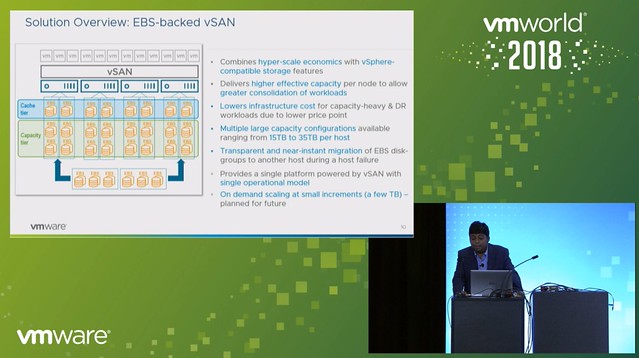
I just watched the session by Rakesh and Peng on Elastic vSAN, also known as “EBS Backed vSAN”. This session was high on my list to watch live at VMworld, but unfortunately, I couldn’t attend it due to various other obligations. If you are interested in the full session, make sure to watch it here, it is free. If you want to read a short summary then have a look below.

EBS backed vSAN is exactly what you expect it to be, having said that I do want to point out that EBS backed vSAN is supported for vSAN in VMware Cloud on AWS only. On top of that, it is recommended to run workloads on it which require high capacity. You could, for instance, consider leveraging EBS backed vSAN as a high capacity target for DR as a Service. But of course this could also be used in cases where there is sufficient CPU/Memory capacity available, but only storage needs to scale in VMware Cloud on AWS. 10TB is the capacity limit per host in VMC today, EBS backed vSAN removes this limit. With EBS backed vSAN you can increase the host per 15, 20, 25, 30 or 35TB per host. Which means you can deliver up to 140TB of capacity in a single 4 node cluster, for 16 nodes that is 560TB!

What is great about this solution is that it also solves another problem. Everyone knows that a host failure results in resyncing data. And depending on how much capacity the host was delivering this could take a long time. With EBS backed vSAN this problem does not exist any longer. When a host fails the EBS volumes simply will be mounted to another host, or a new host when this is introduced. This is a huge benefit if you ask me, even when there’s a high change rate as this happens within seconds.

One thing to point out as a constraint though is that today in VMC you can’t run the management workloads on EBS backed vSAN just yet. Rakesh did mention that this is being tested.

Next, the architecture was discussed, this is where Peng took over. He mentioned that the IOPS limit is set to 10K (regardless of the size) and the throughput is limited at 160MBps. All of this delivered typically with sub-millisecond latency, which is very impressive. Also, Peng mentioned that EBS backed vSAN provided very consistent and predictable performance in all tests. On top of that, EBS backed vSAN is also very reliable and highly available, even when compared to flash devices.

What I found interesting is the architecture, vSAN gets presented a SCSI device, however EBS is network attached and an EBS protocol client was implemented and then presented as an NVMe target through the PCI-e interface. The PCI-e interface allows for multi-volume, hot-add and hot-remove. This is what allows the EBS devices to be removed from a host which has failed (or has a failure) and then added to a healthy host.

When EBS backed vSAN is enabled each host will have 3 disk groups, and each disk group will have 3-7 capacity disks. Note that it is recommended to use RAID-5 for space efficiency and “Compression only mode” is enabled on these disk groups. Considering the target workloads, and the architecture (and EBS performance constraints) it didn’t make sense to use deduplication, hence the vSAN team implemented a solution where it is possible to have only compression enabled. Some I/O amplification is not an issue when you run all-flash and have hundreds of thousands of IOPS per device, but as stated EBS is limited to 10k IOPS per device, which means you need to be smart about how you use those resources.

During the Q&A one thing that was mentioned, which I found interesting, is that although today EBS backed vSAN needs to be introduced in certain increments across the whole cluster, that will not be the case in the future. In the future, according to Peng, it should be possible to add EBS volumes to disk groups on particular hosts even, allowing for full and optimal flexibility,

And for those who didn’t know, the VMworld Hands-On Labs was running on top of EBS backed vSAN and performance above expectations!

UI Confusion: VM Dependency Restart Condition Timeout

Duncan Epping · Sep 3, 2018 ·

Various people have asked me, and I wrote about this before in several articles but as part of a longer article which makes it difficult to find. When specifying the restart priority or restart dependency you can specify when the next batch of VMs should be powered on. Is that when the VMs are powered on when they are scheduled for being powered on, when VMware Tools reports them as running or when the application heartbeat reports itself?

In most cases, customers appear to go for either “powered on” or “VMware Tools” heartbeat. But what happens when one of the VMs in the batch is not successfully restarted? Well HA waits… For how long? Well that depends:

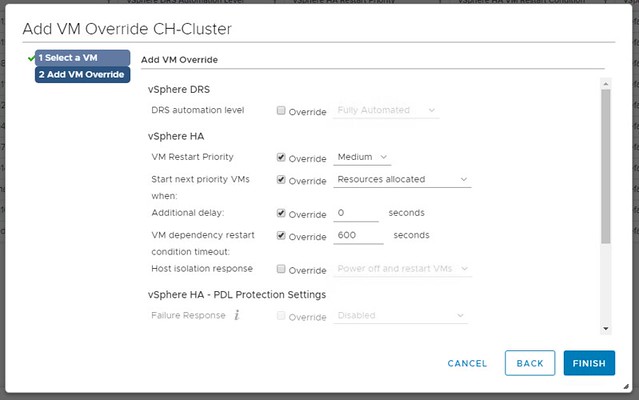
In the UI you can specify how long HA needs to wait by using the option called “VM Dependency Restart Condition Timeout”. This is the time-out in seconds used when one (or multiple VMs) can’t be restarted. So we initiate the restart of the group, and we will start the next batch when the first is successfully restart or when the time-out has been exceeded. By default, the time-out is 600 seconds, and you can override this in the UI.

What is confusing about this setting is the name, it states “VM Dependency Restart Condition Timeout”. So does this time-out apply to “Restarts Priority” or does it apply to “Restart Dependency” or maybe both? The answer is simple, this only applies to “Restart Priority”. Restart Dependency is a rule, a hard rule, a must rule, which means there’s no time-out. We wait until all VMs are restarted when you use restart dependency. Yes, the UI is confusing as the option mentions “dependency” where it should really talk about “priority”. I have reported this to engineering and PM, and hopefully it will be fixed in one of the upcoming releases.

VMworld – VMware vSAN Announcements: vSAN 6.7 U1 and beta announced!

Duncan Epping · Aug 27, 2018 ·

VMworld is the time for announcements, and of course for vSAN that is no different. This year we have 3 major announcements and they are the following:

  • VMware vSAN 6.7 U1
  • VMware vSAN Beta
  • VMware Cloud on AWS new features

So let’s look at each of these, first of all, VMware vSAN 6.7 U1. We are adding a bunch of new features, which I am sure you will appreciate. The first one is various VUM Updates, of which I feel the inclusion of Firmware Updates through VUM is the most significant one. For now, this is for the Dell HBA330 only, but soon other controllers will follow. On top of that there now also is support for custom ISO’s. VUM will recognize the vendor type and validate compliance and update accordingly when/if needed.

The other big thing we are adding os the “Cluster Quickstart wizard“. I have shown this at various sessions already, so some of you may be familiar with it. It basically is a single wizard that allows you to select the required services, add the hosts and configure the cluster. This includes the configuration of HA, DRS, vSAN and the network components needed to leverage these services. I recorded a quick demo that actually shows you what this looks like

One of the major features in my opinion that is introduced is UNMAP. Yes, unmap for vSAN. So as of 6.7 U1 we are now capable of unmapping blocks when the Guest OS sends an unmap/trim command. This is great as it will greatly enhance/improve space efficiency. Especially in environments where for instance large files or many files are deleted. You need to enable it, for now, through “rvc”. And you can do this as follows:

/localhost/VSAN-DC/computers/6.7 u1> vsan.unmap_support -e .

When you run the above command you should see the below response.

Unmap support is already disabled
6.7 u1: success
VMs need to be power cycled to apply the unmap setting
/localhost/VSAN-DC/computers/6.7 u1>

Pretty simple right? Does it really require the VM to be power cycled? Yes, it does, as during the power-on the Guest OS actually queries for the unmap capability, there’s no way for VMware to force that query without power cycling the VM unfortunately. So power it off, and power it on if you want to take advantage of unmap immediately.

There are a couple smaller enhancements that I wanted to sum up for those who have been waiting for it:

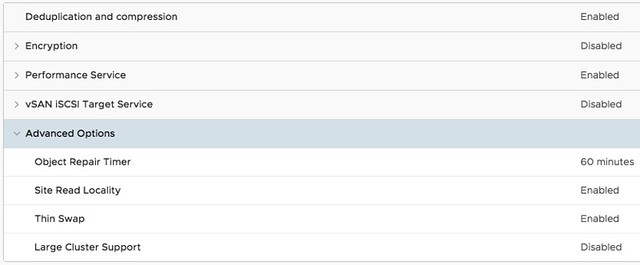
  • UI Option to change the “Object Repair Timer” value cluster-wide. This is the option which determines when vSAN starts repairing an object which has an absent component.
  • Mixed MTU support for vSAN Stretched Clusters (different MTU for Witness traffic then vSAN traffic)
  • Historical capacity reporting
  • VROps dashboards with vSAN stretched cluster awareness
  • Additional PowerCLI cmdlets
  • Enhanced support experience (Network diagnostic mode, specialized dashboards), you can find the below graphs under Monitor/vSAN/Support
  • Additional health checks (storage controllers firmware, unicast network performance test etc)

And last but not least, with vSAN Stretched we have the capability to protect data within a site. As of vSAN 6.7 U1 we also now have the ability to protect data within racks, it is however only available through an RPQ request. So if you need protection within a rack, contact GSS and file an RPQ.

Another announcement was around a vSAN Beta which is coming up. This vSAN Beta will have some great features, three though have been revealed:

  • Data Protection (Snapshot based)
  • File Services
  • Persistent Storage for Containers

I am not going to reveal anything about this, simply to avoid violating the NDA around this. Sign up for the Beta so you can find out more.

And then the last set of announcements was around functionality introduced for vSAN in VMware Cloud on AWS. Here there were two major announcements if you ask me. The first one is the ability to use Elastic Block Storage (EBS volumes) for vSAN. Meaning that in VMware Cloud on AWS you are no longer limited to the storage capacity physically available in the server, no you can now extend your cluster with capacity delivered through EBS. The second one is the availability of vSAN Encryption in VMware Cloud on AWS. This, from a security perspective, will be welcomed by many customers.

That was it, well… almost. This whole week many sessions will reveal various new potential features and futures. I aim to report on those when sitting in on those presentations, or potentially after VMworld.


What happens if all hosts in a vSphere HA cluster are isolated?

Duncan Epping · Aug 15, 2018 ·

I received this question through twitter today from Markus who was going through the vSphere 6.7 Clustering Deep Dive. And it is fairly straightforward: what happens when all hosts are isolated in a cluster, will the isolation response be triggered?

https://twitter.com/RealRockaut/status/1029652167735631874

I wrote about this a long long time ago, but it doesn’t hurt to re-iterate this. Before triggering the isolation response HA will actually verify the state of the rest of the cluster. Does anyone own the datastore on which the VMs that are impacted by this isolation run? If the answer is no, the ownership of a datastore is dropped during the election, then HA will not trigger the isolation response. I will try to update the book when I have time to include that, hopefully, that means a new version of the ebook will be pushed out to all owners automatically.

  • « Go to Previous Page
  • Page 1
  • Interim pages omitted …
  • Page 29
  • Page 30
  • Page 31
  • Page 32
  • Page 33
  • Interim pages omitted …
  • Page 124
  • Go to Next Page »

Primary Sidebar

About the Author

Duncan Epping is a Chief Technologist and Distinguished Engineering Architect at Broadcom. Besides writing on Yellow-Bricks, Duncan is the co-author of the vSAN Deep Dive and the vSphere Clustering Deep Dive book series. Duncan is also the host of the Unexplored Territory Podcast.

Follow Us

  • X
  • Spotify
  • RSS Feed
  • LinkedIn

Recommended Book(s)

Also visit!

For the Dutch-speaking audience, make sure to visit RunNerd.nl to follow my running adventure, read shoe/gear/race reviews, and more!

Do you like Hardcore-Punk music? Follow my Spotify Playlist!

Do you like 80s music? I got you covered!

Copyright Yellow-Bricks.com © 2026 · Log in