• Skip to primary navigation
  • Skip to main content
  • Skip to primary sidebar

Yellow Bricks

by Duncan Epping

  • Home
  • Unexplored Territory Podcast
  • HA Deepdive
  • ESXTOP
  • Stickers/Shirts
  • Privacy Policy
  • About
  • Show Search
Hide Search

vcf

What do I do after a vSAN Stretched Cluster Site Takeover?

Duncan Epping · Nov 10, 2025 · 4 Comments

Over the last couple of months, various new vSAN features were announced. Two of those features are around the Stretched Cluster configuration, and have probably been the number 1 feature request for a few years. Now that we have Site Takeover and Site Maintenance functionality available, I am starting to get some questions about the impact of them, and in particular, the Site Takeover functionality is raising some questions.

For those who don’t know what these features are, let me describe them briefly:

Site Maintenance = The ability to place a full vSAN stretched cluster Fault Domain into maintenance mode at once. This ensures that all hosts within the fault domain have consistently stored the data, and all hosts will go into maintenance mode at the same time.

Site Takeover = This provides the ability when a Witness and a Data Site has failed to bring back the remaining site through a command line interface. This will reconstruct the remaining “site local” RAID configuration, making the objects available again, which will then allow vSphere HA to restart the VMs.

Now, the question that the above typically raises is what happens to the Witness and the Data Site that failed when you do the Site Takeover? If you look at the VMs RAID configuration, you will notice that both the Witness and the Data Site components of the sites that failed will completely disappear from the RAID configuration.

But what do you do next, because even after you run the Site Takeover, you still see your hosts and the witness in vCenter Server, and you still see a stretched cluster configuration in the UI. Now at first I thought that if the environment was completely up and running again, you had to go through some manual effort to reconstruct the stretched cluster. Basically, remove the failed hosts, wipe the disks, and recreate the stretched cluster. This is, however, not the case.

In the example above, if the Preferred site and the Witness site return for duty, vSAN will automatically discard the stale components in those previously failed sites. It will recreate new components for all objects, and it will do a full resync of the data.

If you end up in a situation where your hosts are completely gone (let’s say as a result of a fire), then you will have to do some kind of manual cleanup as follows, before you rebuild and add hosts back:

  • Remove the failed hosts from the vCenter inventory
  • Remove the witness from the vCenter inventory
    • Delete the witness from the vCenter Server it is running, a real delete!
  • Delete the surviving Fault Domain, this should be the only Fault Domain still listed in the vCenter interface
  • You now have a normal cluster again
  • Rebuild hosts and recreate the stretched cluster

I hope that helps,
Are the vSAN disks encrypted or not, and is the environment health?

Duncan Epping · Jun 2, 2025 · Leave a Comment

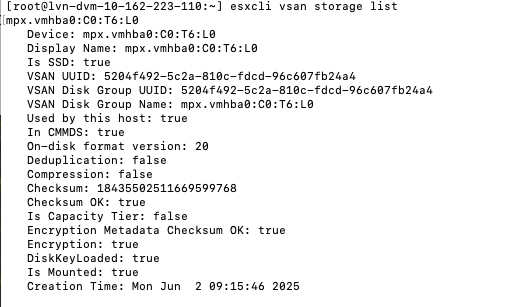
There was an internal question that came up, and I figured I would write a quick article as I had to grab some screenshots anyway. If you have vSAN Encryption – Data At Rest enabled, how do you verify the disks are actually encrypted? There are a couple of things you can do, and one is, of course verify in the vSAN UI that encryption is enabled in the configuration section. But you can also verify on a per-host basis if the disks have been encrypted through the command: esxcli vsan storage list. The output would look as follows:

Are the vSAN disks encrypted or not, and is the environment health?

As you can see, Encryption: true.

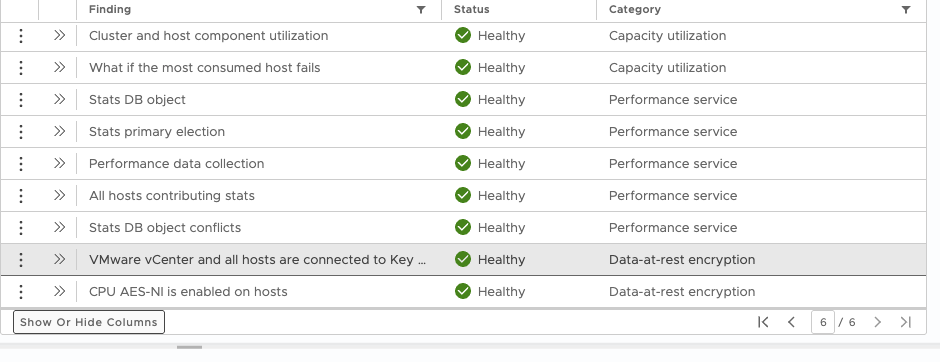
Of course, it is also beneficial to know if the Key Management System is reachable and healthy, as well as whether the necessary CPU instructions are available. These details can be viewed in vSAN Skyline Health, as shown in the next screenshot.

Hope that helps… OH, if you do use the Native Key Server, and encounter an error “not available on host”, verify if you enabled it with “Use key provider only with TPM” ticked or not, as if that is selected and you don’t have a TPM would result in that error.

Does vSAN support a Franken cluster configuration?

Duncan Epping · May 28, 2025 · Leave a Comment

It is funny that this has come up a few times now, actually for the third time in a month. I had a question if you can mix AMD and Intel hosts in the same cluster. Although nothing stops you from doing this, and vSAN supports this configuration, you need to remember that you cannot live migrate (vMotion) between those hosts, which means that if you have DRS enabled you are seriously crippling the cluster as it makes balance resource much more complex.

You are creating a Franken cluster when mixing AMD and Intel. You may ask yourself, why would anyone want to do this in the first place? Well, you could do this for migration purposes for instance. If you use vSAN iSCSI Services for instance, this could be a way to migrate those iSCSI LUNs from old hosts to new host. How? Well, simply add the new hosts to the cluster, place the old hosts into maintenance, and make sure to migrate storage. Do note, all the VMs (or containers) will have to be powered off, and powered on again manually on the new hosts, as a result of moving from Intel to AMD (or the other way around).

If you do end up doing this for migration purposes, please ensure it is for the shortest time possible. Please avoid running with a Franken cluster for multiple days, weeks, or, god forbid, months. Nothing good will come out of it, and your VMs may become little monsters!

#093 – Best practices for Latency Sensitive Workloads featuring Mark A!

Duncan Epping · Mar 23, 2025 · Leave a Comment

For episode 93 I invited Mark A to discuss with us what low latency workloads are all about, and what they require! Mark explains all the ins and outs of why vSphere, and VCF, is the perfect platform for latency sensitive workloads. Listen on Spotify (https://bit.ly/4bT0Lod), Apple (https://bit.ly/4kSbxiC), or just via the below embedded player!

Unexplored Territory #092 – Introducing DSM 2.2 featuring Cormac Hogan!

Duncan Epping · Mar 10, 2025 · 2 Comments

Recently Data Services Manager 2.2 was released, so it was time for me to ask my friend Cormac Hogan back on the show to share with us what was introduced. Although it was just a “minor” release, there were some major announcements, of which the S3 Object Storage capabilities are probably what will excite you the most! Make sure to listen to the episode either via the player below or on your favorite podcast app. (Spotify, Apple, etc)

  • « Go to Previous Page
  • Page 1
  • Page 2
  • Page 3
  • Page 4
  • Go to Next Page »

Primary Sidebar

About the Author

Duncan Epping is a Chief Technologist and Distinguished Engineering Architect at Broadcom. Besides writing on Yellow-Bricks, Duncan is the co-author of the vSAN Deep Dive and the vSphere Clustering Deep Dive book series. Duncan is also the host of the Unexplored Territory Podcast.

Follow Us

  • X
  • Spotify
  • RSS Feed
  • LinkedIn

Recommended Book(s)

Also visit!

For the Dutch-speaking audience, make sure to visit RunNerd.nl to follow my running adventure, read shoe/gear/race reviews, and more!

Do you like Hardcore-Punk music? Follow my Spotify Playlist!

Do you like 80s music? I got you covered!

Copyright Yellow-Bricks.com © 2026 · Log in