• Skip to primary navigation
  • Skip to main content
  • Skip to primary sidebar

Yellow Bricks

by Duncan Epping

  • Home
  • Unexplored Territory Podcast
  • HA Deepdive
  • ESXTOP
  • Stickers/Shirts
  • Privacy Policy
  • About
  • Show Search
Hide Search

vcf

What’s new for vSAN in 9.1?

Duncan Epping · May 7, 2026 · Leave a Comment

VMware Cloud Foundation 9.1 was just announced, and that means a lot of new functionality has been released. Some of the features you already knew about, others may come as a surprise. I know Pete Koehler has a whole series he is going to release, so I am just going to introduce a couple of features that I feel everyone should know about. Here’s a list of what was just announced:

  • Native S3 Object Storage
  • Cyber Recovery enhancements with Any to vSAN ESA, Seeding, Tag-Based VM selection and more
  • Auto-RAID
  • Global Deduplication and enhanced compression
  • QLC support
  • Mixed mode for Remote Datastores (ESA <-> OSA)
  • Enhanced Capacity Reporting
  • Resizing Shared VMDKs

Now, some of these capabilities I have been talking about for a while now at events, like Native S3 Object Storage, but it is probably still worth explaining what is announced. Let’s discuss a few of the above.

Native S3 Object Storage

This, in my opinion, is probably together with the Cyber Protection platform, the biggest feature that was announced for 9.1.  Most of you probably use some kind of S3 Object Storage platform as a backup destination, or you may have developers (and apps) directly accessing an S3 bucket for various reasons. S3 Object Storage use cases and total capacity have exploded over the last decade. So far, we (VMware/Broadcom) have always partnered with 3rd party vendors to deliver these S3 capabilities on top of VCF, but more and more customers have asked for a well-integrated solution that would come as part of VCF. With an upcoming patch release of 9.1 the tech preview of Native S3 Object Storage will be released.

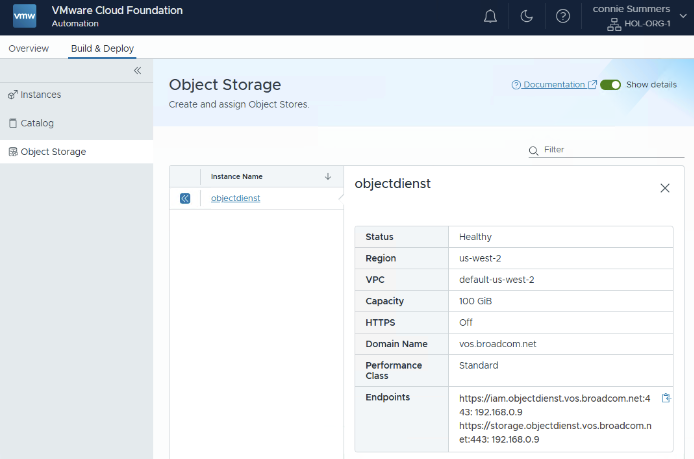
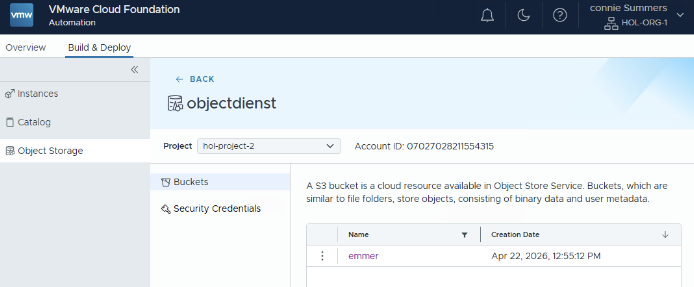
Although the platform has been referred to as “vSAN Native Object Storage” in the past, I feel it is more native to VCF. Although the configuration can be completed entirely through the API and CLI, most customers will likely consume the solution through VCF Automation. VCF Automation will provide the ability to have tenants (organizations) create their own S3 Object Storage Service (or even multiple), and have many buckets per S3 Object Storage Service. This will provide the logical isolation you would expect from a multi-tenancy platform. As a Provider Admin you simply enable S3 Object Storage for a region, and then each tenant who has resources in that region assigned can consume it and create the service, and subsequently buckets, as shown below.
What’s new for vSAN in 9.1?


I will probably upload a demo soon and will record a podcast episode specifically on this topic.

Cyber Recovery

Recovery from a ransomware attack and protection against it, is a hot topic these days for every CIO. Just do a Google search, and you will find countless examples of companies losing millions as a result of production outages due to an attack. At Explore 2025, we showed the world what a sophisticated ransomware recovery platform would potentially look like, and with VCF 9.1 and Site Recovery / Cyber Recover, we are finally at the stage where we can say we have a solution to help you recover safely and efficiently fully on-prem!

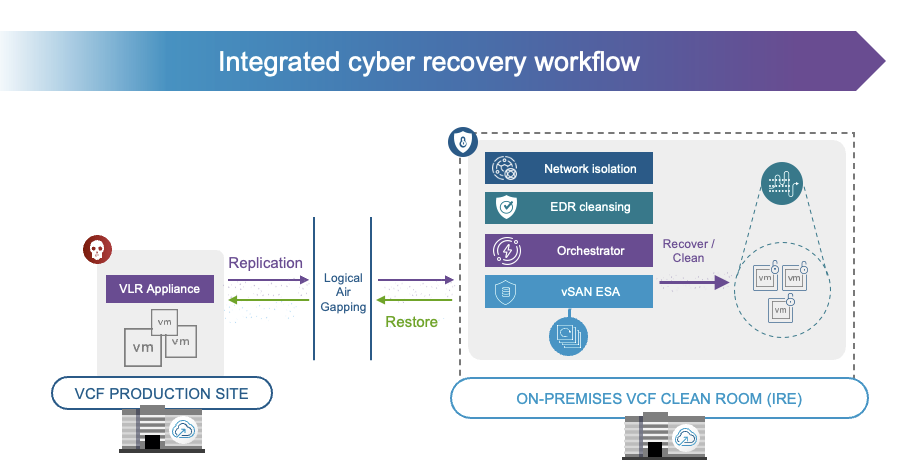
With 9.1 not only do we provide the option to replicate from any storage platform efficiently to vSAN ESA and have deep snapshot chains, but we now also have the option to build an isolated recovery environment / clean room on-premises. This platform comes fully integrated with VCF, and provides an orchestrated workflow to recovery from a ransomware attack. On top of that, the platform integrates with an EDR solution like Carbon Black or CrowdStrike. to ensure recovered data is clean. Of course, it will also work with other EDRs, but it would just not have the automated scanning and cleaning just yet. I’ve had Jatin on the podcast not too long ago to explain all the benefits of the platform, and will be having another episode on this topic soon!
Global Dedupe and enhanced Compression

From an efficiency perspective, various new enhancements have been introduced. Global Deduplication was already part of vSAN ESA, but only available through a support request, as of 9.1 the feature is available for all customers right there in the UI. Along with Global Deduplication going GA, support for Encryption at Rest with Global Dedupe has also been added. For European customers, do note, support for stretched clusters is not there just yet, so some of you have to wait with enabling Global Dedupe. Besides Global Dedupe, a brand new compression algorithm has been added. In the past, compression was done using LZ4, going forward, compression will be done using zStandard. zStandard allows for better tuning, making it more capacity and cost (CPU) efficient, which should result in a higher compression ratio over time.

Auto-RAID and QLC

Last but not least, I should probably also briefly talk about QLC and Auto-RAID. QLC support is mainly intended for Cyber Recovery deployments. As you can imagine, this is the perfect use case for a lower-tier flash device, which provides high capacity at the cost of performance and endurance. This is something to definitely keep in mind, as these devices are definitely not intended to be used in regular production environment. As always, VMware will provide guidance in terms of what is supported and what not, and special Ready Node configurations will be created for Cyber Recovery specifically.

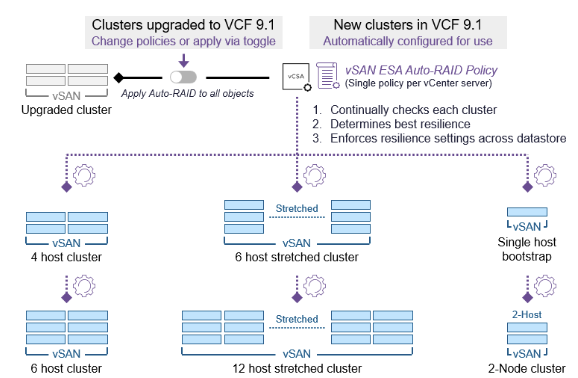
Auto-RAID is a feature that surprised me personally as well. I had heard about plans to develop a new RAID mechanism, but hadn’t realized it was going to ship in the 9.1 release already. This new storage policy option allows vSAN to make intelligent decisions around the to be used RAID configuration for each object based on the size of the cluster, and the features enabled on the cluster. In other words, if you have Stretched Cluster enabled, Auto-RAID will ensure your VMs are stretched and protect the VMs within a site accordingly, based on the number of hosts. If Auto-RAID is enabled, all 9.1 clusters can be managed using the same policy if you prefer vSAN to make the decisions for you! Why is this useful? Well, if the size of the cluster changes, or the cluster is (un)stretched, the Auto-RAID policy will automatically re-configure all associated VMs. This removes the risk of having VMs incorrectly configured and removes the administrative burden of having to make changes to a policy and re-apply it to all the VMs.
I have planned for a podcast recording with Pete Koehler later this week, so expect a brand new episode covering all the above (and more) dropping soon!

Playing around with Memory Tiering, are my memory pages tiered?

Duncan Epping · Dec 18, 2025 · 2 Comments

There was a question on VMTN about Memory Tiering performance, and how you can check if pages were tiered. I haven’t played around with Memory Tiering too much, so I noted down for myself what I needed to do on every host in order to enable it. Note, if the command contains a path and you want to do this in your own environment you need to change the path and device name accordingly. The question was if memory pages were tiered or not, so I dug up the command that allows you to check this on a per host level. It is at the bottom of this article for those who just want to skip to that part.

Now, before I forget, probably worth mentioning as this is something many people don’t seem to understand, memory tiering only tiers cold memory pages. Active pages are not being moved to NVMe, on top of that, it only tiers memory when there’s memory pressure! So if you don’t see any tiering, it could simply be that you are not under any memory capacity pressure. (Why move pages to a lower tier when there’s no need?)

List all storage devices via the CLI:

esxcli storage core device list

Create memory tiering partition on an NVMe device:

esxcli system tierdevice create -d=/vmfs/devices/disks/eui.1ea506b32a7f4454000c296a4884dc68

Enable Memory Tiering on a host level, note this requires a reboot:

esxcli system settings kernel set -s MemoryTiering -v TRUE

How is Memory Tiering configured in terms of DRAM to NVMe ratio? A 4:1 DRAM to NVMe ratio would be 25%, 1:1 would be 100%. So if you have it set at 4:1, with 512GB of DRAM you would only use 128GB of the NVMe at most, regardless of the size of the device.

esxcli system settings advanced list -o /Mem/TierNvmePct

Is memory tiered or not? Find out all about it via memstats!

memstats -r vmtier-stats -u mb

Want to show a select number of metrics?

memstats -r vmtier-stats -u mb -s name:memSize:active:tier1Target:tier1Consumed:tier1ConsumedPeak:comnsumed

So what would the outcome look like when there is memory tiering happening? I removed a bunch of the metrics, just to keep it readable, “tier1” is the NVMe device, and as you can see each VM has several MBs worth of memory pages on NVMe right now.

 VIRTUAL MACHINE MEMORY TIER STATS: Wed Dec 17 15:29:43 2025
 -----------------------------------------------
   Start Group ID   : 0
   No. of levels    : 12
   Unit             : MB
   Selected columns : name:memSize:tier1Consumed

----------------------------------------
           name    memSize tier1Consumed
----------------------------------------
      vm.533611       4096            12
      vm.533612       4096            34
      vm.533613       4096            24
      vm.533614       4096            11
      vm.533615       4096            25
----------------------------------------
          Total      20480           106
----------------------------------------

#109 – Introducing Virtual Private Cloud (VPC) featuring Yves Hertoghs

Duncan Epping · Dec 15, 2025 · Leave a Comment

VMware Cloud Foundation 9 has brought the ⁠Virtual Private Cloud networking model⁠ front and center in the vSphere UI. Not only has it become extremely easy to provide a self-service solution for networking, but it also comes with a plethora of networking services and capabilities. Maybe even more importantly, it allows networking-noobs (like myself) to consume advanced functionality without having to file dozens of service requests. In this episode, Yves Hertoghs explains what a Virtual Private Cloud is and discusses all the ins and outs around the Transit Gateway, vDefend, subnets, and much more.

You can listen to the episode on Spotify (bit.ly/3MArJs9), Apple Podcasts (bit.ly/3YtUhWQ), or online via the embedded player below.

If you like to learn more about VPCs, make sure to read the various blogs, and watch the various Explore sessions on the topic. There’s plenty out there to dive straight into it!

  • Blog: VPCs in vCenter

  • Blog: Self-Service Networking with Virtual Private Clouds

  • Blog – VPC Distributed Network Connectivity – No NSX Edge VMs

  • Explore Video: Easily set up networking in vCenter with VPC — watch it live in action

  • Explore Video: Virtual Private Cloud Zero to Hero: Mastering Private Cloud Networking

Plenty of things to read and watch during the upcoming holiday season, I am going to take a short break as well, but I will be back in January for sure! Enjoy,

#108 – My Explore recap: VCF Native S3 Object Storage, Cyber Recovery, and vSAN on FC!

Duncan Epping · Dec 1, 2025 · Leave a Comment

I had some difficulties scheduling guests the past weeks due to my travel schedule, and as a result, I figured I would try something new. In this episode, I go over the various things I announced at Explore and Explore on Tour in London, Paris, and Frankfurt. I talk about VCF Native S3 Object Storage, the enhancements we are planning for Disaster Recovery as well as Cyber Recovery, and I also briefly touch on vSAN on FC.

You can listen to my solo episode, episode 108, on Spotify (bit.ly/3MxRyZC), Apple Podcasts (bit.ly/4iEM5ML), or via the embedded player on Yellow-Bricks below.

If you like to hear more about vSAN ESA Global Deduplication, make sure ⁠to go to this blog on Yellow-Bricks⁠, as it contains the links to the discussion Pete Koehler and I had on the show a while back. I also just published the demo I recorded for Explore on Youtube, make sure to watch that one!

I also had Jatin Jindal on the show a month or two ago to discuss all Ransomware/Cyber Recovery enhancements in-depth. You can listen to that episode via Spotify (bit.ly/3IWQCwz), Apple (bit.ly/4o6YVoG), or via the embedded player on yellow-bricks.com!

#107 – Why VCF is the best platform for your modern workloads featuring Jad El-Zein!

Duncan Epping · Nov 17, 2025 · Leave a Comment

Recently, I read this article about why VCF is the best platform for modern workloads, so I figured I would invite the author, Jad El-Zein. Jad and I discuss all the arguments of why VCF and all components are the perfect destination for containers, or I should probably say your modern workloads. You can listen to the episode on Apple Podcast (bit.ly/4nXIs5y), Spotify (bit.ly/3K7mj6W), or just use the embedded player below.

  • Page 1
  • Page 2
  • Page 3
  • Page 4
  • Go to Next Page »

Primary Sidebar

About the Author

Duncan Epping is a Chief Technologist and Distinguished Engineering Architect at Broadcom. Besides writing on Yellow-Bricks, Duncan is the co-author of the vSAN Deep Dive and the vSphere Clustering Deep Dive book series. Duncan is also the host of the Unexplored Territory Podcast.

Follow Us

  • X
  • Spotify
  • RSS Feed
  • LinkedIn

Recommended Book(s)

Also visit!

For the Dutch-speaking audience, make sure to visit RunNerd.nl to follow my running adventure, read shoe/gear/race reviews, and more!

Do you like Hardcore-Punk music? Follow my Spotify Playlist!

Do you like 80s music? I got you covered!

Copyright Yellow-Bricks.com © 2026 · Log in