• Skip to primary navigation
  • Skip to main content
  • Skip to primary sidebar

Yellow Bricks

by Duncan Epping

  • Home
  • Unexplored Territory Podcast
  • HA Deepdive
  • ESXTOP
  • Stickers/Shirts
  • Privacy Policy
  • About
  • Show Search
Hide Search

esxi

Which host is selected for an HA initiated restart?

Duncan Epping · Jun 16, 2010 ·

Got asked the following question today and thought it was valuable for everyone to know the answer to this:

How is a host selected for VM placement when HA restarts VMs from a failed host?

It’s actually a really simple mechanism. HA keeps track of the unreserved capacity of each host of the cluster. When a fail-over needs to occur the hosts are ordered. The host with the highest amount of unreserved capacity being the first option. Now to make it absolutely crystal clear, HA keeps track of the unreserved capacity and it is not DRS which does this. HA works completely independent of vCenter and as we all know DRS is part of vCenter. HA also works when DRS is disabled or unlicensed!

Now one thing to note is that HA will also verify if the host is compatible with the VM or not. What this means is that HA will verify if the VMs network is available on the target host and if the datastore is available on the target hosts. If both are the case a restart will be initiated on that host. To summarize:

  1. Order available host based on unreserved capacity
  2. Check compatibility (VM Network / Datastore)
  3. Boot up!

vSphere Update 2 released

Duncan Epping · Jun 11, 2010 ·

By now the whole world has probably read that vSphere 4 Update 2 has been released. (release notes vCenter, release notes ESX, release notes ESXi ) Some of you might have even started slowly upgrading their test systems. (Like I am doing at the moment…)

I will not copy the full release notes but I do want to point out a couple of things on which I have been waiting for.

What’s Cool:

  • vSphere 4.0 U2 includes an enhancement of the performance monitoring utility, resxtop. The resxtop utility now provides visibility into the performance of NFS datastores in that it displays the following statistics for NFS datastores: Reads/s, writes/s, MBreads/s, MBwrtn/s, cmds/s, GAVG/s (guest latency).
  • VMware High Availability configuration might fail when advanced HA option das.allowNetwork uses vNetwork Distributed Switch (vDS) port group on an HA-enabled cluster, if you specify a vDS port group by using the advanced HA configuration option das.allowNetwork, the HA configuration on the hosts might fail. This issue is resolved in this release. Starting with this release, das.allowNetwork works with vDS.
  • The esxtop and resxtop utilities do not display various logical cpu power state statistics; this issue is resolved in this release. A new Power screen is accessible with the esxtop utility (supported on ESX) and resxtop utility (supported on ESX and ESXi) that displays logical cpu statistics. To switch to the Power screen, press y at the esxtop or resxtop screens.
  • For devices using the roundrobin PSP the value configured for the –iops option changes after ESX host reboot. If a device that is controlled by the roundrobin PSP is configured to use the –iops option, the value set for the –iops option is not retained if the ESX Server is rebooted. This issue is resolved in this release.

In this release many issues have been fixed, but also some new features have been added. For me personally the first one in the list is important. Up to ESX 4 Update 1 it was always needed to dive in to vscsiStats to see the Guest Latency for NFS based storage. As of Update 2 you can just run esxtop and check the statistics for your NFS datastore. This will definitely simplify troubleshooting, single pane of glass!

Is this VM actively swapping? (helping @heiner_hardt)

Duncan Epping · Jun 10, 2010 ·

On twitter @heiner_hardt asked for help with a performance related issue he was experiencing. As I am starting to appreciate esxtop more every single day and I really start to appreciate solving performance problems I decided to dive in to it.

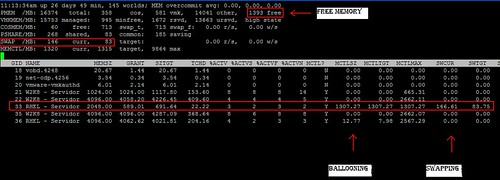
After the initial couple of questions Heiner posted a screenshot:

Heiner highlighted (red outline) a couple of metrics which indicated swapping and ballooning as he pointed out with the text boxes. Although I can’t disagree that swapping and ballooning happened at some point in time I do disagree with the conclusion that this virtual machine is swapping. Lets break it down:

Global Statistics:

  • 1393 Free -> Currently 1393MB memory available
  • High State -> Hypervisor is not under memory pressure
  • SWAP /MB 146 Cur -> 146MB has been swapped
  • SWAP /MB 83 Target -> Target amount that needed to be swapped was 83MB
  • 0.00 r/s -> No reads from swap currently
  • 0.00 w/s -> No writes to swap currently

World Statistics:

  • MCTLSZ 1307.27 -> The amount of guest physical memory that has been reclaimed by the balloon driver is 1307.27MB
  • MCTLTGT 1307.27 -> The amount of guest physical memory to be kept in the balloon driver is 1307.27MB
  • SWCUR 146.61 -> The current amount of memory that has been swapped is 146.61.
  • SWTGT 83.75 -> The target amount of memory that needed to be swapped was 83.75MB

Now that we know what these metrics mean and what the associated values are we can easily draw a conclusion:

At one point the host has most likely been overcommitted. However currently there is no memory pressure (state = high (>6% free memory)) as there is 1393MB of memory available. The metric “swcur” seems to indicate that swapping has occurred” however currently the host is not actively reading from swap or actively writing to swap (0.00 r/s and 0.00 w/s).

If the host is not experiencing memory pressure why is the balloon driver still inflated (MCTLTGT 1307.27MB)? Although the host is currently in a high memory state the amount of available memory almost equals the amount of claimed memory by the balloon driver. However deflating the balloon would return the host to a memory constrained state again.

My recommendation? Cut down on memory on your VMs! The fact that memory has been granted does not necessarily mean it is actively used and in this case it leads to serious overcommitment which in its turn leads to ballooning and even worse swapping.

One thing to point out though is the amount of “PSHARE” (TPS) is compared to average environments low. Might be something to explore!

VLAN ID 4095

Duncan Epping · Jun 10, 2010 ·

One of my colleagues today asked me if it was possible to use VLAN ID 4095 for the “management” network of ESXi. This VLAN ID is however reserved for a very specific purpose.

This particular VLAN ID is only to be used for “Virtual Guest Tagging” (VGT). It basically means that the VLAN ID is stripped off at the Guest OS layer and not at the portgroup layer. In other words the VLAN trunk(multiple VLANs on a single wire) is extended to the virtual machine and the virtual machine will need to deal with it.

When will you use this? To be honest there aren’t many use cases any more. In the past it was used to increase the number of VLANs for a VM. The limit of 4 NICs for VI3 meant a maximum of 4 portgroups / VLANs per VM. However with vSphere the maximum amount of NICs went up to 10 and as such the amount of VLANs for a single VM also went up to 10.

Before people start to get excited about Virtual Guest Tagging, I personally prefer to stay away it. It heavily complicates the configuration of the VM and the vSwitch/dvSwitch and adds additional unneeded “stress” on your VMs vCPU.

Swapping?

Duncan Epping · May 26, 2010 ·

We had a discussion internally about performance and swapping. I started writing this article and asked Frank if it made sense. Frank’s reply “just guess what I am writing about at the moment”. As both of us had a different approach we decided to launch both articles at the same time and refer to each others post. So here’s the link to Frank’s take on the discussion and I highly recommend reading it: “Re: Swapping“.

As always the common theme of the discussion was “swapping bad”. Although I don’t necessarily disagree. I do want to note that it is important to figure out if the system is actually actively swapping or not.

In many cases “bad performance” is blamed on swapping. However this is not always the case. As described in my section on “ESXTOP”  there are multiple metrics on “swap” itself. Only a few of those relate to performance degradation due to swapping. I’ve listed the important metrics below.

Host:
MEM – SWAP/MB curr = Total swapped machine memory of all the groups including virtual machines.
MEM – SWAP/MB “target” = The expected swap usage.
MEM – SWAP/MB “r/s” = The rate at which memory is swapped in from disk.
MEM – SWAP/MB “w/s” = the rate at machine memory is swapped out to disk.

VM:
MEM – SWCUR = If larger than 0 host has swapped memory pages from this VM in the past.
MEM – SWTGT = The expected swap usage.
MEM – SWR/s (J) = If larger than 0 host is actively reading from swap(vswp).
MEM – SWW/s (J) = If larger than 0 host is actively writing to swap(vswp).

So which metrics do really matter when your customer complains about degradation of performance?

First metric to check:
SWR/s (J) = If larger than zero the ESX host is actively reading from swap(vswp).

Associated to that metric I would recommend looking at the following metric:
%SWPWT = The percentage of time the world is waiting for the ESX VMKernel swapping memory.

So what about all those other metrics? Why don’t they really matter?
Take “Current Swap”, as long as it is not being “read” it might just be one of those pages sporadically used which is just sitting there doing nothing. Will it hurt performance? Maybe, but currently as long as it is not being read… no it will most likely not hurt. Even writing to swap does not necessarily hurt performance, it might though. Those should just be used as indicators that the system is severely overcommitted and that performance might be degraded in the future when pages are being read!

  • « Go to Previous Page
  • Page 1
  • Interim pages omitted …
  • Page 18
  • Page 19
  • Page 20
  • Page 21
  • Page 22
  • Interim pages omitted …
  • Page 66
  • Go to Next Page »

Primary Sidebar

About the Author

Duncan Epping is a Chief Technologist and Distinguished Engineering Architect at Broadcom. Besides writing on Yellow-Bricks, Duncan is the co-author of the vSAN Deep Dive and the vSphere Clustering Deep Dive book series. Duncan is also the host of the Unexplored Territory Podcast.

Follow Us

  • X
  • Spotify
  • RSS Feed
  • LinkedIn

Recommended Book(s)

Also visit!

For the Dutch-speaking audience, make sure to visit RunNerd.nl to follow my running adventure, read shoe/gear/race reviews, and more!

Do you like Hardcore-Punk music? Follow my Spotify Playlist!

Do you like 80s music? I got you covered!

Copyright Yellow-Bricks.com © 2026 · Log in