• Skip to primary navigation
  • Skip to main content
  • Skip to primary sidebar

Yellow Bricks

by Duncan Epping

  • Home
  • Unexplored Territory Podcast
  • HA Deepdive
  • ESXTOP
  • Stickers/Shirts
  • Privacy Policy
  • About
  • Show Search
Hide Search

esxi

Which metric to use for monitoring memory?

Duncan Epping · Apr 29, 2011 ·

** PLEASE NOTE: This article was written in 2011 and discussed how to monitor memory usage, which is different then memory / capacity sizing. For more info on “active memory” read this article by Mark A. **

This question has come up several times over the last couple of weeks so I figured it was time to dedicate an article to it. People have always been used to monitoring memory usage in a specific way, mainly by looking at the “consumed memory” stats. This always worked fine until ESX(i) 3.5 introduced the aggressive usage of Large Pages. In the 3.5 timeframe that only worked for AMD processors that supported RVI and with vSphere 4.0 support for Intel’s EPT was added. Every architectural change has an impact. The impact is that TPS (transparent page sharing) does not collapse these so called large pages. (Discussed in-depth here.) This unfortunately resulted in many people having the feeling that there was no real benefit of these large pages, or even worse the perception that large pages are the root of all evil.

After having several discussions with customers, fellow consultants and engineers we managed to figure out why this perception was floating around. The answer was actually fairly simple and it is metrics. When monitoring memory most people look at the following section of the host – summary tab:
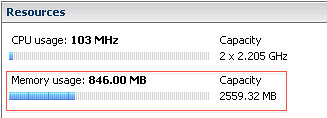
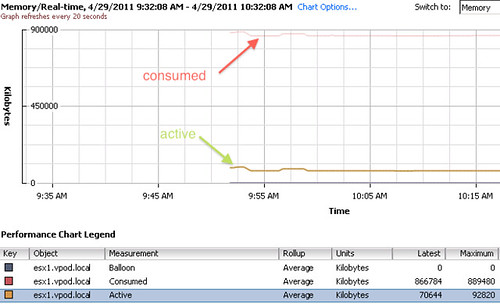
However, in the case of large pages this metric isn’t actually that relevant. I guess that doesn’t only apply to large pages but to memory monitoring in general, although as explained it used to be an indication.  The metric to monitor  is “active memory“. Active memory is is what the VMkernel believes is currently being actively used by the VM. This is an estimate calculated by a form of statistical sampling and this statistical sampling will most definitely come in handy when doing capacity planning. Active memory is in our opinion what should be used to analyze trends. Kit Colbert has also hammered on this during his Memory Virtualization sessions at VMworld. I guess the following screenshot is an excellent example of the difference between “consumed” and “active”. Do we need to be worried about “consumed” well I don’t think so, monitoring “active” is probably more relevant at this point! However, it should be noted that “active” represents a 5 minute time slot. It could easily be that the first 5 minute value observed is the same as the second, yet they are different blocks of memory that were touched. So it is an indication of how active the VM is. Nothing more than that.
What have you been up to – part 2

Duncan Epping · Apr 28, 2011 ·

As I have been posting more regularly on the ESXi Chronicles blog I figured it made sense to make people aware of the series of articles I produced like I did last time. These are the articles I recently published, check them out as I feel they are worth reading. Also note that many of the “Ops Changes” articles will be rolled up in to an official whitepaper that will be published on the Tech Resources section of the VMware website.

  • VMTN Podcast about Transitioning to ESXi
  • Scratch partition best practices for USB/SD booted ESXi?
  • Need to install 100s of ESXi hosts?
  • Is your environment secure?
  • The missing link for scripted installs, adding your ESXi host to vCenter
  • Scripted install with ESXi
  • Cool PowerCLI script for backing up the ESXi System Image
  • Ops changes part 8 – Logging in, Auditing and Log files
  • Ops changes part 7 – Upgrading Firmware
  • Ops changes part 6 – Quick troubleshooting tips
  • Ops changes part 5 – Scratch partition
  • Ops changes part 4 – Injecting or installing drivers
  • Ops changes part 3 – Local disk vs USB vs BFS
  • Ops changes part 2 – Scripted installation
  • Ops changes part 1 – Introduction

I hope my efforts with regards to smoothing the transition to ESXi are helpful so far. If there are any specific areas which you feel need to be covered feel free to leave a comment and I will try to cover asap.

Fling: PXE Manager for vCenter

Duncan Epping · Apr 22, 2011 ·

It is finally released… PXE Manager for vCenter. My former Cloud colleague Max Daneri of VMTS fame has worked very  very hard on this and actually demoed it at VMworld in 2009. I know Max is already working on the next release which of course will work with the upcoming vSphere version as well. So if you’ve tested it and have feedback don’t forget to leave a comment on labs.vmware.com.

PXE Manager for vCenter enables ESXi host state (firmware) management and provisioning. Specifically, it allows:

  • Automated provisioning of new ESXi hosts stateless and stateful (no ESX)
  • ESXi host state (firmware) backup, restore, and archiving with retention
  • ESXi builds repository management (stateless and statefull)
  • ESXi Patch management
  • Multi vCenter support
  • Multi network support with agents (Linux CentOS virtual appliance will be available later)
  • Wake on Lan
  • Hosts memtest
  • vCenter plugin
  • Deploy directly to VMware Cloud Director
  • Deploy to Cisco UCS blades

Free training and book on ESXi?

Duncan Epping · Apr 20, 2011 ·

I just wanted to point to this article on the ESXi Chronicles blog about a free training and free book on ESXi. I actually wrote an article about the book a while back and it is most definitely worth the effort of doing the training and survey!

You might wonder how much a person can write about ESXi, but Dave managed to fill up rough 490 pages. These pages contain solid and detailed information about the ESXi architecture but also for instance on how to implement or secure an ESXi environment. The book has 8 chapters which will take you through the installation and migration step by step but also will prepare you for operating ESXi based environments. On top of that Dave not only discusses the rCLI/vMA but also PowerCLI and it contains some really useful sample scripts.

You can find more details about the training and the book in this ESXi Chronicles article.

Mythbusters: ESX/ESXi caching I/O?

Duncan Epping · Apr 7, 2011 ·

We had a discussion internally about ESX/ESXi caching I/Os. In particular this discussion was around caching of writes  as a customer was concerned about consistency of their data. I fully understand that they are concerned and I know in the past some vendors were doing write caching however VMware does not do this for obvious reasons. Although performance is important it is worthless when your data is corrupt / inconsistent. Of course I looked around for  data to back this claim up and bust this myth once and for all. I found a KB article that acknowledges this and have a quote from one of our VMFS engineers.

Source Satyam Vaghani (VMware Engineering)
ESX(i) does not cache guest OS writes. This gives a VM the same crash consistency as a physical machine: i.e. a write that was issued by the guest OS and acknowledged as successful by the hypervisor is guaranteed to be on disk at the time of acknowledgement. In other words, there is no write cache on ESX to talk about, and so disabling it is moot. So that’s one thing out of our way.

Source – Knowledge Base
VMware ESX acknowledges a write or read to a guest operating system only after that write or read is acknowledged by the hardware controller to ESX. Applications running inside virtual machines on ESX are afforded the same crash consistency guarantees as applications running on physical machines or physical disk controllers.

  • « Go to Previous Page
  • Page 1
  • Interim pages omitted …
  • Page 10
  • Page 11
  • Page 12
  • Page 13
  • Page 14
  • Interim pages omitted …
  • Page 66
  • Go to Next Page »

Primary Sidebar

About the Author

Duncan Epping is a Chief Technologist and Distinguished Engineering Architect at Broadcom. Besides writing on Yellow-Bricks, Duncan is the co-author of the vSAN Deep Dive and the vSphere Clustering Deep Dive book series. Duncan is also the host of the Unexplored Territory Podcast.

Follow Us

  • X
  • Spotify
  • RSS Feed
  • LinkedIn

Recommended Book(s)

Also visit!

For the Dutch-speaking audience, make sure to visit RunNerd.nl to follow my running adventure, read shoe/gear/race reviews, and more!

Do you like Hardcore-Punk music? Follow my Spotify Playlist!

Do you like 80s music? I got you covered!

Copyright Yellow-Bricks.com © 2026 · Log in