• Skip to primary navigation
  • Skip to main content
  • Skip to primary sidebar

Yellow Bricks

by Duncan Epping

  • Home
  • Unexplored Territory Podcast
  • HA Deepdive
  • ESXTOP
  • Stickers/Shirts
  • Privacy Policy
  • About
  • Show Search
Hide Search

dr

VMware announces Ransomware Recovery as a Service and Data Protection vision!

Duncan Epping · Sep 13, 2022 ·

At VMware Explore there was a whole session (CEIB1236US) dedicated to the vision for Data Protection and Ransomware Recovery as a Service. Especially the Ransomware Recovery as a Service had my interest as it is something that keeps coming up with customers. How do I protect my data, and when needed how do recover? Probably a year ago or so I had a conversation with VMware CTO for Cloud Storage and Data (Sazzala) on this topic, and we met up with various customers to gather requirements. Those discussions ultimately led to the roadmap for this new service and new features. Below I am going to summarize what was discussed in this session at VMware Explore, but I would urge you to watch the session as it is very valuable, and it is impossible for me to capture everything.

VMware’s Disaster Recovery as a Service solution is a unique offering as it provides the best of both worlds when it comes to Disaster Recovery. With DR you typically have two options:

  1. Fast recovery, relatively high cost.
    • Traditionally most customers went for this option, they had a “hot standby” environment that provided full capacity in case of emergency. But as this environment is always up and running and underutilized, it is a significant overhead.
  2. Slower recovery, relatively low cost.
    • This is where VMs are replicated to cheap and deep storage and compute resources are limited (if available at all). When a recovery needs to happen, data rehydration is required and as such, it is a relatively slow process.

With VMware’s offering, you now have a 3rd option: Fast recovery, at a relatively low cost! VMware provides the ability to store backups on cheap storage, and then recover (without hydration) directly in a cloud-based SDDC. It provides a lot of flexibility, as you can have a minimum set of hosts constantly running within your prepared SDDC, and scale out when needed during a failure, or you can even create a full SDDC at the time of recovery.

Now, this offering is available in VMware Cloud on AWS in various regions. During the session, the intention was also shared to deliver similar capabilities on Azure VMware Solution, Oracle Cloud VMware Solution, Google Cloud VMware Engine, and/or Alibaba Cloud VMware Service. Basically all global hyper-scalers. Maybe even more important, VMware also discussed additional capabilities that are being worked on. Scaling to tens of thousands of VMs, managing multi-petabytes of storage, providing 1-minute RPO levels, proving multi-VM consistency, having end-to-end SLA observability, providing advanced insights into cost and usage, and probably most important… a full REST API.

All of those enhancements are very useful for those aiming to recover from a disaster, not just natural disasters, but also for Ransomware attacks. Some of you may wonder how common a ransomware attack is, but unfortunately, it is very common. Surveys have revealed that 60% of the surveyed organizations were hit by ransomware in the past 12 months, 92% of those who paid the ransom did not gain full access to the data, and the average downtime was 16 days. Those are some scary numbers in my opinion. Especially the downtime associated with an attack, and the fact that full access was not regained even after paying a ransom.

In general recovery from ransomware is complex as ransomware typically remains undetected for larger periods of time before you are exposed to it. Then when you are exposed you don’t have too many options, you recover to a healthy point in time or you pay the ransom. When you recover, of course, you want to know if the set you are recovering is infected or not. You also want to have some indication of when the environment was infected, as no one wants to go through 3 months of snapshots before you find the right one. That alone would take days, if not weeks, and downtime is extremely expensive. This is where VMware Ransomware Recovery for VMware Cloud DR comes in.

The aim for the VMware Ransomware Recovery for VMware Cloud DR solution is to provide the ability to recover to an Isolated Recovery Environment (including networking). This first of all prevents reinfection at the time of recovery. During the recovery process, the environment is also analyzed by a next-generation anti-virus scanner for known/current threats. Simply to prevent a situation where you recover a snapshot that was infected. What I am even more impressed by is that the plan is to also include a visual indication of when most likely an environment was infected, this is done by providing an insight into the data change rate and entropy. Now, entropy is not a word most non-native speakers are familiar with, I wasn’t, but it refers to the randomness of the data. Both the change rate and the entropy could indicate abnormal patterns, which then could indicate the time of infection and help identify a healthy snapshot to recover!

As mentioned, during recovery the snapshot is scanned by a Next-Gen AV, and of course, when infections are detected they will be reported in the UI. This then provides you the option to discard the recovery and select a different snapshot. Even if no vulnerabilities are found the environment can be powered on fully isolated, providing you the ability to manually inspect before exposing app owners, or end-users, to the environment again.
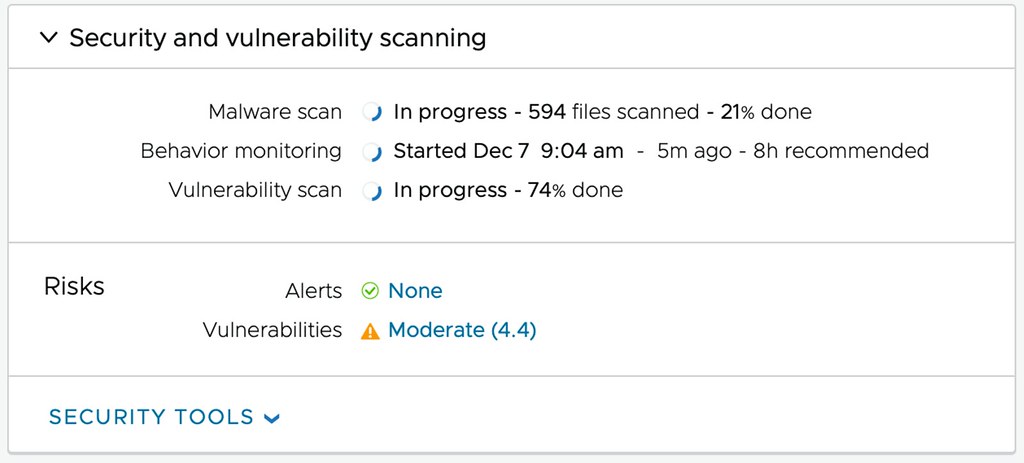

Now comes the cool part, when you have curated the environment, when you are absolutely sure this is a healthy point in time that was not infected, you have the choice to fallback to your “source” environment or simply remain running in your VMware Cloud while you clean up your “source” site. Before I forget, I’ve been talking about full environments and VMs so far, but of course, it is also the intention to provide the ability to restore files and folders of course! All in all, a very impressive solution that should be available in the near future.

If you are interested in these capabilities and would like to stay informed, please fill out this form: https://forms.office.com/r/yh69Npq7nY.
vSphere Replication 6.5, 5 minute RPO for ALL!

Duncan Epping · Nov 16, 2016 ·

I just noticed the following in the vSphere Replication 6.5 release notes which I felt was worth sharing:

5-minute Recovery Point Objective (RPO) support for additional data store types – This version of vSphere Replication extends support for the 5 minute RPO setting to the following new data stores: VMFS 5, VMFS 6, NFS 4.1, NFS 3, VVOL and VSAN 6.5. This allows customers to replicate virtual machine workloads with an RPO setting as low as 5-minutes between these various data store options.

We have had this for vSAN in specific for a while now, but I hadn’t realized yet that we were enabling this for all sorts of datastores in this release. Definitely a great reason to move up to vSphere 6.5 and re-evaluate which VMs can do with a 5 minute RPO and use this great replication mechanism that just ships with vSphere for free! More info found in the release notes here.

If you like to know more about the 6.5 release visit this page with the links to all docs/downloads by William Lam.

VMware View Infrastructure Resiliency whitepaper published

Duncan Epping · Feb 24, 2013 ·

One of the white papers I worked on in 2012 when I was part of Technical Marketing was just published. This white paper is about VMware View infrastructure resiliency. It is a common question from customers, and now with this white paper you can explore the different options and understand the impact of these options. Below is a link to the paper and the description is has on the VMware website.

VMware View Infrastructure Resiliency: VMware View 5 and VMware vCenter Site Recovery Manager
“This case study provides insight and information on how to increase availability and recoverability of a VMware View infrastructure using VMware vCenter Site Recovery Manager (SRM), common disaster recovery (DR) tools and methodologies, and vSphere High Availability.”

I want to thank Simon Richardson, Kris Boyd, Matt Coppinger and John Dodge for working with me on this paper. Glad it is finally available!

Update: VMware vCloud Director DR paper available in Kindle / iBooks format!

Duncan Epping · Mar 29, 2012 ·

I just received a note that the DR paper for vCloud Director is finally available in both epub / mobi format. So if you have an e-reader make sure to download this format as it will render a lot better then a generic PDF!

Description: vCloud Director disaster recovery can be achieved through various scenarios and configurations. This case study focuses on a single scenario as a simple explanation of the concept, which can then easily be adapted and applied to other scenarios. In this case study it is shown how vSphere 5.0, vCloud Director 1.5 and Site Recovery Manager 5.0 can be implemented to enable recoverability after a disaster.

Download:
http://www.vmware.com/files/pdf/techpaper/vcloud-director-infrastructure-resiliency.pdf
http://www.vmware.com/files/pdf/techpaper/vcloud-director-infrastructure-resiliency.epub
http://www.vmware.com/files/pdf/techpaper/vcloud-director-infrastructure-resiliency.mobi

DR of View persistent linked clone desktops…

Duncan Epping · Mar 15, 2012 ·

I know some of you have been waiting for this so I wanted to share some early results. I was in the UK last week and we managed to get an environment configured using persistent linked clone virtual desktops with View. We also managed to fail-over and fail-back desktops between two datacenters. The concepts is really similar to the vCloud Director DR concept.

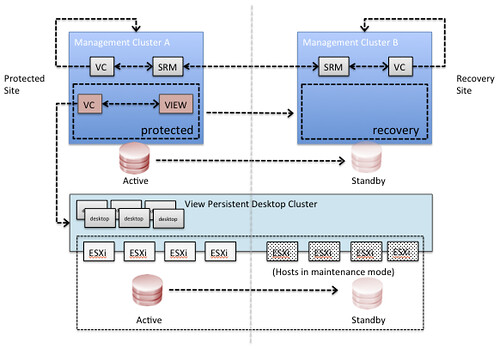
In this scenario Site Recover Manager will be leveraged to fail-over all View management components. In each of the sites it is required to have a management vCenter Server and an SRM Server which aligns with standard SRM design concepts. Since it is difficult to use SRM for View persistent desktops there is no requirement to have an SRM environment connecting to the View desktop cluster’s vCenter Server. In order to facilitate a fail-over of the View desktops a simple mount of the volume is done. This could be using ‘esxcfg-volume -m’ for VMFS or using a DNS c-name mounting the NFS share after point the alias to the secondary NAS server.

What would the architecture look like? This is an oversimplified architecture, of course … but I just want to get the message across:

What would the steps be?

  1. Fail-over View management environment using SRM
  2. Validate all View management virtual machines are powered on
  3. Using your storage management utility break replication for the datastores connected to the View Desktop Cluster and make the datastores read/write (if required by storage platform)
  4. Mask the datastores to the recovery site (if required by storage platform)
  5. Using ESXi command line tools mount the volumes of the View Desktop Cluster cluster on each host of the cluster
    • esxcfg-volume –m <;volume ID>;
      or
    • point the DNS CNAME to the secondary NAS server and mount the NAS datastores
  6. Validate all volumes are available and visible in vCenter, if not rescan/refresh the storage
  7. Take the hosts out of maintenance mode for the View Desktop Cluster (or add the hosts to your cluster, depending on the chosen strategy)
  8. In our tests the virtual desktops were automatically powered on by vSphere HA. vSphere HA is aware of the situation before the fail-over and will power-on the virtual machines according to the last known state

These steps have been validated this week and we managed to successfully fail-over our desktops and fail them back. Keep in mind that we only did these tests two or three times, so don’t consider this article to be support statement. We used persistent linked clones as that was the request we had at that point, but we are certain this will work for the various different scenarios. We will extend our testings to include various other scenarios.

Cool right!?

  • Page 1
  • Page 2
  • Go to Next Page »

Primary Sidebar

About the Author

Duncan Epping is a Chief Technologist and Distinguished Engineering Architect at Broadcom. Besides writing on Yellow-Bricks, Duncan is the co-author of the vSAN Deep Dive and the vSphere Clustering Deep Dive book series. Duncan is also the host of the Unexplored Territory Podcast.

Follow Us

  • X
  • Spotify
  • RSS Feed
  • LinkedIn

Recommended Book(s)

Also visit!

For the Dutch-speaking audience, make sure to visit RunNerd.nl to follow my running adventure, read shoe/gear/race reviews, and more!

Do you like Hardcore-Punk music? Follow my Spotify Playlist!

Do you like 80s music? I got you covered!

Copyright Yellow-Bricks.com © 2026 · Log in