• Skip to primary navigation
  • Skip to main content
  • Skip to primary sidebar

Yellow Bricks

by Duncan Epping

  • Home
  • Unexplored Territory Podcast
  • HA Deepdive
  • ESXTOP
  • Stickers/Shirts
  • Privacy Policy
  • About
  • Show Search
Hide Search

6.0

VSAN and large VMDKs on relative small disks?

Duncan Epping · Jun 4, 2015 ·

Last week and this week I received a question and as it was the second time in a short time I figured I would share it. The question was around how VSAN places a VMDK which is larger than the disks. Lets look at a diagram first as that will make it obvious instantly.

If you look at the diagram you see these stripes. You can define the number of stripes in a policy if you want. In the example above, the stripe width is 2. This is not the only time when you can see objects being striped though. If an object (VMDK for instance) is larger than 256GB it will create multiple stripes for this object. Also, if a physical disk is smaller than the size of the VMDK it will create multiple stripes for that VMDK. These stripes can be located on the same host as you can see in the diagram but also can be across hosts. Pretty cool right.
VAAI support in vSphere Standard and up as of 6.0!

Duncan Epping · May 22, 2015 ·

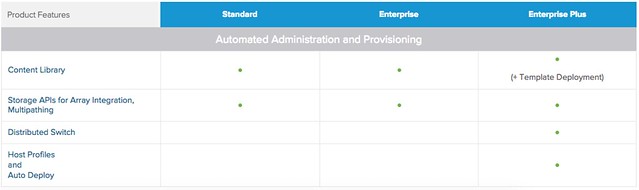
After some internal discussions over the last months it was decided to move VAAI (vSphere APIs for Array Integration) and Multi-Pathing down to vSphere Standard as of 6.0. Main reason for this was that Virtual Volumes, by many considered as the natural evolution of VAAI, is also part of vSphere Standard. So if you have vSphere Standard and a VAAI capable array and looking to move to 6.0, make sure to check the configuration of your hosts and use this great functionality! Note that VAAI did indeed already work in lower editions, but from a licensing point of view you weren’t entitled to it… I guess many folks never really looked at enabling / disabling it explicitly, but for those who did… now you can use it. More details on what is included with which license can be found here: http://www.vmware.com/au/products/vsphere/compare.html

VAAI support in vSphere Standard

This host currently has no network management redundancy

Duncan Epping · May 21, 2015 ·

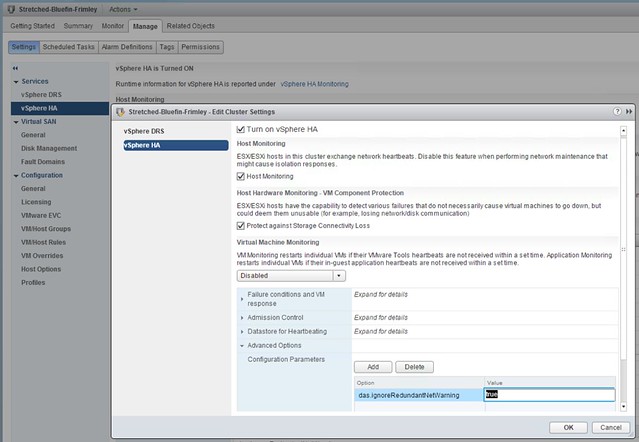
Bumped in to this a billion times by now, and I wouldn’t recommend applying this in production but for your lab when you need to take clean screenshots it works great. I’ve mentioned this setting before but as it was part of a larger article it doesn’t stand out when searching so I figured I would dedicate a short and simple article to it. Here is what you will need to do if you see the following message in the vSphere Web Client: this host currently has no network management redundancy.

  • Go to your Cluster object
  • Go to Settings
  • Go to “vSphere HA”
  • Click “Edit”
  • Add an advanced setting called “das.ignoreRedundantNetWarning”
  • Set the advanced setting to “true”
  • On each host right click and select “reconfigure for vSphere HA”

This is what it should look like in the UI:
This host currently has no network management redundancy

You can also do this in PowerCLI by the way, note that “Stretched-Bluefin-Frimley” is the name of my cluster.

New-AdvancedSetting -Entity Stretched-Bluefin-Frimley -type ClusterHA -Name "das.ignoreRedundantNetWarning" -Value "true" -force


Deploy VCSA 6.0 firstboot error

Duncan Epping · May 19, 2015 ·

I was doing some tests in my lab and while deploying a new VCSA 6.0 I received an error that firstboot was unsuccessful. Not really a great error message if you ask me but okay. I had already validated DNS twice before I got started, but I checked it again just in case… DNS was all good, what else could it be? Figured NTP could be another problem and my friend William Lam confirmed that. I checked the host if NTP was configured and it was not for some reason. So I configured NTP on my ESXi hosts which was straight forward, but what about the VCSA I had deployed? Also not too complicated, I logged in via SSH and did the following:

  • ntp.get
    Will show “Status: Down”
  • ntp.server.add –servers 10.17.0.1
    This configures VCSA to fetch the time from ntp server to 10.17.0.1
  • timesync.set –mode NTP
    Make sure that the time sync is set to ntp
  • ntp.get
    Should show “Status: Up”

That should do it… By the way, you can simply check “resolv.conf” for DNS to see how it is configured today, also look at “hosts” for the host name etc.

Migrate from Windows vCenter to the vCenter Appliance

Duncan Epping · Apr 17, 2015 ·

I thought that most people would have seen this awesome fling by now, but I received a couple of questions if it was already possible to migrate from the Windows vCenter Server to the vCenter Server Appliance. Surprisingly enough as William Lam wrote an excellent blog post on this subject. Anyway, this blog is just a simple short pointer to the Windows vCenter to vCenter Appliance migration tool and to William blog post. Read it, and go for it!

  • « Go to Previous Page
  • Page 1
  • Interim pages omitted …
  • Page 6
  • Page 7
  • Page 8
  • Page 9
  • Page 10
  • Interim pages omitted …
  • Page 12
  • Go to Next Page »

Primary Sidebar

About the Author

Duncan Epping is a Chief Technologist and Distinguished Engineering Architect at Broadcom. Besides writing on Yellow-Bricks, Duncan is the co-author of the vSAN Deep Dive and the vSphere Clustering Deep Dive book series. Duncan is also the host of the Unexplored Territory Podcast.

Follow Us

  • X
  • Spotify
  • RSS Feed
  • LinkedIn

Recommended Book(s)

Also visit!

For the Dutch-speaking audience, make sure to visit RunNerd.nl to follow my running adventure, read shoe/gear/race reviews, and more!

Do you like Hardcore-Punk music? Follow my Spotify Playlist!

Do you like 80s music? I got you covered!

Copyright Yellow-Bricks.com © 2026 · Log in