• Skip to primary navigation
  • Skip to main content
  • Skip to primary sidebar

Yellow Bricks

by Duncan Epping

  • Home
  • Unexplored Territory Podcast
  • HA Deepdive
  • ESXTOP
  • Stickers/Shirts
  • Privacy Policy
  • About
  • Show Search
Hide Search

6.0

Stretched Clusters: Disable failover of specific VMs during full site failure

Duncan Epping · Oct 21, 2015 ·

Last week at VMworld when presenting on Virtual SAN Stretched Clusters someone asked me if it was possible to “disable the fail-over of VMs during a full site failure while allowing a restart during a host failure”. I thought about it and said “no, that is not possible today”. Yes you can “disable HA restarts” on a per VM basis, but you can’t do that for a particular type of failure.

The last statement is correct, HA does not allow you to disable restarts for a site failure. You can fully disable HA for a particular VM though. But when back at my hotel I started thinking about this question and realized that there is a work around to achieve this. I didn’t note down the name of the customer who asked the question, so hopefully you will read this.

When it comes to a stretched cluster configuration typically you will use VM/Host rules. These rules will “dictate” where VMs will run, and typically you use the “should” rule as you want to make sure VMs can run anywhere when there is a failure. However, you can also create “must” rules, and yes this means that the rules will not be violated and that those VMs can only run within that site. If a host fails within a site then the impacted VMs will be restarted within the site. If the site fails then the “must rule” will prevent the VMs from being restarted on the hosts in the other location. The must rules are pushed down to the “compatibility list” that HA maintains, which will never be violated by HA.
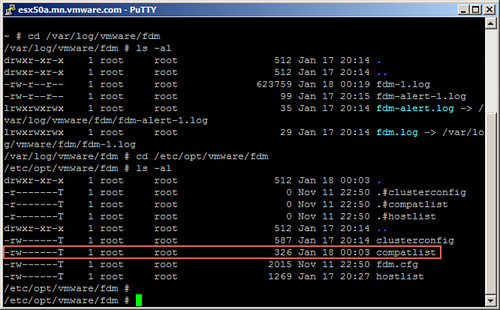
Simple work-around to prevent VMs from being restarted in another site.

Dell FX2 platform certified for VSAN with storage blades!

Duncan Epping · Oct 8, 2015 ·

A couple of weeks ago the Dell FX2 disk controller was added to the Virtual SAN Compatibility Guide and shortly after the Ready Node configurations were added. For those who haven’t looked at the Dell FX2 platform, it is (in my opinion)  hyper-converged on steroids. Not only can it provide you with 4 compute nodes in 2U it also packs a 10GbE switch and can hold two storage blades with each 16 disks in it. What? Yes indeed, that is a lot of horse power in a single system.

I am working with a customer right now who is designing a new cluster configuration leveraging the Dell FX2 platform. In this case they are planning on 16 hosts in total. In their case after assessing their current workloads they are going with the FC430 E5-2670 v3 series with 12 cores (dual processor). Each host will have 256GB of memory and uses SD to boot from.

From a storage perspective they are looking to use the FD332 storage blades. Two per FX2 chassis, fully maxed out with 32 drives in total, which is 8 drives per host. All-flash by the way, leveraging 1.6TB devices for the capacity tier and 400GB devices for the write cache. Yes that is 38.4TB raw capacity per FX2 chassis, times 4… ~153TB.Not a coincidence that the configuration is very similar to the “AF-6 Series – Dell FX2 Platform”, they prefer to use a certified and tested solution instead of picking their own components, which makes sense if you ask me.

One of the key reasons for them to go with all-flash is the beta which is coming up. They want to get their hands dirty with functionality like deduplication, checksumming and RAID-5/6 (aka erasure coding) as soon as possible. All 4 chassis will run in one site first for testing purposes for now and they are considering after the initial tests to deploy them across two sites in a stretched configuration. They asked me what the big benefit was of RAID-5 or RAID-6 over the network (aka erasure coding) and it definitely is the lower raw capacity requirements it will lead to. If you look at the current FTT=1 implementation it means that a 20GB disk requires an additional 20GB for availability reasons, which means 40GB in total. With an RAID-5 implementation instead of RAID-1 this 20GB disk would only require 26.6GB of disk space, that is a savings of almost 14GB immediately. And that is before any type of space efficiency (dedupe) is enabled. Anyway, back to the FX2.

So far only “all-flash” has made it to VSAN Ready Node list, and of course components are also listed as in the disk controller “FD332-PERC” (single and dual ROC) and I’ve seen the 1.8″ flash devices also on the list. Waiting to see what one of these boxes would cost in an all-flash configuration, and hoping to also see a hybrid configuration soon. I’m a fan of the Dell FX2 systems, that is for sure.

2 is the minimum number of hosts for VSAN if you ask me

Duncan Epping · Oct 1, 2015 ·

In 2013 I wrote an article about the minimum number of hosts for Virtual SAN. Since then this post has started living its own life. Somehow people have misunderstood my post and used/abused it in many shapes and forms. When I look at the size of a traditional cluster (non-VSAN) the minimum size is 2. From an availability perspective I ask myself what is the risk I am willing to take. What does that mean?

In a previous life I did many projects for SMB customers. My SMB customers typically had somewhat in the range of 2-5 hosts. With the majority having 2-3. In many cases those having 2-3 hosts were running roughly a similar number of virtual machines. The difference between the two situations “2 hosts” versus “3 hosts” was whether during times of maintenance (upgrading / updating) or failure if the ability to restart the virtual machine after a secondary failure. Many customers decided to go with 2 node clusters. Key reason for it being price vs risk. At normal operations risk is low, but the price of an additional host was relatively high.

Now compare this to Virtual SAN and you will see the same applies. With Virtual SAN we have a minimum of 3 hosts, well in a ROBO configuration you can have 2 with an external witness. This means that from a support perspective the bare minimum of dedicated physical hosts required for VSAN is 2. There you go, 2 is the bare minimum for ROBO. For non-ROBO 3 is the minimum. Fully supported, offers all functionality and similar to 4 hosts.

Is having an extra host a good plan? Yes of course it is. HA / DRS / VSAN (and any other scale-out storage solution for that matter) will benefit from more hosts. You as a customer need to ask yourself what the risk is, and if the cost is justifiable.

PS1: A question just came in, want to make that it is clear. Even in a 2-host ROBO configuration you can do maintenance! A single copy of the data and the witness remains available and will have quorum.

PS2: No, you cannot host your “witness” VM on the VSAN cluster itself, this is not supported as the witness is the quorom for the cluster and it should be outside of the cluster to provide certainty of the state in the case of a failure.

VMworld 2015: vSphere APIs for IO Filtering update

Duncan Epping · Aug 31, 2015 ·

I suspect that the majority of blogs this week will all be about Virtual SAN, Cloud Native Apps and EVO. If you ask me then the vSphere APIs for IO Filtering announcements are just as important. I’ve written about VAIO before, in a way, and it was first released in vSphere 6.0 and opened to a select group of partners. For those who don’t know what it is, lets recap, the vSphere APIs for IO Filtering is a framework which enables VMware partners to develop data services for vSphere in a fully supported fashion. VMware worked closely with EMC and Sandisk during the design and development phase to ensure that VAIO would deliver what partners would require it to deliver.

These data services can be applied to on a VM or VMDK granular level and can be literally anything by simply attaching a policy to your VM or VMDK. In this first official release however you will see two key use cases for VAIO though:

  1. Caching
  2. Replication

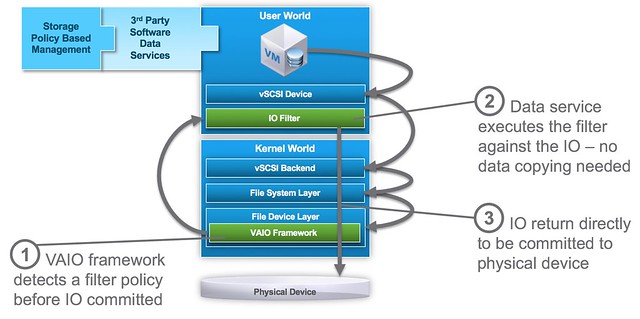
The great thing about VAIO if you ask me is that it is an ESXi user space level API, which over time will make it possible for all the various data services providers (like Atlantis, Infinio etc) who now have a “virtual appliance” based solution to move in to ESXi and simplify their customers environment by removing that additional layer. (To be technically accurate, VAIO APIs are all user level APIs, the filters are all running in user space, only a part of the VAIO framework runs inside the kernel itself.) On top of that, as it is implemented on the “right” layer it will be supported for VMFS (FC/iSCSI/FCoE etc), NFS, VVols and VSAN based infrastructures. The below diagram shows where it sits.

VAIO software services are implemented before the IO is directed to any physical device and does not interfere with normal disk IO. In order to use VAIO you will need to use vSphere 6.0 Update 1. On top of that of course you will need to procure a solution from one of the VMware partners who are certified for it, VMware provides the framework – partners provide the data services!

As far as I know the first two to market will be EMC and Sandisk. Other partners who are working on VAIO based solutions and you can expect to see release something are Actifio, Primaryio, Samsung, HGST and more. I am hoping to be able to catch up with one or two of them this week or over the course of the next week so I can discuss it a bit more in detail.

Virtual SAN going offshore

Duncan Epping · Aug 17, 2015 ·

Over the last couple of months I have been talking to many Virtual SAN customers. After having spoken to so many customers and having heard many special use cases and configurations I’m not easily impressed. I must say that half way during the conversation with Steffan Hafnor Røstvig from TeleComputing I was seriously impressed. Before we get to that lets first look at the background of Steffan Hafnor Røstvig and TeleComputing.

TeleComputing is one of the oldest service providers in Norway. They started out as an ASP with a lot of Citrix expertise. In the last years they’ve evolved more to being a service provider rather than an application provider. Telecomputing’s customer base consists of more than 800 companies and in excess of 80,000 IT users. Customers are typically between 200-2000 employees, so significant companies. In the Stavanger region a significant portion of the customer base is in the oil business or delivering services to the Oil business. Besides managed services, TeleComputing also has their own datacenter they manage and host services in for customers.

Steffan is a solutions architect but started out as a technician. He told me he still does a lot of hands-on, but besides that also supports sales / pre-sales when needed. The office he is in has about 60 employees. And Steffan’s core responsibility is virtualization, mostly VMware based! Note that TeleComputing is much larger than those 60 employees, they have about 700 employees worldwide with offices in Norway, Sweden and Russia.

Steffan told me he got first introduced to Virtual SAN when it was just launched. Many of their offshore installation used what they call “datacenter in a box” solution which was based on IBM Bladecenter. Great solution for that time but there were some challenges with it. Cost was a factor, rack size but also reliability. Swapping parts isn’t always easy either and that is one of the reasons they started exploring Virtual SAN.

For Virtual SAN they are not using blades any longer but instead switched to rack mounted servers. Considering the low number of VMs that are typically running in these offshore environments a fairly “basic” 1U server can be used. With 4 hosts you will now only take up 4U , instead of the 8 or 10U a typical blade system requires. Before I forget, the hosts itself are Lenovo x3550 M4’s with one S3700 Intel SSD of 200GB and 6 IBM 900GB 10K RPM drives. Each host has 64GB of memory and two Intel E5-2630 6 core CPUs. It also uses an M5110 SAS controller. Especially in the type of environments they support this is very important, on top of that the cost is significantly lower for 4 rack mounts vs a full bladecenter. What do I mean with type of environments? Well as I said offshore, but more specifically Oil Platforms! Yes, you are reading that right, Virtual SAN is being used on Oil Platforms.

For these environments 3 hosts are actively used and a 4th host is just there to serve as a “spare”. If anything fails in one of the hosts the components can easily be swapped, and if needed even the whole host could be swapped out. Even with a spare host the environment is still much cheaper than compared to the original blade architecture. I asked Steffan if these deployments were used by staff on the platform or remotely. Steffan explained that staff “locally” can only access the VMs, but that TeleComputing manages the hosts, rent-an-infrastructure or infrastructure as a service is the best way to describe it.

So how does that work? Well they use a central vCenter Server in their datacenter and added the remote Virtual SAN clusters connected via a satellite connection. The virtual infrastructure as such is completely managed from a central location. Not just virtual, also the hardware is being monitored. Steffan told me they use the vendor ESXi image and as a result gets all of the hardware notification within vCenter Server, single pane of glass when you are managing many of these environments like these is key. Plus it also eliminates the need for a 3rd party hardware monitoring platform.

Another thing I was interested in was knowing how the hosts were connected, considering the special location of the deployment I figured there would be constraints here. Steffan mentioned that 10GbE is very rare in these environments and that they have standardized on 1GbE. Number of connection is even limited and today they have 4 x 1GbE per server of which 2 are dedicated to Virtual SAN. The use of 1GbE wasn’t really a concern, the number of VMs is typically relatively low so the expectation was (and testing and production has confirmed) that 2 x 1GbE would suffice.

As we were wrapping up our conversation I asked Steffan what he learned during the design/implementation, besides all the great benefits already mentioned. Steffan said that they learned quickly how critical the disk controller is and that you need to pay attention to which driver you are using in combination with a certain version of the firmware. The HCL is leading, and should be strictly adhered to. When Steffan started with VSAN the Healthcheck plugin wasn’t released yet unfortunately as that could have helped with some of the challenges. Other caveat that Steffan mentioned was that when single device RAID-0 sets are being used instead of passthrough you need to make sure to disable write-caching. Lastly Steffan mentioned the importance of separating traffic streams when 1GbE is used. Do not combine VSAN with vMotion and Management for instance. vMotion by itself can easily saturate a 1GbE link, which could mean it pushes out VSAN or Management traffic.

It is fair to say that this is by far the most exciting and special use case I have heard for Virtual SAN. I know though there are some other really interesting use cases out there as I have heard about installations on cruise ships and trains as well. Hopefully I will be able to track those down and share those stories with you. Thanks Steffan and TeleComputing for your time and great story, much appreciated!

  • « Go to Previous Page
  • Page 1
  • Interim pages omitted …
  • Page 4
  • Page 5
  • Page 6
  • Page 7
  • Page 8
  • Interim pages omitted …
  • Page 12
  • Go to Next Page »

Primary Sidebar

About the Author

Duncan Epping is a Chief Technologist and Distinguished Engineering Architect at Broadcom. Besides writing on Yellow-Bricks, Duncan is the co-author of the vSAN Deep Dive and the vSphere Clustering Deep Dive book series. Duncan is also the host of the Unexplored Territory Podcast.

Follow Us

  • X
  • Spotify
  • RSS Feed
  • LinkedIn

Recommended Book(s)

Also visit!

For the Dutch-speaking audience, make sure to visit RunNerd.nl to follow my running adventure, read shoe/gear/race reviews, and more!

Do you like Hardcore-Punk music? Follow my Spotify Playlist!

Do you like 80s music? I got you covered!

Copyright Yellow-Bricks.com © 2026 · Log in