• Skip to primary navigation
  • Skip to main content
  • Skip to primary sidebar

Yellow Bricks

by Duncan Epping

  • Home
  • Unexplored Territory Podcast
  • HA Deepdive
  • ESXTOP
  • Stickers/Shirts
  • Privacy Policy
  • About
  • Show Search
Hide Search

5

Enabling Hot-Add by default? /cc @gabvirtualworld

Duncan Epping · Jan 16, 2012 ·

Gabe asked the question on one of my recent posts if it made sense to enable Hot-Add by default and if there was an impact/overhead?

Lets answer the impact/overhead portion first, yes there is an overhead. It is in the range of percents. You might ask yourself where this overhead is coming from and if that is vSphere overhead or… When CPU and Memory Hot-add is enabled the Guest OS, especially Windows, will accommodate for all possible memory and CPU changes. For CPU is will take the max amount of vCPUs into account, so with vSphere 5 that would be 32. For memory it will take 16 x  power-on memory in to account, as that is the max you can provision . Does it have an impact? Again, a matter of percents. It could also lead to problems however when you don’t have sufficient memory provisioned as described in this KB by Microsoft: http://support.microsoft.com/kb/913568.

Another impact, mentioned by Valentin (VMware), is the fact that on ESXi 5.0 vNUMA would not be used if you had the HotAdd feature enabled for that VM.

What is our recommendation? Enable it only when you need it. Yes they impact might be small, but if you don’t need it why would you incur it?!

“Hacking” Site Recovery Manager (SRM) / a Storage Array Adapter

Duncan Epping · Jan 10, 2012 ·

** Disclaimer: This is for educational purposes, please don’t implement this in your production environment as it is not supported! **

Last week I received a question and I figured I would dive in to it this week. The question was if it is possible to fail-over LUNs using VMware Site Recovery Manager (SRM) which are not part of the Cluster which SRM “manages”. In other words, can I fail-over a LUN which is attached to a physical Windows Server or to a completely separate VMware Cluster? Before we continue, I did not hack SRM itself, neither did I make any changes to the SRA.

Lets briefly explain what SRM does normally when you go through the process of of creating a DR plan. Now this is slimmed down with only focussing on the relevant stuff for this question:

  • First it will discover the devices using the Storage Replication Adapter (SRA)
  • It then discovers all LUNs using the SRA
  • It show the replicated LUNs containing VMs to the admin
  • Admin can use these in his plan and “protect” the VMs appropriately

I decided to install SRM in a nested environment using the Celerra Uber VSA. I installed the VNX SRA and configured it and went through some of the log files just to find a piece of evidence that my plan is even possible. For Windows 2008 you can find the SRM Log Files in this location by the way:

%ALLUSERSPROFILE%\VMware\VMware vCenter Site Recovery Manager\Logs\

Other locations are documented in this KB. When I created the environment I created multiple LUNs with different sizes to make them easily recognizable. The LUN which is replicated but not exposed to our vCenter/SRM environment is 25GB and the LUN which is exposed is 30GB. This is what the log files showed me when I did a quick find on the size:

(Production) fsid=14 size=30000MB alloc=0MB dense  read-write
path=/srm01/fs14_T1_LUN1_BB005056AE32800000/fs14_T1_LUN1_BB005056AE32800000 (snapped)
(Production) fsid=16 size=25000MB alloc=0MB dense read-write
path=/vc01/fs16_T1_LUN2_BB005056AE32800000/fs16_T1_LUN2_BB005056AE32800000 (snapped)

As you can see both my 25GB and my 30GB LUN is listed. I added a name to it which also allows me to quickly identify it “srm01” and “vc01”, where “vc01” is the one which is not managed by SRM.

So how does SRM get this information? Well it is actually pretty straight forward, SRM calls a script which is part of the SRA. SRM feeds this script XML. This XML code contains the commands / details required. I’ve written about this a long time ago when I was troubleshooting SRM and it is still applicable:

perl command.pl < file.xml

Now the XML file is of course key here… How does that need to be structured and can we use, or should I say abuse, it to do a fail-over of a LUN which is not “managed” by SRM/vCenter. Well I started digging and it turns out to be fairly straight forward. Keep in mind the disclaimer at the top though, this is not what the SRA’s were intended for… this is purely for educational purposes and far from supported. Again the logfiles exposed a lot of details here, but I stripped it down to make it readable. This is the response from the SRA when SRM asked for details on which devices are available:

2012-01-09T12:14:53.583-08:00 [05388 verbose 'SraCommand' opID=7D6C5634-00000023] discoverDevices responded with:
--> <?xml version="1.0" encoding="UTF-8" standalone="yes"?>
--> <SourceDevice state="read-write" id="1-1">
--> <Name>fs14_T1_LUN1_BB005056AE32800000</Name>
--> <Identity>
--> <Wwn>60:06:04:8c:ab:b2:88:c0:59:40:72:24:1b:5f:77:72</Wwn>
--> </Identity>
--> <TargetDevice key="fs14_T1_LUN1_BB005056AE32800000_fs10_T1_LUN1_BB005056AE32820000"/>
--> </SourceDevice>
--> <SourceDevice state="read-write" id="1-2">
--> <Name>fs16_T1_LUN2_BB005056AE32800000</Name>
--> <Identity>
--> <Wwn>60:06:04:8c:b8:50:22:96:0c:0b:bf:d8:59:0b:a1:75</Wwn>
--> </Identity>
--> <TargetDevice key="fs16_T1_LUN2_BB005056AE32800000_fs12_T1_LUN3_BB005056AE32820000"/>
--> </SourceDevice>
--> </SourceDevices>

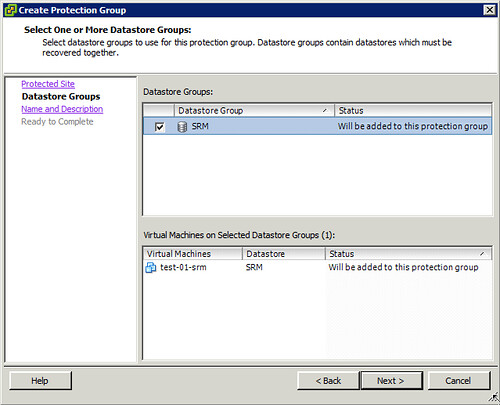
Now if you look at SRM and try to make a Protection Group plan you will quickly discover that only those Datastores which have a VM hosted on there can be added. This is shown in the screenshot below.

As mentioned SRM filters out the “irrelevant LUNs”, to me this LUN wasn’t irrelevant however. So what’s next? I decided to initiated a fail-over and to look at the log files. When the fail-over is initiated the following is issued by SRM, again I stripped some details to make it more readable:

--> <FailoverParameters>
--> <ArrayId>BB005056AE32820000-server_2</ArrayId>
--> <AccessGroups>
--> <AccessGroup id="domain-c7">
--> <Initiator id="iqn.1998-01.com.vmware:localhost-11616041" type="iSCSI"/>
--> <Initiator id="iqn.1998-01.com.vmware:localhost-4a15366e" type="iSCSI"/>
--> <Initiator id="10.21.68.106" type="NFS"/>
--> <Initiator id="10.21.68.105" type="NFS"/>
--> </AccessGroup>
--> </AccessGroups>
--> <TargetDevices>
--> <TargetDevice key="fs14_T1_LUN1_BB005056AE32800000_fs10_T1_LUN1_BB005056AE32820000">
--> <AccessGroups>
--> <AccessGroup id="domain-c7"/>
--> </AccessGroups>
--> </TargetDevice>
--> </TargetDevices>
--> </FailoverParameters>

I guess we should be able to work with this! Using the “discoverdevices” information and combining it with the “Failover” information I should be able to construct my own custom XML file. After creating this XML file I should be able to fail-over any LUN which is part of the selected device… What is my plan? I am planning to change the following:

  • Initiator id
  • TargetDevice key

I wasn’t sure if I needed to change the AccessGroup so I figured I would just test it like this. I called the script as follows:

<path to perl>\bin\perl.exe command.pl < file.xml

I watched a whole bunch of messages pass by and then looked at the Celerra when then fail-over commend was completed and noticed the following:

And of course within the “unmanaged” vCenter you can see it:

Successful fail-over of a LUN which wasn’t part of an SRM Protection Group! Yes, when you replace the Initiator ID even the masking is correctly configured. The only thing left would be either resignaturing the volume or mounting the volume. This of course depends on the OS owning the volume and the desired end result. All in all, a nice little experiment… Once again, don’t try this in your own environment, it is far from supported!

vSphere HA Isolation response when using IP Storage

Duncan Epping · Dec 15, 2011 ·

I had a question from one of my colleagues last week about the vSphere HA Isolation Response and IP Storage. His customer had an ISCSI storage infrastructure (applies to NFS also) and recently implemented a new vSphere environment. When one of the hosts was isolated virtual machines were restarted and users started reporting strange problems.

What happened was that the vSphere HA Isolation Response was configured to “Leave Powered On” and as both the Management Network and the iSCSI Network were isolated there was no “datastore heartbeating” and no “network heartbeating”. Because the datastores were unavailable the lock on the VMDKs expired (virtual disk files) and HA would be able to restart the VMs.

Now please note that HA/ESXi will power-off (or kill actually) the “ghosted VM” (the host which runs the VMs that has lost network connection) when it detects the locks cannot be re-acquired. It still means that the time between when the restart happens and the time  when the isolation event is resolved potentially the IP Address and the Mac Address of the VM will pop up on the network. Of course this will only happen when your virtual machine network isn’t isolated, and as you can imagine this is not desired.

When you are running IP based storage, it is highly (!!) recommend to configure the isolation response to: power-off! For more details on configuring the isolation response please read this article which lists the best practices / recommendations.

Multi NIC vMotion, how does it work?

Duncan Epping · Dec 14, 2011 ·

I had a question last week about multi NIC vMotion. The question was if multi NIC vMotion was a multi initiator / multi target solution. Meaning that, if available, on both the source and the destination multiple NICs are used for the vMotion / migration of a VM. Yes it is!

It is complex process as we need vMotion to able to handle mixes of 10GbE and 1GbE NICs.

When we start the process we will check, from the vCenter side, each host and determine the total combined pool of bandwidth available for vMotion. In other words, if you have 2x1GbE NICs and 1x10GbE NIC, then that host has a pool of 12GbE worth of bandwidth. We will do the same for the source and the destination host. Then, we will walk down each host’s list of vMotion vmknics, pairing off NICs until we’ve exhausted the bandwidth pool.

There are many combinations possible, but lets discuss a few just to provide a better idea of how this works:

  • If the source host has 1x1GbE NIC and the dest 1x1GbE NIC, we’ll open one connection between the these two hosts.
  • If the source has 3x1GbE NICs and the destination 1x10GbE NIC, then we’ll open one connection from each source-side 1GbE NIC to the destination’s 10GbE NIC – so a total of three socket connections all to the dest’s single 10GbE NIC.
  • If the source has 15x1GbE NICs and the destination 1x10GbE NIC and 5x1GbE NICs, then we’ll direct the first 10 source-side 1GbE NICs to connect to the dest’s 10GbE NIC, then the remaining pair of 5 1GbE vmknics will connect to each other – 15 connections in all.

Keep in mind that if the hosts are mismatched, we will create connections between vmknics until one of the sides is “depleted”. In other words if the source has 2 x 1GbE and the destination 1 x 1GbE only 1 connection would be opened.


Using Storage IO Control and Network IO Control together?

Duncan Epping · Dec 7, 2011 ·

I had a question today from someone who asked if there was any point in enabling SIOC (Storage IO Control) when you have NIOC (Network IO Control) enabled and configured. Lets start with the answer: Yes there is! NIOC controls traffic on a single NIC port level. In other words, when you have 10GbE NIC ports and vMotion, VMs and NFS (for instance) use the same NIC port it will prevent one of the streams from claiming all bandwidth while others need it. It basically is the police officer who controls a group of people getting too loud in a single room.

As not many people realize this lets repeat it… NIOC controls traffic on a NIC port level. Not on a NIC pair, not on a host level and not on a cluster wide level. On a NIC port level!

SIOC does IO control on a Datastore-VM layer. Meaning that when a certain threshold is reached it will determine on a datastore wide level which hosts and essentially which VMs get a specific chunk of the resources. SIOC prevents a single VM from claiming all IO resources for a datastore in a cluster. SIOC is cluster wide on a datastore level! It basically is the police officer who asks your neighbor to tone it down when as he is bothering the rest of the street.

Yes, enabling SIOC and NIOC together makes a lot of sense!

  • « Go to Previous Page
  • Page 1
  • Page 2
  • Page 3
  • Page 4
  • Interim pages omitted …
  • Page 14
  • Go to Next Page »

Primary Sidebar

About the Author

Duncan Epping is a Chief Technologist and Distinguished Engineering Architect at Broadcom. Besides writing on Yellow-Bricks, Duncan is the co-author of the vSAN Deep Dive and the vSphere Clustering Deep Dive book series. Duncan is also the host of the Unexplored Territory Podcast.

Follow Us

  • X
  • Spotify
  • RSS Feed
  • LinkedIn

Recommended Book(s)

Also visit!

For the Dutch-speaking audience, make sure to visit RunNerd.nl to follow my running adventure, read shoe/gear/race reviews, and more!

Do you like Hardcore-Punk music? Follow my Spotify Playlist!

Do you like 80s music? I got you covered!

Copyright Yellow-Bricks.com © 2026 · Log in
