• Skip to primary navigation
  • Skip to main content
  • Skip to primary sidebar

Yellow Bricks

by Duncan Epping

  • Home
  • Unexplored Territory Podcast
  • HA Deepdive
  • ESXTOP
  • Stickers/Shirts
  • Privacy Policy
  • About
  • Show Search
Hide Search

5

ESXi commandline work….

Duncan Epping · Nov 16, 2011 ·

I am just playing around in my lab and needed to do a couple of common ESXi commandline tasks which I figured I would document as they will come in handy at some point.

  • List all VMs registered to this host (This reveals the Vmid needed for other commands)
    vim-cmd /vmsvc/getallvms
  • Unregister a VM
    vim-cmd /vmsvc/unregister <Vmid>
  • Register a VM
    vim-cmd /solo/register /path/to/file.vmx
  • Get power state of a VM
    vim-cmd /vmsvc/power.getstate <Vimid>
  • Power off a VM
    vim-cmd /vmsvc/power.off <Vmid>
  • Power on a VM
    vim-cmd /vmsvc/power.on <Vmid>
vShield App broke down on the host that is running vCenter now what?

Duncan Epping · Nov 15, 2011 ·

I was playing around with vShield App and I locked out my vCenter VM which happened to be hosted on the cluster which was protected by vShield App. Yes I know that it is not recommended, but I have a limited amount of compute resources in my lab and I can’t spare a full server just for vCenter so I figured I would try it anyway and by breaking stuff I learn a lot more.

I wanted to know what happened when my vShield App virtual machine would fail. So I killed it and of course I couldn’t reach vCenter anymore. The reason for this being is the fact that a so-called dvfilter is used. The dvfilter basically captures the traffic, sends it to the vShield App VM which inspects it and then sends it to the VM (or not depending on the rules). As I killed my vShield App VM there was no way it would work. If I would have had my vCenter available I would just vMotion the VMs to another host and the problem would be solved, but it was my vCenter which was impacted by this issue. Before I started digging myself I did a quick google and I noticed this post by vTexan. He had locked himself out by creating strict rules, but my scenario was different. What were my options?

Well there are multiple options of course:

  1. Move the VM to an unprotected host
  2. Disarm the VM
  3. Uninstall vShield

As I did not have an unprotected host in my cluster and did not want to uninstall vShield I had only 1 option left. I figured it couldn’t be too difficult and it actually wasn’t:

  1. Connect your vSphere Client to the ESXi host which is running vCenter
  2. Power Off the vCenter VM
  3. Right click the vCenter VM and go to “Edit Settings”
  4. Go to the Options tab and click General under Advanced
  5. Click Configuration Parameters
  6. Look for the “ethernet0.filter0” entries and remove both values
  7. Click Ok, Ok and power on your vCenter VM

As soon as your vCenter VM is booted you should have access to vCenter again. Isn’t that cool? What would happen if your vShield App would return? Would this vCenter VM be left unprotected? No it wouldn’t, vShield App would actually notice it is not protected and add the correct filter details again so that the vCenter VM will be protected. If you want to speed this process up you could of course also vMotion the VM to a host which is protected. Now keep in mind that while you do the vMotion it will insert the filter again which could cause the vCenter VM to disconnect. In all my tests so far it would reconnect at some point, but that is no guarantee of course.

Tomorrow I am going to apply a security policy which will lock out my vCenter Server and try to recover from that… I’ll keep you posted.

** Disclaimer: This is for educational purposes, please don’t try this at home… **

Repeated characters when typing in your VMs remote console?

Duncan Epping · Nov 14, 2011 ·

Today I was working on a couple of test scenarios in a remote lab. For some reason the latency was a lot higher than normal and I was very difficult to type anything in the Remote Console through the vCenter Client. Every single character I tried popped up 2 or 3 times… which makes it very difficult to type a password as you can imagine. I knew I read a KB article about this exact problem a long time ago. Considering it is KB 196 I probably wasn’t the first to bump in to this. The solution is fairly simple:

  • Power off the VM
  • Edit Settings
  • Click the Options Tab
  • Click “General”
  • Click “Configuration Parameters”
  • Click “Add Row”
  • Enter the name: keyboard.typematicMinDelay
  • Enter the value: 2000000

Although the KB article doesn’t mention it, this also applies to vSphere 5.0.

What happens to powered off VMs when a host fails?

Duncan Epping · Nov 11, 2011 ·

I had the question today what happens to a powered off VM when the host they are registered against fails? This customer always has multiple powered off VMs and was afraid their VMs would show up as orphaned. I was pretty confident that the VM would be re-registered against one of the remaining hosts in the cluster, but I validated it just in case and this is what the events section of the VM shows:

Relocating from cs-tkmt-h08, emc-vnx-fcoe to cs-tkmt-h05, emc-vnx-fcoe

In other words, the VM is relocated from my ESXi host cs-tkmt-h08 to cs-tkmt-h05. No need to worry about orphaned VMs and manually registering them against the remaining hosts… vSphere does it for you.

vShield App and layering your design

Duncan Epping · Nov 10, 2011 ·

I started diving in to vShield App and one thing that I like about vShield App is that it allows you to use different types of objects to apply your policies to. Never really put too much thought in to it, but considering the world is more and more changing to policy based management this fits right in. I just wanted to share something that I was working on, any feedback / thoughts are welcome…

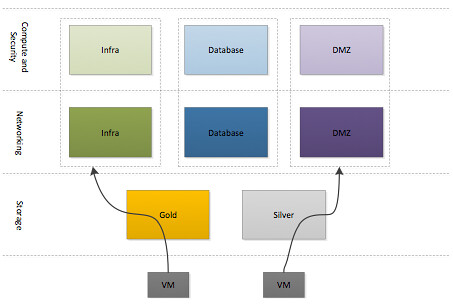
The VMware Cloud Infrastructure aims to reduce operational overhead and lower Total Cost of Ownership (TCO) by simplifying management tasks and abstracting complex processes. The focus of this architecture, as indicated by our customer requirements, is resource aggregation and isolation through the use of pools for each of the crucial pillars: network, storage and compute. Each of the three pillars will be carved in to multiple units of consumption with priority allocated based on their service level agreement. This will be achieved by leveraging core functionality offered by vSphere 5.0. Subsequently vShield App will be used to isolate each of the different type of workloads. As a hypervisor-based application-aware firewall solution, vShield App allows defining policies to logical, dynamic application boundaries (security groups) instead of physical boundaries.

This resource and security layering method will allow for a fast and safe deployment of new workloads.

Each of the different types of resources are carved up in to different groups for each of the respective workload types. A virtual machine, or vApp, will be deployed in one of the three different compute and security groups after which a specific networking group will be selected and a storage tier. Compute, Security and Network  group types are currently defined based on the different type of workloads this virtual infrastructure will host. In the future additional blocks may be added based on the requirements of the internal customers and the different types of workloads being deployed…

  • « Go to Previous Page
  • Page 1
  • Page 2
  • Page 3
  • Page 4
  • Page 5
  • Page 6
  • Interim pages omitted …
  • Page 14
  • Go to Next Page »

Primary Sidebar

About the Author

Duncan Epping is a Chief Technologist and Distinguished Engineering Architect at Broadcom. Besides writing on Yellow-Bricks, Duncan is the co-author of the vSAN Deep Dive and the vSphere Clustering Deep Dive book series. Duncan is also the host of the Unexplored Territory Podcast.

Follow Us

  • X
  • Spotify
  • RSS Feed
  • LinkedIn

Recommended Book(s)

Also visit!

For the Dutch-speaking audience, make sure to visit RunNerd.nl to follow my running adventure, read shoe/gear/race reviews, and more!

Do you like Hardcore-Punk music? Follow my Spotify Playlist!

Do you like 80s music? I got you covered!

Copyright Yellow-Bricks.com © 2026 · Log in