• Skip to primary navigation
  • Skip to main content
  • Skip to primary sidebar

Yellow Bricks

by Duncan Epping

  • Home
  • Unexplored Territory Podcast
  • HA Deepdive
  • ESXTOP
  • Stickers/Shirts
  • Privacy Policy
  • About
  • Show Search
Hide Search

5

ESXi 5: Suppressing the local/remote shell warning

Duncan Epping · Jul 21, 2011 ·

On twitter today Duco asked how to disable esxi shell warning (or SSH) for vSphere 5.0. I knew it was possible so I dug it up. This is the warning Duco is referring to for those who are not familiar with it: “SSH for the host has been enabled” or “ESXi shell for the host has been enabled”. I guess the “exclamation” mark on your host kind of leaves a bad taste.
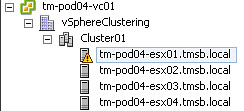
disable esxi shell warning

Now suppressing it is fairly simple. Go to your host, click the configuration tab, click “advanced settings”, go to UserVars” and scroll all the way down to “UserVars.SuppressShellWarning” change the value from 0 to 1. Simple huh!
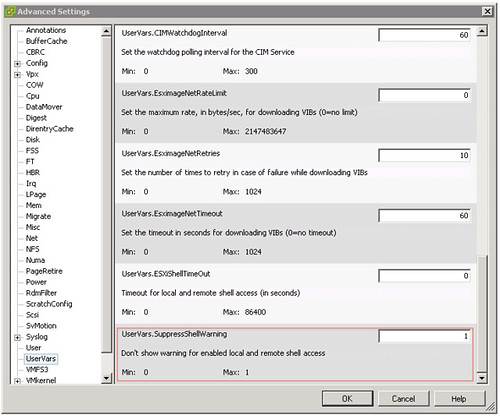
disable esxi shell warning

Yes I know most of you probably don’t have access yet, but this is one of those little things that will come in handy at some point.

What’s new?

Duncan Epping · Jul 20, 2011 ·

I had a lot of trouble finding the vSphere 5.0 What’s New whitepapers so I figured I would list all of them as I probably wouldn’t be the only one finding it challenging to get all of these. These are useful to quickly scan what has been introduced for a specific category. I would recommend reading these as it will give you a better understanding of what is coming up!

  • What’s New in vSphere 5.0
  • What’s New in VMware vSphere 5.0: VMware vCenter
  • What’s New in VMware vSphere 5.0: Platform Whitepaper
  • What’s New in VMware vSphere 5.0: Performance Whitepaper
  • What’s New in VMware vSphere 5.0: Storage Whitepaper
  • What’s New in VMware vSphere 5.0: Networking Whitepaper
  • What’s New in VMware vSphere 5.0: Availability Whitepaper
  • What’s New in VMware Data Recovery 2.0 Technical Whitepaper
  • VMware vSphere Storage Appliance Technical Whitepaper
  • What’s New in VMware vCenter Site Recovery Manager 5 Technical Whitepaper
  • What’s New in VMware vCloud Director 1.5 Technical Whitepaper

Paperback editions finally available of vSphere 5 Clustering Tech Deepdive

Duncan Epping · Jul 18, 2011 ·

I guess Amazon and Createspace had enough of getting those phone calls three or four times from Frank every day since Tuesday as magically the book popped up on Amazon overnight. It took a while and our apologies for that, here are the links to all three books:

Amazon:
eBook (Kindle) – $ 9.99

Black & White Paperback – $ 29.95
Full Color Paperback – $ 49.95

I hope you guys will enjoy it. Frank and I are considering to do a book signing at VMworld, let me know if that is something you would be interested in!

Storage DRS interoperability

Duncan Epping · Jul 15, 2011 ·

I was asked about this a couple of times over the last few days so I figured it might be an interesting topic. This is described in our book as well in the Datastore Cluster chapter but I decided to rewrite it and add some of it into a table to make it easier to digest. Lets start of with the table and explain why/where/what… Keep in mind that this is my opinion and not necessarily the best practice or recommendation of your storage vendor. When you implement Storage DRS make sure to validate this against their recommendations. I have marked the area where I feel caution needs to be taken with (*).

Capability Mode Space I/O Metric
Thin Provisioning Manual Yes (*) Yes
Deduplication Manual Yes (*) Yes
Replication Manual (*) Yes Yes
Auto-tiering Manual Yes No (*)

Yes you are reading that correctly, Storage DRS enabled with all of them and even with I/O metric enabled except for auto-tiering. Now although I said “Manual” for all of them I even believe that in some of these cases Fully Automated mode would be perfectly fine. Now as it will of course depend on the environment I would suggest to start out in Manual mode if any of these 4 storage capabilities are used to see what the impact is after applying a recommendation.

First of all “Manual Mode”… What is it? Manual Mode basically means that Storage DRS will make recommendations when the configured thresholds for latency or space utilization has been exceeded. It also will provide recommendations for placement during the provisioning process of a virtual machine or a virtual disk. In other words, when setting Storage DRS to manual you will still benefit from it as it will monitor your environment for you and based on that recommend where to place or migrate virtual disks to.

In the case of Thin Provisioning I would like to expand. I would recommend before migrating virtual machines that the “dead space” that will be left behind on the source datastore after the migration can be reclaimed by the use of the unmap primitive as part of VAAI.

Deduplication is a difficult one. The question is, will the “deduplication” process be as efficient after the migration as it was before the migration. Will it be able to deduplicate the same amount of data? There is always a chance that this is not the case… But than again, do you really care all that much about it when you are running out of disk space on your datastore or are exceeding your latency threshold? Those are very valid reasons to move a virtual disk as both can lead to degradation of service.

In an environment where replication is used care should be taken when balancing recommendations are applied. The reason for this being that the full virtual disk that is migrated will need to be replicated after the migration. This temporarily leads to an “unprotected state” and as such it is recommended to only migrate virtual disks which are protected during scheduled maintenance windows.

Auto-tiering arrays have been a hot debate lately. Not many seem to agree with my stance but up til today no one has managed to give me a great argument or explain to me exactly why I would not want to enable Storage DRS on auto-tiering solutions. Yes I fully understand that when I move a virtual machine from datastore A to datastore B the virtual machine will more than likely end up on relatively slow storage and the auto-tiering solution will need to optimize the placement again. However when you are running out of diskspace what would you prefer, down time or a temporary slow down? In the case of “I/O” balancing this is different and in a follow up post I will explain why this is not supported.

** This article is based on vSphere 5.0 information **

Punch Zeros!

Duncan Epping · Jul 15, 2011 ·

I was just playing around with vSphere 5.0 and noticed something cool which I hadn’t noticed before. I logged in to the ESXi Shell and typed a command I used a lot in the past, vmkfstools, and I noticed an option called -K. (Just been informed that 4.1 has it as well, I never noticed it though… )

-K –punchzero
This option deallocates all zeroed out blocks and leaves only those blocks that were allocated previously and contain valid data. The resulting virtual disk is in thin format

This is one of those options which many have asked for as in order to re”thin” their disks it would normally require a Storage vMotion. Unfortunately though it only currently works when the virtual machine is powered off, but I guess that is just the next hurdle that needs to be taken.

  • « Go to Previous Page
  • Page 1
  • Interim pages omitted …
  • Page 11
  • Page 12
  • Page 13
  • Page 14
  • Go to Next Page »

Primary Sidebar

About the Author

Duncan Epping is a Chief Technologist and Distinguished Engineering Architect at Broadcom. Besides writing on Yellow-Bricks, Duncan is the co-author of the vSAN Deep Dive and the vSphere Clustering Deep Dive book series. Duncan is also the host of the Unexplored Territory Podcast.

Follow Us

  • X
  • Spotify
  • RSS Feed
  • LinkedIn

Recommended Book(s)

Also visit!

For the Dutch-speaking audience, make sure to visit RunNerd.nl to follow my running adventure, read shoe/gear/race reviews, and more!

Do you like Hardcore-Punk music? Follow my Spotify Playlist!

Do you like 80s music? I got you covered!

Copyright Yellow-Bricks.com © 2026 · Log in