• Skip to primary navigation
  • Skip to main content
  • Skip to primary sidebar

Yellow Bricks

by Duncan Epping

  • Home
  • Unexplored Territory Podcast
  • HA Deepdive
  • ESXTOP
  • Stickers/Shirts
  • Privacy Policy
  • About
  • Show Search
Hide Search

VM showing that HA failure response is disabled in 6.5?

Duncan Epping · Apr 11, 2017 ·

I had a customer asking me today why on each VM it was showing that all HA responses are disabled. This customer is running vSphere 6.5 and below you can see what the UI showed. Note that it still says the VM is Protected, yet none of the protection mechanisms appeared to be enabled

I asked them to show me a screenshot of their HA configuration, and the HA configuration actually had several of these response mechanisms enabled. I checked my vSphere 6.5 lab and it seems I have the same problem and there’s a UI issue on the VM level details for vSphere HA in vSphere 6.5. I verified with engineering, and this is indeed a known issue which has been identified and is fixed in vCenter Server 6.5.0b! KB Article on the topic can be found here, and in the release notes for 6.5.0b it is mentioned that it is fixed.

HA disabled VMs not registered on other hosts after failure?

Duncan Epping · Apr 7, 2017 ·

A couple of weeks ago one of our SEs asked me about vSphere HA functionality that was introduced a while ago, which is the ability to have HA disabled VMs being registered on other healthy hosts in a cluster after a failure. Not only does this apply to “HA disabled VMs” but also to powered-off VMs. This functionality was introduced to make it easier to power-on a VM after a host failure which was powered off before the failure, or which was disabled for HA restarts. Without this functionality you would need to re-register the VM on a different host, which are various unneeded steps.

The customer testing this scenario had noticed that whenever a failure occurred HA disabled, and powered off, VMs did not get registered. Strange as the documentation states the following:

“If a host fails, vSphere HA attempts to register to an active host the affected virtual machines that were powered on and have a restart priority setting of Disabled, or that were powered off.”

After talking to the vSphere HA engineers it was discovered that there was a bug in vSphere 6.0 U1 and U2. This bug resulted in the fact that HA disabled (or powered-off) VMs were not registered on other hosts. Very annoying. Fortunately, this problem has been solved in vSphere 6.0 U3. If you rely on this functionality to work correctly, please upgrade to vSphere 6.0 U3 to fix your problem. Thanks!

Cohesity announces 4.0 and Round C funding

Duncan Epping · Apr 4, 2017 ·

Earlier this week I was on the phone with Rawlinson Rivera, my former VMware/vSAN colleague, and he told me all about the new stuff for Cohesity that was just announced. First of all, congrats with Round C funding. As we’ve all seen, lately it has been mayhem in the storage world. Landing a $90 million round is big. This round was co-led by investors GV (formerly Google Ventures) and Sequoia Capital. Both Cisco Investments and Hewlett Packard Enterprise (HPE) also participated in this round as strategic investors. I am not an analyst, and I am not going to pretend either, lets talk tech.
Besides the funding round, Cohesity also announced the 4.0 release of their hyper-converged secondary storage platform. Now, let it be clear, I am not a fan of the “hyper-converged” term used here. Why? Well I think this is a converged solution. They combined multiple secondary storage use cases and created a single appliance. Hyper-Converged stands for something in the industry, and usually it means the combination of a hypervisor, storage software and hardware. The hypervisor is missing here. (No I am not saying “hyper” in hyper-converged” stands for hypervisor.) Anyway, lets continue.

In 4.0 some really big functionality is introduced, lets list it out and then discuss each at a time:

  • S3 Compatible Object Storage
  • Quotas for File Services
  • NAS Data Protection
  • RBAC for Data Protection
  • Folder and Tag based protection
  • Erasure Coding

As of 4.0 you can now on the Cohesity platform create S3 Buckets, besides replicating to an S3 bucket you can now also present them! This is fully S3 compatible and can be created through their simple UI. Besides exposing their solution as S3 you can also apply all of their data protection logic to it, so you can have cloud archival / tiering /replication. But also enable encryption, data retention and create snapshots.

Cohesity already offered file services (NFS and SMB), and in this release they are expanding the functionality. The big request from customers was Quotas and that is introduced in 4.0. Along with what they call Write-Once-Read-Many (WORM) capabilities, which refers to data retention in this case (write once, keep forever).

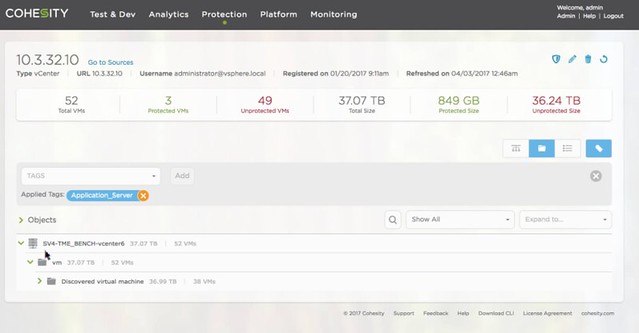
For the Data Protection platform they now offer NAS Data Protection. Basically they can connect to a NAS device and protect everything which is stored on that device by snapping the data and storing it on their platform. So if you have a NetApp filer for instance you can now protect that by offloading the data to the Cohesity platform. For the Data Protection solution they also intro Role Based Access. I think this was one of the big ticket items missing, and with 4.0 they now provide that as well. Last but not last “vCenter Integration”, which means that they can now auto-protect groups of VMs based on the folder they are in or the tag they have provided. Just imagine you have 5000 VMs, you don’t want to associate a backup scheme with each of these, you probably much rather do that for an X number of VMs with a similar SLA at a time. Give them a tag, and associate the tag with the protection scheme (see screenshot). Same for folders, easy.

Last but not least: Erasure Coding. This is not a “front-end” feature, but it is very useful to have. Especially in larger configurations it can safe a lot of precious disk space. Today they have “RAID-1” mechanism more or less, where each block is replicated / mirrored to another host in the cluster. This results in a 100% overhead, in other words: for every 100GB stored you need 200GB capacity. By introducing Erasure Coding they reduce that immediately to 33%. Or in other words, with a 3+1 scheme you get 50% more usable capacity and with a 5+2 (double protection) you get 43% more. Big savings, a lot of extra usable capacity.

Oh and before I forget, besides getting Cisco and HPE as investors you can now also install Cohesity on Cisco kit (there’s a list of approved configurations). HPE took it one step further even, they can sell you a configuration with Cohesity included and pre-installed. Smart move.

All in all, some great new functionality and some great enhancements of the current offering. Good work Cohesity, looking forward to see what is next for you guys.

vSAN needs 3 fault domains

Duncan Epping · Mar 29, 2017 ·

I have been having discussions with various customers about all sorts of highly available vSAN environments. Now that vSAN has been available for a couple of years customers are starting to become more and more comfortable around designing these infrastructures, which also leads to some interesting discussions. Many discussions these days are on the subject of multi room or multi site infrastructures. A lot of customers seem to have multiple datacenter rooms in the same building, or multiple datacenter rooms across a campus. When going through these different designs one thing stands out, in many cases customers have a dual datacenter configuration, and the question is if they can use stretched clustering across two rooms or if they can do fault domains across two rooms.

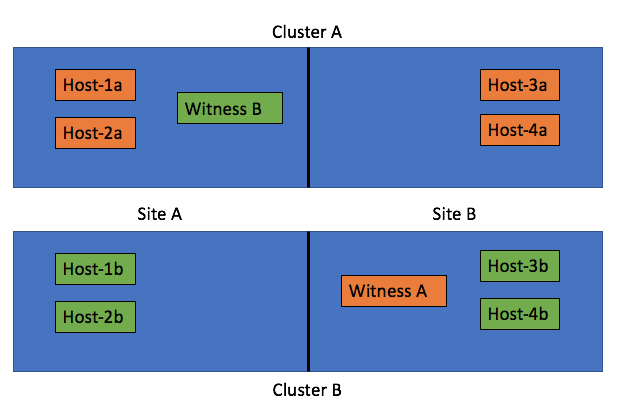
Of course theoretically this is possible (not supported, but you can do it). Just look at the diagram below, we cross host the witness and we have 2 clusters across 2 rooms and protect the witness by hosting it on the other vSAN cluster:

The challenge with these types of configurations is what happens when a datacenter room goes down. What a lot of people tend to forget is that depending on what fails the impact will vary. In the scenario above where you cross host a witness the failure if “Site A”, which is the left part of the diagram, results in a full environment not being available. Really? Yeah really:

  • Site A is down
  • Hosts-1a / 2a / 1b / 2b are unavailable
  • Witness B for Cluster B is down >> as such Cluster B is down as majority is lost
  • As Cluster B is down (temporarily), Cluster A is also impacted as Witness A is hosted on Cluster B
  • So we now have a circular dependency

Some may say: well you can move Witness B to the same side as Witness A, meaning in Site B. But now if Site B fails the witness VMs are gone also impacting all clusters directly. That would only work if only Site A is  ever expected to go down, who can give that guarantee? Of course the same applies to using “fault domains”, just look at the diagram below:

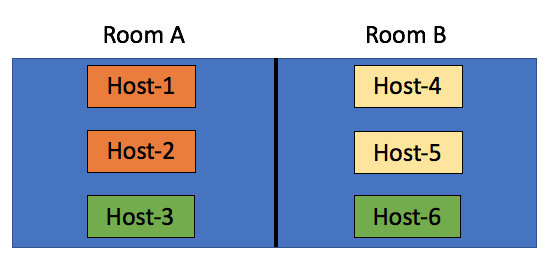
In this scenario we have the “orange fault domain” in  Room A, “yellow” in Room B and “green” across rooms as there is no other option at that point. If Room A fails, VMs that have components in “Orange” and on “Host3” will be impacted directly, as more than 50% of their components will be lost the VMs cannot be restarted in Room B. Only when their components in “fault domain green” happen to be on “Host-6” then the VMs can be restarted. Yes in terms of setting up your fault domains this is possible, this is supported, but it isn’t recommended. No guarantees can be given your VMs will be restarted when either of the rooms fail. My tip of the day, when you start working on your design, overlay the virtual world with the physical world and run through failure scenarios step by step. What happens if Host 1 fails? What happens if Site 1 fails? What happens if Room A fails?

Now so far I have been talking about failure domains and stretched clusters, these are all logical / virtual constructs which are not necessarily tied to physical constructs. In reality however when you design for availability/failure, and try to prevent any type of failure to impact your environment the physical aspect  should be considered at all times. Fault Domains are not random logical constructs, there’s a requirement for 3 fault domains at a minimum, so make sure you have 3 fault domains physically as well. Just to be clear, in a stretched cluster the witness acts as the 3rd fault domain. If you do not have 3 physical locations (or rooms), look for alternatives! One of those for instance could be vCloud Air, you can host your Stretched Cluster witness there if needed!

Intel Optane support for vSAN, first HCI solution to deliver it

Duncan Epping · Mar 21, 2017 ·

I am in Australia this week for the Sydney and Melbourne VMUG UserCon’s. Had a bunch of meetings yesterday and this morning the news was dropped that Intel Optane support was released for vSAN. The performance claims look great, 2.5x more IOPS and 2.5x less latency. (I don’t know the test specifics yet.) On top of that, Optane typically has a higher endurance rating, meaning that the device can incur a lot more writes, which makes it an ideal device for the vSAN caching layer.

While talking to customers the past couple of days though it was clear to me that performance is one thing, but flexibility of configuration is much more important. With vSAN you have the ability to select any server from the vSphere HCL and pick the components you want as long as they are on the vSAN HCL.  Or you can simply pick a ready node and swap components as needed. As long as the controller remains the same for a ready node you can do that. Either way, you have choice, and now with Optane being certified you can use the latest in flash technology with vSAN!

Oh for those paying attention, the Intel P4800X Optane device isn’t listed on the HCL yet. The database is being updated as we speak, and the device should be included soon!

  • « Go to Previous Page
  • Page 1
  • Interim pages omitted …
  • Page 90
  • Page 91
  • Page 92
  • Page 93
  • Page 94
  • Interim pages omitted …
  • Page 497
  • Go to Next Page »

Primary Sidebar

About the Author

Duncan Epping is a Chief Technologist and Distinguished Engineering Architect at Broadcom. Besides writing on Yellow-Bricks, Duncan is the co-author of the vSAN Deep Dive and the vSphere Clustering Deep Dive book series. Duncan is also the host of the Unexplored Territory Podcast.

Follow Us

  • X
  • Spotify
  • RSS Feed
  • LinkedIn

Recommended Book(s)

Also visit!

For the Dutch-speaking audience, make sure to visit RunNerd.nl to follow my running adventure, read shoe/gear/race reviews, and more!

Do you like Hardcore-Punk music? Follow my Spotify Playlist!

Do you like 80s music? I got you covered!

Copyright Yellow-Bricks.com © 2026 · Log in