• Skip to primary navigation
  • Skip to main content
  • Skip to primary sidebar

Yellow Bricks

by Duncan Epping

  • Home
  • Unexplored Territory Podcast
  • HA Deepdive
  • ESXTOP
  • Stickers/Shirts
  • Privacy Policy
  • About
  • Show Search
Hide Search

VVols design and procurement considerations

Duncan Epping · Feb 21, 2017 ·

Over the past couple of months I have had more and more discussions with customers and partners about VVols. It seems that Policy Based Management and the VVol granular capabilities are really starting to sink in, and more and more customers are starting to see the benefit of using vSphere as the management plane. The other option of course is pre-defining what is enabled on a datastore/LUN level and use spreadsheets and complex naming schemes to determine where a VM should land, far from optimal. I am not going to discuss the VVols basics at this point, if you need to know more about that simply do a search on VVol.

When having these discussions a bunch of things typically come up, these all have to do with design and procurement considerations when it comes to VVol capable storage. VMware provided a framework, and API, and based on this each vendor has developed their own implementation. These vary from vendor to vendor, as not all storage systems are created equal. So what do you have to think about when designing a VVols environment or when you are procuring new VVol capable storage? Below you find a list of questions to ask, with a short explanation of why this may be important. I will try to add new questions and considerations when I come up with them.

  • What level of software is needed for my storage system to support VVol?

In many cases, especially existing legacy storage systems, an upgrade is needed of the software to support VVols, ask:

  • What does this upgrade entail?
  • What is the risk?

When it is clear what you need to support VVols from a software point of view, ask:

  • What are the constraints and limits?
    • How many Protocol Endpoints can I have per storage system?
      • Do you support all protocols? (FC, NFS, iSCSI etc)
      • Is the IO proxied via the Protocol Endpoint? If it is, is their an impact with a large number of VMs?
        • Some systems can make a distinction between traffic type and for normal IO will not go through the PE, which means you don’t hit any PE limitations (queue depth being one)
    • How many Storage Pools can you have per storage system?
      • In some cases (legacy storage systems) the storage pool equals an existing physical construct on the array, what is it and what is the impact of this?
        • What kind of options do I select during the creation of the pool? Anything you select on a per Pool level means that when you change policy VVols may have to migrate to other pools, I prefer to avoid data movement. In some cases for instance “replication” is enabled on a storage pool level, I prefer to have this as a policy option
    • How many VVols can I have per storage system? (How many VMs do you have, and how many VVols do you expect to have per VM?)
      • In some cases, usually legacy storage systems, the number of VVols per array is limited. I have seen as “low” as 2000, with 3 VVols per VM at a mininum (typical 5) you can imagine this restricts the number of VMs you can run on single storage system

And then there is the control / management plane:

  • How is the VASA (vSphere APIs for Storage Awareness) Provider implemented?
    • There are two options here, either it comes as part of the storage system or it is provided as a virtual machine.
  • Then as part of that there’s also the decision around the availability model of the VASA Provider:
    • Is it a single instance?
    • Active/Standby?
    • Active/Active?
    • Scale-out?

Note, as it stands today, in order to power-on a VM or create a VM the VASA Provider needs to be available. Hence the availability model is probably of importance, depending on the type of environment you are designing. Also, some prefer to avoid having it implemented on the storage system, as any update means touching the storage system. Others prefer to have it as part of the storage system as it removes the need to have a separate VM that needs to be managed and maintained.

Last but not least, policy capabilities:

  • What is exposed through policy?
    • Availability? (RAID type / number of copies of object)
    •  QoS?
      • Reservations
      • Limits
    • Replication?
    • Snapshot (scheduling)?
    • Encryption?
    • Application type?
    • Thin provisioning?

I hope this helps having the conversation with your storage vendor, developing your design or guide the conversation during the procurement process. If anyone has additional considerations please leave a comment so I can add it to the list when applicable.

Rubrik update >> 3.1

Duncan Epping · Feb 8, 2017 ·

It has been a while since I wrote about Rubrik. This week I was briefed by Chris Wahl on what is coming in their next release, which is called Cloud Data Management 3.1. As Chris mentioned during the briefing, backup solutions grab data. In most cases this data is then never used, or in some cases used for restores but that is it. A bit of a waste if you imagine there are various other uses cases for this data.

First of all, it should be possible from a backup and recovery perspective to set a policy, secure it, validate compliancy and search the data. On top of that the data set should be fully indexed and should be accessible through APIs which allows you to automate and orchestrate various types of workflows, like for instance provide it to developers for test/dev purposes.

Anyway, what was introduced in Cloud Data Management 3.1? Today Rubrik from a source perspective supports vSphere, SQL Server, Linux and NAS and with 3.1 also “physical” Windows (or native, whatever you want to call it) is supported. (Windows 2008 R2, 2012 and 2012 R2) Fully policy based in a similar way to how they implemented it for vSphere. Also, support for SQL Server Failover Clustering (WSFC) was added. Note that the Rubrik connector must be installed on both nodes. Rubrik will automatically recognize that the hosts are part of a cluster and provide additional restore options etc.

There are a couple of User Experience improvements as well. Instead of being “virtual machine” centric now the UI revolves around “hosts”. Meaning that the focus is on the “OS”, and they will for instance show all file systems which are protected and a calendar with snapshots and per day a set of the snapshots of the host. One of the areas Rubrik still had some gaps was reporting and analytics. With 3.1 Rubrik Envision is introduced.

Rubrik Envision provides you build your own fully customisable reports, and of course provides different charts and filtering / query options. These can be viewed, downloaded and emailed in html-5 format. This can also be done in a scheduled fashion, create a report and schedule it to be send out. Four standard reports are included to get you started, of course you can also tweak those if needed.


(blatantly stole this image from Mr Wahl)

Cloud Data Management 3.1 also adds Software Based encryption (AES-256) at rest, where in the past self encrypting devices were used. Great thing is that this will be supported for all R300 series. Single click to enable it, nice! When thinking about this later I asked Chris a question about multi-tenancy and he mentioned something I had not realized:

For multi tenant environments, we’re encrypting data transfers in and out of the appliance using SSL certificates between the clusters (such as hosting provider cluster to customer cluster), which are logically divided by SLA Domains. Customers don’t have any visibility into other replication customers and can supply their own keys for archive encryption (Azure, AWS, Object, etc.)

That was a nice surprise to me. Especially in multi-tenancy environments or large enterprise organizations with clear separation between business units that is a nice plus.

Some “minor” changes Chris mentioned as well, in the past Rubrik would help with every upgrade but this didn’t scale well plus there are customers who have Rubrik gear installed in a “dark site” (meaning no remote connection for security purposes). With the 3.1 release there is the option for customers to do this themselves. Download the binary, upload to the box, type upgrade and things happen. Also, restores directly to ESXi are useful. In the past you needed vCenter in place first. Some other enhancements around restoring, but too many little things to go in to. Overall a good solid update if you ask me.

Last but not least, from a company/business point of view, 250 people work at Rubrik right now. 6x growth in terms of customer acquisition, which is great to hear. (No statement around customer count though.) I am sure we will hear more from the guys in the future. They have a good story, a good product and are solving a real pain point in most datacenters today: backup/recovery and explosion of data sets and data growth. Plenty of opportunities if you ask me.

Lucky 7k, go vSAN!

Duncan Epping · Jan 27, 2017 ·

VMware announced the Q4 earnings last night, one of the things I was most interested about was how vSAN did in Q4. Here is what was announced yesterday, for those interested in more detail check the full earnings call. (Hint, it isn’t just vSAN doing well.)
  • We’ve reached 7000 customers
  • 150% Year over Year growth

Awesome growth (5500 customers in Q3 reached) if you ask me. Really ramping up fast now, and I cannot wait for us to hit 10k. (That is going to be a big party Yanbing / Christos.)

Before I forget, I want to thank all VMware colleagues and all of our partners who are helping us making vSAN one of the fastest growing products within VMware. We couldn’t do this without you, lets kill it again in the upcoming months!

Oh, I just noticed a great post by Lee Caswell on LinkedIn on these numbers, make sure to read that one.

XenDesktop/XenApp 7.12 MCS works with vSAN

Duncan Epping · Jan 25, 2017 ·

This is something that has kept me busy for a while. For the past 2 years there were some challenges with regards to the use of MCS and XenDesktop/XenApp in combination with vSAN. In fact, Citrix never supported vSAN and MCS, and it actually did not work either. PVS worked great in combination with vSAN however. Some customers though prefer to use MCS. After various discussions, emails and engineering discussions it seems that the problem customers faced has finally been resolved.

Citrix recently announced a hotfix that will allow you to use MCS with XenDesktop/XenApp 7.12 and vSAN version 6.0, 6.2 or 6.5. You can find the hotfix and details here: https://support.citrix.com/article/CTX219670

I would like to thank a couple of folks for making this happen, from Citrix: Christian Reilly (Thanks for connecting me to everyone!), Vishal Ganeriwala, Paul Browne, Yuhua Lu, Rick Dehlinger, Amanda Austin and from VMware Weiguo He, Tony Kuo and Sophie Ting Yin. Thanks everyone for making this happen in between releases. I am certain our joint customers will appreciate this! Note, that it is not a full statement of support (yet), but a great step in the right direction!

For those interested in XenDesktop/XenApp with vSAN, make sure to read this great reference paper by Sophie Yin. It provides a lot of detail around performance etc.


Two host stretched vSAN cluster with Standard license?

Duncan Epping · Jan 24, 2017 ·

I was asked today if it was possible to create a 2 host stretched cluster using a vSAN Standard license or a ROBO Standard license. First of all, from a licensing point of view the EULA states you are allowed to do this with a Standard license:

A Cluster containing exactly two Servers, commonly referred to as a 2-node Cluster, can be deployed as a Stretched Cluster. Clusters with three or more Servers are not allowed to be deployed as a Stretched Cluster, and the use of the Software in these Clusters is limited to using only a physical Server or a group of physical Servers as Fault Domains.

I figured I would give it a go in my lab. Exec summary: worked like a charm!

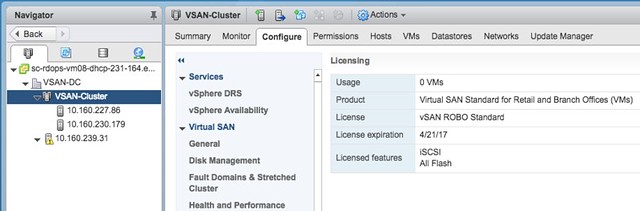
Loaded up the ROBO license:

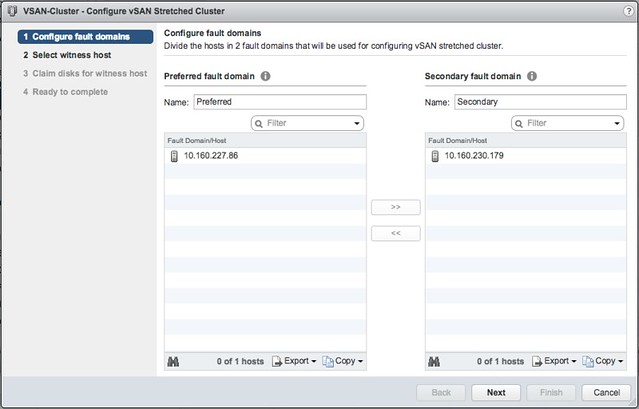
Go to the Fault Domains & Stretched Cluster section under “Virtual SAN” and click Configure. And one host to “preferred” and one to “secondary” fault domain:

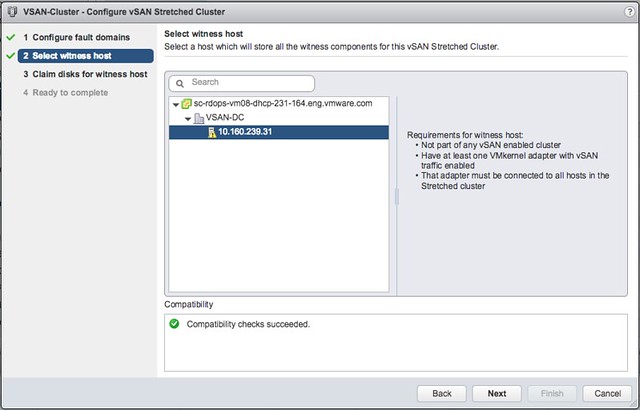
Select the Witness host:

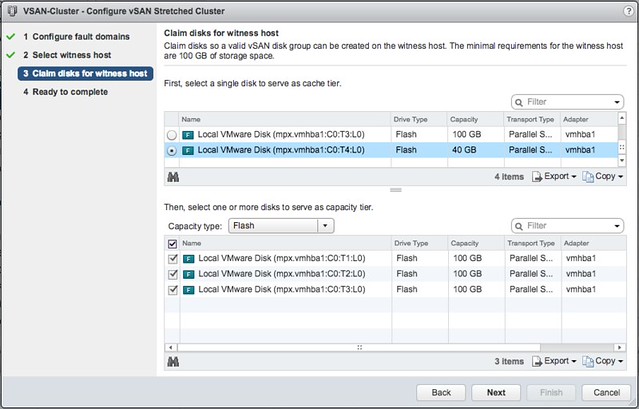
Select the witness disks for the vSAN cluster:

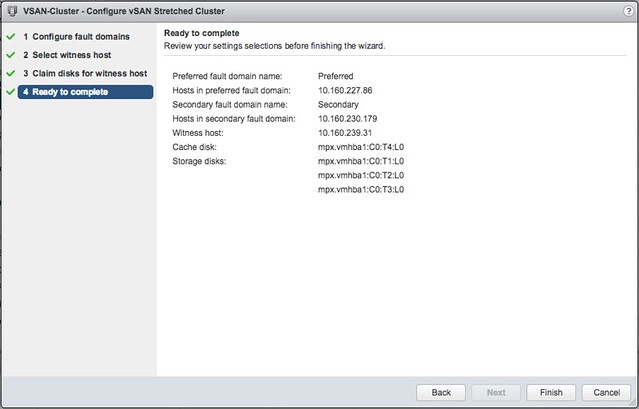
Click Finish:

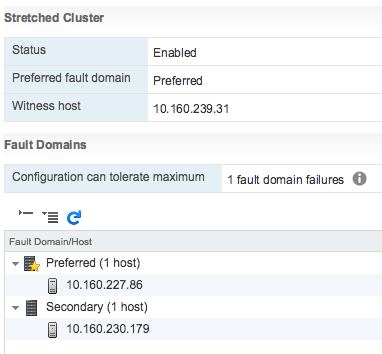
And then the 2-node stretched cluster is formed using a Standard or ROBO license:

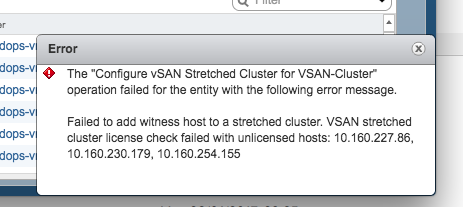
Of course I tried the same with 3 hosts, which failed as my license does not allow me to create a stretched cluster larger than 1+1+1. And even if it would succeed, the EULA clearly states that you are not allowed to do so, you need Enterprise licenses for that.

There you have it. Two host stretched using vSAN Standard, nice right?!

  • « Go to Previous Page
  • Page 1
  • Interim pages omitted …
  • Page 92
  • Page 93
  • Page 94
  • Page 95
  • Page 96
  • Interim pages omitted …
  • Page 497
  • Go to Next Page »

Primary Sidebar

About the Author

Duncan Epping is a Chief Technologist and Distinguished Engineering Architect at Broadcom. Besides writing on Yellow-Bricks, Duncan is the co-author of the vSAN Deep Dive and the vSphere Clustering Deep Dive book series. Duncan is also the host of the Unexplored Territory Podcast.

Follow Us

  • X
  • Spotify
  • RSS Feed
  • LinkedIn

Recommended Book(s)

Also visit!

For the Dutch-speaking audience, make sure to visit RunNerd.nl to follow my running adventure, read shoe/gear/race reviews, and more!

Do you like Hardcore-Punk music? Follow my Spotify Playlist!

Do you like 80s music? I got you covered!

Copyright Yellow-Bricks.com © 2026 · Log in