• Skip to primary navigation
  • Skip to main content
  • Skip to primary sidebar

Yellow Bricks

by Duncan Epping

  • Home
  • Unexplored Territory Podcast
  • HA Deepdive
  • ESXTOP
  • Stickers/Shirts
  • Privacy Policy
  • About
  • Show Search
Hide Search

Startup intro: SaaS-based backup solution Clumio

Duncan Epping · Apr 6, 2020 ·

Last week I saw an update from one of the Clumio founders on twitter. It reminded me that I had promised to take a look at their product. This week I had a meeting set up with Clumio and we went over their product and how to configure it briefly. Clumio is a SaaS based backup solution that was founded in 2017 by former PernixData, Nutanix, EMC folks. The three founders are Poojan Kumar, Kaustubh Patil, and Woon Jung, and those three you may remember from PernixData. One thing to point out is that they had 3 rounds of funding (~190 million dollars) so far and they came out of stealth around VMworld 2019. Coincidentally they won the Gold award for Best of VMworld in the data protection category, and best of show for the entire show, not bad for a first VMworld. I guess that I have to point out that although I would classify them as backup/recovery today, they are adding new functionality weekly and “backup/recovery” is probably not a fair category, data protection is more appropriate and it would not surprise me if that evolves to data management and protection over time. If you are not a fan of reading, simply head over to my youtube video on Clumio, otherwise, just continue below.

So how does it work conceptually? Well they basically have a SaaS solution, but you will need to install an OVA (they call it a cloud connector) in your environment to connect to the SaaS platform for VMware on-premises and VMware Cloud on AWS. When you connect AWS EBS they use a cloud formation template. This cloud connector is a 4 vCPU/8GB virtual machine that then needs the ability to connect to “the outside world” of course. The Cloud Connector is stateless and requires no updates. You can run this Cloud Connector appliance in multiple clusters, on-prem, or in VMware Cloud on AWS and once they are registered you will see those data sources in your portal.  This is nice as you can see all your data sources across public and private clouds in one single pane of glass. You will have the ability to define “backup schemes” by creating policies. These policies can of course then be associated with objects. These objects can be VMs, Clusters and even vCenter Server instances. This means that if you assign a policy to vCenter Server that every new VM created will inherit the policy automatically. You may wonder, where is your data stored? Your data is stored in S3 buckets that are part of the Clumio SaaS-based platform. Customers are isolated from each other, they will have their own dedicated S3 buckets, and these buckets are created and maintained by Clumio, you as a customer only interact with Clumio! [Read more…] about Startup intro: SaaS-based backup solution Clumio

ESXTOP in vSphere 7

Duncan Epping · Apr 2, 2020 ·

I was playing around with Scalable Shares and then noticed some enhancements in esxtop which I didn’t realize were there. I figured I would list the changes I spotted so people are aware of what was added to esxtop in vSphere 7.0. Although it isn’t a huge amount, it is still very valuable to know!

  • RDMA Device “display” is added, so a fully new category for those running RDMA!
    • This, of course, has fields like “Megabits Tx/s”, “% Packets Dropped” etc.
  • CPU Display now has the ability to disable the PCPU usage info at the top by typing “f” followed by “k”
  • vSAN Display now provides UNMAP stats (E, F) additionally

What is also new is that you can now suppress the server physical CPU stats when you type “esxtop -u”, this could be useful when dumping your info into a .csv file. I just added the new details to my ESXTOP page as well, for those who use that as a reference. If there’s more I stumble into then I will report it.

Install and Configure vSphere Replication with SRM 8.3 on vSphere 7

Duncan Epping · Apr 2, 2020 ·

I haven’t really done much with vSphere Replication and Site Recovery Manager (SRM) in the past years as my main focus has been vSAN. I figured I would get two clusters up and running and install and configure both vSphere Replication as well as SRM on top of vSphere 7. Although the installation and configuration are pretty straight forward, there are a few steps which are important. Below the steps I took to get things up and running.

  • Deploy the vSphere Replication appliance in both clusters
  • Deploy the Site Recovery Manager appliance in both clusters
  • Go to “https://<ip of vSphere Replication appliance>:5480” in first cluster
    • username: root
    • password: what ever you specified!
  • Click on “Configuration Page” link
  • Specify Password of vCenter Server in the Password field
  • Click “Apply Network Settings”
  • Click “Save and Restart Service”
  • Accept the SSL Certificate
  • Repeat the above for the second cluster!
  • Now go to your vSphere H5 Client and wait until the vSphere Replicated tasks are completed
  • Log out of the vSphere H5 Client and log back in for both clusters
  • Now go to the first cluster / vCenter server
  • Now click on “Menu” and then “Site Recovery”
  • Click “open Site Recovery”
  • Click “New Site Pair”
  • Fill out the details of the second vCenter Server
  • Click Next and Connect if you get a security alert and are certain this is the correct vCenter instance
  • Select the correct listed vCenter instance and vSphere Replication appliance
  • Click Next and Finish, now you will see a task within vCenter that states “Connect vSphere Replication Sites”
  • Now you have vSphere Replication running and you can replicate VMs from one location to the other manually if and when desired.

[Read more…] about Install and Configure vSphere Replication with SRM 8.3 on vSphere 7

Creating a vSAN 7.0 Stretched Cluster

Duncan Epping · Mar 31, 2020 ·

A while ago I wrote this article and created this demo showing the creation of a vSAN Stretched Cluster. I bumped into the article/video today when I was looking for something and figured that it is time to recreate the vSAN Stretched Cluster demo. I recorded it today, using vSphere / vSAN 7, and just wanted to share it with you here. Hope you enjoy it.

vSAN 7.0 UI enhancements for vSphere Replication

Duncan Epping · Mar 24, 2020 ·

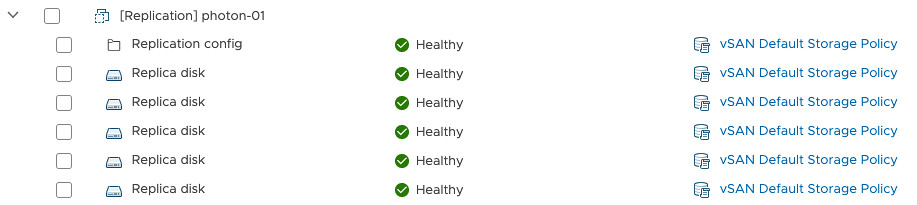
I have been playing around with vSphere / vSAN 7.0 the past week or so. Today I configured vSphere Replication between two vCenter Server instances with vSphere / vSAN 7.0. I wanted to check out the enhancements that were introduced in the UI. Although they are relatively small enhancements, I feel they will make your life as an administrator much easier. The problem people had with VMs which were replicated using vSphere Replication is the fact that the vSphere Client didn’t show much information about the objects. You could not see how much capacity was consumed, or even to what the object belonged to. vSphere 7.0 changes this! When you go to the vSAN section under Monitoring you can now in the “Virtual Objects” pane not only see the objects, you can also easily identify to which VM they belong and you can easily see the different “point in time” copies associated with the VM.

On top of that, the Capacity overview also shows you these details under “User Objects”. Interested in what it looks like? Just watch the demo below, it is just under 2 minutes, a nice quick to-the-point overview of what was introduced for vSphere Replication in vSAN 7.0


  • « Go to Previous Page
  • Page 1
  • Interim pages omitted …
  • Page 56
  • Page 57
  • Page 58
  • Page 59
  • Page 60
  • Interim pages omitted …
  • Page 502
  • Go to Next Page »

Primary Sidebar

About the Author

Duncan Epping is a Chief Technologist and Distinguished Engineering Architect at Broadcom. Besides writing on Yellow-Bricks, Duncan is the co-author of the vSAN Deep Dive and the vSphere Clustering Deep Dive book series. Duncan is also the host of the Unexplored Territory Podcast.

Follow Us

  • X
  • Spotify
  • RSS Feed
  • LinkedIn

Recommended Book(s)

Also visit!

For the Dutch-speaking audience, make sure to visit RunNerd.nl to follow my running adventure, read shoe/gear/race reviews, and more!

Do you like Hardcore-Punk music? Follow my Spotify Playlist!

Do you like 80s music? I got you covered!

Copyright Yellow-Bricks.com © 2026 · Log in