• Skip to primary navigation
  • Skip to main content
  • Skip to primary sidebar

Yellow Bricks

by Duncan Epping

  • Home
  • Unexplored Territory Podcast
  • HA Deepdive
  • ESXTOP
  • Stickers/Shirts
  • Privacy Policy
  • About
  • Show Search
Hide Search

vSphere HA internals: restart placement changes in vSphere 7!

Duncan Epping · May 13, 2020 ·

Frank and I are looking to update the vSphere Clustering deep dive to vSphere 7. While scoping the work I stumbled on to something interesting, and this is the change that was introduced for the vSphere HA restart mechanism,  and specifically the placement of VMs in vSphere 7. In previous releases vSphere HA had a straight forward way of doing placement for VMs when VMs need to be restarted as a result of a failure. In vSphere 7.0 this mechanism was completely overhauled.

So how did it work pre-vSphere 7?

  • HA uses the cluster configuration
  • HA uses the latest compatibility list it received from vCenter
  • HA leverages a local copy of the DRS algorithm with a basic (fake) set of stats and runs the VMs through the algorithm
  • HA receives a placement recommendation from the local algorithm and restarts the VM on the suggested host
  • Within 5 minutes DRS runs within vCenter, and will very likely move the VM to a different host based on actual load

As you can imagine this is far from optimal. So what is introduced in vSphere 7? Well, we introduce two different ways of doing placement for restarts in vSphere 7:

  1. Remote Placement Engine
  2. Simple Placement Engine

The Remote Placement Engine, in short, is the ability for vSphere HA to make a call to DRS for the recommendation of the placement of a VM. This will take the current load of the cluster, the VM happiness, and all configured affinity/anti-affinity/vm-host affinity rules into consideration! Will this result in a much slower restart? The great thing is that the DRS algorithm has been optimized over the past years and it is so fast that there will not be a noticeable difference between the old mechanism and the new mechanism. Added benefit of course for the engineering team is that they can remove the local DRS module, which means there’s less code to maintain. How this works is that the FDM Master communicated with the FDM Manager which runs in vCenter Server. FDM Manager communicates with the DRS service to request a placement recommendation.
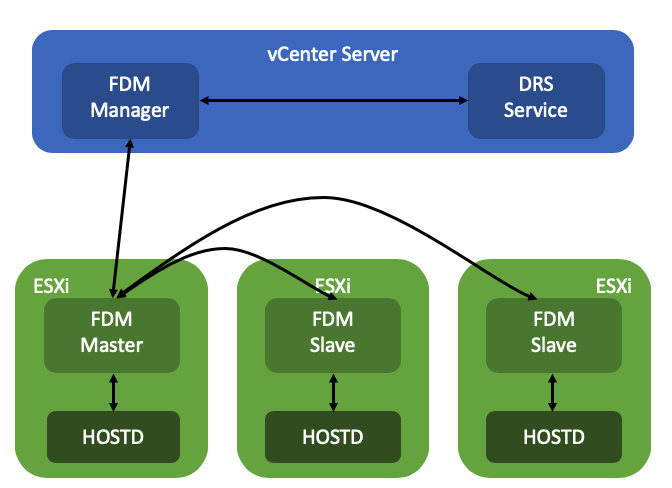
Now some of you will probably wonder what happens when vCenter Server is unavailable, well this is where the Simple Placement Engine comes into play. The team has developed a new placement engine that basically takes a round-robin approach, but does consider of course “must rules” (VM to Host) and the compatibility list. Note, affinity, or anti-affinity rules, are not considered when SPE is used instead of RPE! This is a known limitation, which is considered to be fixed in the future. If a host, for instance, is not connected to the datastore the VM is running on that needs to be restarted than that host is excluded from the list of potential placement targets. By the way, before I forget, version 7 also introduced a vCenter heartbeat mechanism as a result. HA will be heart beating the vCenter Server instance to understand when it will need to resort to the Simple Placement Engine vs the Remote Placement Engine.

I dug through the FDM log to find some proof of these new mechanisms, (/var/log/fdm.log) and found an entry that shows there are indeed two placement engines:

Invoking the RPE + SPE Placement Engine

RPE stands for “remote placement engine”, and SPE for “simple placement engine”. Where Remote of course refers to DRS. You may ask yourself, how do you know if DRS is being called? Well, that is something you can see in the logs in the DRS log files, when a placement request is received, the below entry shows up in the log file:

FdmWaitForUpdates-vim.ClusterComputeResource:domain-c8-26307464

This even happens when DRS is disabled and also when you use a license edition which does not include DRS even, which is really cool if you ask me. If for whatever reason vCenter Server is unavailable, and as a result DRS can’t be called, you will see this mentioned in the FDM log, and as shown below, it will use the Simple Placement Engine’s recommendation for the placement of the VM:

Invoke the placement service to process the placement update from SPE

A cool and very useful small HA enhancement if you ask me for vSphere 7.0!


** Disclaimer: This article contains references to the words master and/or slave. I recognize these as exclusionary words. The words are used in this article for consistency because it’s currently the words that appear in the software, in the UI, and in the log files. When the software is updated to remove the words, this article will be updated to be in alignment. **


vSphere HA internals: VMCP super aggressive option in vSphere 7

Duncan Epping · May 11, 2020 ·

Most of you probably heard about a feature called VMCP aka VM Component Protection. If not, this is the functionality in vSphere HA that enabled you to restart VMs which have been impacted by a PDL (permanent device loss) or APD (all paths down) scenario. (If you have no idea what I am talking about read this article first.)

When you configure the APD response you have four options:

  1. Disable
  2. Issue Event
  3. Power Off / Restart – Conservative
  4. Power Off / Restart – Aggressive

The main difference between Conservative and Aggressive is that if you find yourself in a situation where HA isn’t sure whether a VM can be restarted during an APD scenario it will not power off the VM when using Conservative. If you have it configured as Aggressive it will power off the VM. However, if HA is certain that a VM can’t be powered on it will not power off the VM. Basically it prefers availability of the VM.

As you can imagine, in certain scenarios having a VM running while it is impacted by an “APD” situation makes no sense. The VM has lost access to storage, and you simply may prefer to kill the workload. Why? Well, when it loses access to storage it can’t write to disk. You could find yourself in a situation where a change is acknowledged and you think it is written to disk but it somehow is sitting in a memory cache etc.

If you prefer the VM to be killed, regardless of whether it can be restarted or not, you can enable this via a vSphere HA advanced setting. Now before you implement this, do note that if a cluster-wide APD situation occurs, you could find yourself in the scenario where ALL virtual machines are powered off by HA and not restarted as the resources are not available. Anyway, if you feel this is a requirement, you can configure the following vSphere HA advanced setting in vSphere 7:

das.restartVmsWithoutResourceChecks = true

vSAN 7.0 webinars, sign up!

Duncan Epping · May 6, 2020 ·

There’s a series of webcasts (EMEA timezone, but available for replay as well!) scheduled on the topic of vSAN 7 and VMware Cloud Foundation 4. Topics include things like File Services, Cloud Native Apps, Networking and Security etc. I will present the “vSAN 7.0 What’s New” webinar which is scheduled for June the 23rd, and I will co-present the vSAN File Services webinar with Cormac Hogan which is scheduled for July the 7th. Make sure to sign up here.

Cool tool update: RVTool 4.0.4 released

Duncan Epping · May 4, 2020 ·

Probably one of the most downloaded tools ever, just released a new version: RVTools 4.0.4. Rob emailed me over the weekend, that this new version was just released and he also mentioned that he has reached over 1.2 million downloads. 1.2 million indeed! Crazy number, especially knowing how many customers VMware has today. Congratulations Rob! Anyway, RVTools 4.0.4 was just released, what is in it?

Version 4.0.4 (May 1, 2020)

  • Upgraded RVTools solution to use VMware vSphere Management SDK 7.0
  • Upgraded RVTools solution to use CIS REST API, available since vSphere 6.5, to get tag information
  • vInfo tab page new columns: Virtual machine tags and min Required EVC Mode Key
  • vCPU tab page new columns: Virtual machine tags
  • vMemory tab page new columns: Virtual machine tags and Memory Reservation Locked To Max
  • vDisk tab page new columns: Virtual machine tags
  • vPartition tab page new columns: Virtual machine tags
  • vCD tab page new columns: Virtual machine tags
  • vFloppy tab page new columns: Virtual machine tags
  • vNetwork tab page new columns: Virtual machine tags
  • vSnapshot tab page new columns: Virtual machine tags
  • vTools tab page new columns: Virtual machine tags
  • vRP tab page new columns: Resource Pool tags and object ID
  • vCluster tab page new columns: Cluster tags, custom attributes and object ID
  • vHost tab page new columns: Host tags, in Maintenance Mode and in Quarantine Mode
  • dvSwitch tab page new columns: Distributed VirtualSwitch tags, custom attributes and object ID
  • dvPort tab page new columns: Distributed VirtualSwitch Port Group tags and object ID
  • vDatastore tab page new columns: Datastore tags, custom attributes and object ID
  • Preference extra checkbox for “Exclude tags”
  • CLI new parameter -ExcludeTags
  • Bug fix: removed column “Config Checksum” from vInfo tab page.
    This Base64Binary field was sometimes the cause for a XML deserialize error!
  • Bug fix: not all snapshots from all snapshot siblings where displayed
  • Bug fix: preference setting “Exclude Annotation fields” value was overwritten.
  • Bug fix: Name on vRP tab page was full path
  • Bug fix: In example RVToolsBatchMultipleVCs.ps1 script parameters changed for RVToolsMergeExcelFiles.exe
  • Bug fix: vSphere 7, “Unhandled exception: Input string was not in a correct format.”
  • Known issue: Tags are only visible when logged on with userid/password. It’s not working when SSO is used!

You don’t need any brains to listen to music – the grunge edition

Duncan Epping · May 1, 2020 ·

A while ago I did a bunch of posts on the topic of music. I haven’t done a post on this topic in a while, and as I did a podcast with a friend in dutch (you can listen to it here) on the topic of Grunge I figured I would share the songs that were played during the podcast and the stories around these songs with you. Some of you will know this already, but I have always been a big fan of alternative music. Metal, punk, hardcore-pun, metalcore, thrash metal, death metal, etc. I also listen to other styles though, and grunge is one of them. I started listening to grunge around 1989 probably, the very early days and got acquainted with it through this album by Nirvana called Bleach. Grunge back then wasn’t that popular just yet, but it wouldn’t take too long before it took off massively. Surprisingly to many, as grunge is pretty raw and dark, and can also come across chaotic at times.

For this podcast, I was asked to create a list of my five or six favorite songs in a specific genre and preferably from different bands. Which wasn’t too difficult as there are many great grunge bands around. I wanted to share these songs with you as well. I created a simple Spotify playlist with the songs featured in this podcast but I also want to provide the reason I picked these tracks. I also added the Youtube videos after each song below, for those who prefer to watch the videos.

If anyone has any recommended bands or songs, just drop them in the comment section, always interested in expanding my horizon.

The first song is a song by Pearl Jam called State of Love and Trust. Pearl Jam’s album Ten is probably one of my favorite albums from the 90s. That whole album just breaths rock/grunge from start to finish. State of Love and Trust, however, was not on that album, although it does have the same vibe as the songs on Ten. It probably also is my favorite Pearl Jam song. You may wonder why it has the same vibe while it isn’t on the album, well this song was recorded and written during the same timeframe, it just wasn’t released as part of the Ten release but was a song for a movie called Singles. The interesting thing about the track is that there are two versions, and I recommend you to listen to both, there’s one version with drummer Dave Krusen, and one with drummer Dave Abbruzzese. The one by Krusen sounds a bit trashier, while the one by Abbruzzese is a bit faster. Both versions are awesome though. The youtube video below is the live version as there’s no video clip.

The second song on the list is Hunger Strike by Temple of the Dog. Temple of the Dog is formed out of members of various other bands and was started as a tribute to the vocalist of Mother Love Bone who died of an overdose. I love this song because it is a duet between Chris Cornell (Soundgarden) and Eddie Vedder (Pearl Jam), but originally it wasn’t intended to be a duet. Eddie Vedder was asked to join during the recordings when Chris Cornell had trouble recording certain parts of the song. It is my favorite song of the album, and it was recently covered by Chris Cornell’s daughter Toni. Watch that version as well if you have some time on your hands…

Next on the list is Heart-Shaped Box by Nirvana. I personally feel that every single grunge playlist needs to have at least one Nirvana track. This is the band that literally introduced grunge to the world. Although there were various bands playing grunge before Nirvana, none of them were as successful as Nirvana was (and still is). This song is from my favorite album called In Utero. The album came out after the hit album Nevermind and probably shocked a lot of people. Instead of the more clean sound that Nevermind had, In Utero was raw, and that is probably also why I really like it.

Whenever Nirvana and Kurt Cobain’s name comes up, the name Courtney Love also comes to mind as she was married to Kurt. Courtney was part (or was) of the band called Hole, and a lot of people at the time felt that Hole was mainly getting attention because of that Nirvana/Cobain connection. I don’t agree with that. If you listen to their album Live Through This, and especially the song Doll Parts, you realize that this is much more than just lifting on the success of Nirvana. The song is about the early days of the relationship between Kurt and Courtney and has that characteristic Hole sound with the distinct sound of Courtney Love’s vocals.

One of the bands I never really was in to was Melvins, well I did listen to them but they simply weren’t my favorite band in this genre. They did however undeniably influence the grunge scene, and many other genres as well. They also released an insane amount of albums so it wasn’t easy to pick a song. I picked a song called Night Goat as it is dark, sludgy, doom, and grunge at the same time. Definitely my favorite Melvins song. It just sounds scary and you simply can’t play it loud enough. The video below is a live version, but the quality is great.

Last but not least is Outshined by Soundgarden. The vocals by Chris Cornell are brilliant on this track, but what stands out most are the lyrics. I think everyone who has heard this song will be able to sing along the famous sentence: “looking California and feeling Minnesota”. It is a shame

I hope you enjoyed the list and some of the backstories.

  • « Go to Previous Page
  • Page 1
  • Interim pages omitted …
  • Page 49
  • Page 50
  • Page 51
  • Page 52
  • Page 53
  • Interim pages omitted …
  • Page 498
  • Go to Next Page »

Primary Sidebar

About the Author

Duncan Epping is a Chief Technologist and Distinguished Engineering Architect at Broadcom. Besides writing on Yellow-Bricks, Duncan is the co-author of the vSAN Deep Dive and the vSphere Clustering Deep Dive book series. Duncan is also the host of the Unexplored Territory Podcast.

Follow Us

  • X
  • Spotify
  • RSS Feed
  • LinkedIn

Recommended Book(s)

Also visit!

For the Dutch-speaking audience, make sure to visit RunNerd.nl to follow my running adventure, read shoe/gear/race reviews, and more!

Do you like Hardcore-Punk music? Follow my Spotify Playlist!

Do you like 80s music? I got you covered!

Copyright Yellow-Bricks.com © 2026 · Log in