• Skip to primary navigation
  • Skip to main content
  • Skip to primary sidebar

Yellow Bricks

by Duncan Epping

  • Home
  • Unexplored Territory Podcast
  • HA Deepdive
  • ESXTOP
  • Stickers/Shirts
  • Privacy Policy
  • About
  • Show Search
Hide Search

vCenter Extension error when deploying vSphere Replication?

Duncan Epping · Nov 26, 2012 ·

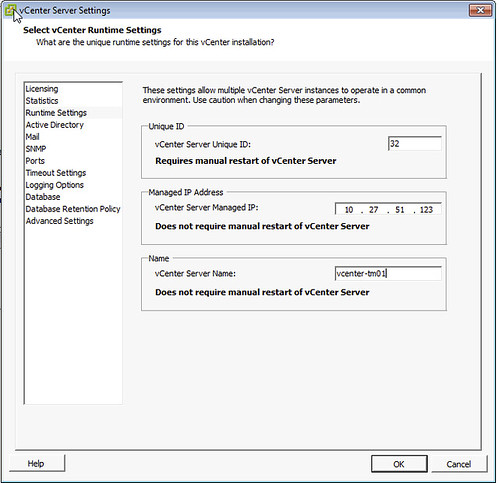
I’ve seen this popping up fairly often now and was under the impression I wrote about it a while back, but can’t find it. So here you go. If during the deployment of an OVF, in this case vSphere Replication, you hit a vCenter extension error it is probably due to a field missing in the vCenter runtime section of the vCenter settings.

The error which is shown in the log is:

“The virtual machine ‘<vm name>’ has a required vService dependency ‘vCenter Extension Installation’ which is not bound to a provider.”

It will show up in the UI with “No provider available” and “This dependency is required”. You can simply solve this by doing the following:

  • Open the vSphere Client
  • Go to “Administration” and “vCenter Server Settings”
  • Click “Runtime Settings”
  • Ensure both “Managed IP Address” (typically missing) and “vCenter Server Name” are filled out.
    vcenter extension error

Now the OVF should deploy correctly. Note that the “Managed IP Address” field is empty by default, so if you are deploying a new vCenter Server instance make sure to fill it out. This will help preventing from running into the vCenter extension error in the future when adding other services.

VMware ThinApp 4.7 Essentials by Peter Björk!

Duncan Epping · Nov 26, 2012 ·

About a year ago one of my colleagues reached out with some questions around book publishing. Many people ask me questions around what it takes, hours involved etc etc, and unfortunately many decide it is not the right time. I guess Peter Björk decided it was the right time as he managed to crank out this awesome book within a year. Congrats Peter, awesome work and major achievement!
The book is titled “VMware ThinApp 4.7 Essentials” and contains everything you need to know about ThinApp, or as the website states:

“VMware ThinApp 4.7 Essentials” shows you how to deploy ThinApp packages in order to improve the portability, manageability and compatibility of applications by encapsulating them from the underlying operating system on which they are executed.

In this book you will learn about how application virtualization works and how to deploy ThinApp packages. You will learn how to update and tweak ThinApp Projects before distribution. This book will then cover design and implementation considerations for future ThinApp projects.

You can find it on Amazon here: Kindle ($ 23.25) – Paper (54.99). Pick it up!

What is that poweron file in my .vSphere-HA folder?

Duncan Epping · Nov 23, 2012 ·

When answering some questions in the vSphere HA section of the VMTN forum the “poweron” file was mentioned. I have gotten some other questions as well about this file so a public blog post makes most sense.

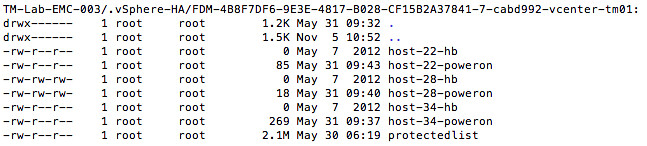
Each hosts in a vSphere HA cluster keeps track of the power state of the virtual machines it is hosting. This set of powered on virtual machines is stored the “poweron” file. Note that this applies to both the master and the slave hosts in your cluster. This file is located on your vmfs volumes in the hidden directory “.vSphere-HA/<FDM cluster ID>“.

The naming scheme for this file is as follows:
host-<id>-poweron

Tracking virtual machine power-on state is not the only thing the “poweron” file is used for. This file is also used by the slaves to inform the master that it is isolated from the management network: the top line of the file will either contain a “0” (zero) or a “1”. A “0” means not-isolated and a “1” means isolated. The master will inform vCenter about the isolation of the host.

This also means that if a host is not sending out any heartbeats to the master, the master will validate if that host has been isolated by reading the “poweron” file. This could be considered as an extra check on top of the “datastore heartbeating” mechanism.

Want to do some VMware Hands-on Labs but don’t have the kit?

Duncan Epping · Nov 22, 2012 ·

Those who have visited VMworld and done a couple of labs know how awesome these are. Recently VMware announced that the VMware Hands-On Labs (HoL) would be made available online. You had the option to register for the beta and last week they announced the public beta was opened! On twitter some early reports are already popping up and judging by the comments people are loving it.

Just completed my first HOL – highly productive!! /cc @vmwarehol

— Maish Saidel-Keesing (@maishsk) November 22, 2012


@vmwarehol Glad to be a part of it! Really amazing stuff!!!

— Jake Robinson (@jakerobinson) November 17, 2012


Loving the HoL Beta! cc: @heyitspablo @vmwareholyfrog.com/mof74p

— Bill Hill (@virtual_bill) November 14, 2012


If you want to know more about the HoL portal make sure to read this blog, I played around with it various times… I loved it. Sign up and try it out. There is no excuse any longer for not having hands-on experience with VMware products, you don’t need to own a lab…

vSphere 5.1 Clustering Deepdive only $17.95, limited time!

Duncan Epping · Nov 21, 2012 ·

Frank and I decided to put the vSphere 5.1 Clustering Deepdive (paper copy) up for sale for only $ 17.95. This is a limited time offer (21st of December), so if you want to get yourself, your friend-husband-father-kids or even grandmother a nice present be quick.

How’s that for a black-friday, cyber-monday, christmas / sinterklaas special? Yes indeed, the paper copy is cheaper than all e-books on vSphere 5.x out there on Amazon and with 5 stars (11 reviews) you know you can’t go wrong.

Happy holidays,

Frank and Duncan
(ps: the kindle copy is only 7.49, so even combined it is cheaper than most e-books out there :-))

  • « Go to Previous Page
  • Page 1
  • Interim pages omitted …
  • Page 209
  • Page 210
  • Page 211
  • Page 212
  • Page 213
  • Interim pages omitted …
  • Page 502
  • Go to Next Page »

Primary Sidebar

About the Author

Duncan Epping is a Chief Technologist and Distinguished Engineering Architect at Broadcom. Besides writing on Yellow-Bricks, Duncan is the co-author of the vSAN Deep Dive and the vSphere Clustering Deep Dive book series. Duncan is also the host of the Unexplored Territory Podcast.

Follow Us

  • X
  • Spotify
  • RSS Feed
  • LinkedIn

Recommended Book(s)

Also visit!

For the Dutch-speaking audience, make sure to visit RunNerd.nl to follow my running adventure, read shoe/gear/race reviews, and more!

Do you like Hardcore-Punk music? Follow my Spotify Playlist!

Do you like 80s music? I got you covered!

Copyright Yellow-Bricks.com © 2026 · Log in