• Skip to primary navigation
  • Skip to main content
  • Skip to primary sidebar

Yellow Bricks

by Duncan Epping

  • Home
  • Unexplored Territory Podcast
  • HA Deepdive
  • ESXTOP
  • Stickers/Shirts
  • Privacy Policy
  • About
  • Show Search
Hide Search

How to configure the Virtual SAN observer for monitoring/troubleshooting

Duncan Epping · Oct 21, 2013 ·

There have been various blog posts on the topic of configuring the Virtual SAN observer on both Windows and Linux by Rawlinson Rivera and Erik Bussink. I like to keep things in a single location and document them for my own use so I figured I would do a write-up for yellow-bricks.com. First of all, what is the Virtual SAN / VSAN observer? One of our engineers (Christian Dickmann) published an internal blog on this topic and I believe it explains what it is / what it does best:

You will also find VSAN datastore as well as VM level performance statistics in the vSphere Web Client. If however you are the kind of guy who wants to really drill down on your VSAN performance in-depth, down to the physical disk layers, understand cache hit rates, reasons for observed latencies, etc. then the vSphere Web Client won’t satisfy your thirst in vSphere 5.5. That’s where the VSAN observer comes in.

So how do I enable it? Well I am a big fan of the vCenter Server Appliance so that will be my focus. Just a couple of short steps to get this up and running luckily:

  • Open an ssh session to your vCenter Server Appliance:
    • ssh root@<name or ip of your vcva>
  • Open rvc using your root account and the vCenter name, in my case:
    • rvc root@localhost
  • Now do a “cd” in to your vCenter object (you can do an “ls” so see what the names are of your objects on any level), and if you do tab it will be completed with your datacenter object:
    • cd localhost/Datacenter/
  • Now do a “cd” again, the first object is “computers” and the second is your “cluster”, in my case that looks as follows:
    • cd computers/VSANCluster/
  • Now you can start the VSAN observer using the following command:
    • vsan.observer . –run-webserver –force
  • Now you can see the observer querying stats every 60 seconds, and as mentioned you can stop this by doing a <Ctrl>+<C>

Fairly straight forward right? You can now go to the observer console using:

  • http://<vcenter name or ip>:8010
    The below is what it should look like (Thanks Rawlinson for the nice screenshot)

Now one thing that is important to realize is that everything is kept in memory until you stop the VSAN observer… So it will take up GBs after a couple of hours. This tool is intended for short term monitoring and troubleshooting. Now there are  some other commands in RVC that might be useful. One of the commands I found useful was “vsan.resync_dashboard”. Basically it shows you what is happening in terms of mirror sync’ing. If you fail a host, you should see the sync happening here…

I also found “vsan.vm_object_info” very useful and interesting as it allows you to see the state of your objects. And for the geeks who do not prefer to see the pretty graphs the observer shows, take a look at “vsan.vm_perf_stats”.

Startup News Flash part 7

Duncan Epping · Oct 16, 2013 ·

VMworld europe is this week and I’ve been very busy just running around on the show floor and doing sessions. Considering there were a couple of small but worthy updates I figured I would publish this one in between sessions… Here it is: Startup News Flash part 7.

announced yesterday that Ken Klein is taking on the role of Chief Executive Officer  and Former CEO and founder, Kieran Harty assumes the new role of Chief Technology Officer and will drive Tintri’s product strategy and roadmap.

Pernix has just announced a program called PernixPro, which gives industry experts free access to PernixData FVP software + various tools for collaborating with PernixData experts and R&D. If you are a vExpert or a VCDX and want to get familiar with FVP, sign up here.

“Traditionally” SimpliVity has been more focused on generic server virtualization with a high level of integration with regards to DR and Back-up / Recovery. This week SimpliVity announced they are entering the VDI space. They announced new partnership agreements with NVIDIA and Teradici. What I like about their platform is, that although they offer a hyperconverged solution, that you can connect from the outside in. Meaning scale compute independ of storage. Also, their platform offer inline deduple, optimized full clones, and 1:1 persistent desktops. For more details hit up their website.

Nutanix just announced that they have been validated by VMware for the VMware Horizon View Agent Direct-Connection, which is part of the Horizon Suite 5.3.

For those who missed it, read the Startup Intro I posted this week on CohoData. Interesting company / solution if you ask me!

Startup intro: Coho Data

Duncan Epping · Oct 15, 2013 ·

Today a new startup is revealed named Coho Data, formerly known as Convergent.io. Coho Data was founded by Andrew Warfield, Keir Fraser and Ramana Jonnala. For those who care, they are backed by Andreessen Horowitz. Probably most known for the work they did at Citrix on Xenserver. What is it they introduced / revealed this week?

Coho Data introduces a new scale-out hybrid storage solution (NFS for VM workloads). With hybrid meaning a mix of SATA and SSD. This for obvious reasons, SATA bringing you capacity and flash providing you raw performance. Let me point out that Coho is not a hyperconverged solution, it is a full storage system.

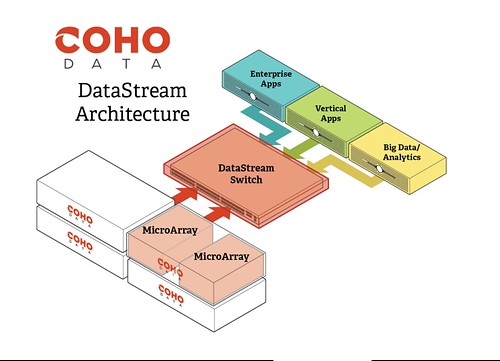
What does it look like? It is a 2U box which holds 2 “MicroArrays” which each MicroArray having 2 processors, 2 x 10GbE NIC port and 2 PCIe INTEL 910 cards. Each 2u block provides you 39TB of capacity and ~180K IOPS (Random 80/20 read/write, 4K block size). Starting at $2.50 per GB, pre-dedupe & compression (which they of course offer). Couple of things I liked looking at their architecture, first and probably foremost the “scale-out” architecture, scale to infinity is what they say in a linear fashion. On top of that, it comes with an OpenFlow-enabled 10GbE switch to allow for ease of management and again scalability.

If you look closely at how they architected their hardware, they created these highspeed IO lanes: 10GbE NIC <–> CPU <–> PCIe Flash Unit. Each highway has its dedicated CPU, NIC Port, ad on top of that they PCIe Flash, allowing for optimal performance, efficiency and fine grained control. Nice touch if you ask me.

Another thing I really liked was their UI. You can really see they put a lot of thought in the user experience aspect by keeping things simple and presenting data in an easy understandable way. I wish every vendor did that. I mean, if you look at the screenshot below how simple does that look? Dead simple right!? I’ve seen some of the other screens, like for instance for creating a snapshot schedule… again same simplicity. Apparently, and I have not tested this but I will believe them on their word, they brought that simplicity all the way down to the “install / configure” part of things. Getting Coho Data up and running literally only takes 15 minutes.

What I also liked very much about the Coho Data solution is that Software-defined Networking (SDN) and Software-defined Storage (SDS) are tightly coupled. In other words, Soho configures the network for you… As just said, it takes 15 minutes to setup. Try creating the zoning / masking scheme for a storage system and a set of LUNs these days, even that takes more time then 15 – 20 minutes. There aren’t too many vendors combining SDN and SDS in a smart fashion today.

When they briefed me they gave me a short demo and Andy explained the scale-out architecture, during the demo it happened various times that I could draw a parallel between the VMware virtualization platform and their solution which made is easy for me to understand and relate to their solution. For instance, Soho Data offers what I would call DRS for Software-Defined Storage. If for whatever reasons defined policies are violated then Coho Data will balance the workload appropriately across the cluster. Just like DRS (and Storage DRS) does, Coho Data will do a risk/benefit analysis before initiating the move. I guess the logical question would be, well why would I want Coho to do this when VMware can also do this with Storage DRS? Well keep in mind that Storage DRS works “across datastores”, but as Coho presents a single datastore you need something that allows you to balance within.

I guess the question then remains what do they lack today? Well today as a 1.0 platform Coho doesn’t offer replication to outside of their own cluster. But considering they have snapshotting in place I suspect their architecture already caters for it, and it something they should be able to release fairly quickly. Another thing which is lacking today is a vSphere Web Client plugin, but then again if you look at their current UI and the simplicity of it I do wonder if there is any point in having one.

All in all, I have been impressed by these newcomers in the SDS space and I can’t wait to play around with their gear at some point!

VC Ops included in the VMware Horizon Suite 5.3

Duncan Epping · Oct 15, 2013 ·

I was reading up on the announcements published today during VMworld. When talking about VDI/EUC with customers, and I am not an EUC guy so try to avoid this when I can, a couple of things always stood… First one was storage problems and the second one was monitoring. I think the announcements done today are a game-changer in that space, and I am sure that you will appreciate this:

New VMware Virtual SAN for Horizon View beta will deliver significantly lower upfront capital expense (CAPEX) and total cost of ownership (TCO) for virtual desktop infrastructure (VDI). The bundling of VMware vCenter Operations Manager for View in Horizon Suite, available at no additional cost, offers advanced VDI performance and operations management for large-scale virtual desktop production monitoring, advanced problem warning, faster time to resolution and complete infrastructure coverage.

How about that? I definitely think this a great step forward, and am happy to see that especially VC Ops is being included with the Horizon Suite. I can definitely recommend implementing it to those who own the Horizon Suite, and those who do not own the Suite yet, it might be time to invest. Please note that VSAN is still in Beta and is not been included from a licensing perspective but has been tested with the Horizon Suite. Use it in your test environments – play with it etc… but do not run your production workloads on it yet.  (Read Andre’s article for more details on the Horizon Suite.)

** EDIT, there was a lot of confusion yesterday about VSAN being bundled or not. Apparently the press release was only supposed to say that you can use VSAN with the Horizon Suite. There is no support, no bundling, no technology preview. **

Pretty pictures Friday, the VSAN edition…

Duncan Epping · Oct 11, 2013 ·

I’ve been working on a whole bunch of VSAN diagrams… I’ve shared a couple already via twitter and in the various blog articles, but I liked the following two very much and figured I would share it with you as well. Hoping they make sense to everyone. Also, if there are any other VSAN concepts you like to see visualized let me know and I will see what I can do.

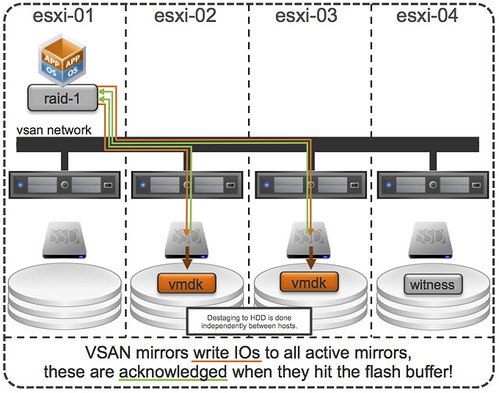
First one shows how VSAN mirrors writes to two active mirror copies. Writes need to be acknowledged by all active copies, but note they are acknowledged as soon as they his the flash buffer! De-staging from buffer to HDD is a completely independent process, even between the two hosts this happens independently from each other.

VSAN write acknowledgement

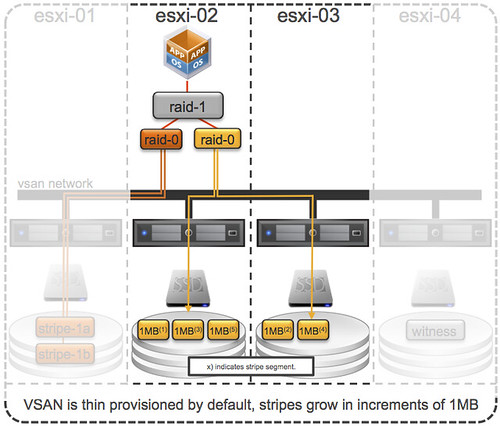
The second diagram is all about striping. When the stripe width is defined using the VM Storage Policies then objects will grow in increments of 1MB. In other words: stripe segment 1 will go to esxi-02 and stripe segment 2 will go to esxi-03 and so on.

VSAN stripe increments

Just a little something I figured was nice to share on a Friday, some nice light pre-weekend/VMworld content 🙂

  • « Go to Previous Page
  • Page 1
  • Interim pages omitted …
  • Page 170
  • Page 171
  • Page 172
  • Page 173
  • Page 174
  • Interim pages omitted …
  • Page 497
  • Go to Next Page »

Primary Sidebar

About the Author

Duncan Epping is a Chief Technologist and Distinguished Engineering Architect at Broadcom. Besides writing on Yellow-Bricks, Duncan is the co-author of the vSAN Deep Dive and the vSphere Clustering Deep Dive book series. Duncan is also the host of the Unexplored Territory Podcast.

Follow Us

  • X
  • Spotify
  • RSS Feed
  • LinkedIn

Recommended Book(s)

Also visit!

For the Dutch-speaking audience, make sure to visit RunNerd.nl to follow my running adventure, read shoe/gear/race reviews, and more!

Do you like Hardcore-Punk music? Follow my Spotify Playlist!

Do you like 80s music? I got you covered!

Copyright Yellow-Bricks.com © 2026 · Log in